

How to add middleware with STM32CubeMX2 and VS Code manually
- March 20, 2026
- 0 replies
- 729 views
Summary
This knowledge article provides guidance on how to integrate middleware in VS Code with CMake-based project manually, using the FreeRTOS™ middleware from the STM32C5 package as an example. The knowledge article explains how to locate, enable, and configure middleware components using components.cmake. Additionally, how to integrate them into the application with the middleware’s CMakeLists.txt, and how to verify the integration.
- Summary
- Introduction
- 1. Project setup overview
- 1.1 Prerequisites
- 1.2 STM32CubeMX2 configuration
- 1.3 Understanding CMake project structure and middleware integration
- 1.4 Top-levelCMakeLists.txt
- 2. Step-by-step integration of FreeRTOS™ middleware
- 2.1 Add the FreeRTOS folder into the project
- 2.2 Enable FreeRTOS™ components incomponents.cmake
- 2.3 Ensure FreeRTOSConfig.h is available
- 2.4 Register application files that use FreeRTOS™
- 3. Configure, build, and verify
- 4. Generalizing the approach
- 4.1 How to discover available middleware
- Conclusion
- Related links
Introduction
STM32CubeMX2 offers an integrated workflow for a subset of middleware components. These components can be configured from the graphical user interface and generated directly into the user project, together with the initialization code and drivers. However, not all middleware delivered in STM32Cube packages is currently exposed in this way. In many cases, the middleware is provided as part of the device or board package and must be integrated into the MX2-generated project manually.
This document focuses on middleware that is available in the STM32Cube package but is not directly configured and generated by STM32CubeMX2.
Using FreeRTOS™ from the STM32C5 series package as an example, this document describes how to:
- Identify the FreeRTOS™ sources in the STM32C5 package and add the required folder to the project, aligned with the MX2 project structure.
- Extend components.cmake, files.cmake, and flags.cmake to integrate the middleware in a clean way, instead of maintaining long, ad hoc file lists.
- Configure include paths and definitions so that FreeRTOS™ is correctly built and used by the application target.
- Use the integrated FreeRTOS™ in an MX2-based project built with CMake in Visual Studio Code, including a simple LED task example.
The objective is to provide a clear, repeatable method for integrating middleware that is not managed by the graphical user interface into MX2 projects. It's structured in a way that remains consistent with the MX2-generated organization and is scalable to other middleware beyond FreeRTOS™.
1. Project setup overview
This document assumes a CMake-based STM32 project generated by STM32CubeMX2 and developed in Visual Studio Code. Before adding middleware such as FreeRTOS™, the base project, including a simple LED, must already be built and run on the board.
1.1 Prerequisites
- Board: NUCLEO‑C562RE.
- Software tools:
- STM32CubeMX2.
- Visual Studio Code with C/C++ and STM32CubeIDE for VS Code extension pack.
- STM32C5 firmware package installed, used as a reference to copy the FreeRTOS™ middleware sources.
- Files: FreeRTOSConfig.h, mx_freertos_app.c, and mx_freertos_app.h
1.2 STM32CubeMX2 configuration
In STM32CubeMX2, prepare the project as follows:
- Create a new project
- Select the target device or board (for example, NUCLEO‑C562RE).
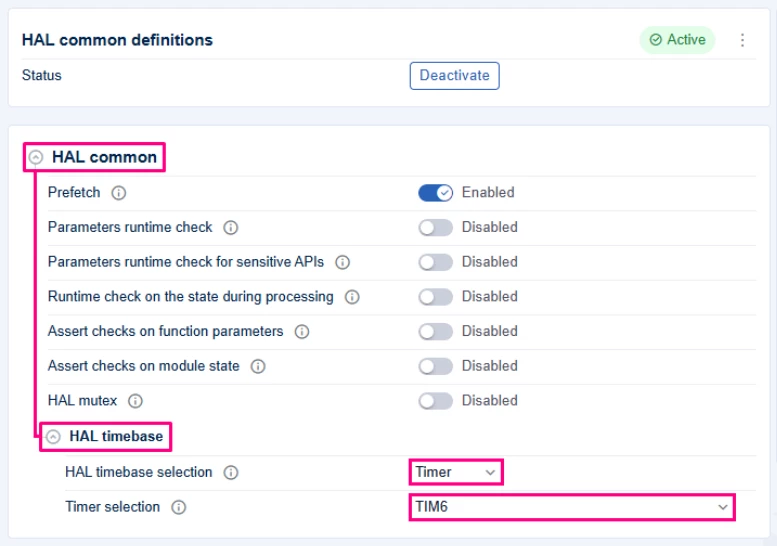
- Configure system basics and timebase
- Configure the system clock according to your application needs.
- In the "Peripherals" section, activate [TIM6].
- Go to the "Project Settings" section.
- In the [HAL common definitions] → [HAL common], set the "HAL timebase" to [TIM6] instead of SysTick.
- This allows the SysTick to be used by FreeRTOS™ as its kernel clock tick source.
- TIM6 is used by the HAL for HAL_GetTick() and timeouts.
- Configure a user LED
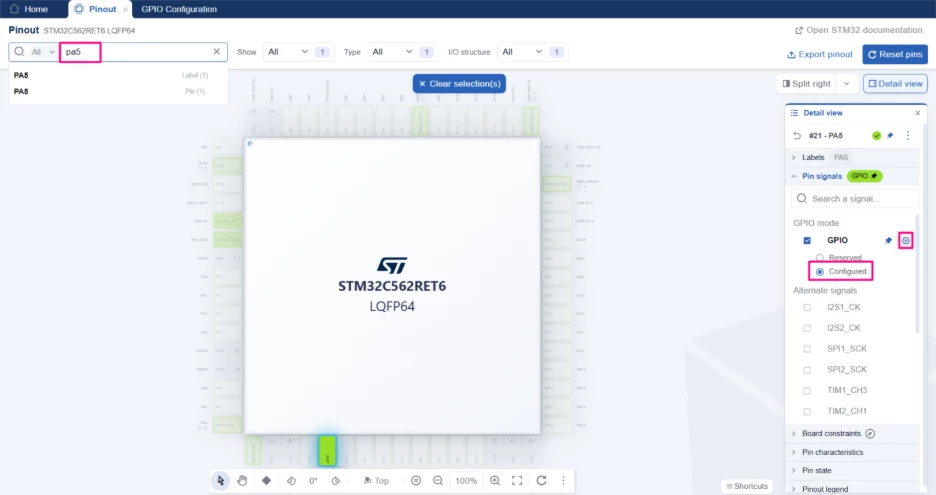
- In the pinout view, locate the on‑board user LED.
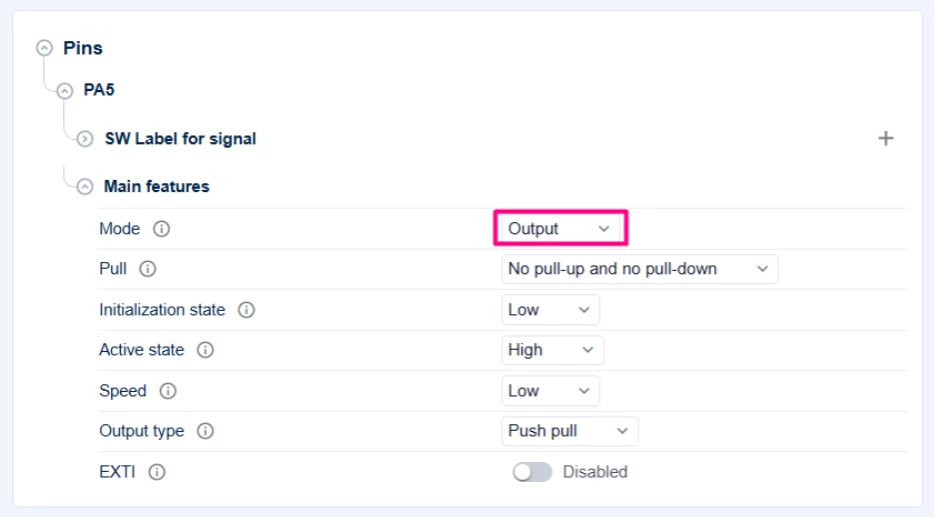
- Set the corresponding pin to GPIO_Output.
- Optionally assign a user label (for example, LED_GREEN or USER_LED) for clarity.
- Generate the project
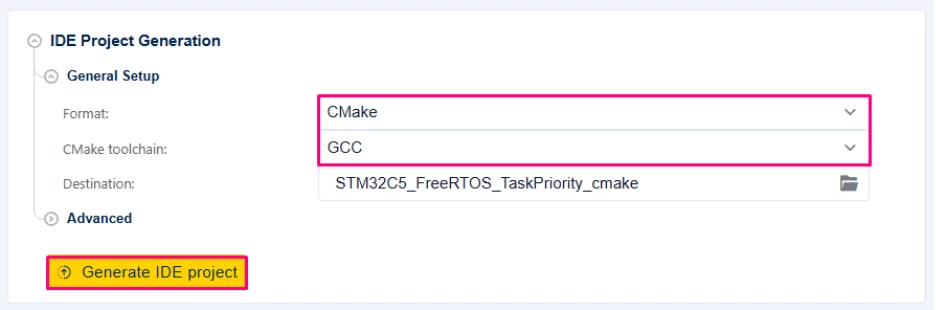
- In the "Project Settings" → "IDE Project Generation" → "General Setup" section.
- Choose [CMake] as the project output format.
- Select the appropriate toolchain (GCC/ARM).
- Generate the code.
At this stage, you should be able to:
- Open the generated project in Visual Studio Code.
- Configure CMake, pointing to your toolchain file if required.
- Build and flash the project, verifying that:
- The project runs correctly.
- You can control the LED from main.c using the HAL (this will later be moved into a FreeRTOS™ task).
The FreeRTOS™ middleware is added on top of this baseline manually as a reference for the process. The LED configured is used in the example task to demonstrate that the RTOS is running and scheduling correctly.
1.3 Understanding CMake project structure and middleware integration
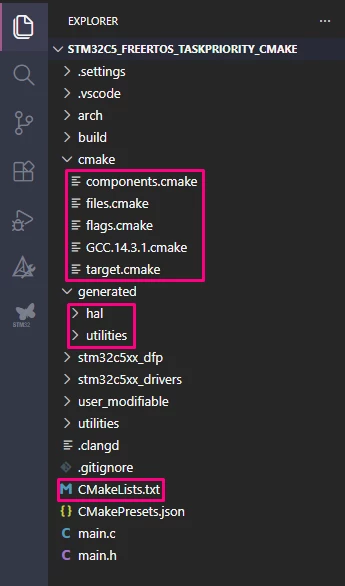
In an STM32CubeMX2 CMake project, the top-level CMakeLists.txt acts primarily as a hub: it creates the application target and then delegates most of the configuration to smaller .cmake modules.
After STM32CubeMX2 generation and initial CMake configuration, a typical project layout looks like:
1.4 Top-level CMakeLists.txt
Your top-level file is intentionally minimal:
cmake_minimum_required(VERSION 3.20)

set(CMAKE_EXPORT_COMPILE_COMMANDS TRUE)
set(CMAKE_C_COMPILER_FORCED TRUE)
set(CMAKE_CXX_COMPILER_FORCED TRUE)

include(cmake/target.cmake)
include(cmake/${TOOLCHAIN_FILE})

project(STM32C5_FreeRTOS_TaskPriority)
add_executable(STM32C5_FreeRTOS_TaskPriority)

include(cmake/files.cmake)
include(cmake/flags.cmake)
include(cmake/components.cmake)

# Stubs for project-specific customizations
target_sources(${CMAKE_PROJECT_NAME} PRIVATE)
target_include_directories(${CMAKE_PROJECT_NAME} PUBLIC)
target_compile_definitions(${CMAKE_PROJECT_NAME} PUBLIC)
target_compile_options(${CMAKE_PROJECT_NAME} PUBLIC)
target_link_options(${CMAKE_PROJECT_NAME} PUBLIC)
target_link_directories(${CMAKE_PROJECT_NAME} PUBLIC)
target_link_libraries(${CMAKE_PROJECT_NAME} PUBLIC)
The main roles of these files are:
cmake/target.cmake + toolchain file
- Describe the STM32C5 device (core type, clock, FPU, security, etc.).
- Pass these parameters to the toolchain file, which derives the proper GCC flags:
- -mcpu, -mfpu, -mthumb, security flags, endianness, etc.
cmake/components.cmake
- Builds the CMSIS_COMPONENTS_LIST used by the CMSIS/RTE machinery.
- Adds subdirectories such as arch/cmsis, stm32c5xx_dfp, stm32c5xx_drivers, generated/hal, generated/utilities.
- Links their resulting targets to your application.
This file is also the integration point for middleware. For FreeRTOS™, you do not manually list the *.c files; instead the developer has to:
- Append the relevant FreeRTOS™ components to CMSIS_COMPONENTS_LIST (for example, Core + Heap_4).
- lLnk the resulting STMicroelectronics_freertos_X_Y_Z target to ${CMAKE_PROJECT_NAME}.
The CMake logic in the STM32C5 FreeRTOS™ package then automatically adds the correct kernel sources, portable layer, heap implementation, and include paths.
cmake/files.cmake
- Registers the application sources, for example:
- main.c, main.h.
- Middleware sources themselves remain in the STM32C5 package structure and are brought into the build via components.cmake (through the FreeRTOS™ package CMakeLists.txt), not listed directly here.
cmake/flags.cmake
- Sets the *.elf suffix and applies CPU flags.
- Configures optimization and debugging options.
- Sets global include directories (CMSIS core, HAL, DFP, user configuration).
- Adds core definitions (for example STM32C562xx, _RTE_).
- Configures linker options (map file, garbage collection, specs).
2. Step-by-step integration of FreeRTOS™ middleware
This section shows how to integrate FreeRTOS™ into the STM32CubeMX2‑generated STM32C5 project using the STM32C5 package’s own CMake support, instead of manually listing all the middleware source files.
The key steps are as follows:
- Enable FreeRTOS as CMSIS components in components.cmake.
- The CMakeLists.txt delivered with the middleware/freertos package selects the correct kernel sources, portable layer, and heap implementation, and exposes everything as a CMake target to link to the application.
2.1 Add the FreeRTOS folder into the project
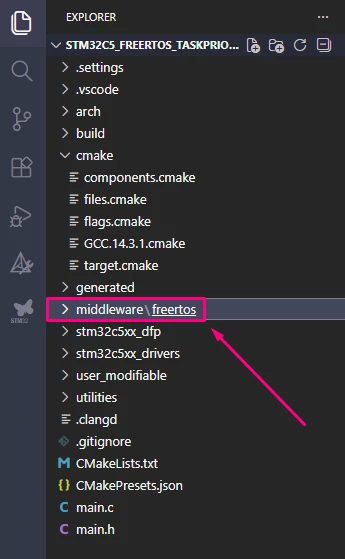
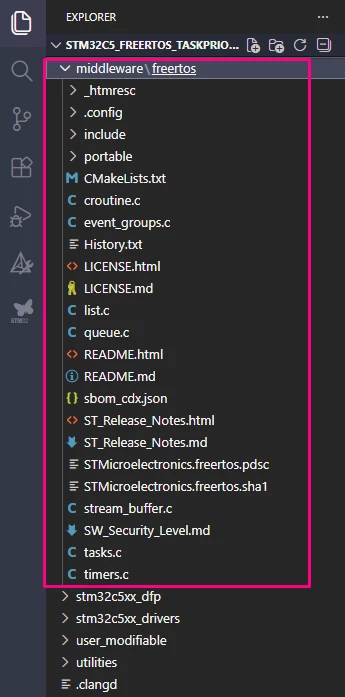
From your STM32C5 firmware package, locate the FreeRTOS™ middleware folder:
<STM32C5_Package>/middleware/freertos/
Create a corresponding folder inside your project, for example:
Copy and paste all the files:
2.2 Enable FreeRTOS™ components in components.cmake
In cmake/components.cmake, you control which CMSIS components are active by populating CMSIS_COMPONENTS_LIST. To enable FreeRTOS™ core and a specific heap implementation (for this example Heap_4), extend the list for your configuration:
set(CMSIS_COMPONENTS_LIST ) # Start with empty component list. To be populated below by each config.
if(${CMAKE_BUILD_TYPE} STREQUAL "debug_GCC_NUCLEO-C562RE")
 # Existing CMSIS / HAL / LL / MX2 components ...
 list(APPEND CMSIS_COMPONENTS_LIST "Cvendor:STMicroelectronics#Cclass:CMSIS#Cgroup:CORE#Cversion:6.2.0")
 # ...
 list(APPEND CMSIS_COMPONENTS_LIST "Cvendor:STMicroelectronics#Cclass:Utility#Cgroup:sysmem#Cvariant:Standalone sysmem#Cversion:1.0.0")

 # --- Add your FreeRTOS components (core+heap_4) ---
 list(APPEND CMSIS_COMPONENTS_LIST "Cvendor:STMicroelectronics#Cclass:RTOS#Cgroup:FreeRTOS#Csub:Core#Cversion:11.2.0")
 list(APPEND CMSIS_COMPONENTS_LIST "Cvendor:STMicroelectronics#Cclass:RTOS#Cgroup:FreeRTOS#Csub:MemMang#Cvariant:Heap_4#Cversion:11.2.0")

 set(CMSIS_RTE_FOLDER "${CMAKE_SOURCE_DIR}/user_modifiable")
endif()

# Existing package subdirectories
add_subdirectory(arch/cmsis)
add_subdirectory(stm32c5xx_dfp)
add_subdirectory(stm32c5xx_drivers)
add_subdirectory(utilities/syscalls)
add_subdirectory(generated/hal)
add_subdirectory(generated/utilities)

# --- Add FreeRTOS subdirectory (CMakelists.txt) ---
add_subdirectory(middleware/freertos)

# Link low-level drivers and CMSIS targets
target_link_libraries(${CMAKE_PROJECT_NAME}
generated_STMicroelectronics_stm32c5xx_hal_drivers_0_0_1
generated_STMicroelectronics_syscalls_2_0_0
STMicroelectronics_CMSIS_6_3_0
STMicroelectronics_stm32c5xx_dfp_2_0_0
STMicroelectronics_stm32c5xx_hal_drivers_2_0_0
STMicroelectronics_syscalls_2_0_0

# --- Link FreeRTOS interface target ---
STMicroelectronics_freertos_0_9_1
)
- By adding the middleware/freertos subdirectory, the CMakelists.txt located inside it is added to the project.
- Adding the two FreeRTOS component strings to CMSIS_COMPONENTS_LIST activates:
- RTOS_FreeRTOS_Core_11_2_0, and
- RTOS_FreeRTOS_MemMang_Heap_4_11_2_0.
- When middleware/freertos/CMakeLists.txt runs, it checks:
if("Cvendor:STMicroelectronics#Cclass:RTOS#Cgroup:FreeRTOS#Csub:Core#Cversion:11.2.0" IN_LIST CMSIS_COMPONENTS_LIST)
 # add kernel sources, includes, portable layer…
endif()

if("Cvendor:STMicroelectronics#Cclass:RTOS#Cgroup:FreeRTOS#Csub:MemMang#Cvariant:Heap_4#Cversion:11.2.0" IN_LIST CMSIS_COMPONENTS_LIST)
 # add heap_4.c
endif()
- It uses target_sources and target_include_directories on STMicroelectronics_freertos_0_9_1 to add all required files and paths.
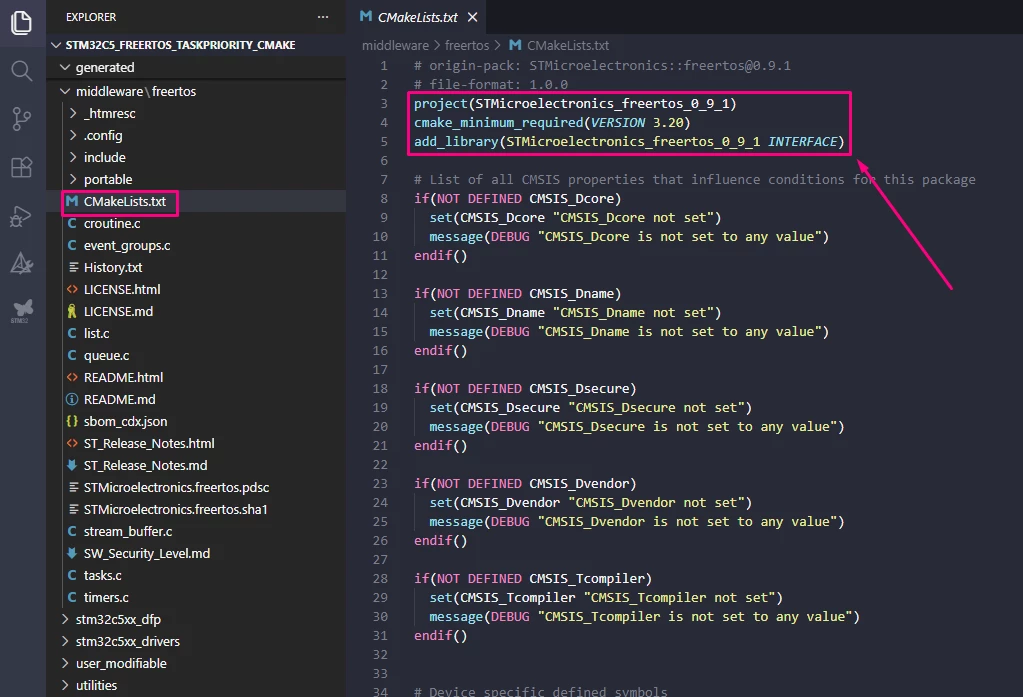
By linking STMicroelectronics_freertos_0_9_1 into ${CMAKE_PROJECT_NAME}, your application automatically gets:
- Kernel sources.
- The correct portable implementation for Cortex‑M33 / GCC / TZ-disabled.
- heap_4.c.
- FreeRTOS™ include directories.
You avoid manual file lists in your own CMake.
2.3 Ensure FreeRTOSConfig.h is available
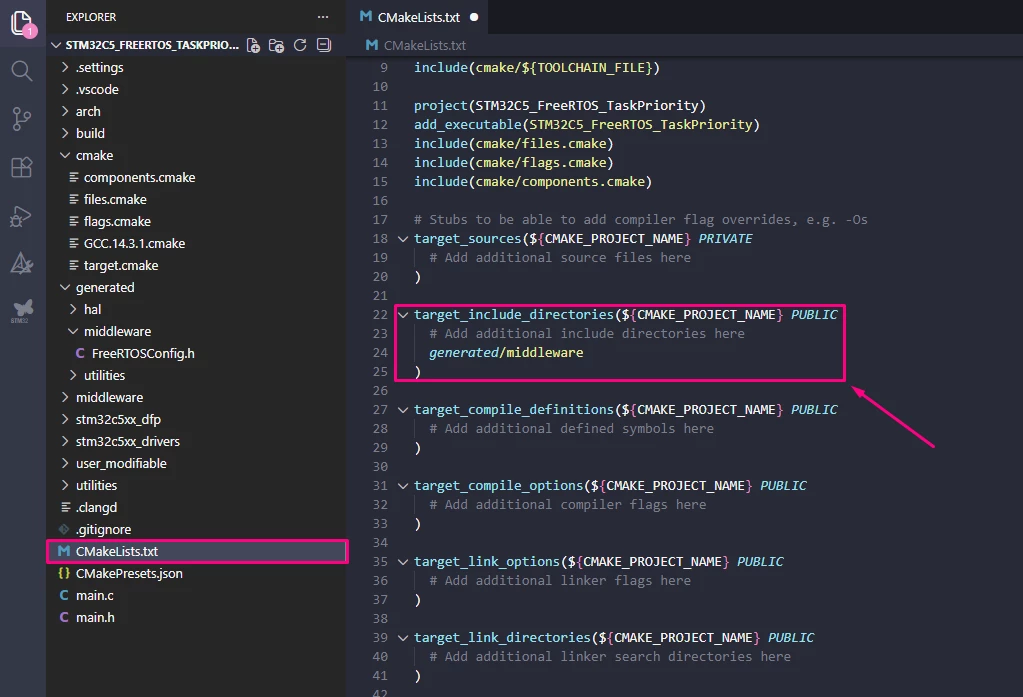
A project-specific FreeRTOSConfig.h must be provided. Create a generated/middleware folder and add FreeRTOSConfig.h. Start from a reference configuration from the STM32C5 package or a standard FreeRTOS™ Cortex® M33 example. To make this header visible to the application code, add an include path in the CMake configuration, typically in the top-level CMakeLists.txt.
Create a generated/middleware folder and a configuration header FreeRTOSConfig.h, for example:
<ProjectRoot>/generated/middleware/FreeRTOSConfig.h
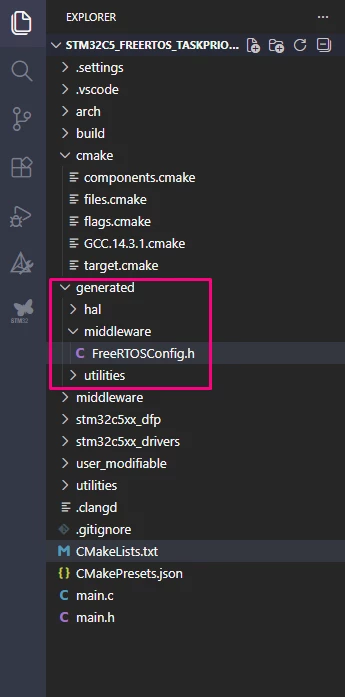
Start from a reference configuration from the STM32C5 package or from a standard FreeRTOS™ Cortex®‑M33 example. For this example, the FreeRTOSConfig.h, mx_freertos_app.c, and mx_freertos_app.h are attached.
To make this header visible to your application code, add an include path in your CMake configuration. A typical approach is to add it to your top-level CMakeLists.txt:
2.4 Register application files that use FreeRTOS™
In the top-level CMakeLists.txt file, add a source file where tasks are created and the scheduler is started:
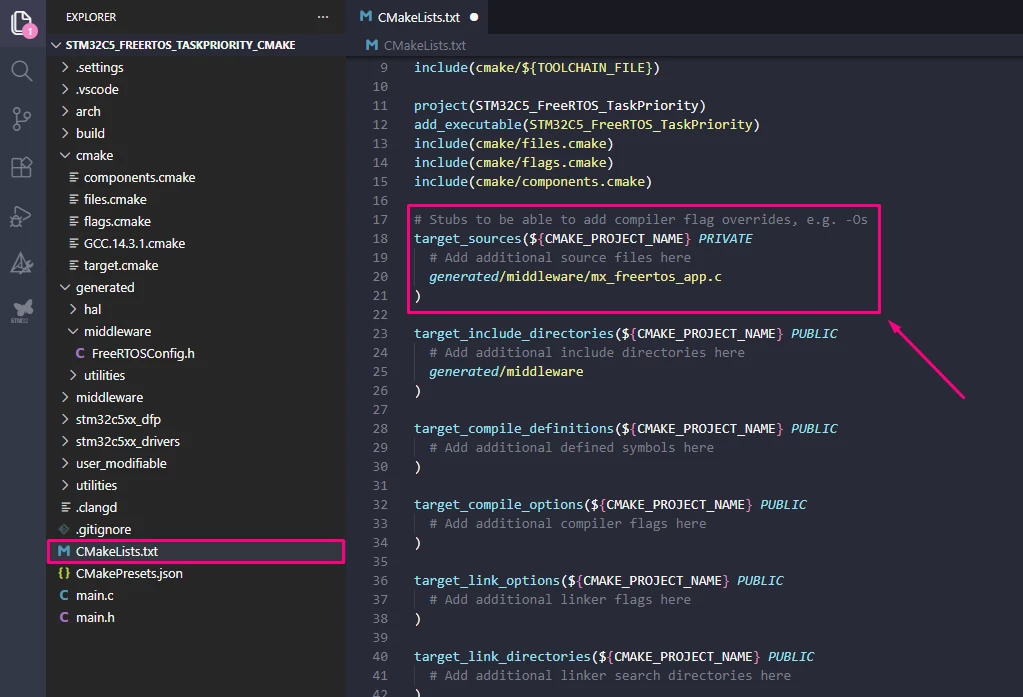
Create mx_freertos_app.c and implement a basic LED task, for this example you can use the attached mx_freertos_app.c and mx_freertos_app.h and paste inside generated/middleware:
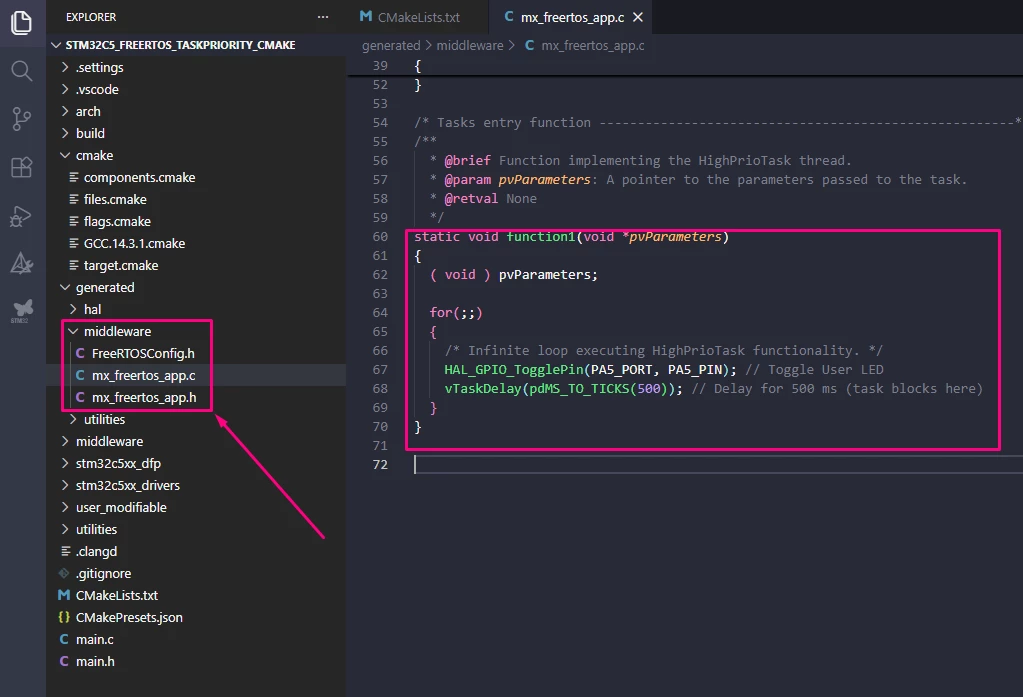
Then, call in main.c after the HAL and peripherals initialization:
/* Includes ------------------------------------------------------------------*/
#include "main.h"
#include "mx_freertos_app.h"

/* Private typedef -----------------------------------------------------------*/
/* Private define ------------------------------------------------------------*/
/* Private macro -------------------------------------------------------------*/
/* Private variables ---------------------------------------------------------*/
/* Private functions prototype -----------------------------------------------*/

/**
  * brief:  The application entry point.
  * retval: none but we specify int to comply with C99 standard
  */
int main(void)
{
  /** System Init: this code placed in targets folder initializes your system.
    * It calls the initialization (and sets the initial configuration) of the peripherals.
    * You can use STM32CubeMX to generate and call this code or not in this project.
    * It also contains the HAL initialization and the initial clock configuration.
    */
  if (mx_system_init() != SYSTEM_OK)
  {
    return (-1);
  }
  else
  {
    /*
      * You can start your application code here
      */
    app_synctasks_init ();
    vTaskStartScheduler();

    while (1) {}
  }
} /* end main */
Given that:
- HAL timebase is configured to TIM6 in MX2.
- SysTick is free for use by FreeRTOS™.
- The STM32C5 FreeRTOS™ package selects the ARM_CM33_NTZ port for GCC based on CMSIS_Dcore, CMSIS_Dsecure, and CMSIS_Tcompiler.
The scheduler should start and the LED should toggle at the expected interval.
3. Configure, build, and verify
- Reconfigure CMake so that:
- The updated CMSIS_COMPONENTS_LIST is processed.
- STMicroelectronics_freertos_0_9_1 is configured with the correct sources and includes.
- app_freertos.c is part of the building.
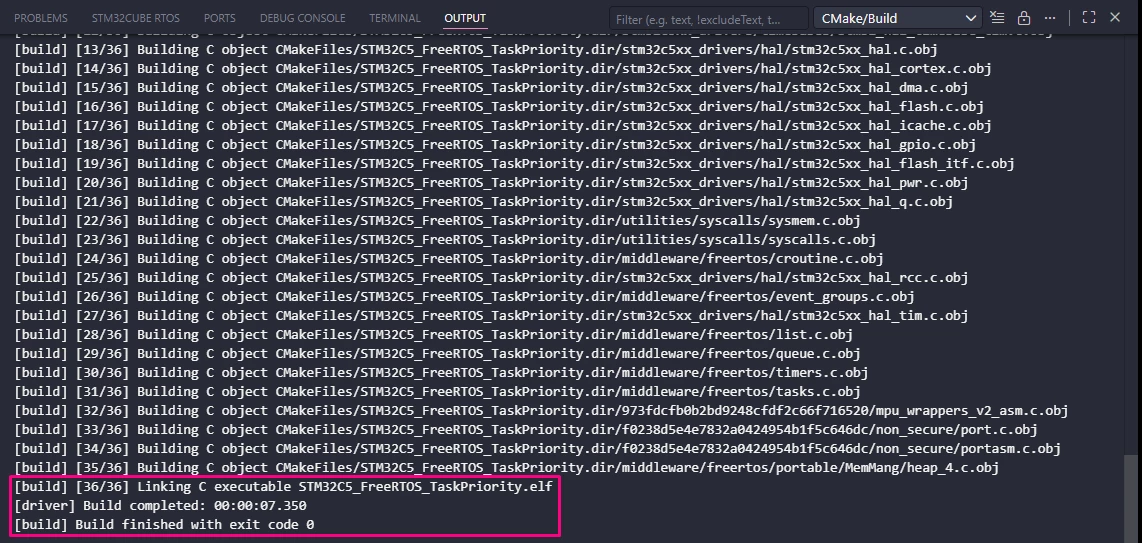
- Build the project:
- If you see missing FreeRTOS.h or FreeRTOSConfig.h, verify include paths to the FreeRTOS package and your config header.
- If you see duplicate heap or port files, check that only one heap variant is enabled (here: Heap_4) and that you are not adding manual FreeRTOS™ sources anywhere else.
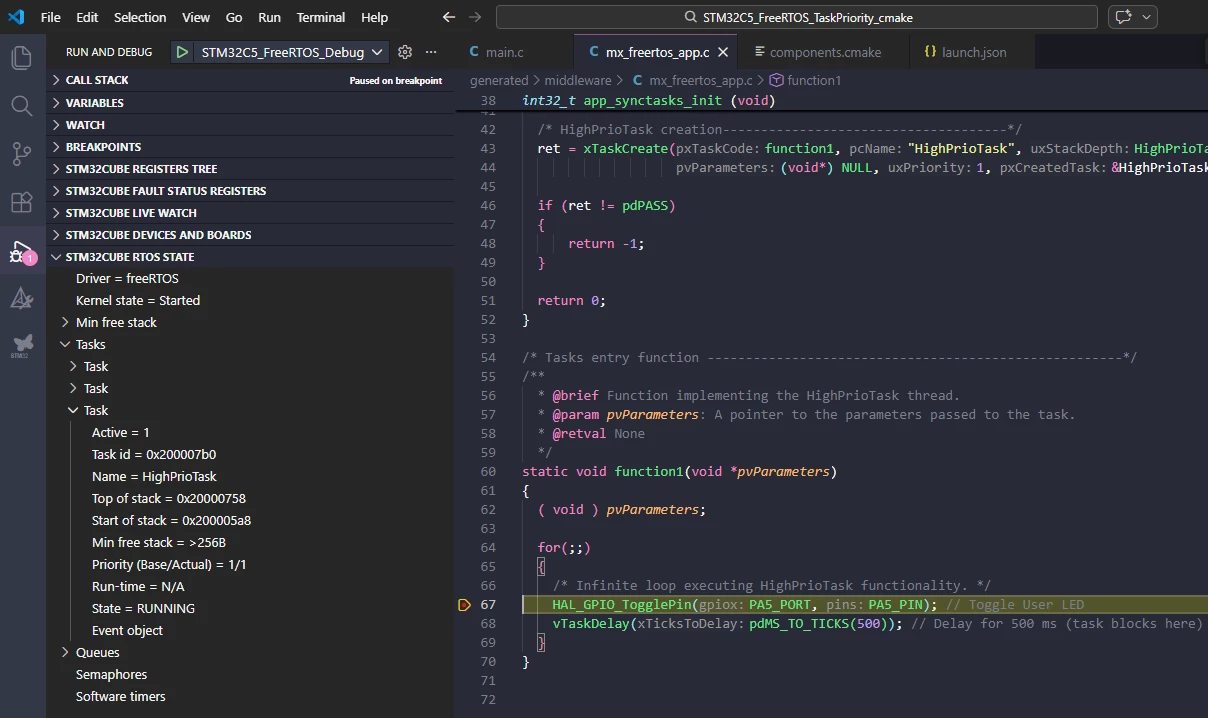
- Flash and run on the NUCLEO‑C562RE:
- The user LED should blink via the FreeRTOS™ task, confirming that the middleware is correctly integrated and scheduled.
4. Generalizing the approach
The integration flow used for FreeRTOS™ is not specific to RTOS middleware. It can be applied to other STM32Cube middleware that follows the same CMSIS component + CMake package model.
Applying the same pattern to other middleware
- Locate the middleware package
- Browse the STM32Cube package under Middlewares/ and identify the middleware folder (for example, USB_Device, FatFs, LwIP, etc.)
- Look for a corresponding CMakeLists.txt inside that folder. This file defines the middleware CMake target and its conditions.
- Inspect the middleware CMakeLists.txt
- Check which CMSIS component strings it expects in CMSIS_COMPONENTS_LIST.
- Identify:
- The main “Core” component (for example, Cclass:USB#Cgroup:Device#Csub:Core),
- Optional subcomponents (for example, class drivers, memory backends, heap variants, etc.).
- Enable components in components.cmake
- Append the relevant middleware components to CMSIS_COMPONENTS_LIST exactly as specified in that CMake file.
- Ensure that the middleware’s package directory is part of the project (through the corresponding DFP or middleware pack integration).
- Link the middleware target
- Link the middleware CMake target (for example, STMicroelectronics_usb_device_xxx, STMicroelectronics_fatfs_xxx, STMicroelectronics_lwip_xxx) into ${CMAKE_PROJECT_NAME} in components.cmake.
- Expose configuration headers and includes
- Add include paths with target_include_directories(${CMAKE_PROJECT_NAME} PUBLIC) to the top-level CMakeLists.txt file for any project‑specific configuration headers (for example, usbd_conf.h, ffconf.h, lwipopts.h) stored under generated/middleware or a similar directory.
- Use the middleware from your application
- Add application code (for example, USB class callbacks, FatFs mount logic, LwIP network bring‑up) to the top-level CMakeLists.txt with target_sources(${CMAKE_PROJECT_NAME} PRIVATE)
4.1 How to discover available middleware
To see what middleware is available and how to enable it:
- Explore the Middlewares/ directory of the STM32Cube package.
- For each middleware folder, open its CMakeLists.txt:
- Look for conditions based on CMSIS_COMPONENTS_LIST.
- Identify the Cvendor:…#Cclass:…#Cgroup:…#Csub:… strings you must add in components.cmake.
- Note the CMake target name created (for example, add_library(STMicroelectronics_..._INTERFACE)).
This gives you a searchable “catalog” of middleware components that can be enabled without copying files manually.
Conclusion
This article has provided a practical guide on how to integrate middleware that is not directly exposed in the STM32CubeMX2 GUI. It uses FreeRTOS™ from the STM32C5 package as a concrete example on the NUCLEO-C562RE.
By following the step-by-step instructions, you have seen how to:
- Generate an STM32CubeMX2 CMake project targeting STM32C5 and prepare a simple LED baseline.
- Understand the MX2 CMake project structure and the role of target.cmake, components.cmake, files.cmake, and flags.cmake.
- Enable FreeRTOS™ by adding its CMSIS component descriptors to CMSIS_COMPONENTS_LIST, letting the STM32C5 FreeRTOS™ CMakeLists.txt select the correct sources, portable layer, and heap implementation.
- Integrate a basic LED task scheduled by FreeRTOS™.
Using the CMake integration delivered with the STM32Cube packages avoids manual source management. It keeps the project aligned with the MX2 generated organization, and makes it easier to update or extend the configuration. Combined with the CMake based MX2 flow and Visual Studio Code, this approach offers a maintainable and scalable way to add advanced middleware such as: RTOS, USB, FatFs or LwIP to STM32 applications, while preserving a clean and modular project structure.
Related links
- NUCLEO-C562RE
- STM32CubeMX code generator - STMicroelectronics
- STM32 Embedded software documentation
- STM32CubeMX2 software documentation
