

How to use FDCAN and HSE with STM32CubeMX2
Summary
This tutorial guides you through enabling and configuring the flexible data-rate controller area network (FDCAN) peripheral using STM32CubeMX2 on the NUCLEO-C562RE board. It includes:
- Setting up FDCAN for basic CAN communication
- Configuring clock sources with emphasis on HSE for timing accuracy
- Using FDCAN as the controller
- Summary
- Introduction
- 1. Importance of HSE and clock settings for FDCAN accuracy
- 1.1 Why HSE?
- 1.2 Clock configuration for FDCAN
- 2. Prerequisites
- 3. STM32CubeMX2 project creation and basic setup
- 4. FDCAN peripheral configuration
- 4.1 Enable FDCAN
- 4.2 Project Manager settings
- 5. Configuring the project in Visual Studio Code
- 6. Code snippets for basic FDCAN communication – controller side
- 7. Validation
- Conclusion
- Related links
Introduction
FDCAN is an advanced CAN protocol controller supporting flexible data rates up to 8 Mbps, extended frame formats, and enhanced error handling. It is widely used in automotive and industrial applications for robust and real-time communication.
Accurate timing is critical for CAN bus communication. The clock source, especially the High-Speed External (HSE) oscillator, plays a vital role in ensuring precise baud rates and synchronization on the CAN bus.
1. Importance of HSE and clock settings for FDCAN accuracy
1.1 Why HSE?
- The FDCAN peripheral requires a stable and accurate clock to generate precise bit timing.
- Internal oscillators (HSI) typically have higher frequency tolerance and jitters, which can degrade CAN timing and cause communication errors.
- Using the High-Speed External (HSE) crystal oscillator (usually 8 MHz, 16 MHz or 24 MHz crystal) provides a precise and stable clock source, improving CAN bit timing accuracy and reliability.
1.2 Clock configuration for FDCAN
- In STM32CubeMX2, select HSE as the clock source for the system clock (SYSCLK) or the peripheral clock feeding FDCAN.
- Configure the PLL or PSI, depending on your STM32, to generate the desired system clock frequency based on your MCU capabilities and board setup.
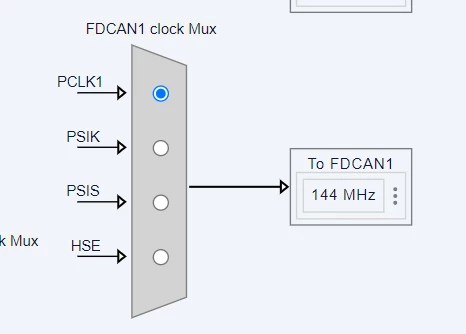
- Ensure that the FDCAN clock source is derived from the system clock or a dedicated peripheral clock with minimal jitter.
- Proper clock tree configuration is essential to meet the timing requirements for CAN baud rates (for example, 500 kbps, 1 Mbps).
2. Prerequisites
Make sure that you have installed:
- STM32CubeMX2
- Latest STM32C5 HAL2 driver
- STM32Cube for Visual Studio Code IDE
Hardware: 2x NUCLEO-C562RE board (or compatible STM32C5 MCU board)
3. STM32CubeMX2 project creation and basic setup
Follow these steps to create the FDCAN controller application project for the NUCLEO-C562RE board. This demo leverages the responder example to establish back and forth communication:
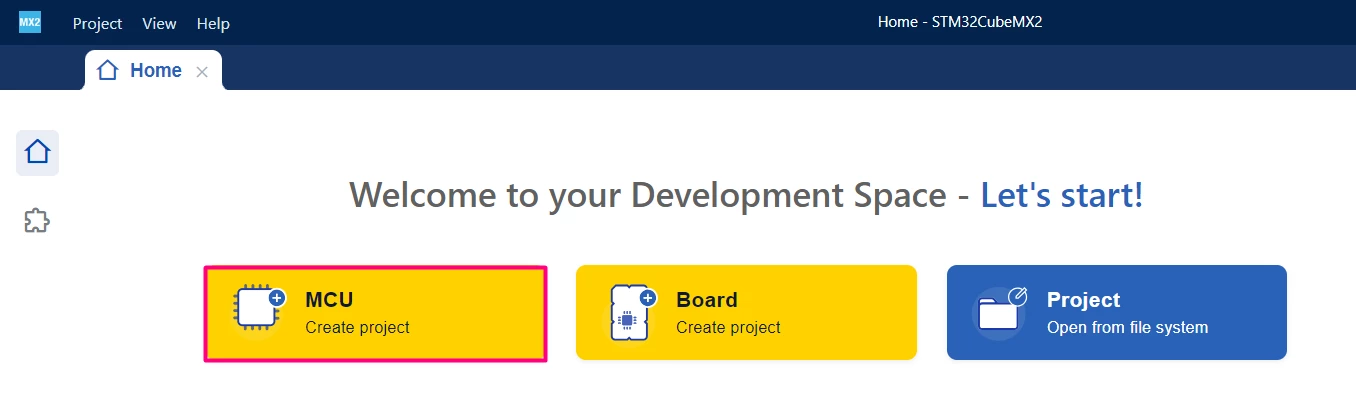
Open STM32CubeMX2. On the Home page, click the [MCU square] to create a new project.
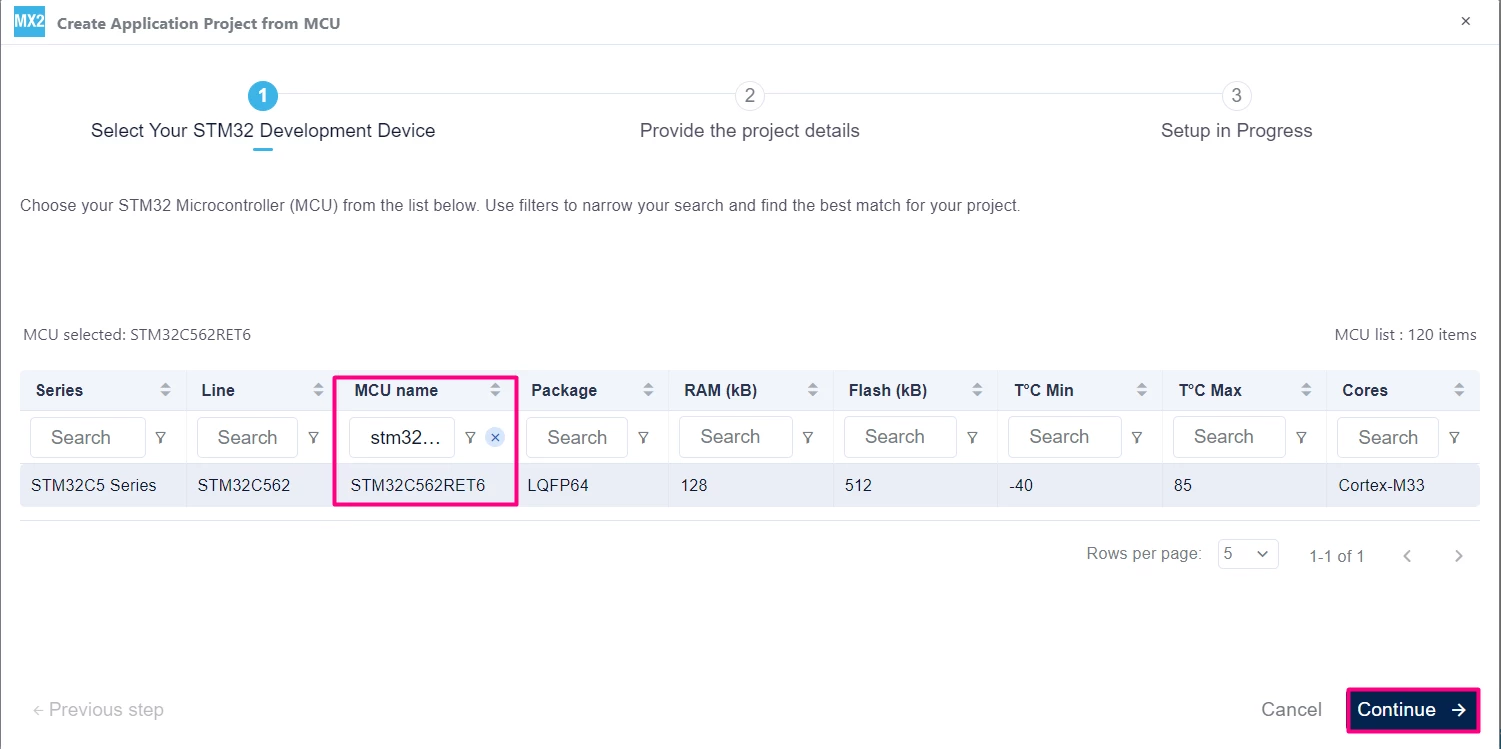
In the search field under MCU name, enter STM32C562RE and select your board. Click [Continue].
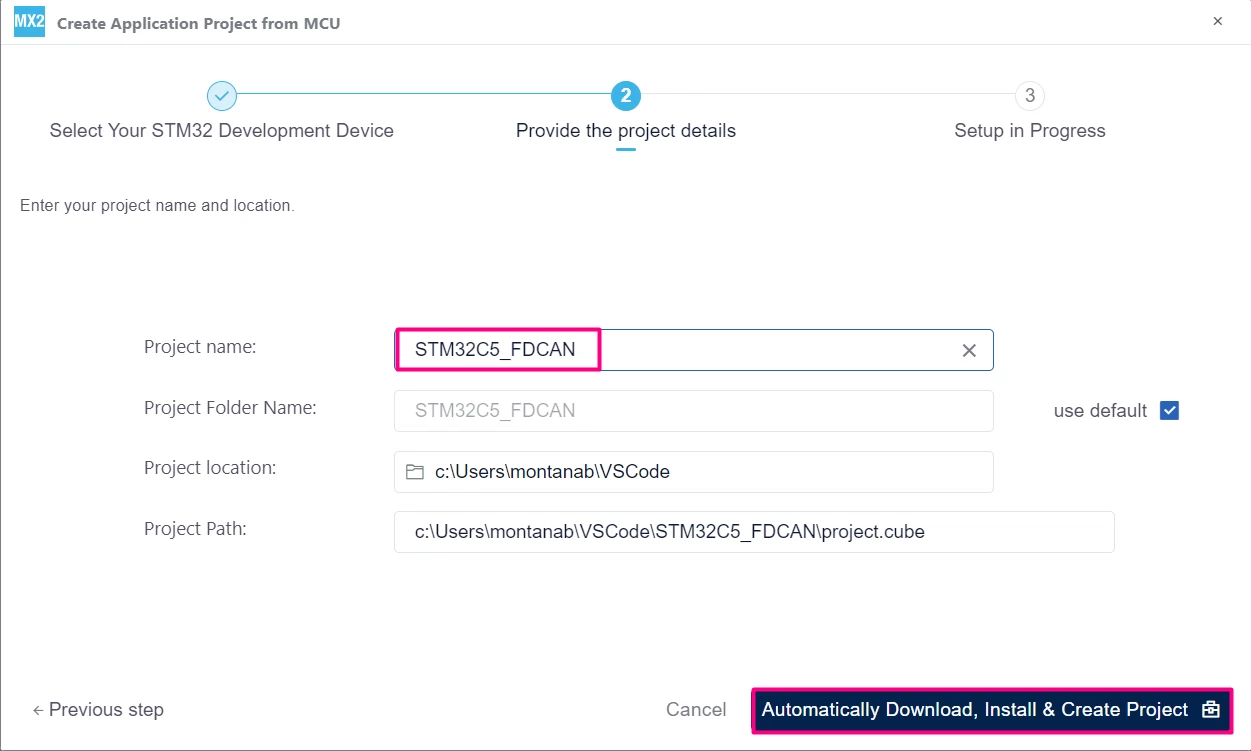
Enter your project name and location. Click [Automatically Download, Install & Create Project] to finish project creation.
4. FDCAN peripheral configuration
4.1 Enable FDCAN
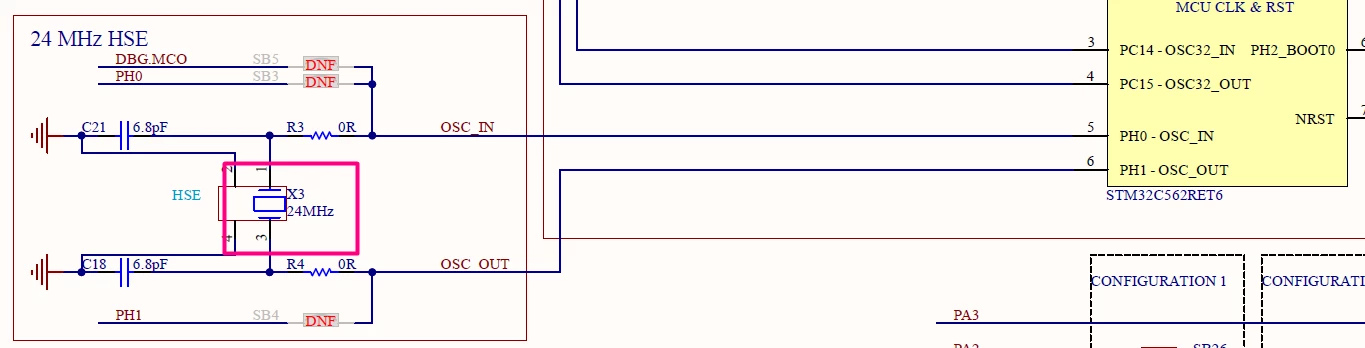
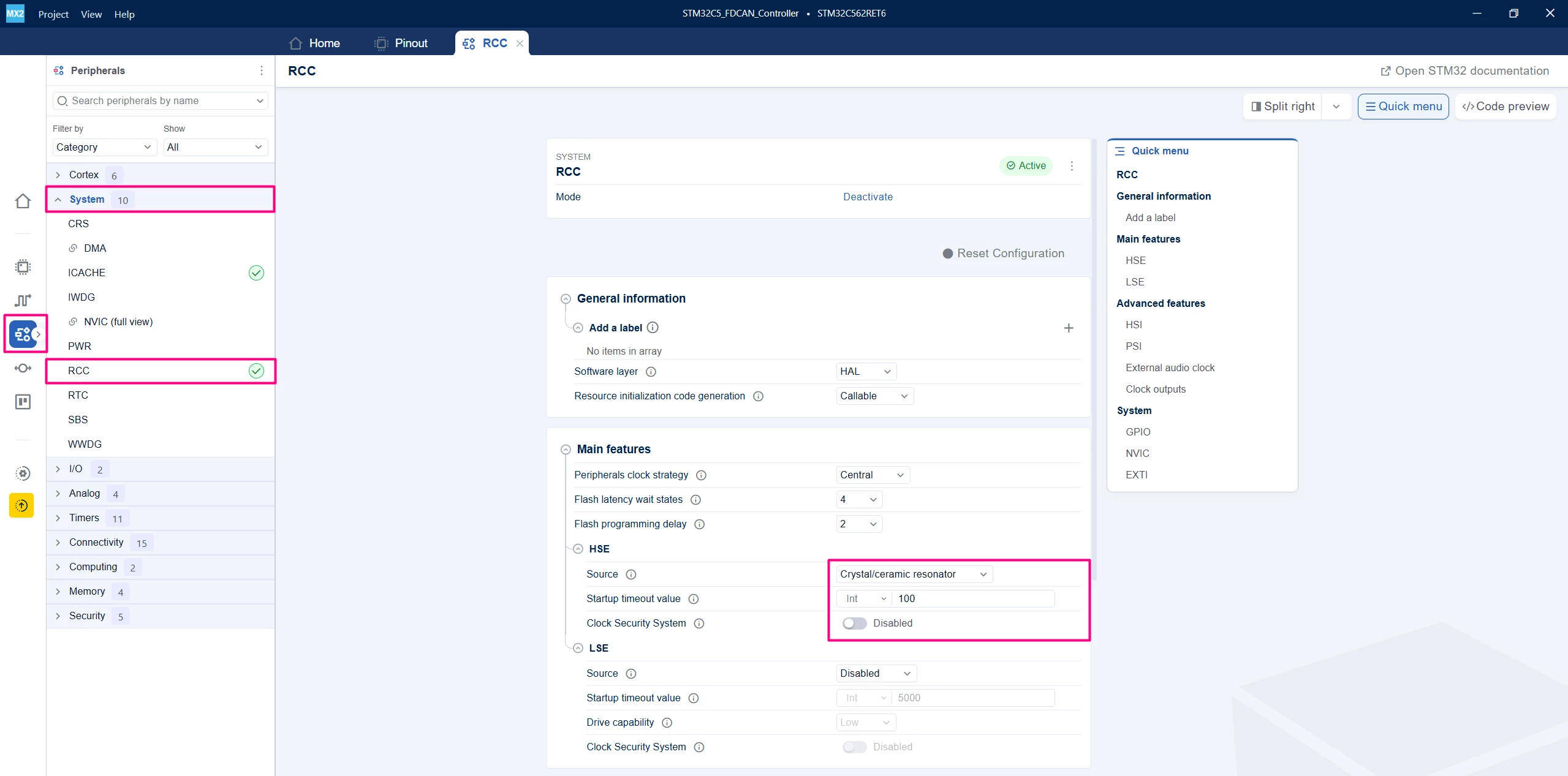
Go to the "Peripherals" → "System Core" → RCC and enable the HSE. The Nucleo board has a 24 MHz crystal available:
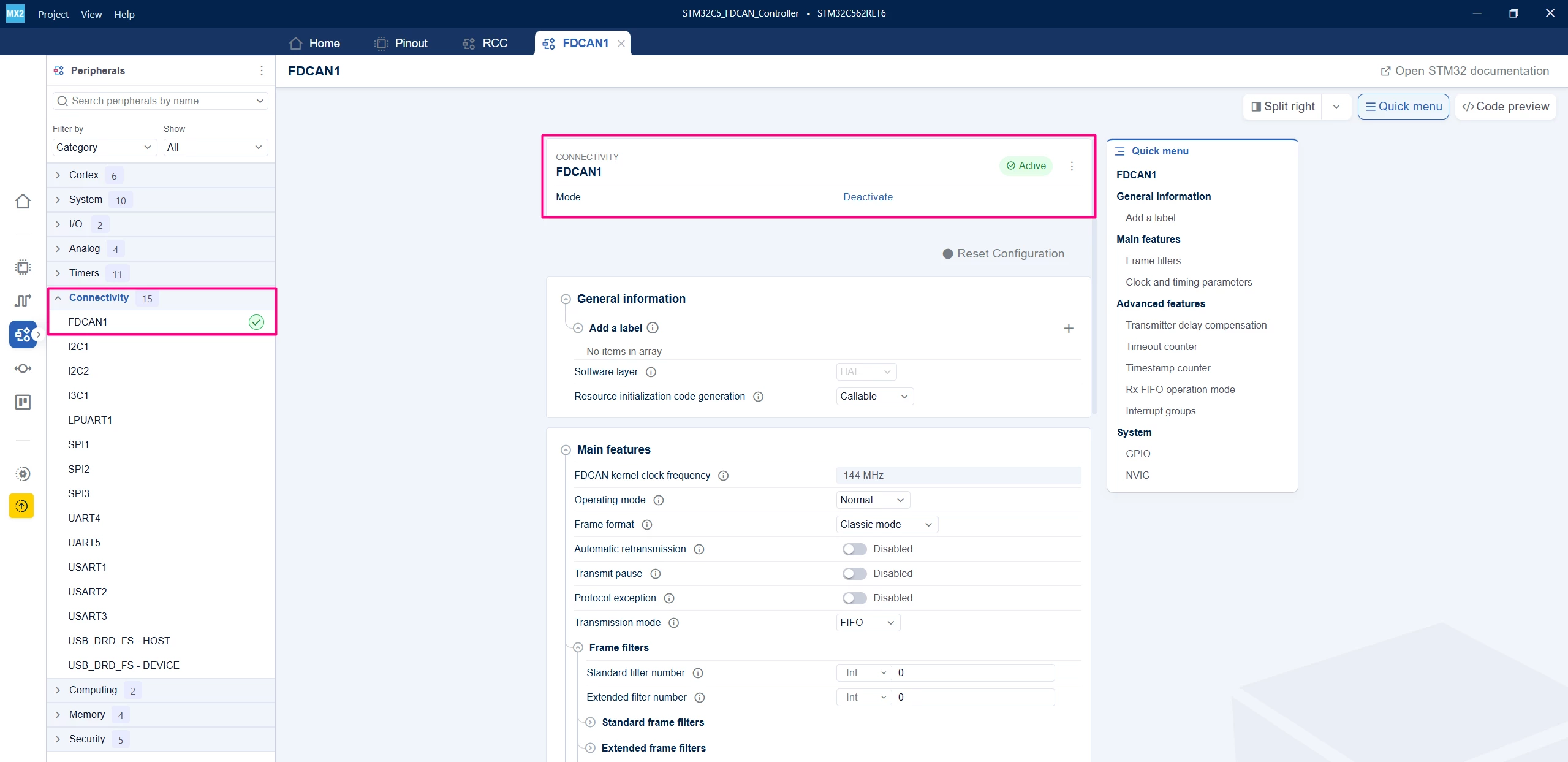
Go to "Peripherals" →"Connectivity" → FDCAN1 and enable the FDCAN1 peripheral.
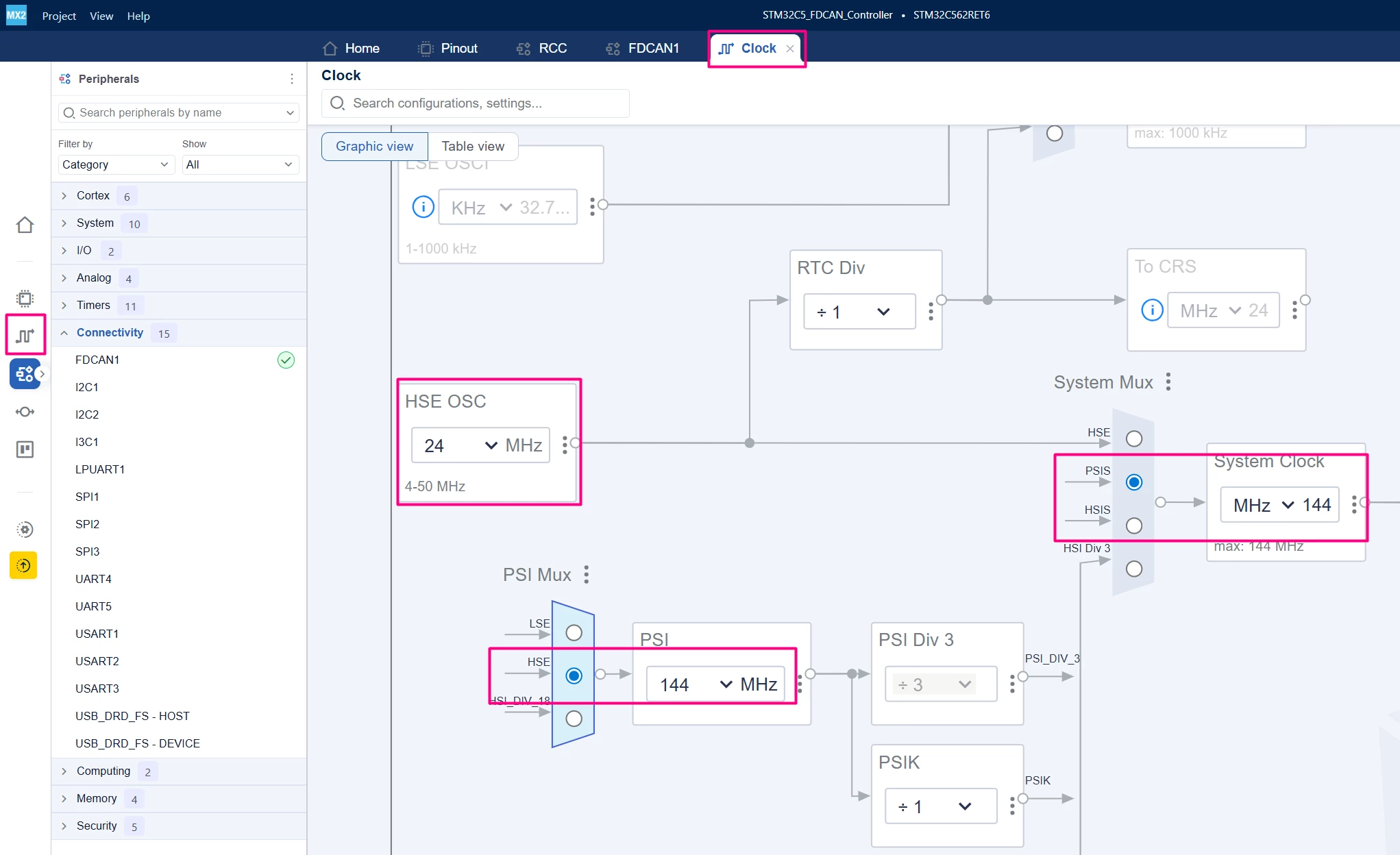
Go back to the "Clock" tab and adjust the FDCAN1 origin clock, HSE value, and PSI:
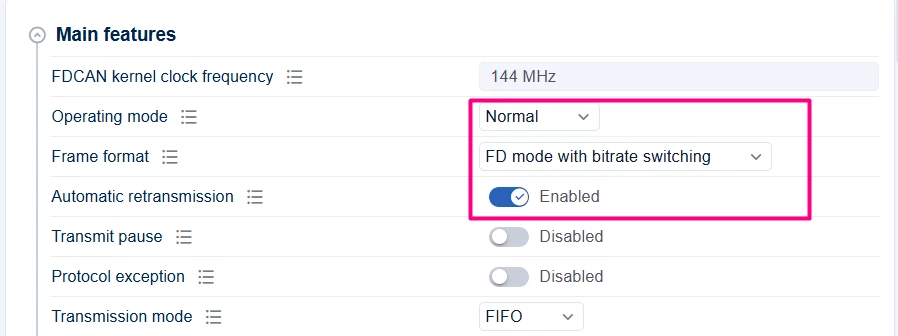
Configure the operating mode and frame format.
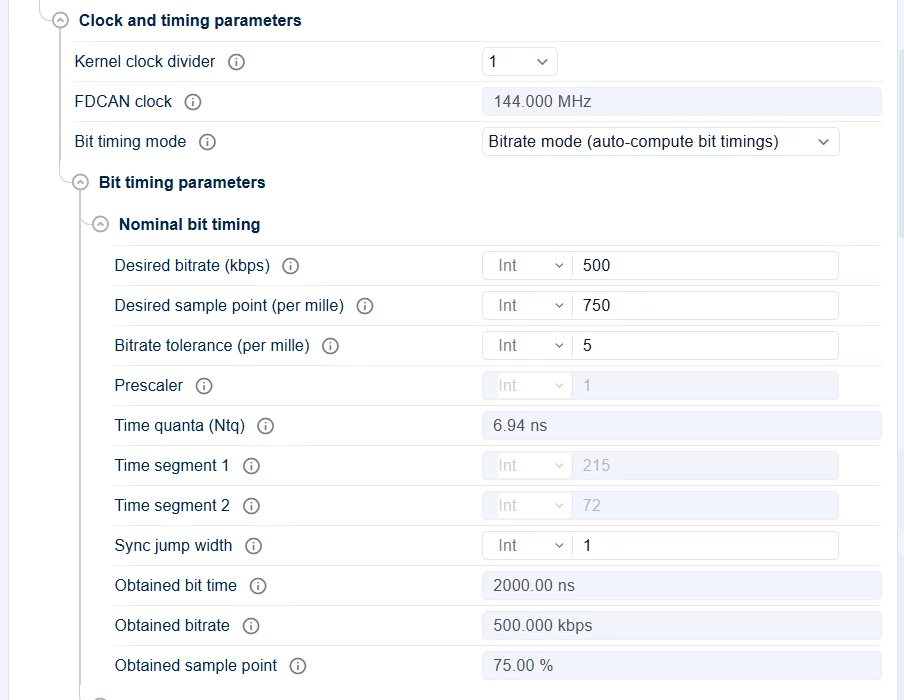
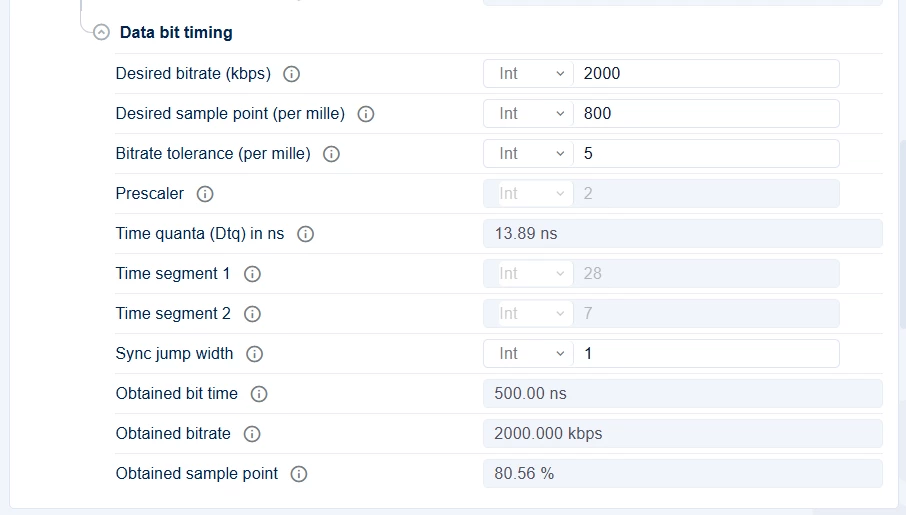
Configure the bit timing parameters, including the desired bitrate. In this case, 500 kbps was chosen.
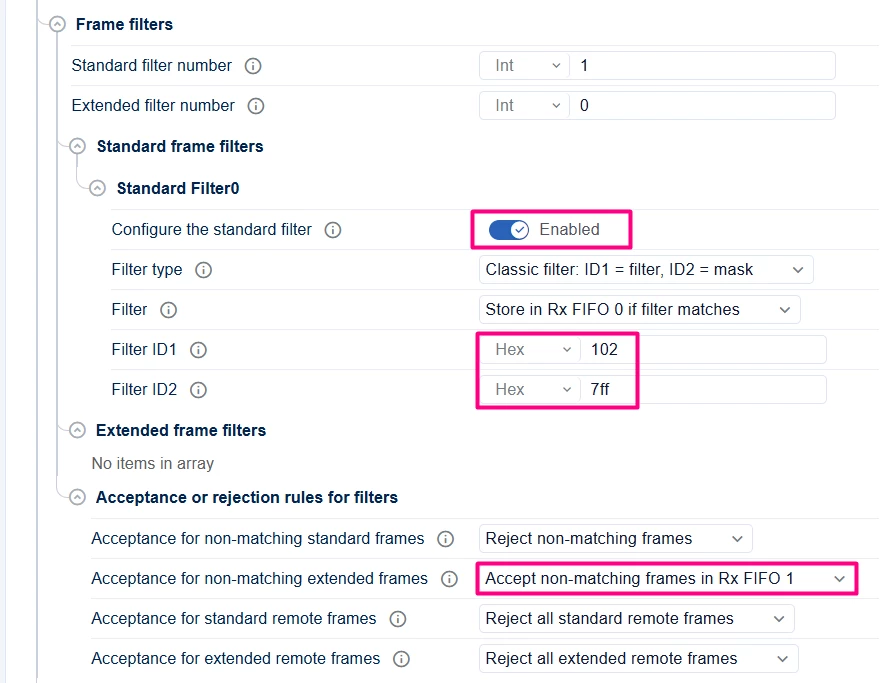
Configure the required filters. In this case, only the standard filter is used. Non-matching frames are directed to Rx FIFO1.
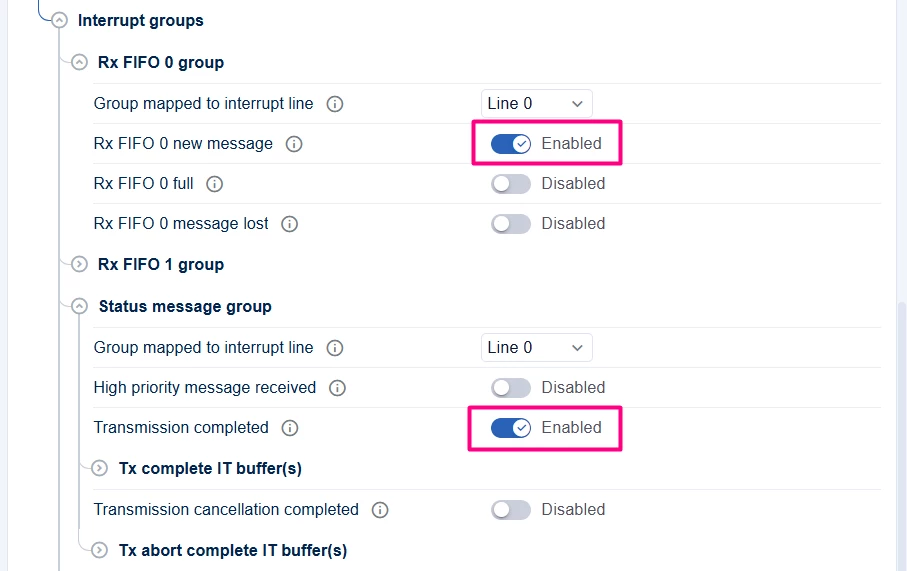
Enable the Rx FIFO 0 for new messages and the transmission completed status message.
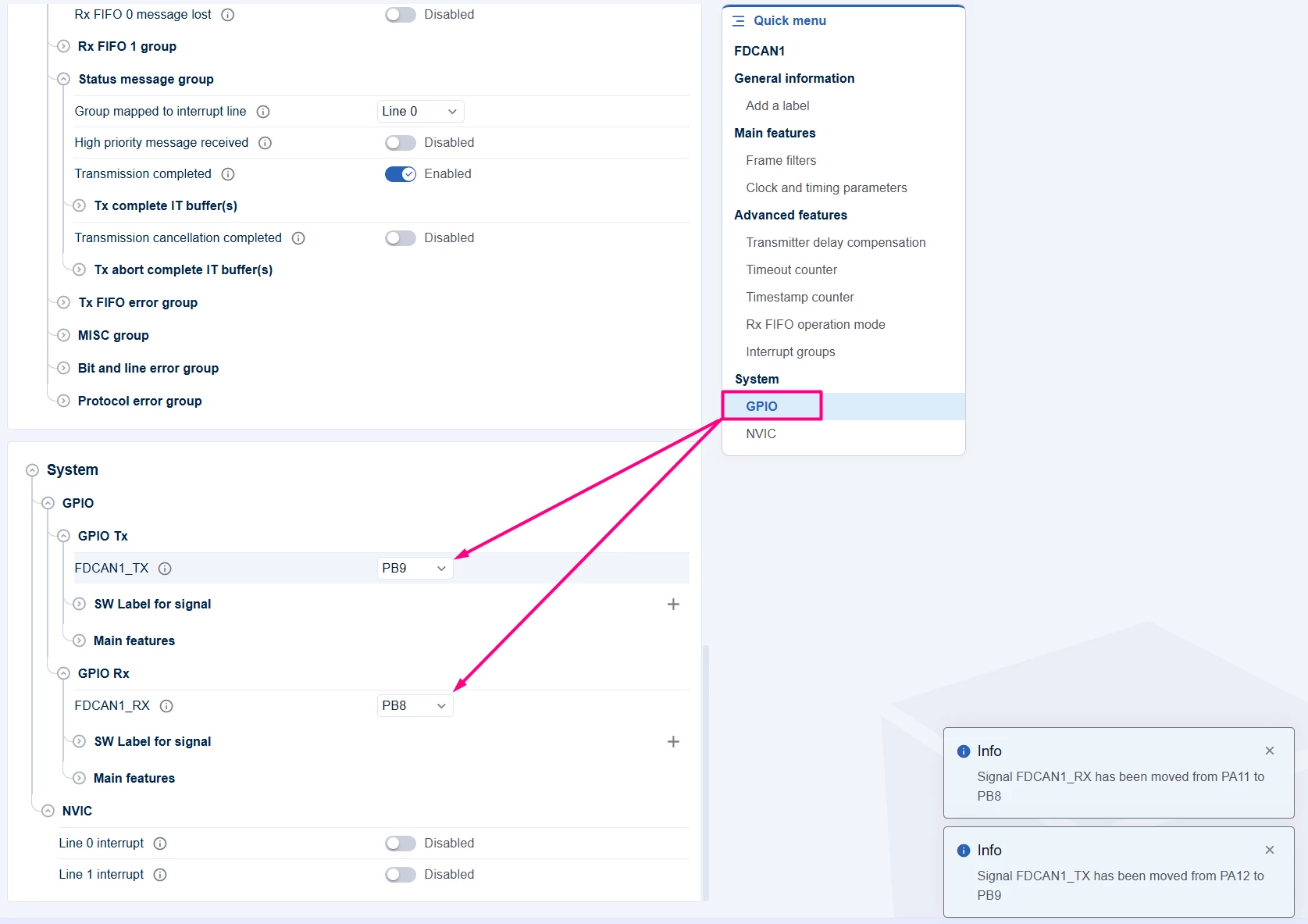
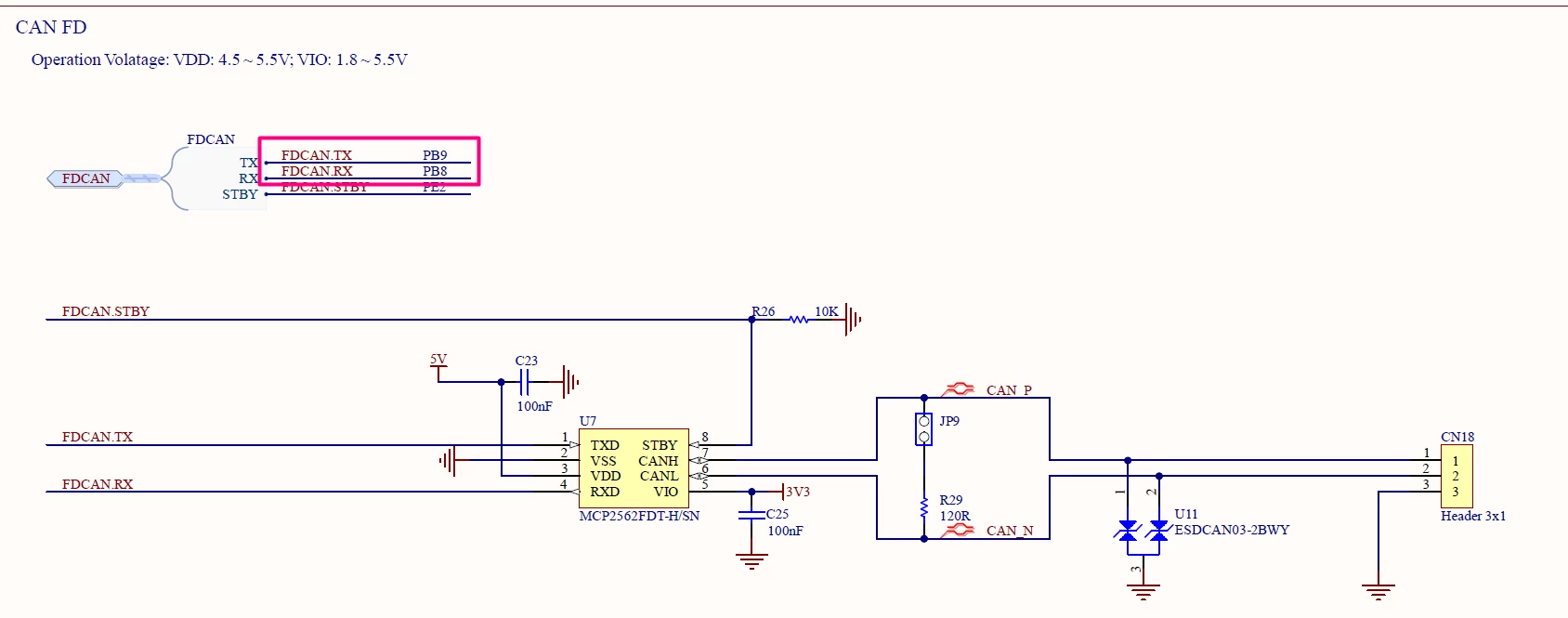
Make sure your GPIOs are allocated based on the hardware.
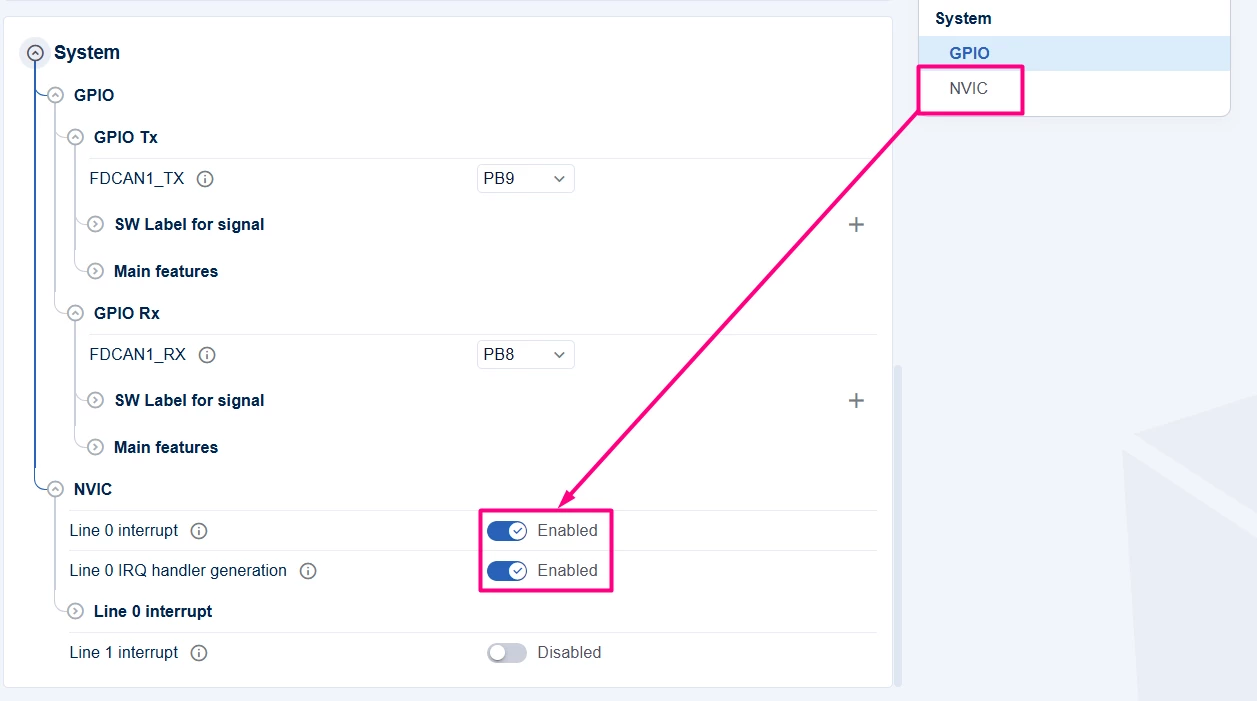
Enable [Global Interrupt] and [IRQ handler generation] if you plan to use interrupt-driven communication.
Optionally, configure additional GPIO like LED or UART for status indication. In this case, a simple printf is used, so UART2 with PA2/PA3 is added.
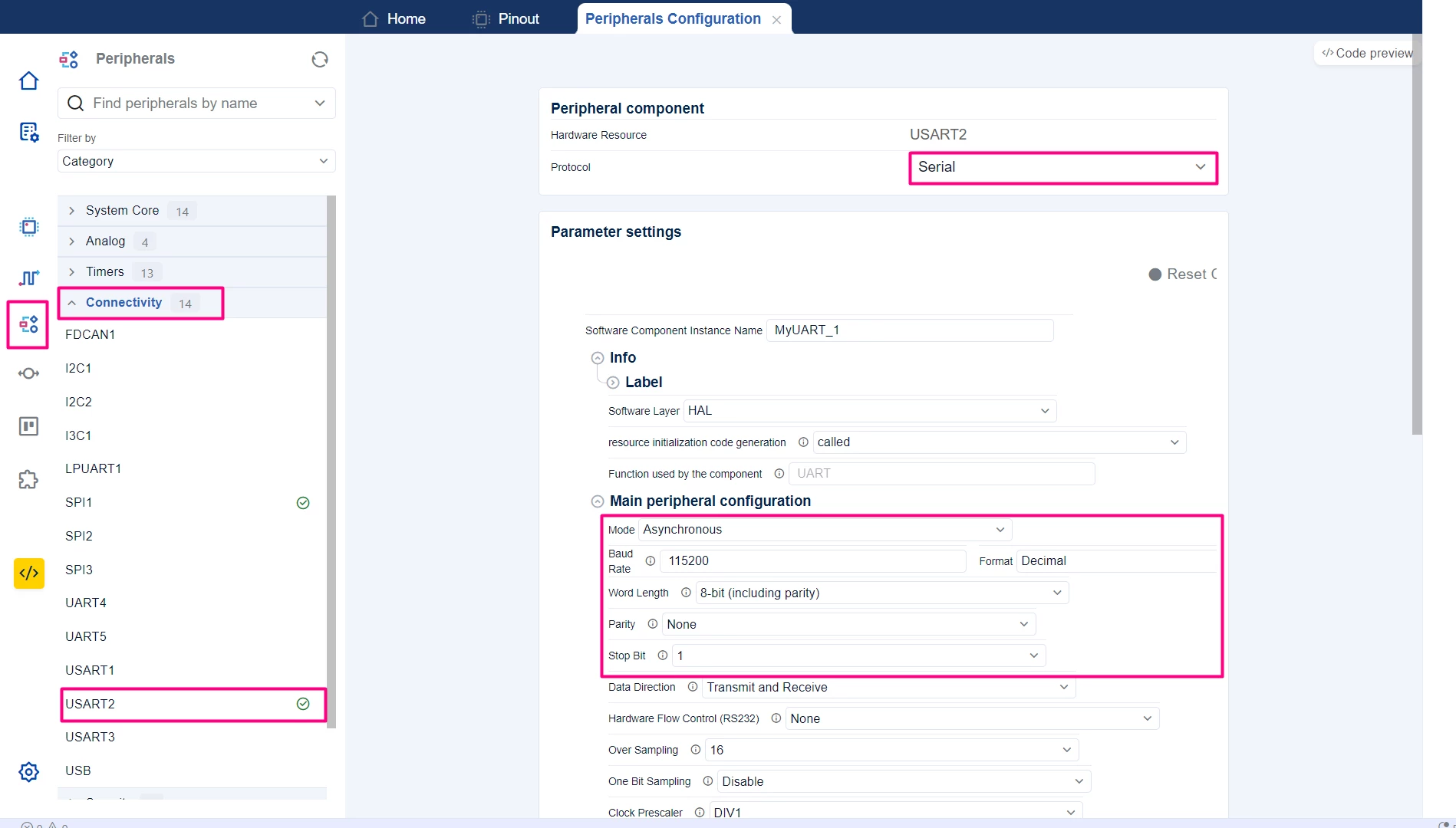
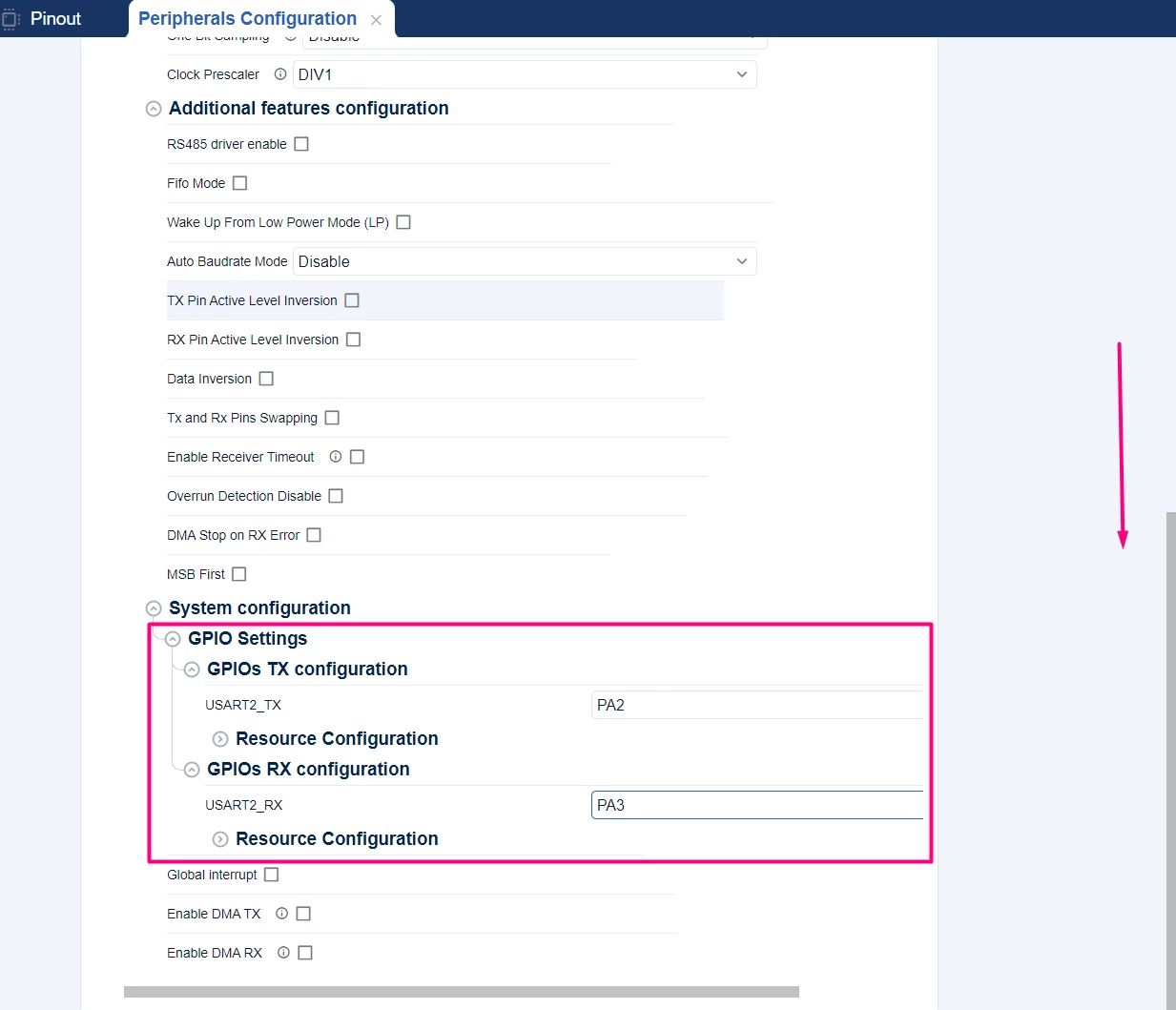
4.2 Project Manager settings
- Go to the "Project Manager" tab.
- Under "IDE Project Generation", select your IDE (for example, CMake for STM32Cube for Visual Studio Code).
- Locate the Global services and click on the Actions’ engine to add the register callback.
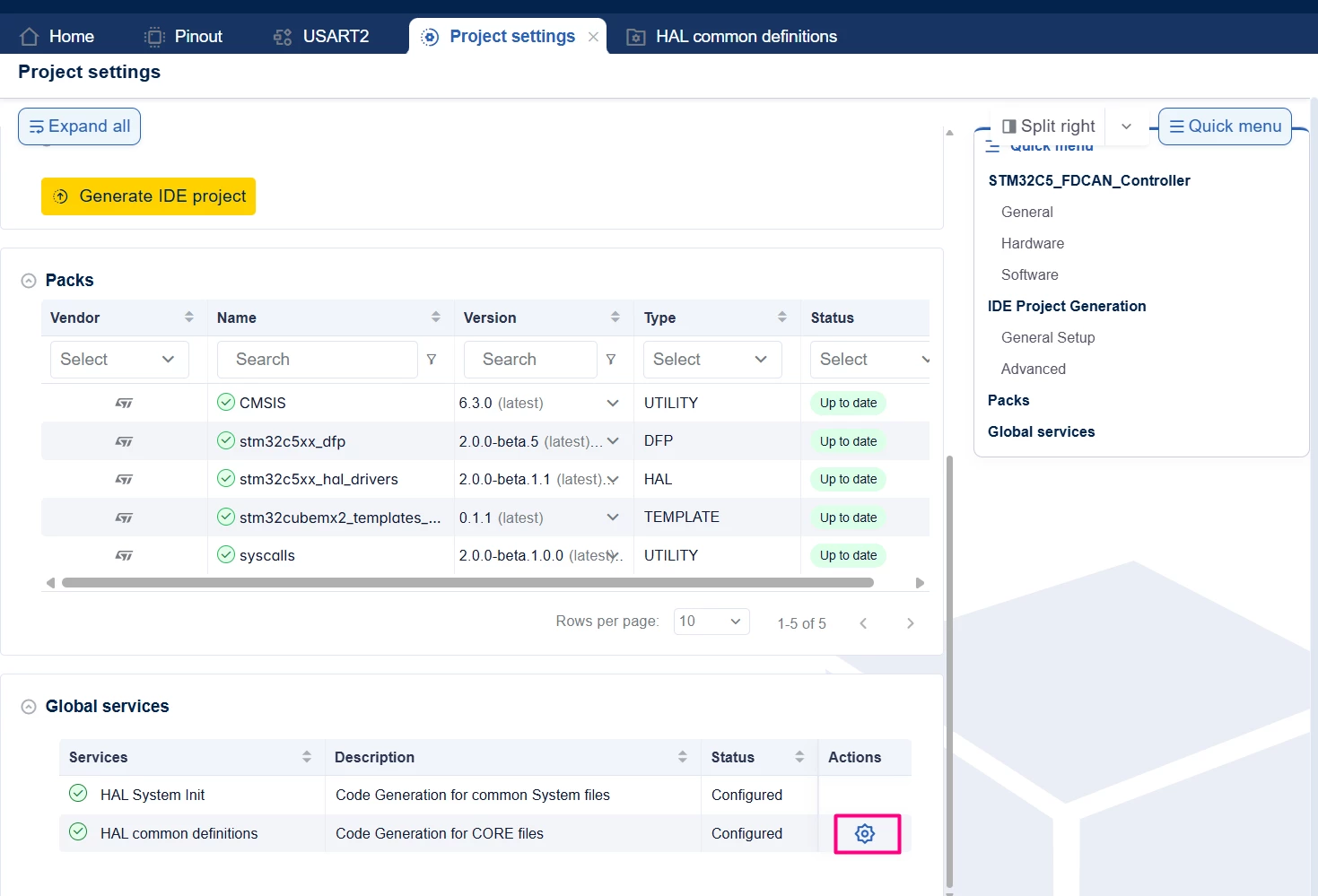
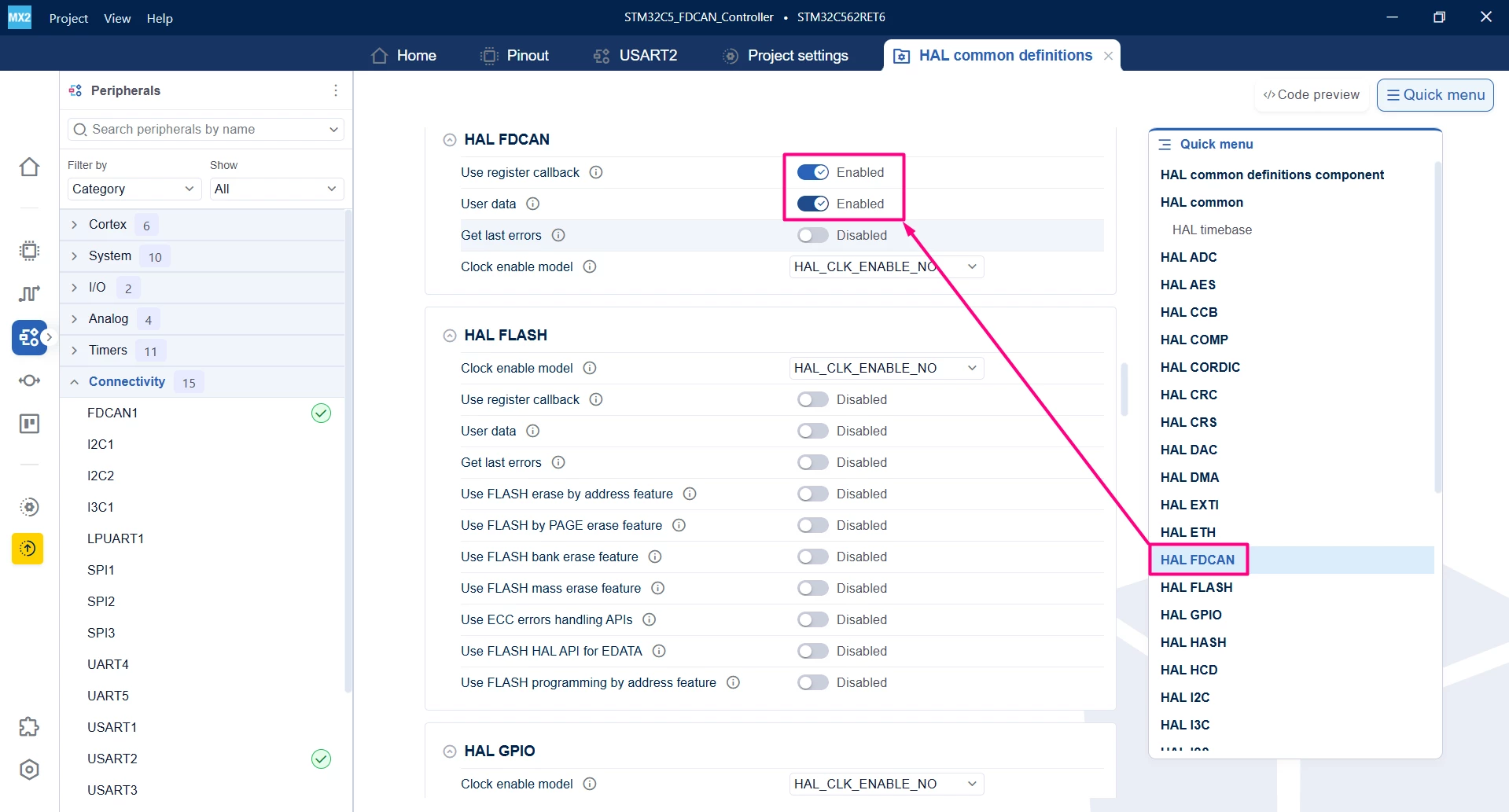
- Go back to the "Project Settings" tab and generate the project.
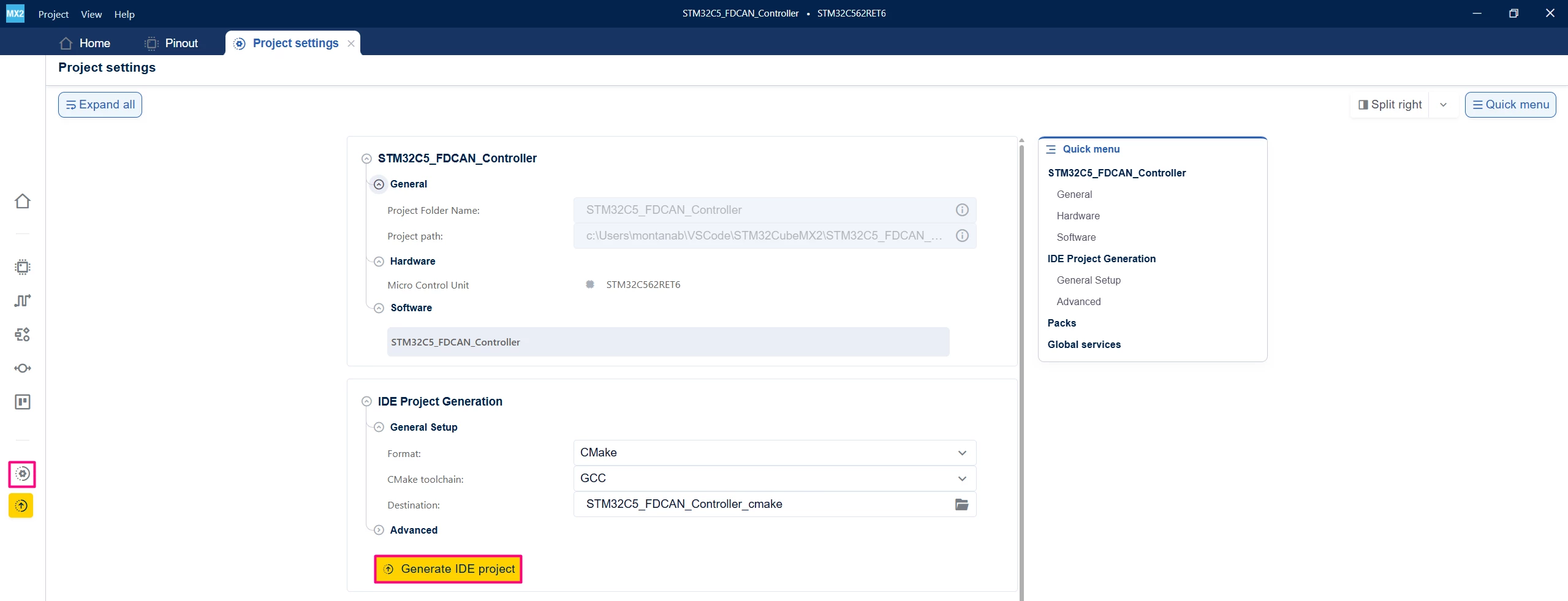
Click Generate Code and open the generated project folder in your IDE.
5. Configuring the project in Visual Studio Code
Open Visual Studio Code and open the project folder.
You are prompted with a selection. In case you miss click or that does not appear, press Ctrl+Shift+P, type CMake: Select Configure Preset, and choose your debug configuration.
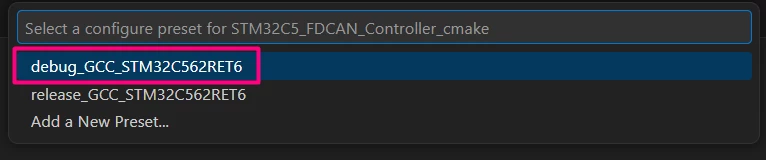
Build the project to ensure that everything is properly set and then we move to the implementation code.
6. Code snippets for basic FDCAN communication – controller side
This example demonstrates sending and receiving CAN messages using interrupts and FIFOs. The main process implements a retry-based FDCAN communication loop. After preparing the transmit header and toggling between two predefined TX buffers, the code attempts up to MAX_COM_ATTEMPTS to complete a full transmit–receive–verify cycle.
For each attempt, the code clears the interrupt and status flags, then requests a non-blocking FDCAN transmission. On a successful transmit request, it waits until either the transmit-complete or error interrupt sets the corresponding flag. In case of error, it logs and retries; otherwise, it waits for a received frame or an error.
When a frame is received without errors, the code retrieves the message from Rx FIFO0. If the receive operation fails, it logs the error and retries. Only when the receive succeeds does it validate the transfer using a transfer complete callback, which checks data length and buffer equality.
In main.c:
/**
 ******************************************************************************
 * file : main.c
 * brief : Main program body
 * Calls target system initialization then loop in main.
 ******************************************************************************
 *
 * Copyright (c) 2025 STMicroelectronics.
 * All rights reserved.
 *
 * This software is licensed under terms that can be found in the LICENSE file
 * in the root directory of this software component.
 * If no LICENSE file comes with this software, it is provided AS-IS.
 *
 ******************************************************************************
 */

/* Includes ------------------------------------------------------------------*/
#include "main.h"
#include "stdio.h"
#include "string.h" /* for memset and memcmp */

/* Private define ------------------------------------------------------------*/
/* Define the controller requested Frame ID in Standard Mode (11bits) */
#define FDCAN_CONTROLLER_FRAME_ID 0x101U
/* Data size of the TX and RX FDCAN frames in bytes. */
#define MSG_DATA_LENGTH HAL_FDCAN_DATA_LEN_CAN_FDCAN_8_BYTE
/* Data size of the TX FDCAN buffer in bytes */
#define TX_BUFFER_SIZE 8U
/* Data size of the RX FDCAN buffer in bytes */
#define RX_BUFFER_SIZE 64U
/* Max number of attempts to complete a data transfer */
#define MAX_COM_ATTEMPTS 10U

/* Private variables ---------------------------------------------------------*/
volatile uint8_t TransmissionCompleteFlag = 0U; /* Set to 1 if a transmission complete is detected */
volatile uint8_t ReceptionFlag = 0U; /* Set to 1 if a transmission complete is detected */
volatile uint8_t TransferError = 0U; /* Set to 1 if a transmission or a reception error is detected */

/* BufferA, BufferB: fixed-size buffers to transfer alternately. */
static const uint8_t BufferA[TX_BUFFER_SIZE] = {
 0x10, 0x32, 0x54, 0x76, 0x98, 0xBA, 0xDC, 0xFE
};
static const uint8_t BufferB[TX_BUFFER_SIZE] = {
 0x00, 0x11, 0x22, 0x33, 0x44, 0x55, 0x66, 0x77
};

/* Pointer to the buffer used for transmission */
static const uint8_t *pTxData = NULL;

/* Buffer used for reception */
static uint8_t RxBuffer[RX_BUFFER_SIZE] = {0U};

/* FDCAN handle pointer (from MX layer) */
hal_fdcan_handle_t *pFDCAN1;

/* Private functions prototype ----------------------------------------------*/
int __io_putchar(int ch)
{
 HAL_UART_Transmit(mx_usart2_uart_gethandle(), (uint8_t *)&ch, 1, 100);
 return ch;
}

/* FDCAN TX complete callback (weak in HAL, overridden here) */
void TxTransmissionCompleteCallback(hal_fdcan_handle_t *hfdcan,
 uint32_t buffer_indexes)
{
 TransmissionCompleteFlag = 1U;
}

/* FDCAN RX FIFO0 callback (weak in HAL, overridden here) */
void RxFifoEventCallback(hal_fdcan_handle_t *hfdcan,
 uint32_t buffer_indexes)
{
 ReceptionFlag = 1U;
}

static void TransferErrorCallback(hal_fdcan_handle_t *hfdcan)
{
 /* Asynchronous processing related to step 3 and 5 */
 TransferError = 1U;
}
/**
 * brief: The application entry point.
 * retval: int to comply with C99 standard
 */
int main(void)
{
 hal_status_t hal_status; /* HAL status of the FDCAN TX/RX operations */

 /* System Init: HAL, clock, peripherals (generated elsewhere) */
 if (mx_system_init() != SYSTEM_OK) {
 return -1;
 }

 /* Get FDCAN handle from MX layer */
 pFDCAN1 = mx_fdcan1_gethandle();

 printf("[INFO] Step 1: Device initialization COMPLETED.\n");

 /* Register the FDCAN callbacks */
 HAL_FDCAN_RegisterTxBufferCompleteCallback(pFDCAN1, TxTransmissionCompleteCallback);
 HAL_FDCAN_RegisterRxFifo0Callback(pFDCAN1, RxFifoEventCallback);
 HAL_FDCAN_RegisterErrorCallback(pFDCAN1, TransferErrorCallback);

 /* Start FDCAN module */
 HAL_FDCAN_Start(pFDCAN1);

 while (1) {

 uint32_t com_attempts = 0U; /* number of attempts in this cycle */
 uint8_t transfer_ok = 0U; /* 0 = not yet OK, 1 = OK */
 hal_fdcan_rx_header_t rx_element_header;

 /* Prepare FDCAN transmit message header (constant across attempts) */
 hal_fdcan_tx_header_t tx_element_header = {
 .b.identifier = FDCAN_CONTROLLER_FRAME_ID,
 .b.frame_type = HAL_FDCAN_FRAME_DATA,
 .b.identifier_type = HAL_FDCAN_ID_STANDARD,
 .b.error_state_indicator = HAL_FDCAN_ERROR_STATE_IND_ACTIVE,
 .b.message_marker = 52U,
 /* change to HAL_FDCAN_FRAME_FORMAT_CAN to send in classical CAN format */
 .b.frame_format = HAL_FDCAN_HEADER_FRAME_FORMAT_FD_CAN,
 .b.bit_rate_switch = HAL_FDCAN_BIT_RATE_SWITCH_ON,
 .b.event_fifo_control = HAL_FDCAN_TX_EVENTS_FIFO_STORE,
 .b.data_length = MSG_DATA_LENGTH,
 };
 /* Toggle between BufferA and BufferB to select the message to send */
 if (pTxData == BufferA) {
 pTxData = BufferB;
 } else {
 pTxData = BufferA; /* first time pTxData is NULL -> this branch -> BufferA */
 }

 /* Clear RX buffer (only the part used for comparison) */
 memset(RxBuffer, 0U, TX_BUFFER_SIZE);
 /* ==================================================================== */

 /* Try to complete a transfer up to MAX_COM_ATTEMPTS times */
 while ((com_attempts < MAX_COM_ATTEMPTS) && (transfer_ok == 0U)) {

 /* Clear the FDCAN interrupt flags before starting a new transfer */
 TransmissionCompleteFlag = 0U;
 ReceptionFlag = 0U;

 /* Start a new communication attempt */
 com_attempts++;

 /* Step 2: Transmit in interrupt mode the buffer pointed by pTxData */
 hal_status = HAL_FDCAN_ReqTransmitMsgFromFIFOQ(pFDCAN1,
 &tx_element_header,
 (uint8_t *)pTxData);
 /* Ignore detailed error management: if it fails, just retry */
 if (hal_status != HAL_OK) {
 continue;
 }

 /* Wait for FDCAN TransmissionCompleteFlag interrupt */
 while (TransmissionCompleteFlag == 0U) {
 __WFI();
 }

 /* Step 3: wait for reception complete interrupt */
 while (ReceptionFlag == 0U) {
 __WFI();
 }

 /* Read received message from RX FIFO0 */
 hal_status = HAL_FDCAN_GetReceivedMessage(pFDCAN1,
 HAL_FDCAN_RX_FIFO_0,
 &rx_element_header,
 RxBuffer);
 /* Ignore detailed error management: if it fails, just retry */
 if (hal_status != HAL_OK) {
 continue;
 }

 /* === HandleTransferCplt() logic (inlined, simplified) ============= */
 if ((rx_element_header.b.data_length == MSG_DATA_LENGTH) &&
 (memcmp(pTxData, RxBuffer, TX_BUFFER_SIZE) == 0)) {

 printf("[INFO] Controller - Tx/Rx Buffers IDENTICAL. "
 "Transfer COMPLETED of %lu bytes.\n",
 (unsigned long)TX_BUFFER_SIZE);

 transfer_ok = 1U; /* Success: exit attempts loop */
 } else {
 printf("[ERROR] Controller - Tx/Rx Buffers DIFFERENT. TRYING AGAIN.\n");
 /* transfer_ok stays 0U -> another attempt if com_attempts < MAX */
 }
 /* ================================================================== */

 } /* end while (com_attempts < MAX_COM_ATTEMPTS && !transfer_ok) */

 /* Here you can add a delay or other processing between cycles */
 /* HAL_Delay(1000); */
 } /* end while(1) */

} /* end main */
7. Validation
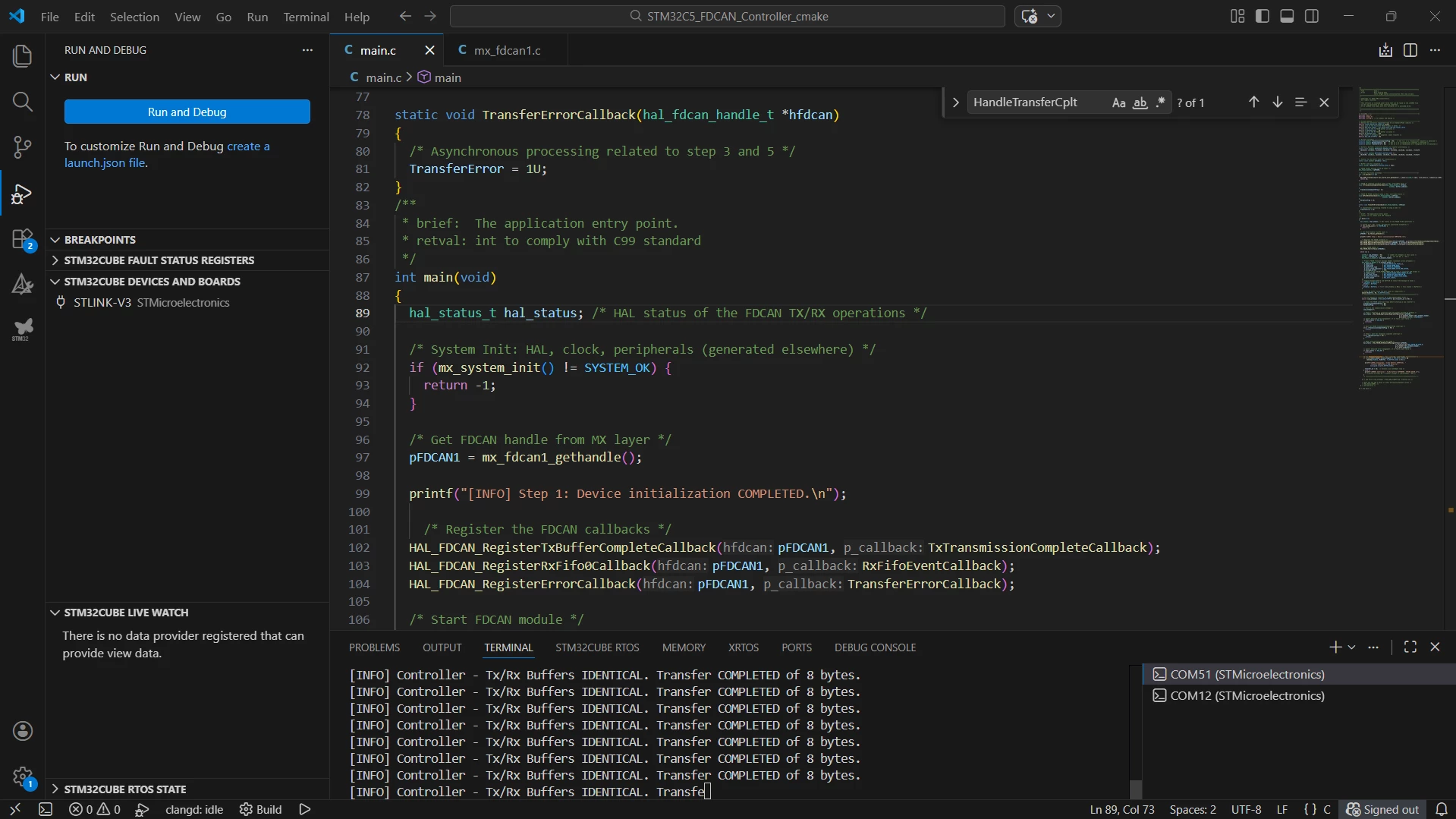
Locate and load the FDCAN responder example at ..\examples\hal\fdcan\two_boards_com_it_responder and connect the wires to create the FDCAN connection between the two NUCLEO-C562RE boards. After building the controller application, locate the Run and Debug icon, and create a debug session by selecting the STLINK GDB Server option.
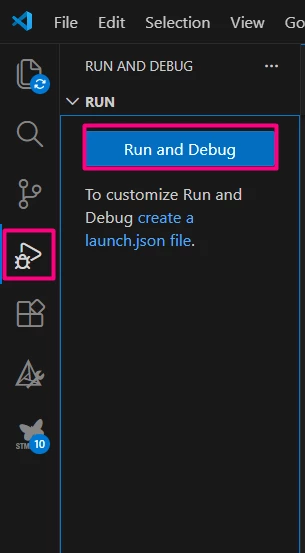
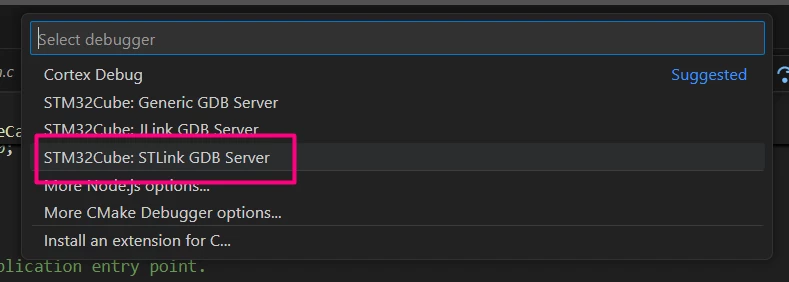
Once in debug mode and before running the code, press Ctrl+Shift+P, type Open Serial, select COMXY (STMicroelectronics), and set the baud rate to 115200. The communication runs in an endless loop, and it is possible to open two serial monitors to check both sides of the communication.
Conclusion
This tutorial describes how to configure and use the STM32 FDCAN peripheral with STM32CubeMX2 on the NUCLEO-C562RE board. It emphasizes the importance of the HSE oscillator for accurate CAN timing and provides a step-by-step explanation of the example using interrupt and Rx FIFO communication on the controller side.
