

How to use DAC with STM32CubeMX2
Summary
This tutorial provides a step-by-step guide on how to enable and configure the digital-to-analog converter (DAC) peripheral using STM32CubeMX2. The example uses the NUCLEO-C562RE board and demonstrates output on DAC channel1. The tutorial covers:
- Basic DAC output in polling mode
- DAC output using DMA for waveform generation
- Summary
- Introduction
- 1. Software setup
- 2. STM32CubeMX2 project creation and basic setup
- 2.1 Project creation
- 2.2 Pinout and DAC configuration
- 2.3 Project manager settings
- 3. Configuring the project in Visual Studio Code
- 4. Code snippets (basic DAC output - polling mode)
- 4.1 Validation
- 5. Code snippets (DAC with DMA for waveform generation)
- 5.1 Validation
- 6. Additional notes
- Conclusion
- Related links
Introduction
The DAC peripheral in STM32 microcontrollers converts digital values into analog voltages. It is commonly used for audio output, waveform generation, and analog control signals.
STM32 DAC supports multiple channels and can be triggered by software, timers, or external events. Using interrupts and DMA allows efficient and precise control of DAC output without a heavy CPU load.
1. Software setup
Install the following tools:
- STM32CubeMX2
- The latest STM32C5 HAL2 driver
- STM32CubeIDE extension for Visual Studio Code
The hardware used in this tutorial is the NUCLEO-C562RE board.
2. STM32CubeMX2 project creation and basic setup
Follow these steps to create a DAC application project for the NUCLEO-C562RE board:
2.1 Project creation
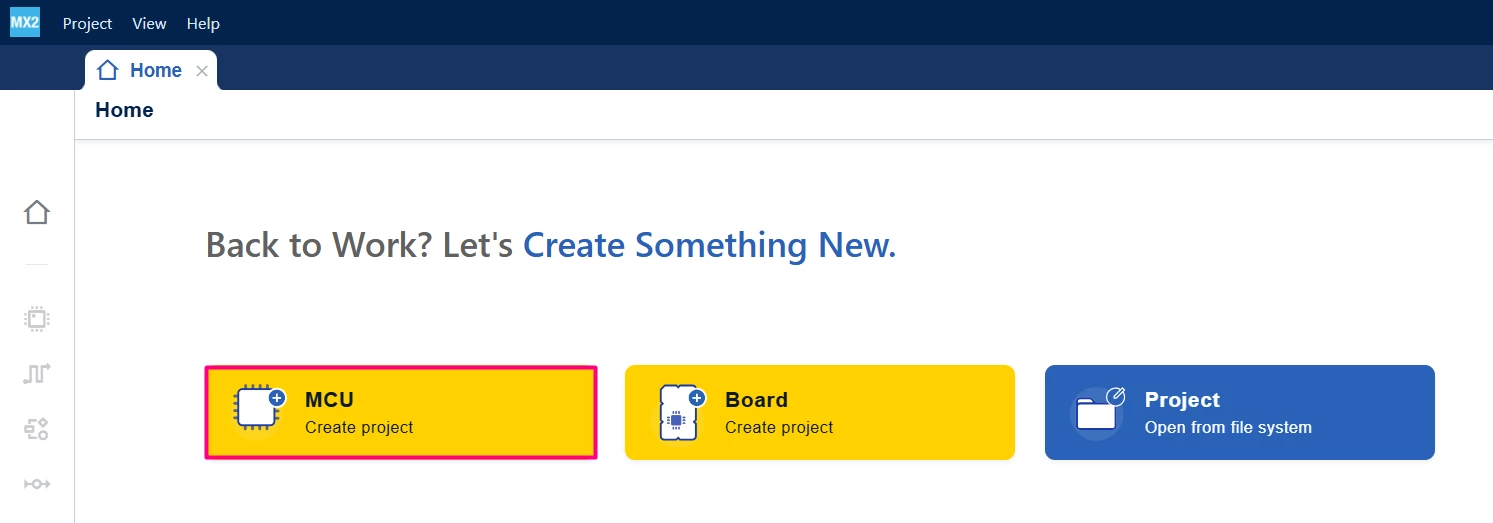
Open STM32CubeMX2. On the Home page, click the [MCU square] to create a new project.
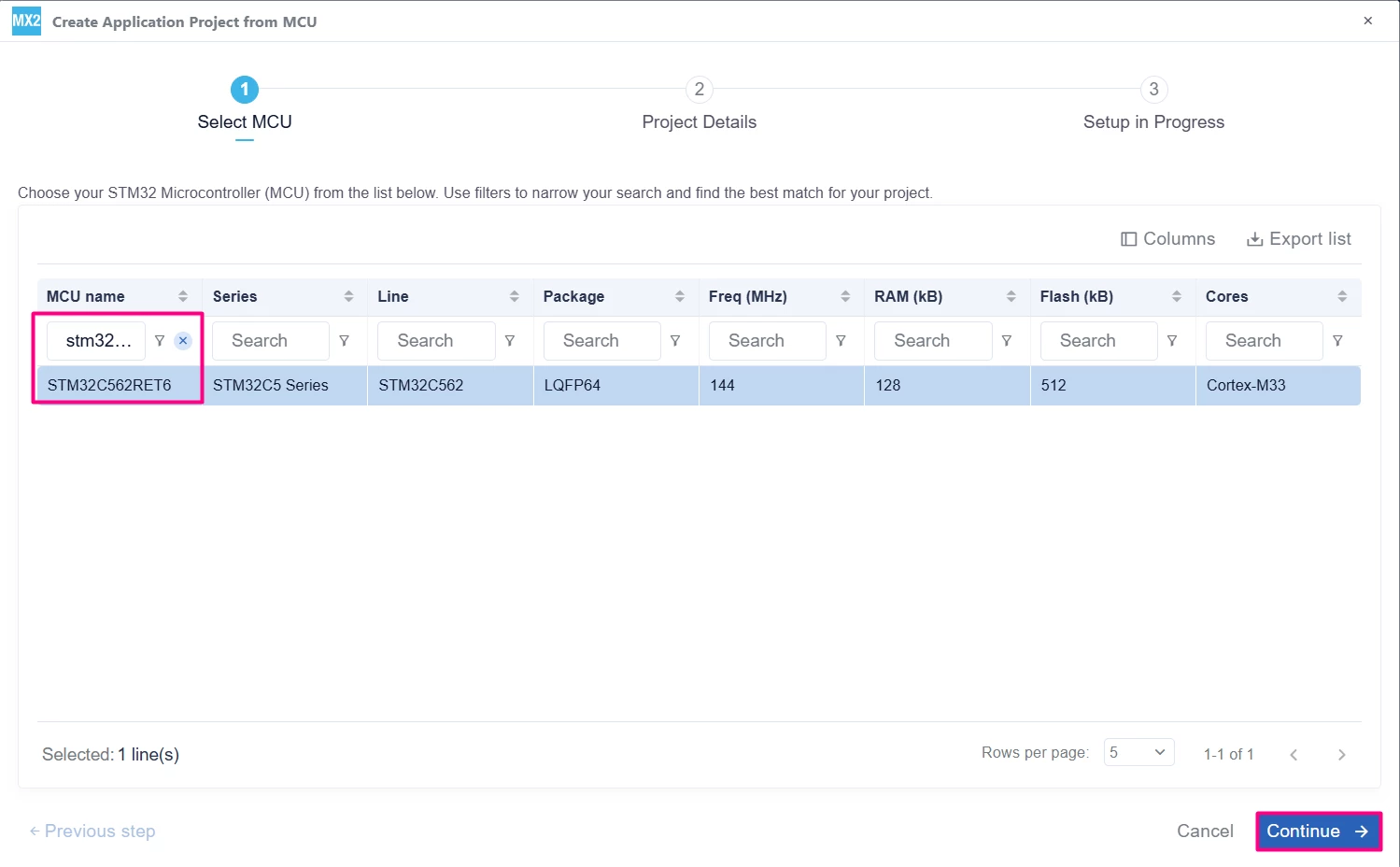
In the search field under MCU name, enter STM32C562RE and select your board. Click [Continue].
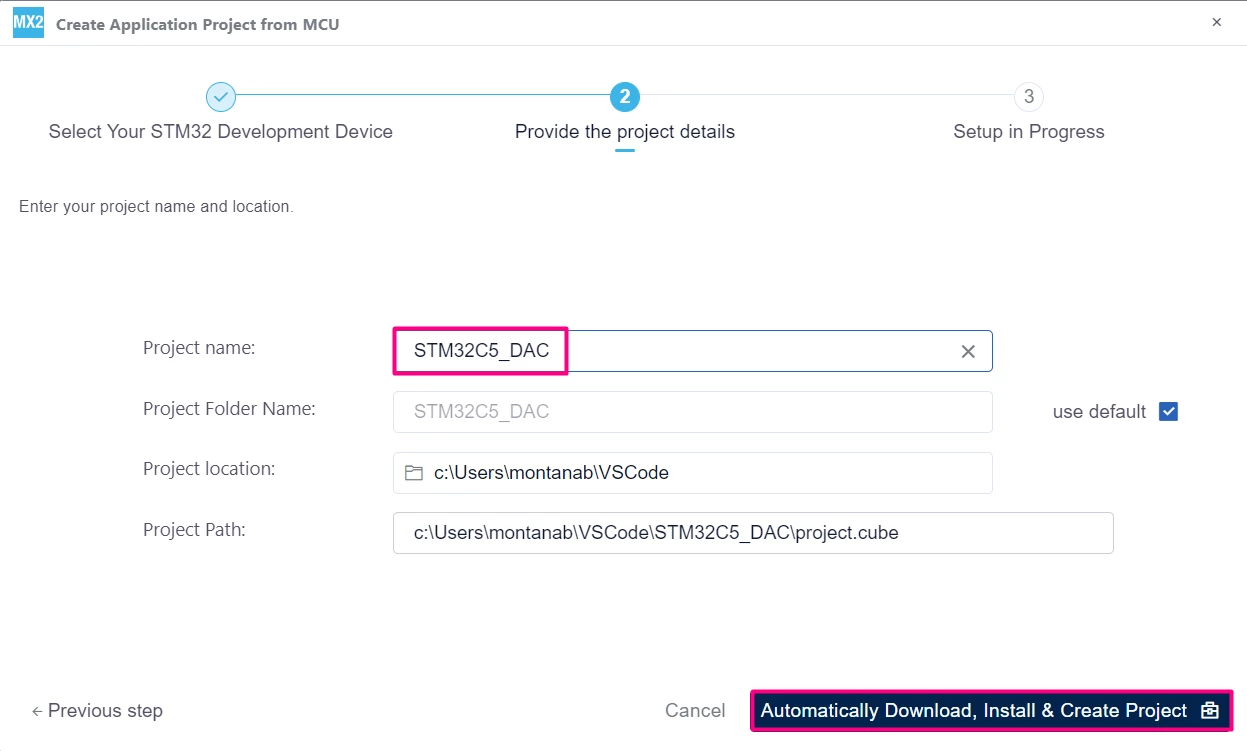
Enter your project name and location. Click [Automatically Download, Install & Create Project] to finish project creation.
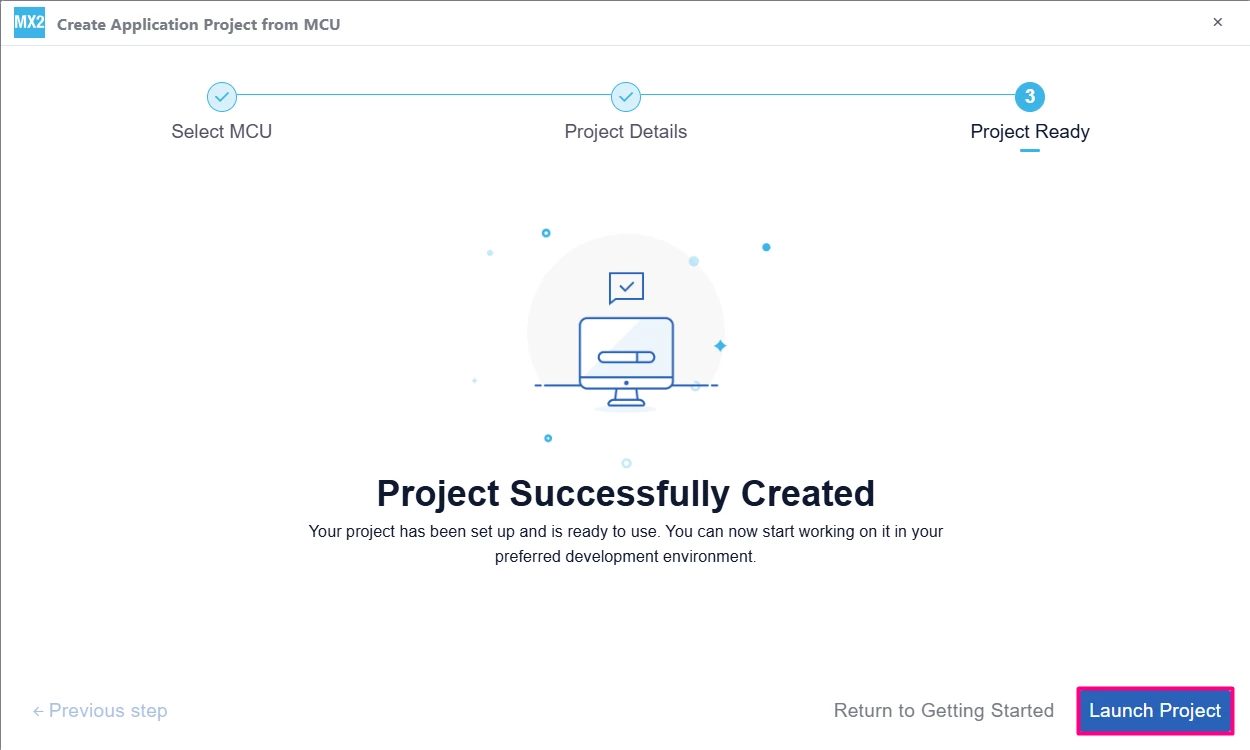
Select [Launch Project] to start.
2.2 Pinout and DAC configuration
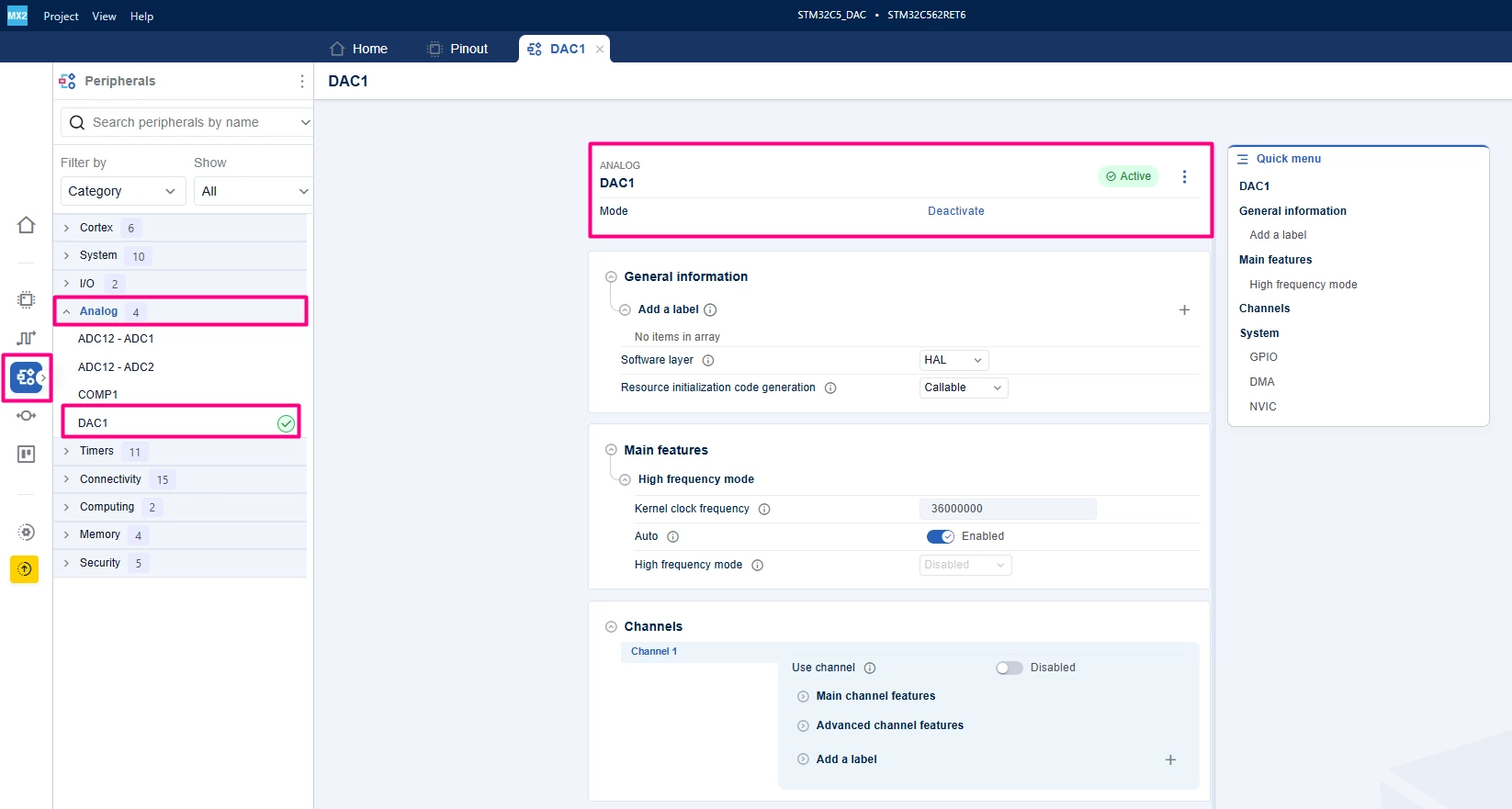
Go to Peripherals →Analog → DAC.
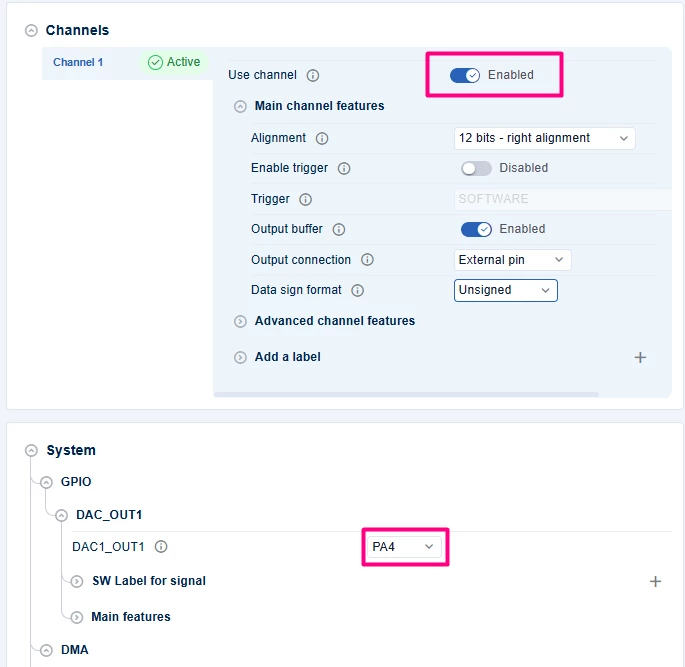
 Enable DAC Channel 1 (typically on PA4)
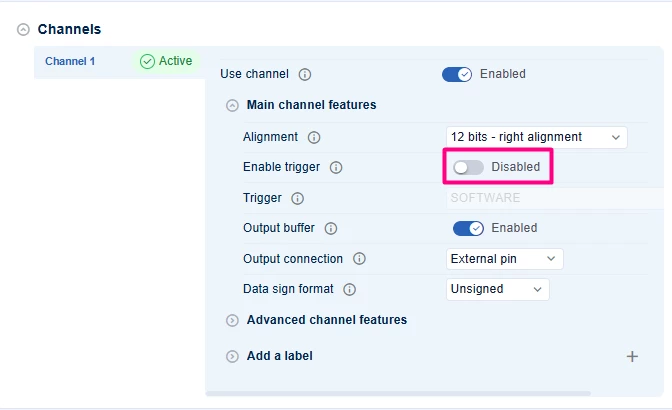
Set Enable trigger to [Disabled] for basic output or select a timer/event for triggered output. Enable Output Buffer for better drive capability (optional).
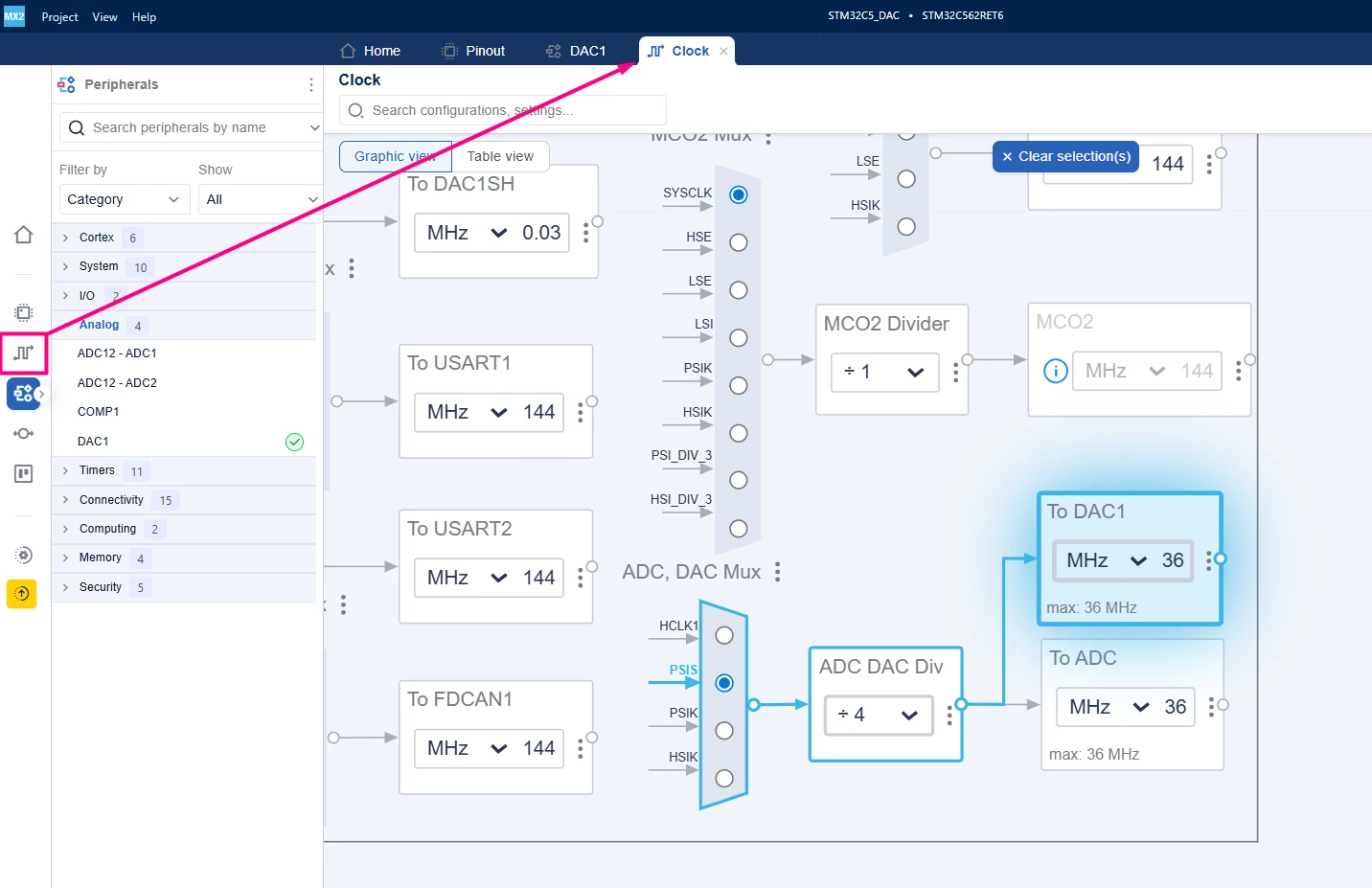
The DAC has two possible clock muxes, which can be observed in the Clock tab. This article uses the default one, via PSIS divided by 4.
 Enable DMA and/or Interrupt if you plan to use those modes. We cover that later in this article.
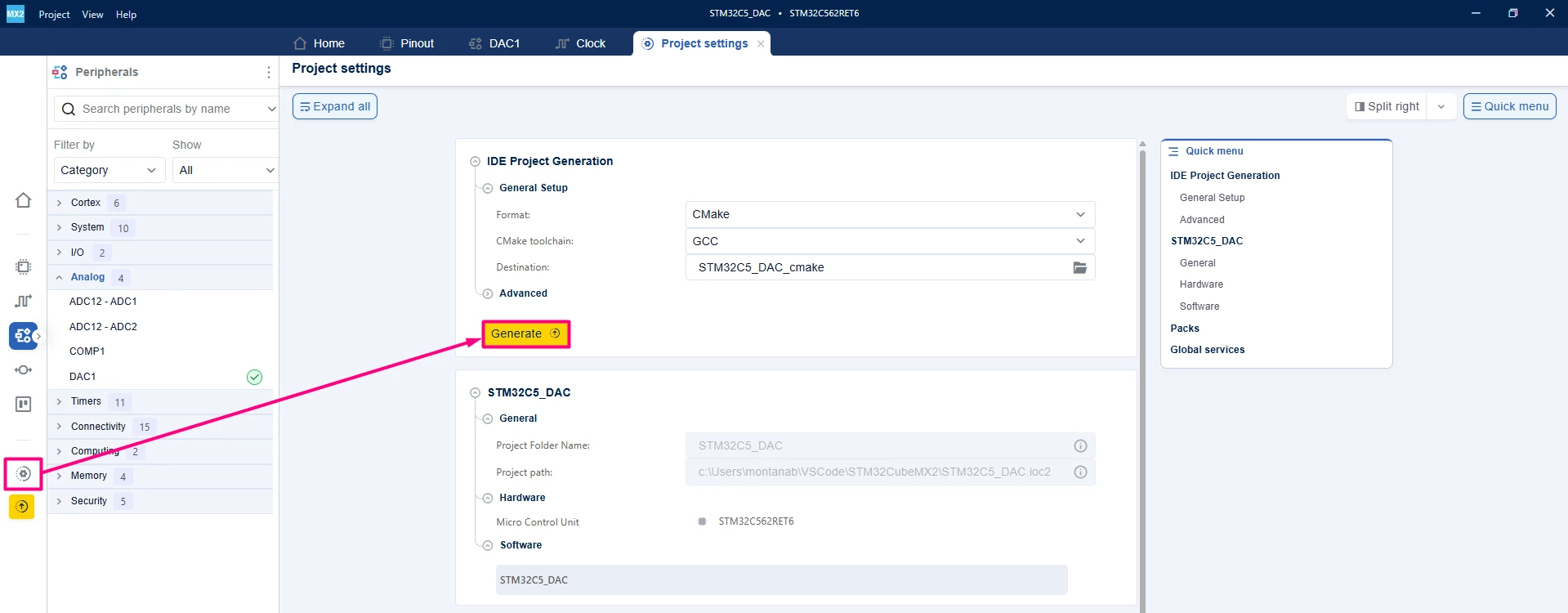
2.3 Project manager settings
- Go to Project Manager tab.
- Select your IDE (for example, CMake for STM32Cube for Visual Studio Code).
- Generate the project and open it in your IDE.
3. Configuring the project in Visual Studio Code
Open Visual Studio Code and open the project folder. You be prompted with a selection. In case you miss click or that does not appear, press Ctrl+Shift+P, type CMake: Select Configure Preset, and choose your debug configuration.
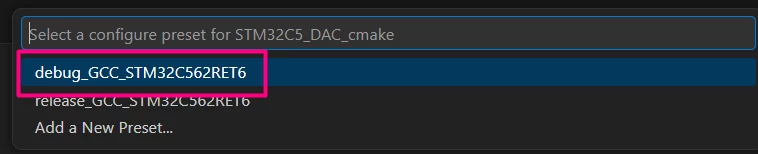 Build the project to ensure that everything is properly set and then we move on to the implementation code.
4. Code snippets (basic DAC output - polling mode)
This example outputs fixed voltage value to the DAC channels using polling mode.
/**
 ******************************************************************************
 * file : main.c
 * brief : Main program body
 * Calls target system initialization then loop in main.
 ******************************************************************************
 *
 * Copyright (c) 2025 STMicroelectronics.
 * All rights reserved.
 *
 * This software is licensed under terms that can be found in the LICENSE file
 * in the root directory of this software component.
 * If no LICENSE file comes with this software, it is provided AS-IS.
 *
 ******************************************************************************
 */
/* Includes ------------------------------------------------------------------*/
#include "main.h"
/* Private typedef -----------------------------------------------------------*/
/* Private define ------------------------------------------------------------*/
#define DAC_MAX_VALUE 4095U // 12-bit DAC max value
/* Private macro -------------------------------------------------------------*/
/* Private variables ---------------------------------------------------------*/
hal_dac_handle_t *pDAC;
/* Private functions prototype -----------------------------------------------*/

/**
 * brief: The application entry point.
 * retval: none but we specify int to comply with C99 standard
 */
int main(void) {
 /** System Init: this code placed in targets folder initializes your system.
 * It calls the initialization (and sets the initial configuration) of the
 * peripherals. You can use STM32CubeMX to generate and call this code or not
 * in this project. It also contains the HAL initialization and the initial
 * clock configuration.
 */
 if (mx_system_init() != SYSTEM_OK) {
 return (-1);
 } else {
 /*
 * You can start your application code here
 */
 // Start DAC channels
 pDAC = mx_dac1_gethandle();
 HAL_DAC_StartChannel(pDAC, HAL_DAC_CHANNEL_1);

 while (1) {
 // Set DAC output values
 HAL_DAC_SetChannelData(pDAC, HAL_DAC_CHANNEL_1,
 DAC_MAX_VALUE / 2); // 1.65 V approx.
 HAL_DAC_TrigSWConversionChannel(pDAC, HAL_DAC_CHANNEL_1);
 HAL_Delay(100);
 // Set DAC output values
 HAL_DAC_SetChannelData(pDAC, HAL_DAC_CHANNEL_1,
 DAC_MAX_VALUE / 4); // 1.65 V approx.
 HAL_Delay(100);
 }
 }
} /* end main */
4.1 Validation
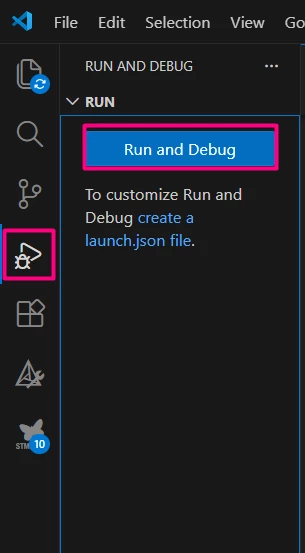
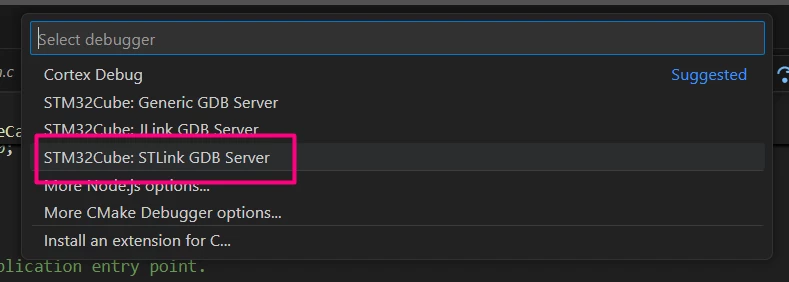
After building the application, locate the [Run and Debug] icon, create your debug session by selecting the STLINK GDB Server option:
Locate the PA4 at CN8.3.
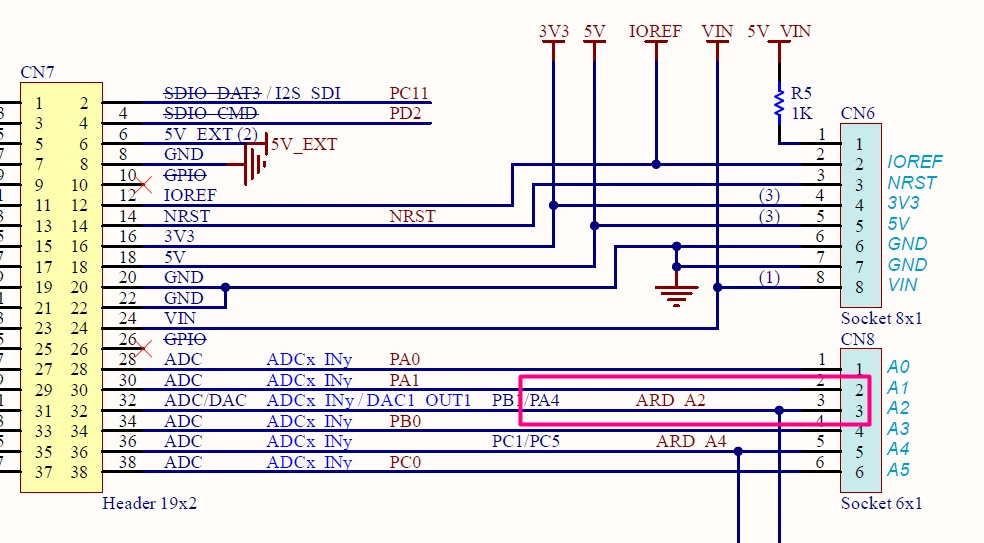
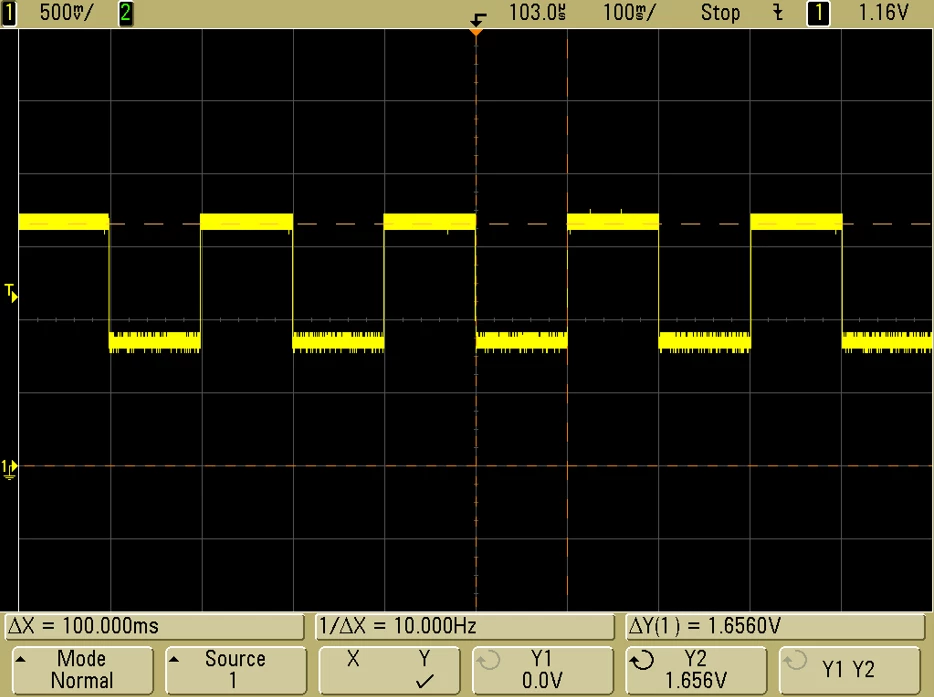
And connect a scope or similar to monitor the 100ms duration of around VDD/2 followed by 100ms of VDD/4.
5. Code snippets (DAC with DMA for waveform generation)
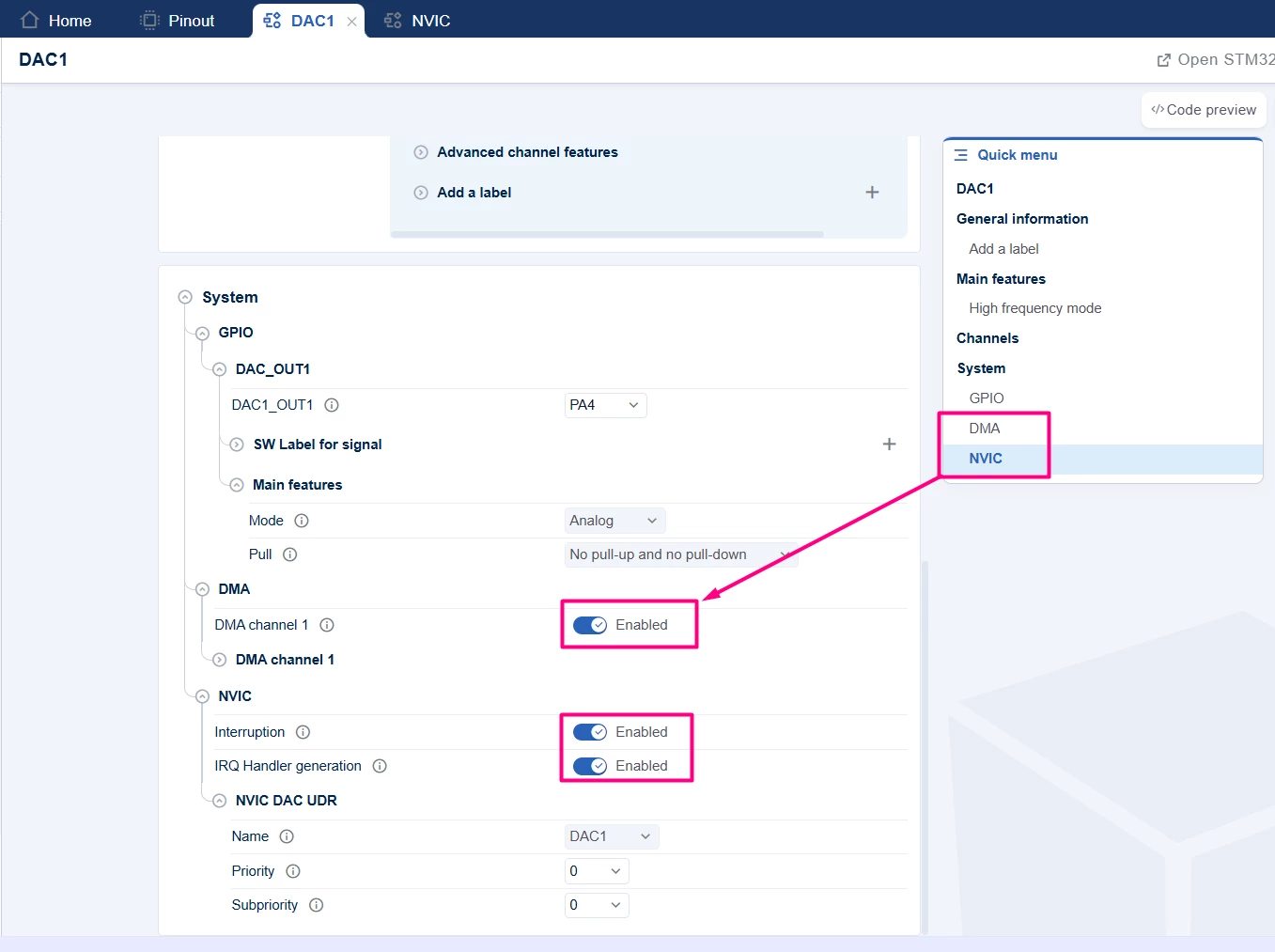
DMA mode is ideal for generating waveforms by continuously feeding DAC data from a buffer. To enable it, go back to STM32CubeMX2 and enable DMA and NVIC.
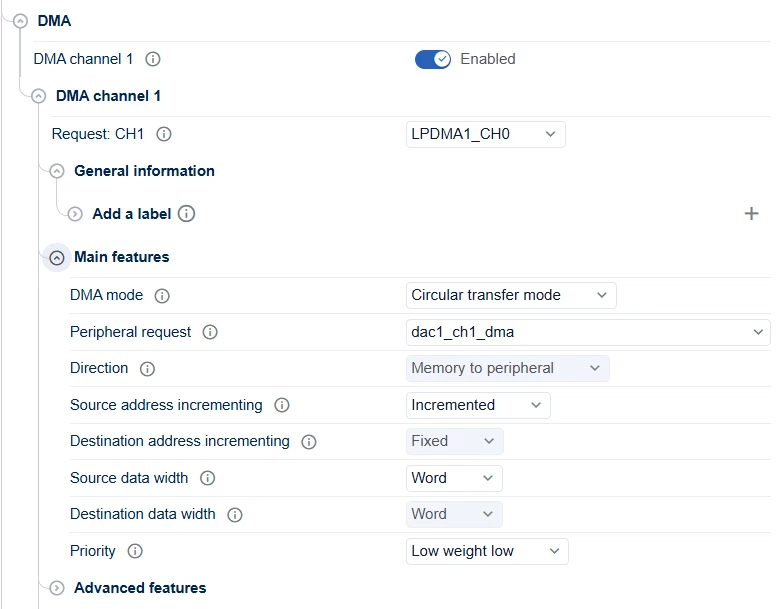
The default DMA settings should be set to Circular transfer mode, incrementing source address and word size.
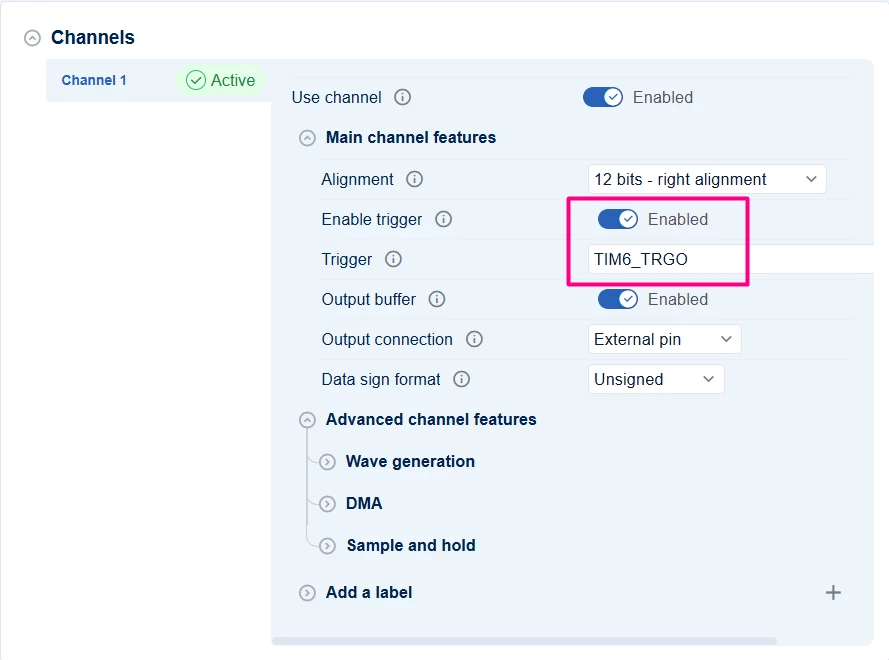
Add the trigger source for the DAC to be TIM6 based.
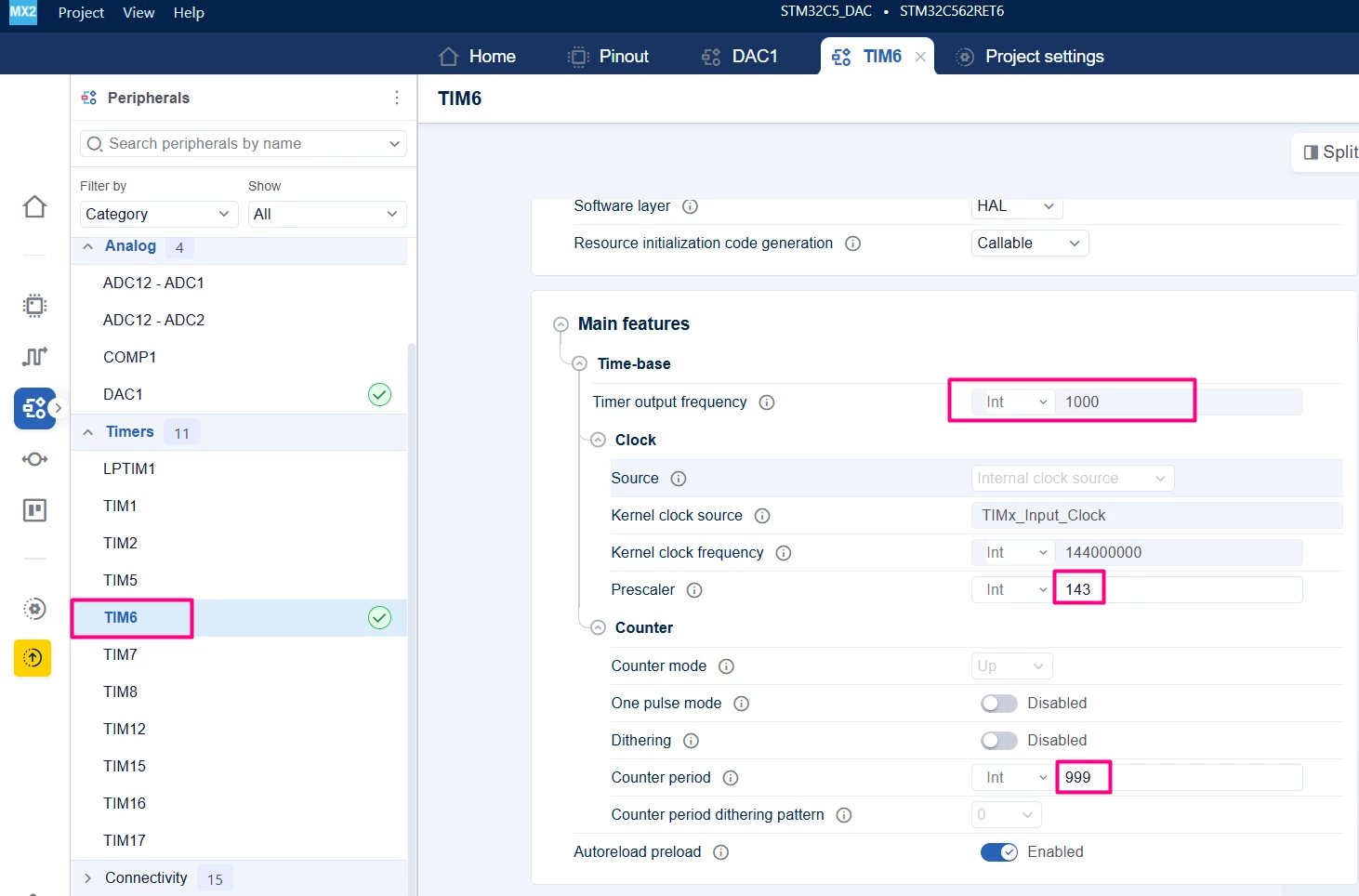
Configure TIM6 to be a 1 KHz frequency with the trigger output based on update.
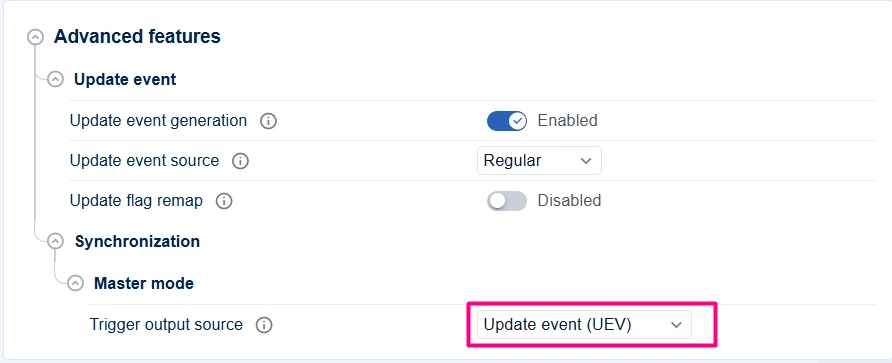
Re-generate the code and make the following changes in main.c
/**
 ******************************************************************************
 * file : main.c
 * brief : Main program body
 * Calls target system initialization then loop in main.
 ******************************************************************************
 *
 * Copyright (c) 2025 STMicroelectronics.
 * All rights reserved.
 *
 * This software is licensed under terms that can be found in the LICENSE file
 * in the root directory of this software component.
 * If no LICENSE file comes with this software, it is provided AS-IS.
 *
 ******************************************************************************
 */
/* Includes ------------------------------------------------------------------*/
#include "main.h"
/* Private typedef -----------------------------------------------------------*/
/* Private define ------------------------------------------------------------*/
#define DAC_MAX_VALUE 4095U // 12-bit DAC max value
#define WAVEFORM_SIZE 32
/* Private macro -------------------------------------------------------------*/
/* Private variables ---------------------------------------------------------*/
hal_dac_handle_t *pDAC;
uint32_t waveform[WAVEFORM_SIZE] = {
 2048, 2447, 2831, 3185, 3495, 3749, 3939, 4056, 4095, 4056, 3939,
 3749, 3495, 3185, 2831, 2447, 2048, 1649, 1265, 911, 601, 347,
 157, 40, 0, 40, 157, 347, 601, 911, 1265, 1649};
/* Private functions prototype -----------------------------------------------*/
void HAL_DAC_ConvCpltCallback(hal_dac_handle_t *hdac,
 hal_dac_channel_t channel) {
 HAL_DAC_StartChannel_DMA(mx_dac1_gethandle(), HAL_DAC_CHANNEL_1, waveform,
 128);
}
/**
 * brief: The application entry point.
 * retval: none but we specify int to comply with C99 standard
 */
int main(void) {
 /** System Init: this code placed in targets folder initializes your system.
 * It calls the initialization (and sets the initial configuration) of the
 * peripherals. You can use STM32CubeMX to generate and call this code or not
 * in this project. It also contains the HAL initialization and the initial
 * clock configuration.
 */
 if (mx_system_init() != SYSTEM_OK) {
 return (-1);
 } else {
 /*
 * You can start your application code here
 */
 // Start DAC channels
 pDAC = mx_dac1_gethandle();
#ifdef POLLING
 HAL_DAC_StartChannel(pDAC, HAL_DAC_CHANNEL_1);
#else
 /* The calibration allows a better output voltage precision */
 HAL_DAC_SetChannelData(pDAC, HAL_DAC_CHANNEL_1, waveform[0]);
 HAL_DAC_CalibrateChannelBuffer(pDAC, HAL_DAC_CHANNEL_1);
HAL_TIM_Start(mx_tim6_gethandle());
 /* Enable the DAC channel */
 HAL_DAC_StartChannel_DMA(pDAC, HAL_DAC_CHANNEL_1, waveform, 128);
#endif
 while (1) {
#ifdef POLLING
 // Set DAC output values
 HAL_DAC_SetChannelData(pDAC, HAL_DAC_CHANNEL_1,
 DAC_MAX_VALUE / 2); // 1.65 V approx.
 HAL_DAC_TrigSWConversionChannel(pDAC, HAL_DAC_CHANNEL_1);
 HAL_Delay(100);
 // Set DAC output values
 HAL_DAC_SetChannelData(pDAC, HAL_DAC_CHANNEL_1,
 DAC_MAX_VALUE / 4); // 1.65 V approx.
 HAL_Delay(100);
#endif
 }
 }
} /* end main */
5.1 Validation
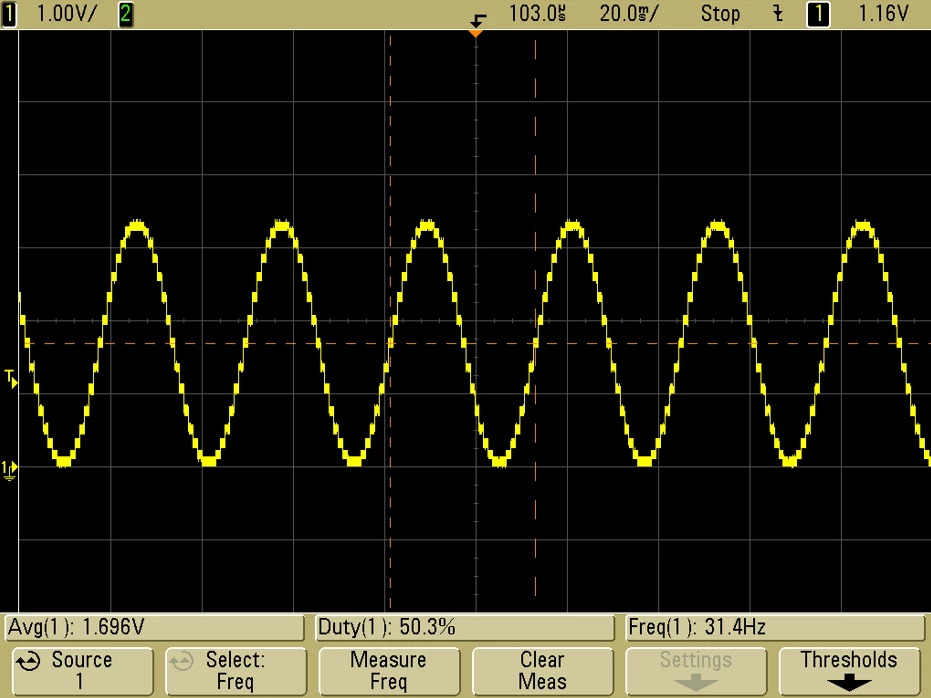
Running the code and connecting the DAC output in a scope or similar, it is possible to observe the wave form being shown, updating based on the TIM6 frequency.
6. Additional notes
- The DAC output voltage depends on the reference voltage (usually 3.3 V) and the digital value set. For 12-bit DAC, output voltage = (DigitalValue / 4095) * Vref.
- Software trigger mode is simple for manual updates; timer or external triggers enable precise waveform timing.
- DMA mode is highly efficient for continuous waveform output without CPU overhead.
- Interrupts can be used to handle underrun or error conditions.
Conclusion
This tutorial guides you through configuring and using the STM32 DAC peripheral with two output channels on the NUCLEO-C562RE board using STM32CubeMX2 and STM32Cube for Visual Studio Code. It covers basic output, interrupt handling, and DMA-driven waveform generation, enabling flexible analog output solutions for embedded applications.
