

How to use ADC with STM32CubeMX2
Summary
This tutorial provides a step-by-step guide to enable and configure the analog-to-digital converter (ADC) peripheral using STM32CubeMX2. The example uses the NUCLEO-C562RE board and demonstrates the acquisition of two ADC channels simultaneously:
- Internal reference voltage channel (VREFINT)
- External analog input channel (for example, ADC1_IN5 corresponding to a specific GPIO pin)
The tutorial covers:
- ADC configuration with multiple channels
- Polling mode conversion
- Interrupt-driven conversion
- DMA-based continuous conversion
- Summary
- Introduction
- Prerequisites
- 1. STM32CubeMX2 project creation and basic setup
- 1.1 Project creation
- 1.2 Pinout and configuration
- 1.3 Optional configuration for printf
- 1.4 Code generation
- 2. Configuring the project in Visual Studio Code
- 3. Code editing
- 3.1 ADC Polling mode conversion
- 3.1.1 Validation
- 3.2 ADC interrupt-driven conversion
- 3.2.1 STM32CubeMX2 editing
- 3.2.2 Code editing
- 3.2.3 Validation
- 3.3 ADC DMA-based continuous conversion
- 3.3.1 STM32CubeMX2 editing
- 3.3.2 Code editing
- 3.3.3 Validation
- 3.3.4 Additional notes
- Conclusion
- Related links
Introduction
The ADC peripheral in STM32 microcontrollers converts analog signals to digital values. It supports multiple channels, including internal channels such as VREFINT (internal reference voltage), temperature sensor, and battery voltage.
Using multiple channels in scan mode allows sequential sampling of several inputs. This tutorial shows how to configure and use two channels: one internal (VREFINT) and one external, to read analog values efficiently with STM32CubeMX2 and STM32Cube for Visual Studio Code.
Prerequisites
Ensure that you have installed:
- STM32CubeMX2
- The latest STM32C5 HAL2 driver
- STM32CubeIDE extension for Visual Studio Code
The hardware used in this tutorial is the NUCLEO-C562RE board.
1. STM32CubeMX2 project creation and basic setup
Follow these steps to create an application project for the NUCLEO-C562RE board. This exercise creates a simple USART application.
1.1 Project creation
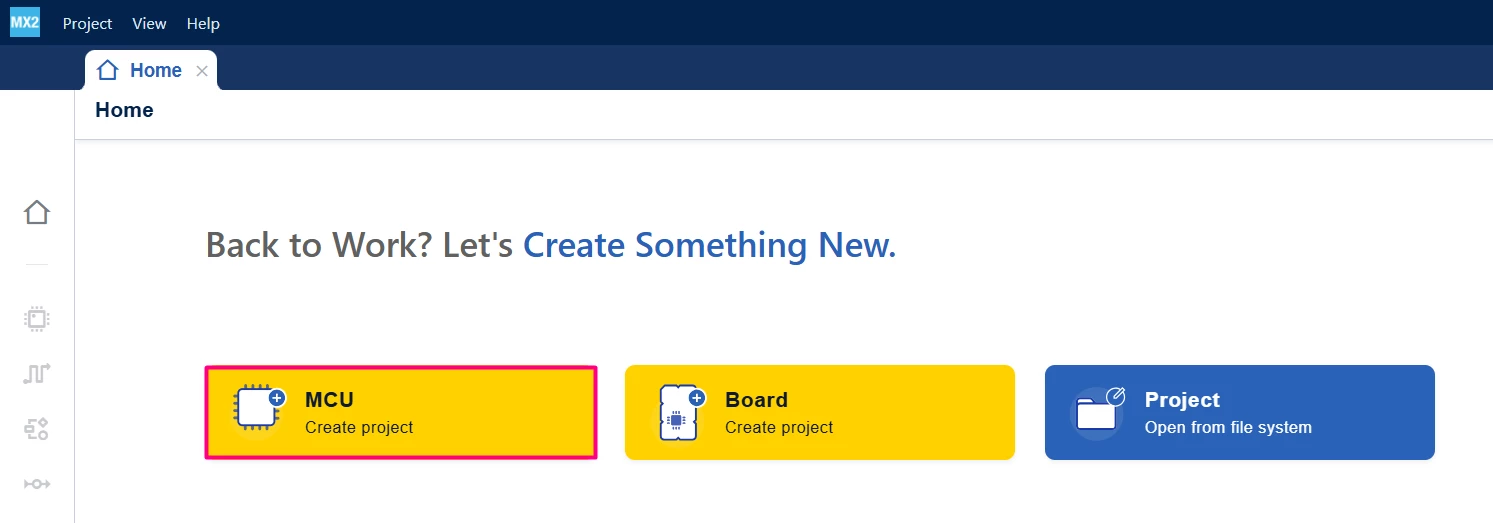
Open STM32CubeMX2. On the Home page, click the [MCU square] to create a new project.
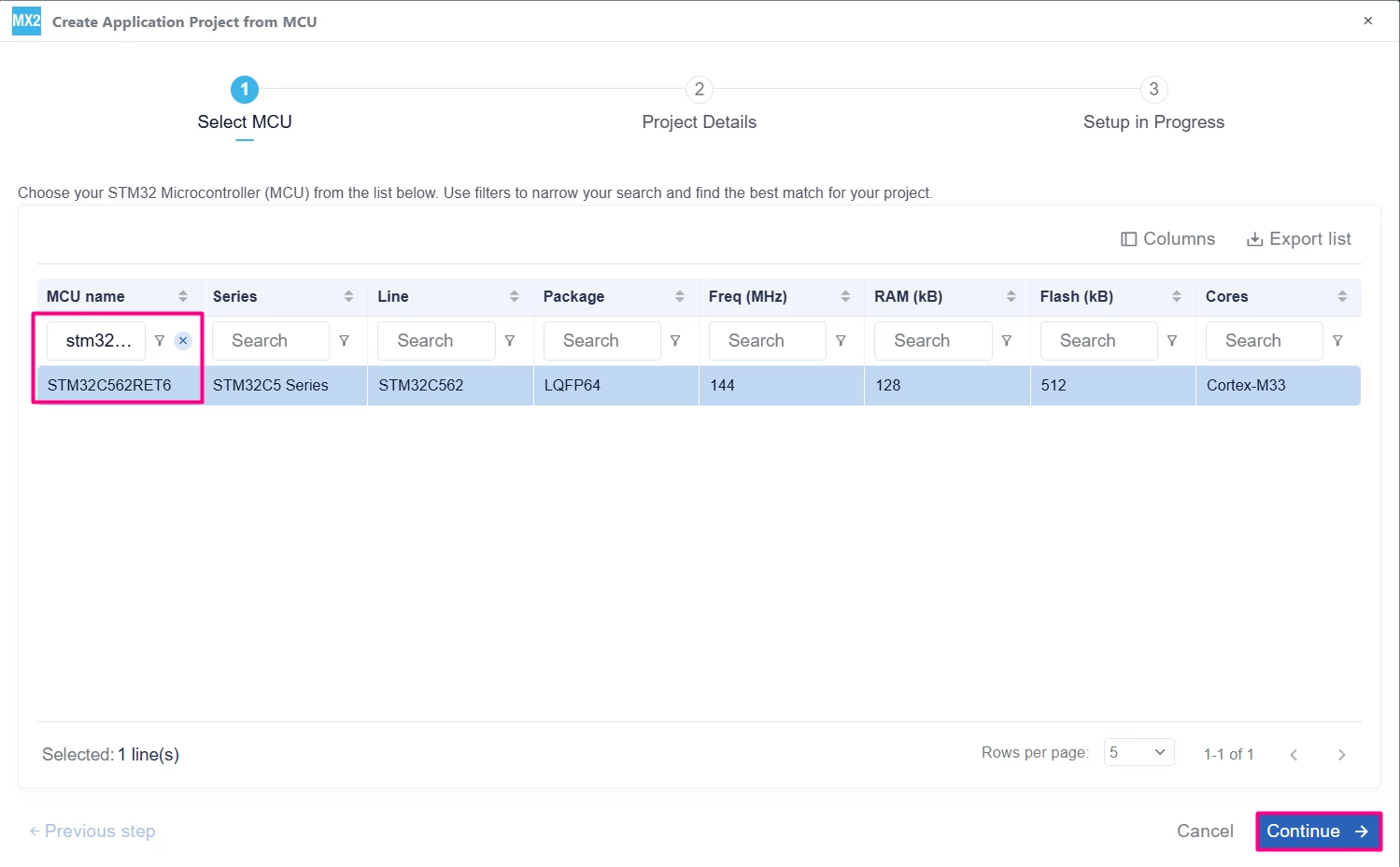
In the search field under MCU name, enter STM32C562RE and select your board. Click [Continue].
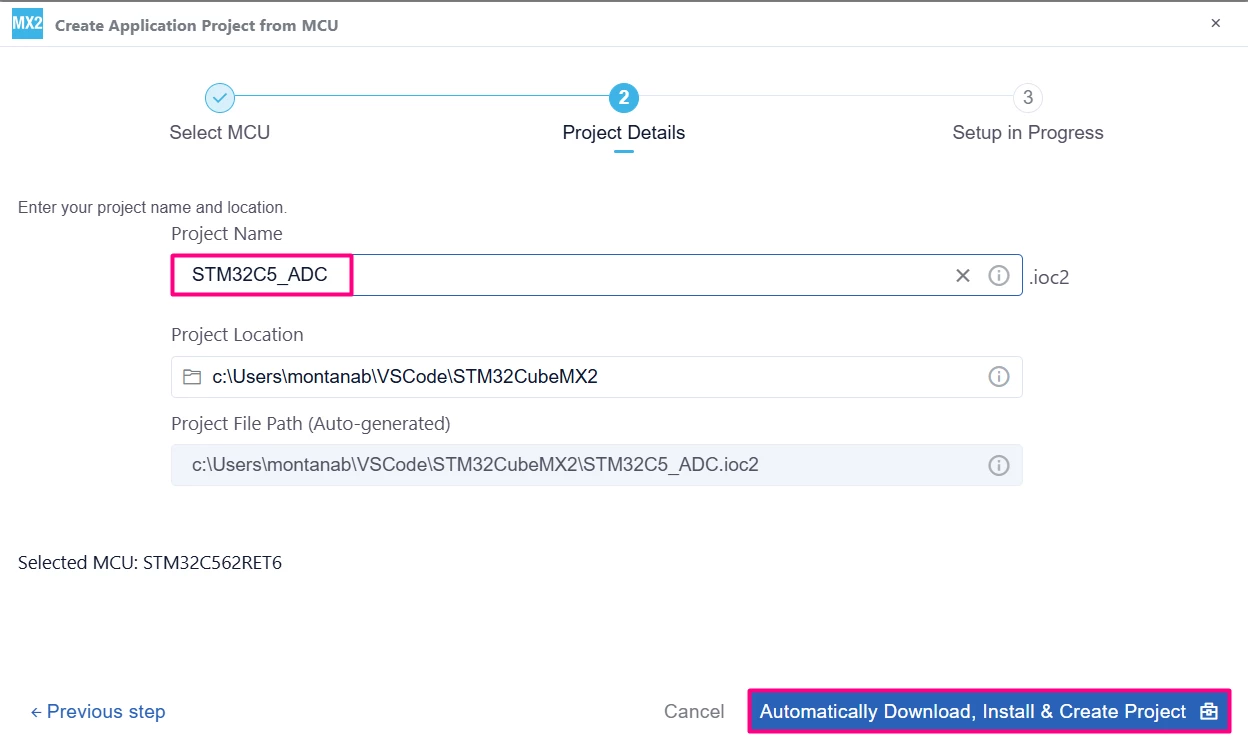
Enter your project name and location. Click [Automatically Download, Install & Create Project] to finish project creation.
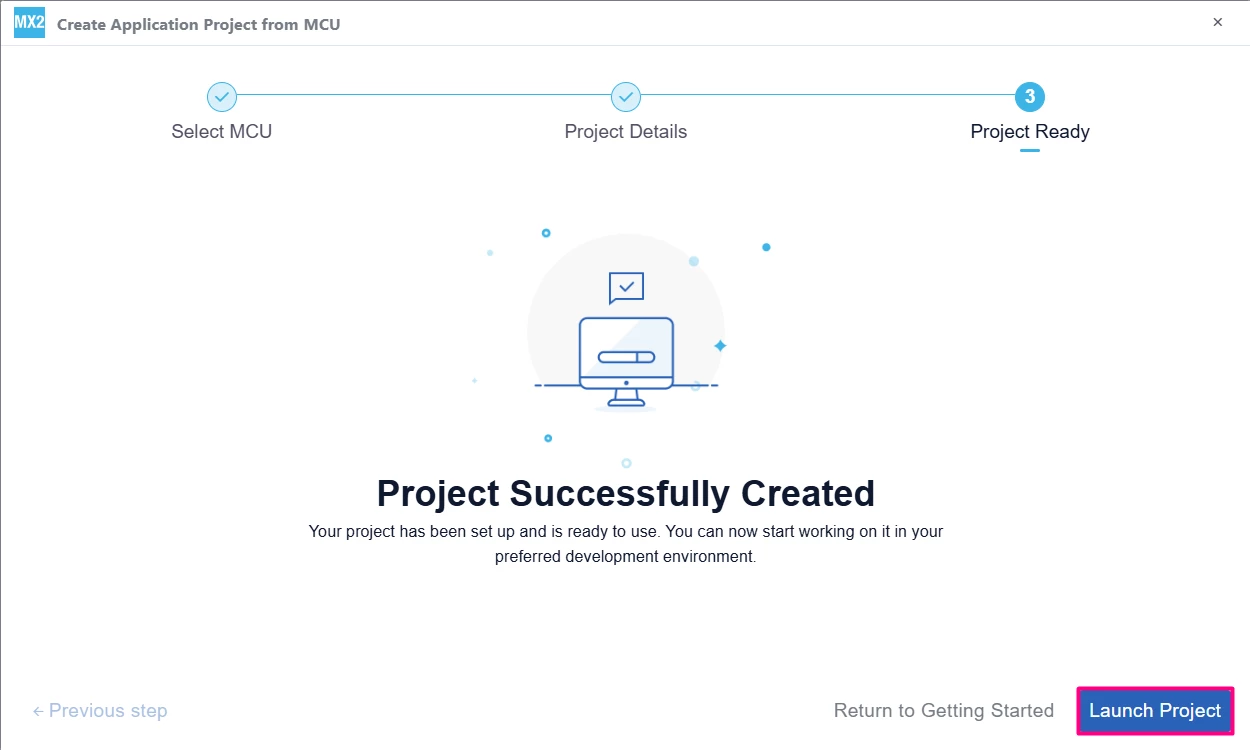
Select [Launch Project] to start.
1.2 Pinout and configuration
The ADC can be configured in several different modes, but for simplicity, two channels are used to showcase the typical application. A continuous conversion, scanning the channels.
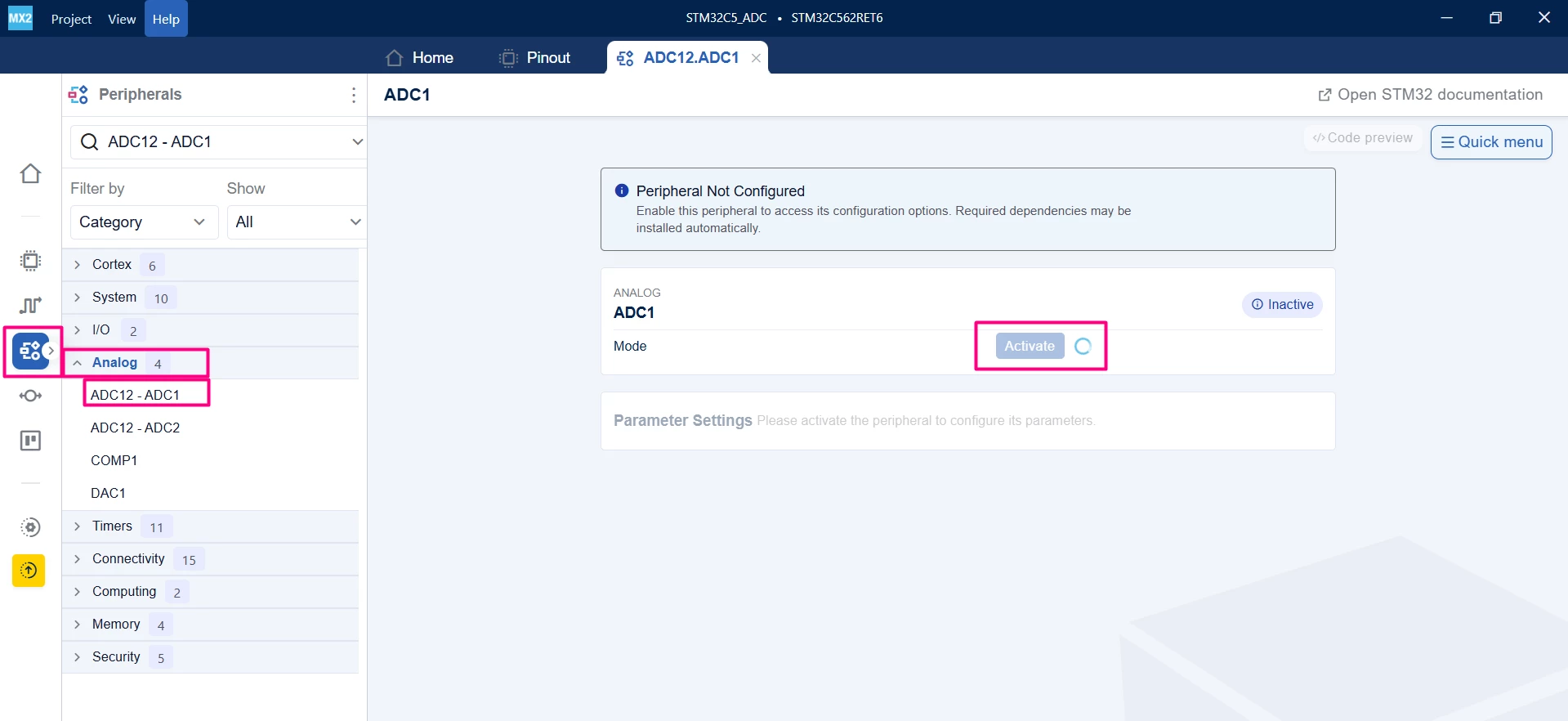
Go to Peripherals → Analog → ADC1 and enable ADC1.
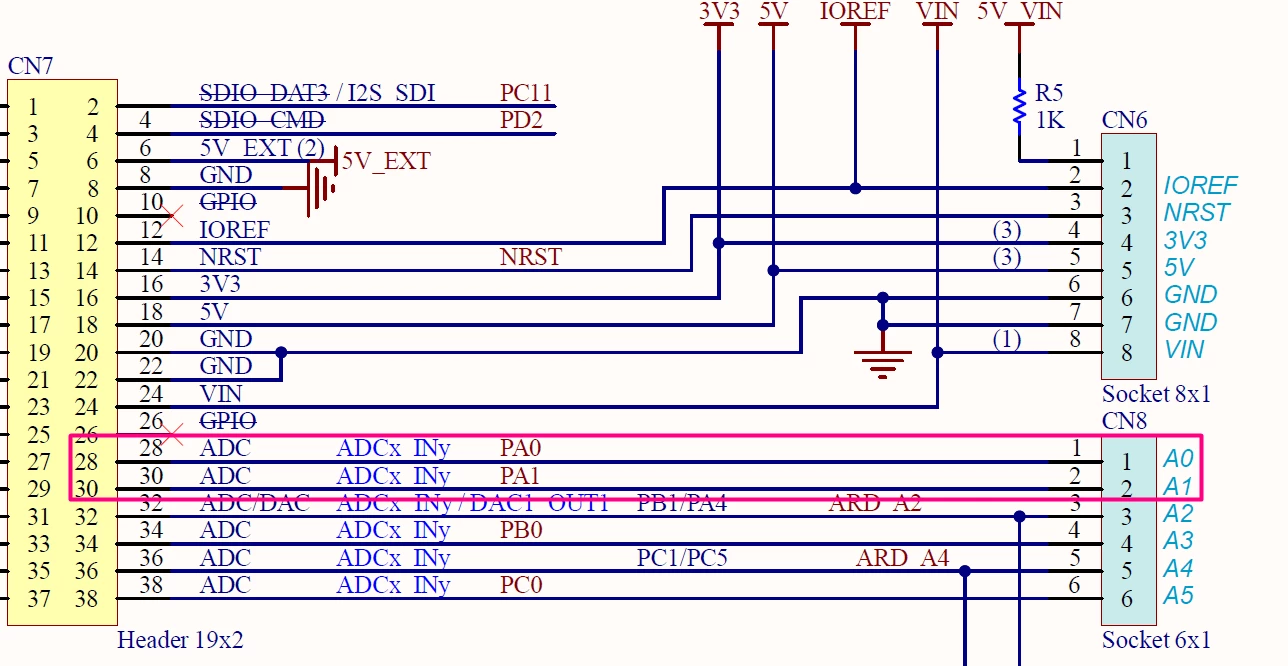
Enable Channel 1 and Channel 2, those will be allocated at PA0 and PA1, readily available at CN7 and CN8.
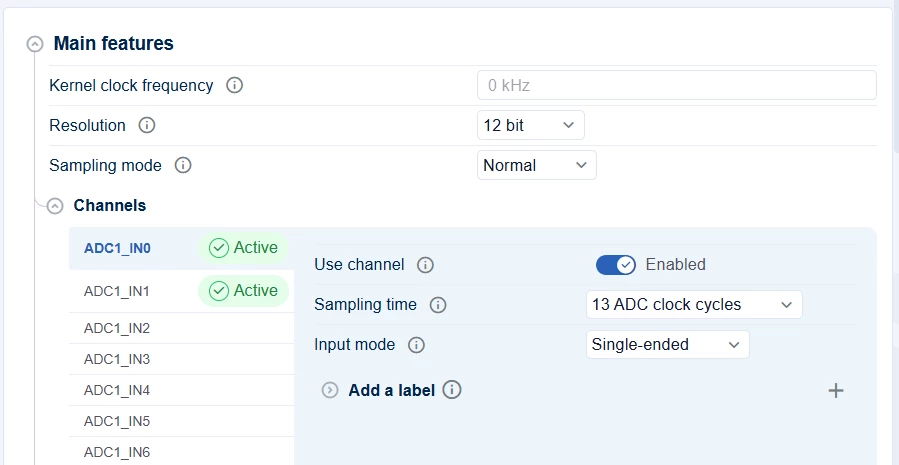
Configure the channels to have the desired sampling rate and to work as single-ended.
In ADC group configuration, select the Continuous Mode, sequencer with 2 ranks, so we can assign each channel an order and then, set the index order.
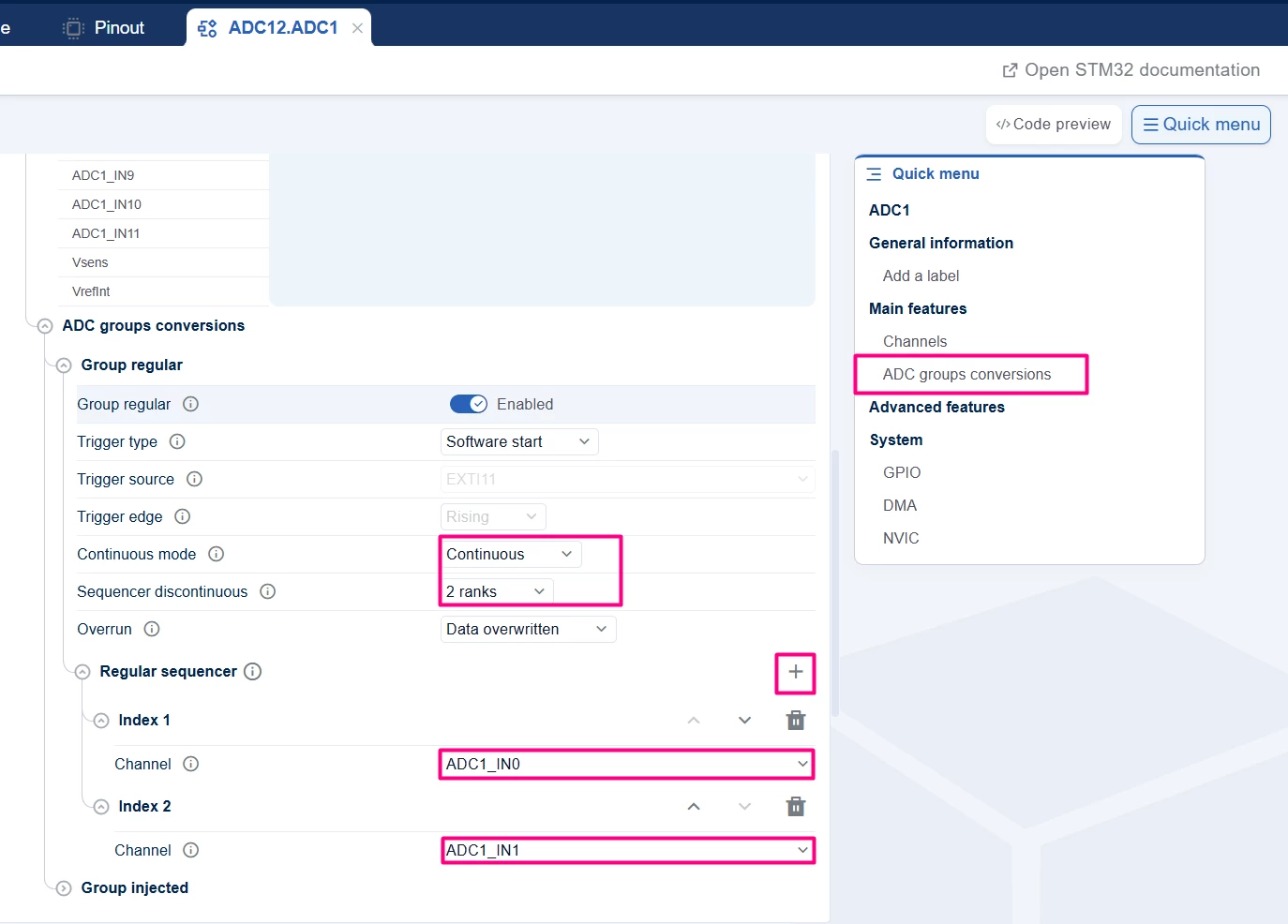
Optionally, in this same area, one can enable the NVIC as well as the DMA, but for now, we focus on the polling method.
1.3 Optional configuration for printf
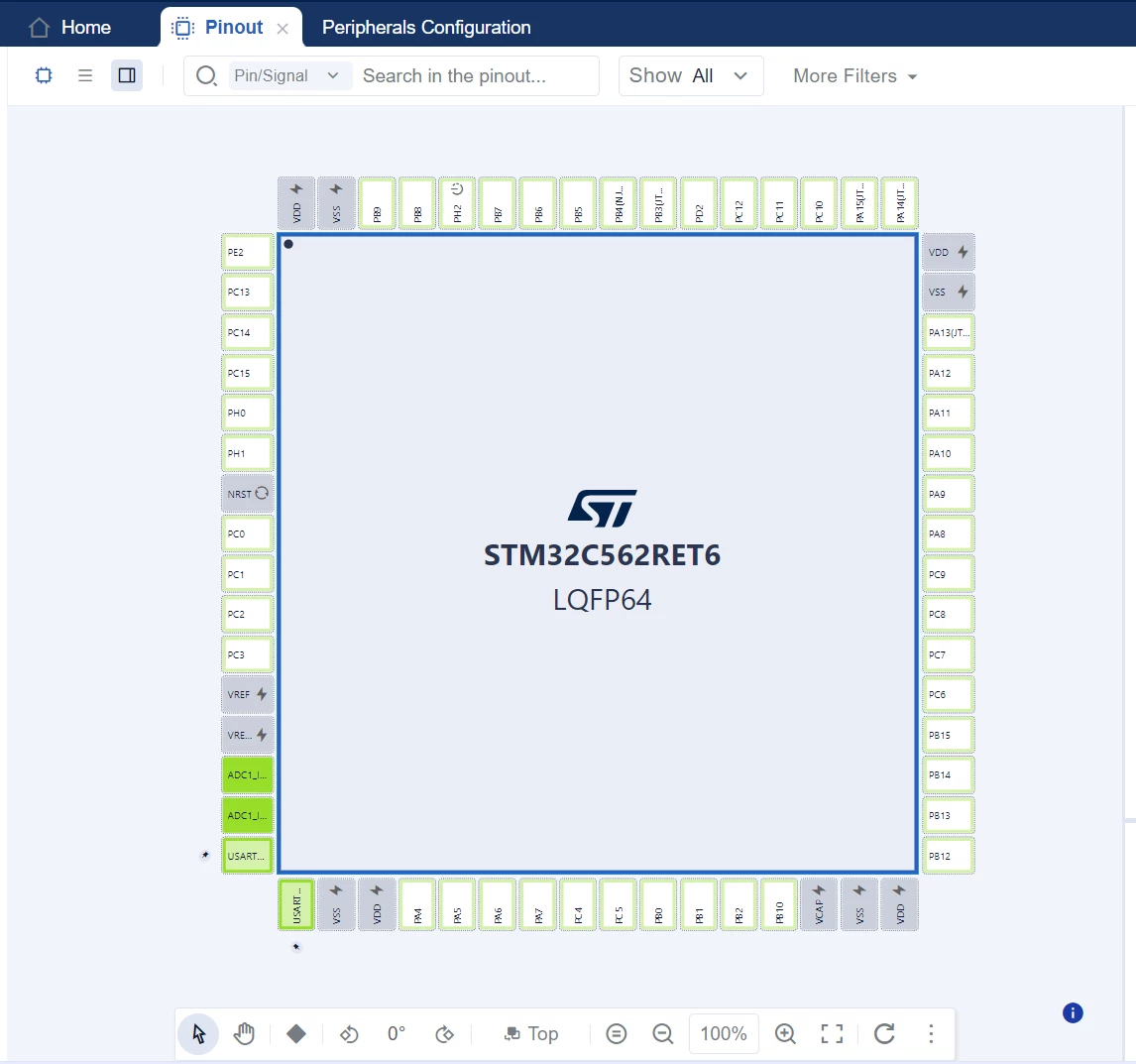
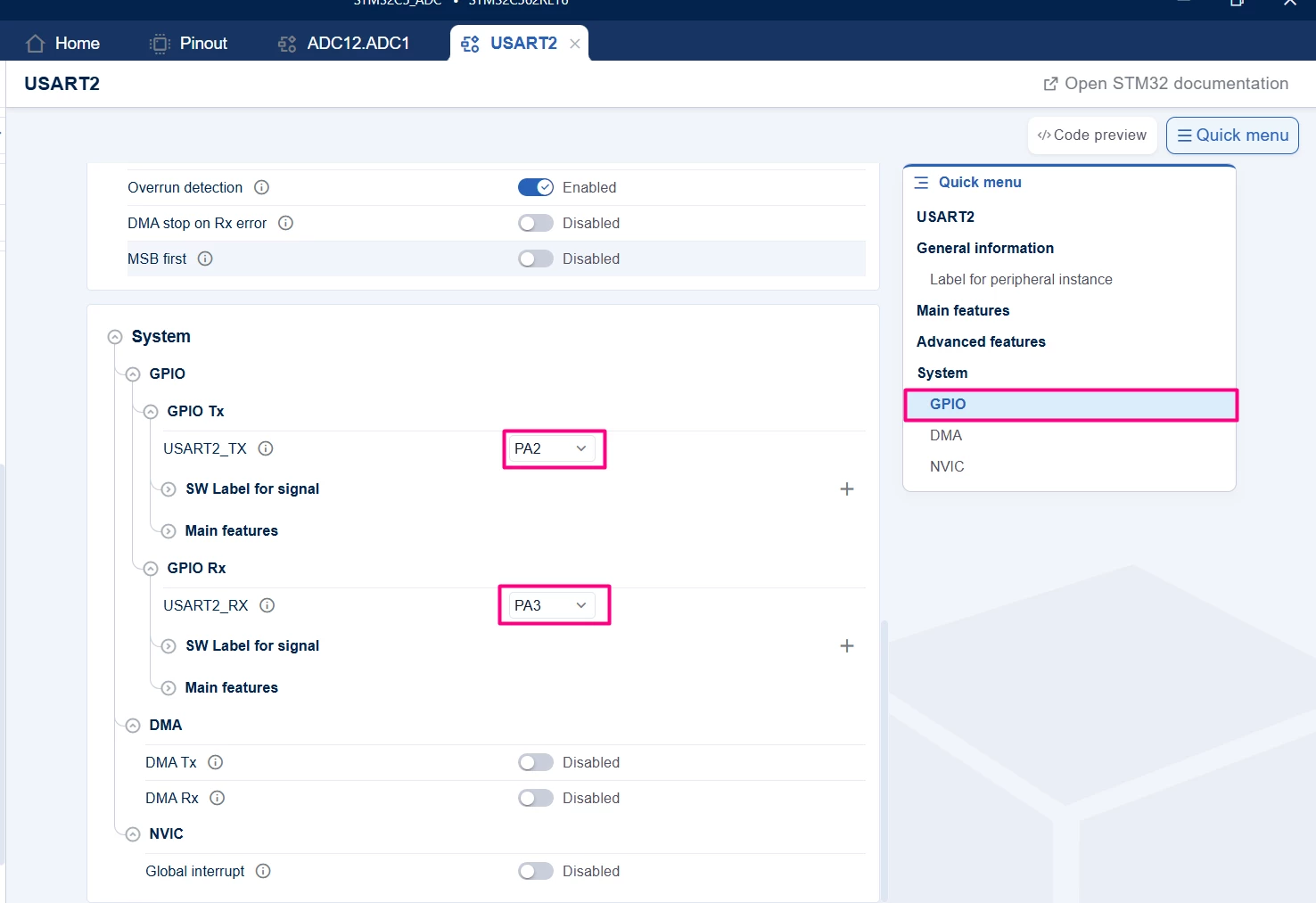
In the "Pinout" tab, it’s possible to double check the two pins allocated for the ADC as well as configure the PA2 and PA3 for UART2, to allow printf.
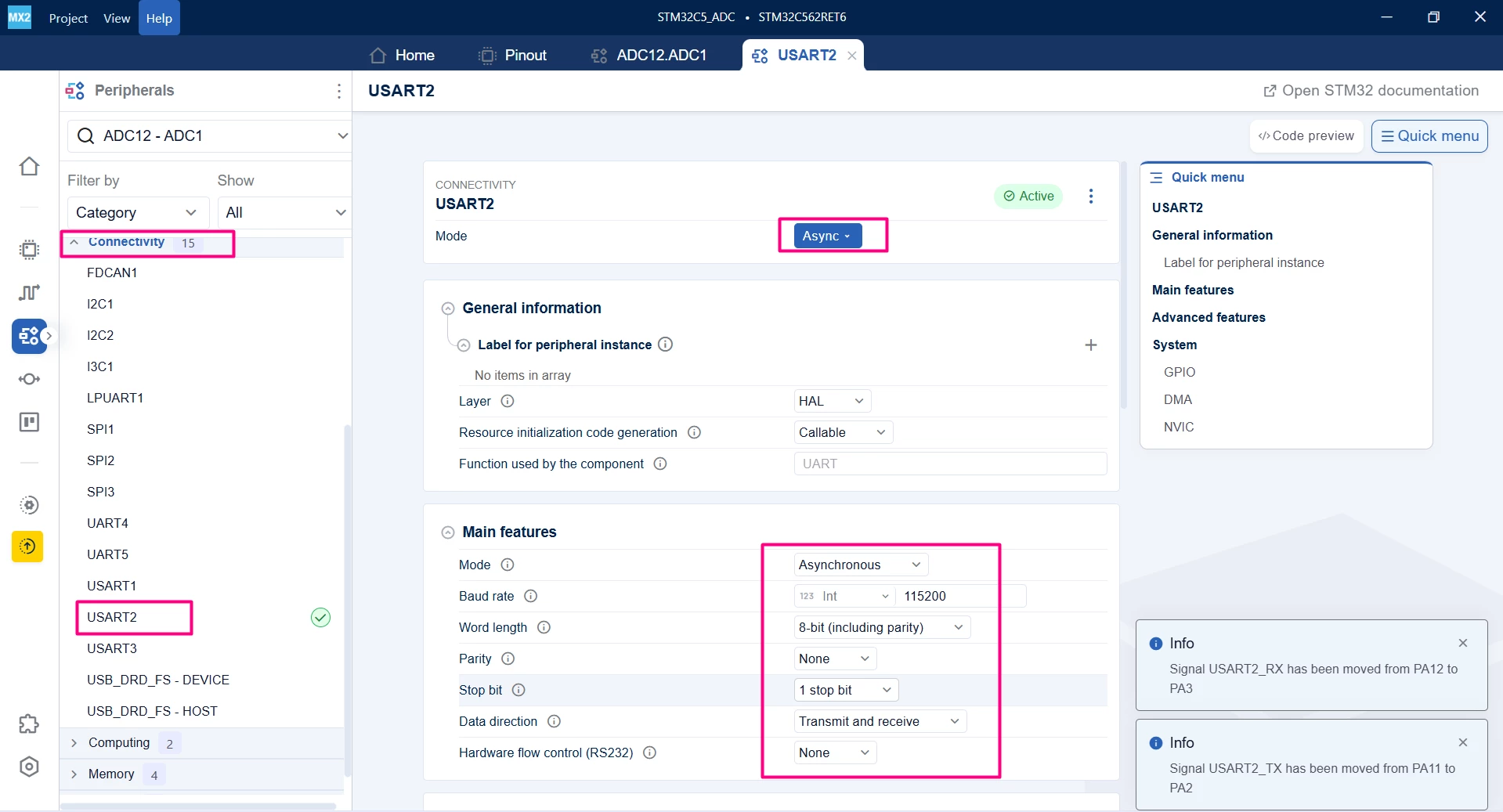
Configure the UART2.
1.4 Code generation
To generate the code:
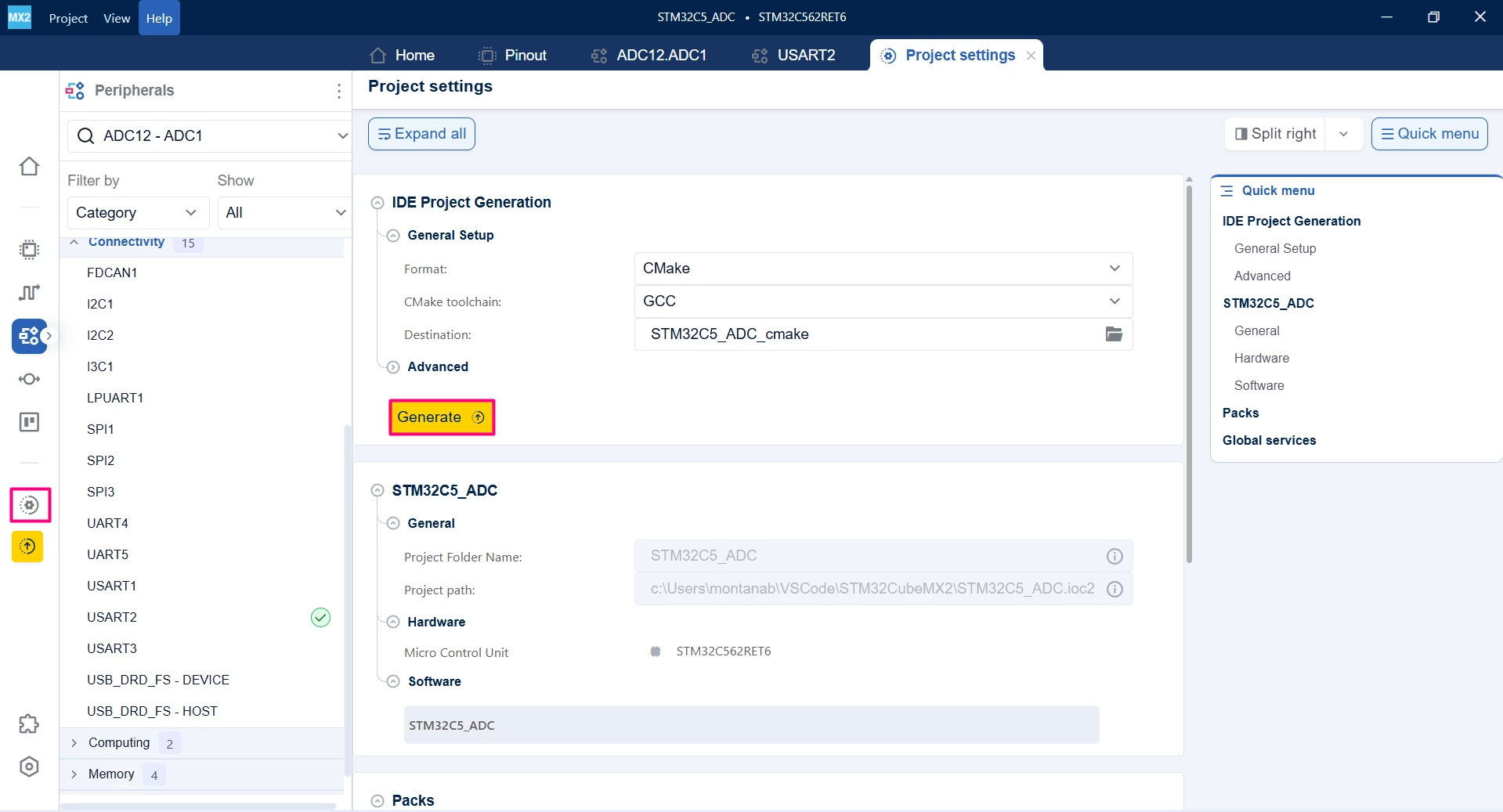
- Click on the [Project settings] icon and select the desired IDE.
- Click the [Generate] button.
2. Configuring the project in Visual Studio Code
Open Visual Studio Code and open the project folder.
If prompted, select the configuration. If not prompted, press Ctrl+Shift+P, type CMake: Select Configure Preset, and choose the debug configuration.

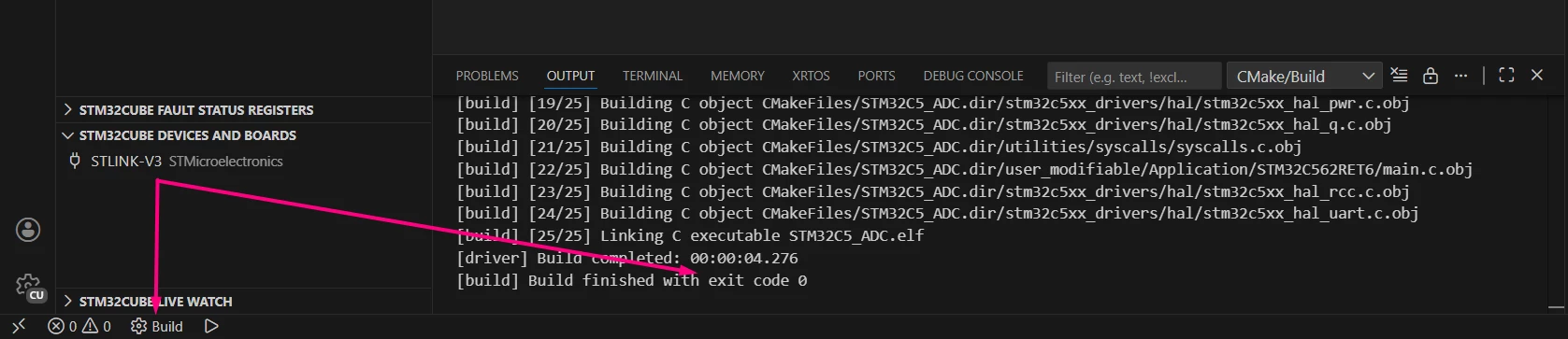
Build the project to ensure everything is set, then proceed to code implementation.
3. Code editing
3.1 ADC Polling mode conversion
This example reads two ADC channels sequentially using polling.
In main.c:
/**
 ******************************************************************************
 * file : main.c
 * brief : Main program body
 * Calls target system initialization then loop in main.
 ******************************************************************************
 *
 * Copyright (c) 2025 STMicroelectronics.
 * All rights reserved.
 *
 * This software is licensed under terms that can be found in the LICENSE file
 * in the root directory of this software component.
 * If no LICENSE file comes with this software, it is provided AS-IS.
 *
 ******************************************************************************
 */
/* Includes ------------------------------------------------------------------*/
#include "main.h"
#include <stdio.h>
/* Private typedef -----------------------------------------------------------*/
/* Private define ------------------------------------------------------------*/
#define ADC_TIMEOUT 1000U
#define ADC_CHANNEL_COUNT 2

/* Private macro -------------------------------------------------------------*/
/* Private variables ---------------------------------------------------------*/
int32_t adcValues[ADC_CHANNEL_COUNT] = {0};
/* Private functions prototype -----------------------------------------------*/
int __io_putchar(int ch) {
 HAL_UART_Transmit(mx_usart2_uart_gethandle(), (uint8_t *)&ch, 1, 100);
 return ch;
}

/**
 * brief: The application entry point.
 * retval: none but we specify int to comply with C99 standard
 */
int main(void) {
 /** System Init: this code placed in targets folder initializes your system.
 * It calls the initialization (and sets the initial configuration) of the
 * peripherals. You can use STM32CubeMX to generate and call this code or not
 * in this project. It also contains the HAL initialization and the initial
 * clock configuration.
 */
 if (mx_system_init() != SYSTEM_OK) {
 return (-1);
 } else {
 /*
 * You can start your application code here
 */
 printf("ADC Polling Mode with 2 Channels Example\r\n");
 HAL_ADC_Start(mx_adc1_gethandle());
 HAL_ADC_Calibrate(mx_adc1_gethandle());
 while (1) {
 for (int i = 0; i < ADC_CHANNEL_COUNT; i++) {
 // Configure ADC channel rank dynamically if needed
 // Or rely on scan mode configuration in CubeMX

 if (HAL_ADC_REG_StartConv(mx_adc1_gethandle()) == HAL_OK) {
 if (HAL_ADC_REG_PollForConv(mx_adc1_gethandle(), ADC_TIMEOUT) ==
 HAL_OK) {
 adcValues[i] = HAL_ADC_REG_ReadConversionData(mx_adc1_gethandle());
 }
 // if the conversion had a different trigger, it might be interesting
 // to stop the regular conversion
 // HAL_ADC_REG_StopConv(mx_adc1_hal_gethandle());
 }
 }
 printf("Channel 0: %lu, Channel 1: %lu\r\n", adcValues[0], adcValues[1]);
 HAL_Delay(1000);
 }
 }
} /* end main */
3.1.1 Validation
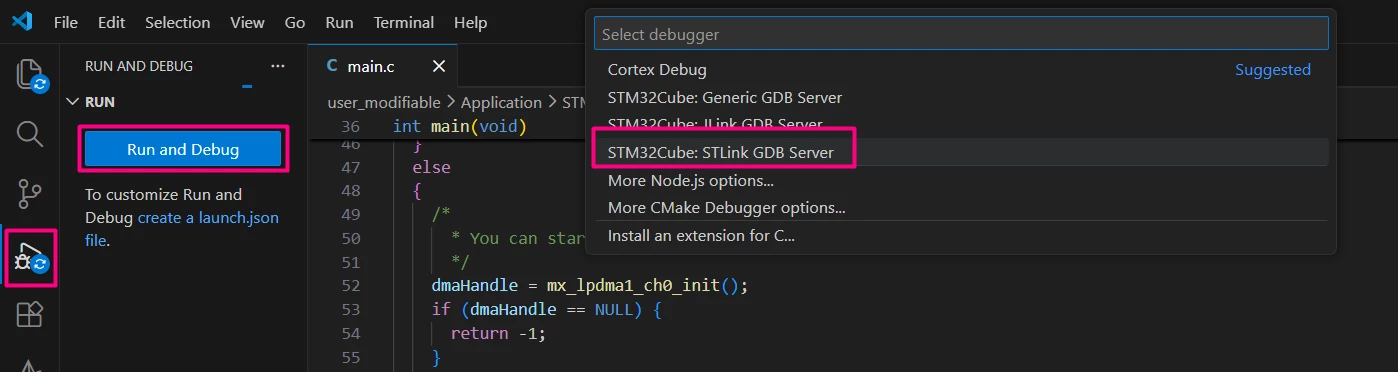
After building the application, select the [Run and Debug] icon. Create a debug session by selecting the STLINK GDB Server option.
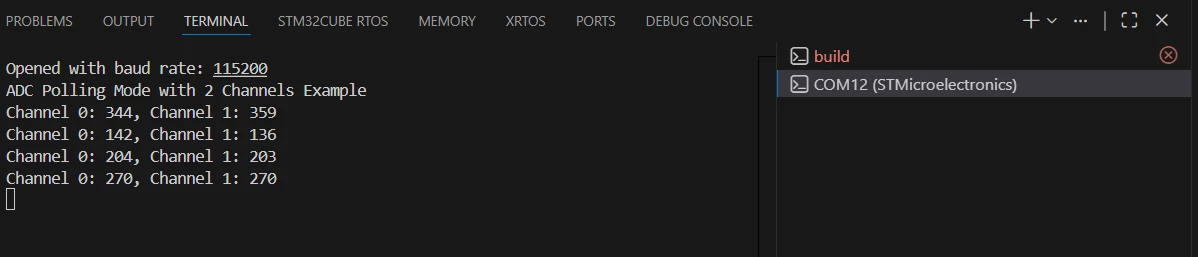
Press Ctrl+Shift+P and type [Open Serial] > COMXY (STMicroelectronics) > 115200.
PA0 and PA1 floating:
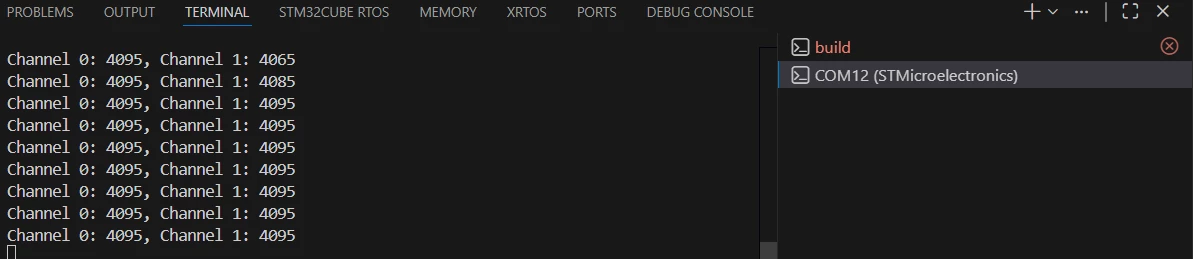
It might be simpler to ensure that you have the proper data by connecting the PA0 and PA1 to a known voltage, such as GND or 3v3, available on the nearby connector. In this case, both were tied to the board’s 3v3
3.2 ADC interrupt-driven conversion
This example uses an ADC conversion complete interrupt to read two channels in single mode. The interrupt is generated upon completion of each channel and the ADC is stopped until the software triggers a new start.
3.2.1 STM32CubeMX2 editing
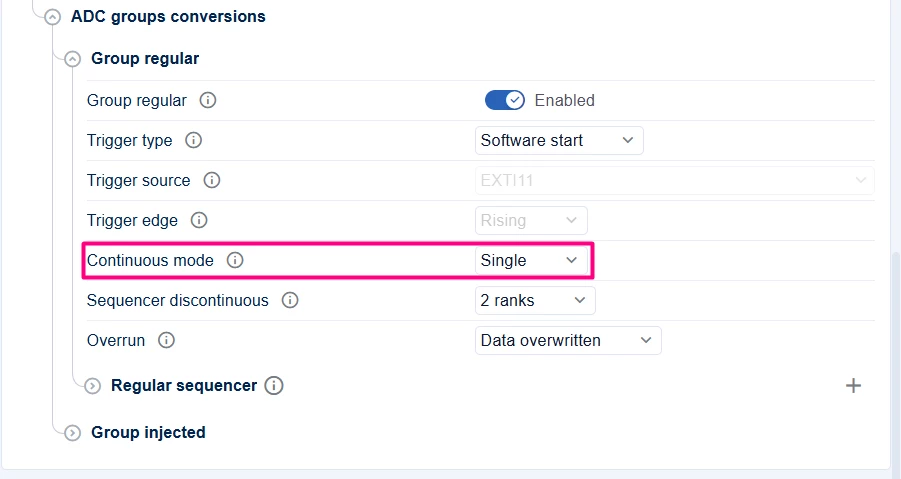
In the ADC tab, change the ADC settings from "Continuous" to "Single".
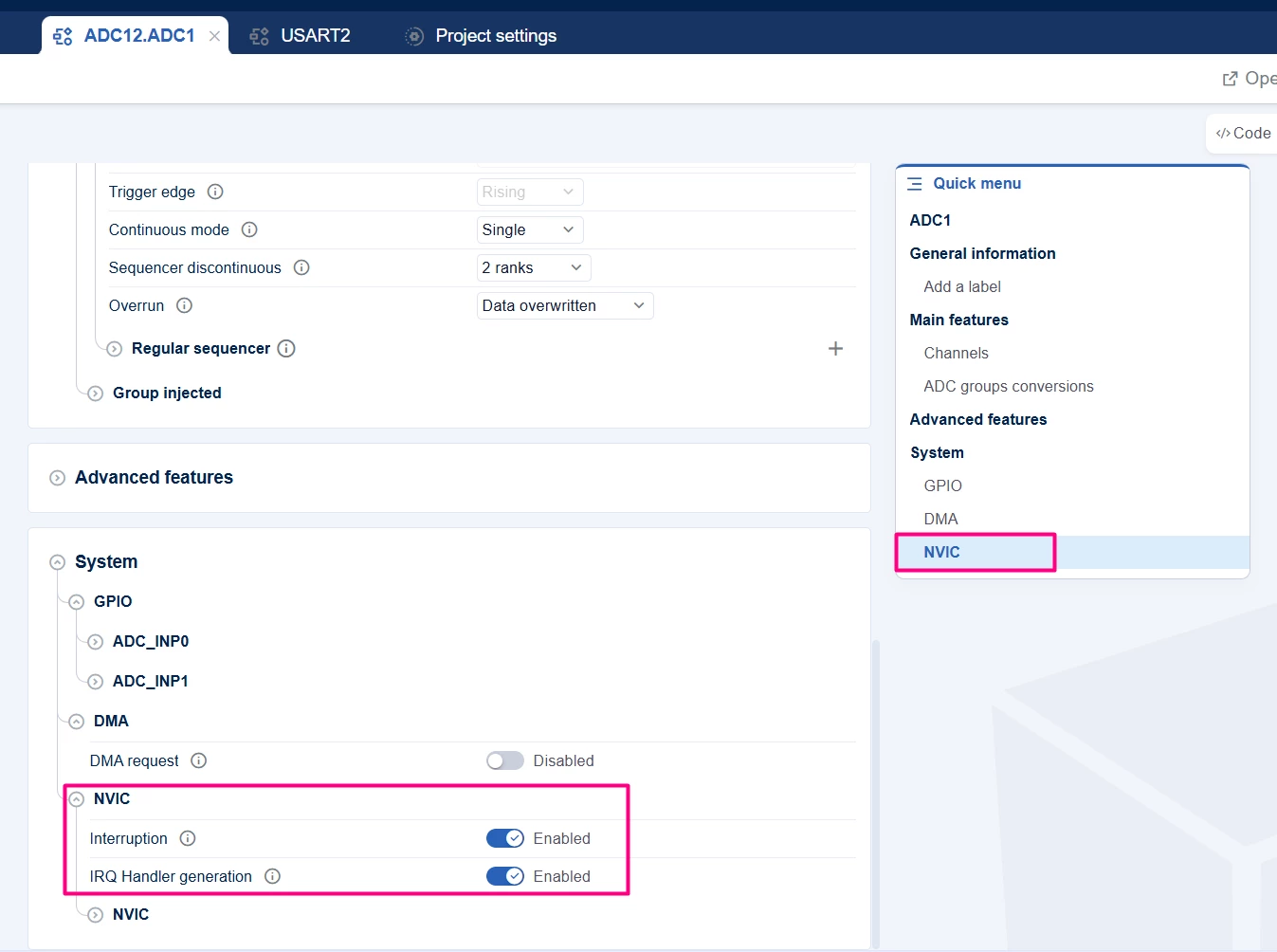
And using the Quick menu to navigate, click in the NVIC and enable it.
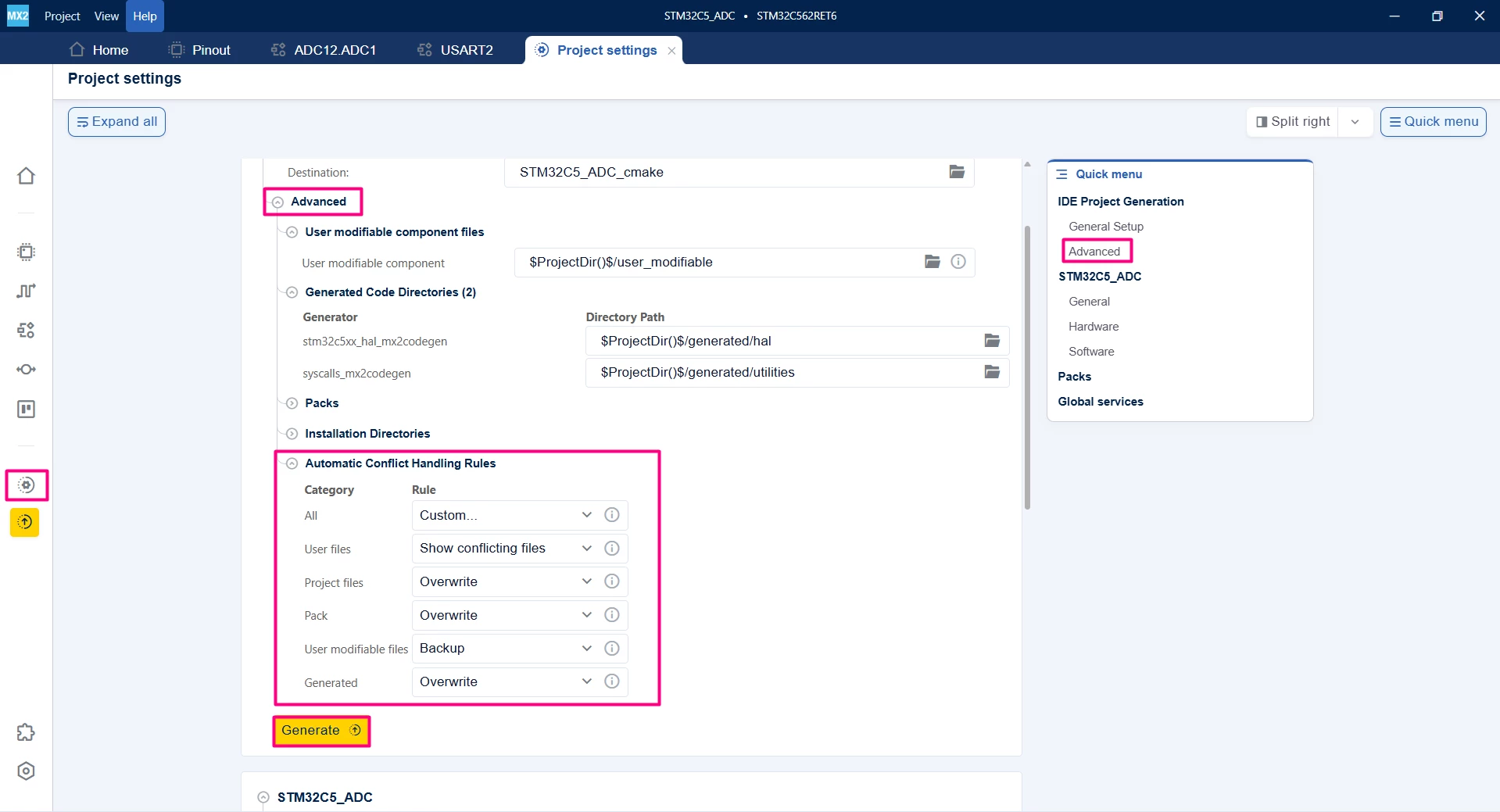
Generate the code. To either keep or backup the previous user files and other aspects of the project, use the "Advanced setup" to customize according to your needs.
3.2.2 Code editing
main.c file
/**
 ******************************************************************************
 * file : main.c
 * brief : Main program body
 * Calls target system initialization then loop in main.
 ******************************************************************************
 *
 * Copyright (c) 2025 STMicroelectronics.
 * All rights reserved.
 *
 * This software is licensed under terms that can be found in the LICENSE file
 * in the root directory of this software component.
 * If no LICENSE file comes with this software, it is provided AS-IS.
 *
 ******************************************************************************
 */
/* Includes ------------------------------------------------------------------*/
#include "main.h"
#include <stdint.h>
#include <stdio.h>
/* Private typedef -----------------------------------------------------------*/
/* Private define ------------------------------------------------------------*/
#define ADC_TIMEOUT 1000U
#define ADC_CHANNEL_COUNT 2
#define USE_IT
/* Private macro -------------------------------------------------------------*/
/* Private variables ---------------------------------------------------------*/
uint32_t adcValues[ADC_CHANNEL_COUNT] = {0};
volatile uint8_t adcConvComplete = 0;
/* Private functions prototype -----------------------------------------------*/
int __io_putchar(int ch) {
 HAL_UART_Transmit(mx_usart2_uart_gethandle(), (uint8_t *)&ch, 1, 100);
 return ch;
}
#ifdef USE_IT
void HAL_ADC_REG_UnitaryConvCpltCallback(hal_adc_handle_t *hadc){
 static uint8_t i = 0;
 // Read all converted values from ADC data register or DMA buffer
 adcValues[i] = HAL_ADC_REG_ReadConversionData(mx_adc1_gethandle());
 if(i++ >= ADC_CHANNEL_COUNT )
 {
 i = 0;
 adcConvComplete = 1;
 }
 else {
 HAL_ADC_REG_StartConv_IT(mx_adc1_gethandle());
 }
}
#endif
/**
 * brief: The application entry point.
 * retval: none but we specify int to comply with C99 standard
 */
int main(void) {
 /** System Init: this code placed in targets folder initializes your system.
 * It calls the initialization (and sets the initial configuration) of the
 * peripherals. You can use STM32CubeMX to generate and call this code or not
 * in this project. It also contains the HAL initialization and the initial
 * clock configuration.
 */
 if (mx_system_init() != SYSTEM_OK) {
 return (-1);
 } else {
 /*
 * You can start your application code here
 */
#ifdef USE_POLLING
 printf("ADC Polling Mode with 2 Channels Example\r\n");
#else
 printf("ADC Interrupt Mode with 2 Channels Example\r\n");
#endif
 HAL_ADC_Start(mx_adc1_gethandle());
 HAL_ADC_Calibrate(mx_adc1_gethandle());
#ifdef USE_IT
 HAL_ADC_REG_StartConv_IT(mx_adc1_gethandle());
#endif
 while (1) {
#ifdef USE_IT
 if (adcConvComplete) {
 adcConvComplete = 0;
 printf("Channel 5 (External): %lu, VREFINT: %lu\r\n", adcValues[0],
 adcValues[1]);
 HAL_Delay(1000);
 HAL_ADC_REG_StartConv_IT(mx_adc1_gethandle());
 }
#endif
#ifdef USE_POLLING
 for (int i = 0; i < ADC_CHANNEL_COUNT; i++) {
 // Configure ADC channel rank dynamically if needed
 // Or rely on scan mode configuration in CubeMX

 if (HAL_ADC_REG_StartConv(mx_adc1_gethandle()) == HAL_OK) {
 if (HAL_ADC_REG_PollForConv(mx_adc1_gethandle(), ADC_TIMEOUT) ==
 HAL_OK) {
 adcValues[i] = HAL_ADC_REG_ReadConversionData(mx_adc1_gethandle());
 }
 // if the conversion had a different trigger, it might be interesting
 // to stop the regular conversion
 // HAL_ADC_REG_StopConv(mx_adc1_hal_gethandle());
 }
 }

 printf("Channel 0: %lu, Channel 1: %lu\r\n", adcValues[0], adcValues[1]);
 HAL_Delay(1000);
#endif
 }
 }
} /* end main */
3.2.3 Validation
Enter in debug mode and monitor the change. A breakpoint can be added in the callback.

3.3 ADC DMA-based continuous conversion
DMA mode allows continuous ADC conversion with results stored in a buffer without CPU intervention.
3.3.1 STM32CubeMX2 editing
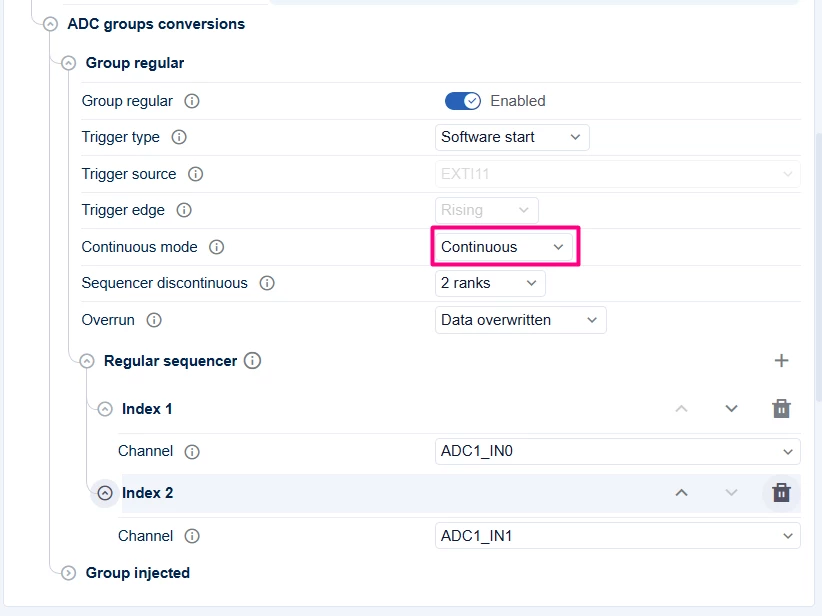
In the ADC tab, change the ADC settings back to [Continuous] and Enable the DMA in Circular transfer mode.
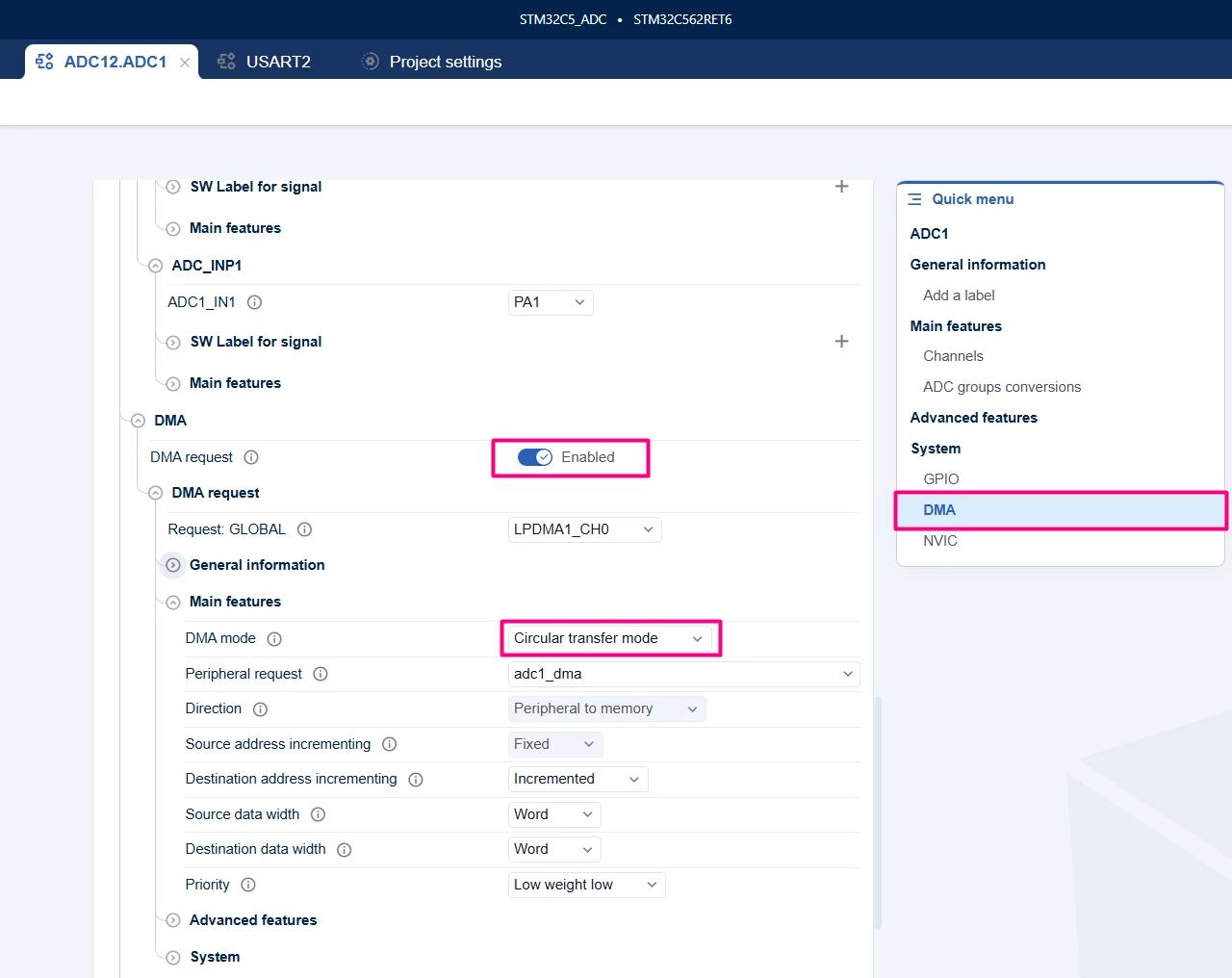
Generate the code. To either keep or backup the previous user files and other aspects of the project, use the Advanced setup to customize your needs.
3.3.2 Code editing
main.c file.
/**
 ******************************************************************************
 * file : main.c
 * brief : Main program body
 * Calls target system initialization then loop in main.
 ******************************************************************************
 *
 * Copyright (c) 2025 STMicroelectronics.
 * All rights reserved.
 *
 * This software is licensed under terms that can be found in the LICENSE file
 * in the root directory of this software component.
 * If no LICENSE file comes with this software, it is provided AS-IS.
 *
 ******************************************************************************
 */
/* Includes ------------------------------------------------------------------*/
#include "main.h"
#include "stm32c5xx_hal_adc.h"
#include <stdint.h>
#include <stdio.h>
/* Private typedef -----------------------------------------------------------*/
/* Private define ------------------------------------------------------------*/
#define ADC_TIMEOUT 1000U
#define ADC_CHANNEL_COUNT 2
//#define USE_IT 1
#define USE_DMA 1
/* Private macro -------------------------------------------------------------*/
/* Private variables ---------------------------------------------------------*/
uint32_t adcValues[ADC_CHANNEL_COUNT] = {0};
volatile uint8_t adcConvComplete = 0;
/* Private functions prototype -----------------------------------------------*/
int __io_putchar(int ch) {
 HAL_UART_Transmit(mx_usart2_uart_gethandle(), (uint8_t *)&ch, 1, 100);
 return ch;
}
#ifdef USE_IT
void HAL_ADC_REG_UnitaryConvCpltCallback(hal_adc_handle_t *hadc) {
 static uint8_t i = 0;
 // Read all converted values from ADC data register or DMA buffer
 adcValues[i] = HAL_ADC_REG_ReadConversionData(mx_adc1_gethandle());
 if (i++ >= ADC_CHANNEL_COUNT) {
 i = 0;
 adcConvComplete = 1;
 } else {
 HAL_ADC_REG_StartConv_IT(mx_adc1_gethandle());
 }
}
#endif
#ifdef USE_DMA
void HAL_ADC_REG_DataTransferCpltCallback(hal_adc_handle_t *hadc) {
 // DMA transfer complete - adcValues buffer updated
 adcConvComplete = 1;
}
#endif
/**
 * brief: The application entry point.
 * retval: none but we specify int to comply with C99 standard
 */
int main(void) {
 /** System Init: this code placed in targets folder initializes your system.
 * It calls the initialization (and sets the initial configuration) of the
 * peripherals. You can use STM32CubeMX to generate and call this code or not
 * in this project. It also contains the HAL initialization and the initial
 * clock configuration.
 */
 if (mx_system_init() != SYSTEM_OK) {
 return (-1);
 } else {
 /*
 * You can start your application code here
 */
#ifdef USE_POLLING
 printf("ADC Polling Mode with 2 Channels Example\r\n");
#elif USE_IT
 printf("ADC Interrupt Mode with 2 Channels Example\r\n");
#else
 printf("ADC DMA Mode with 2 Channels Example\r\n");
#endif
 HAL_ADC_Start(mx_adc1_gethandle());
 HAL_ADC_Calibrate(mx_adc1_gethandle());
#ifdef USE_IT
 HAL_ADC_REG_StartConv_IT(mx_adc1_gethandle());
#elif USE_DMA
 HAL_ADC_REG_StartConv_DMA(mx_adc1_gethandle(),adcValues,ADC_CHANNEL_COUNT* sizeof(uint32_t));
#endif
 while (1) {
#ifdef USE_DMA
 if (adcConvComplete) {
 adcConvComplete = 0;
 printf("Channel 5 (External): %lu, VREFINT: %lu\r\n", adcValues[0],
 adcValues[1]);
 HAL_Delay(1000);
 HAL_ADC_REG_StartConv_DMA(mx_adc1_gethandle(),adcValues,ADC_CHANNEL_COUNT* sizeof(uint32_t));
 }
#endif
#ifdef USE_IT
 if (adcConvComplete) {
 adcConvComplete = 0;
 printf("Channel 5 (External): %lu, VREFINT: %lu\r\n", adcValues[0],
 adcValues[1]);
 HAL_Delay(1000);
 HAL_ADC_REG_StartConv_IT(mx_adc1_gethandle());
 }
#endif
#ifdef USE_POLLING
 for (int i = 0; i < ADC_CHANNEL_COUNT; i++) {
 // Configure ADC channel rank dynamically if needed
 // Or rely on scan mode configuration in CubeMX

 if (HAL_ADC_REG_StartConv(mx_adc1_gethandle()) == HAL_OK) {
 if (HAL_ADC_REG_PollForConv(mx_adc1_gethandle(), ADC_TIMEOUT) ==
 HAL_OK) {
 adcValues[i] = HAL_ADC_REG_ReadConversionData(mx_adc1_gethandle());
 }
 // if the conversion had a different trigger, it might be interesting
 // to stop the regular conversion
 // HAL_ADC_REG_StopConv(mx_adc1_hal_gethandle());
 }
 }

 printf("Channel 0: %lu, Channel 1: %lu\r\n", adcValues[0], adcValues[1]);
 HAL_Delay(1000);
#endif
 }
 }
} /* end main */
3.3.3 Validation
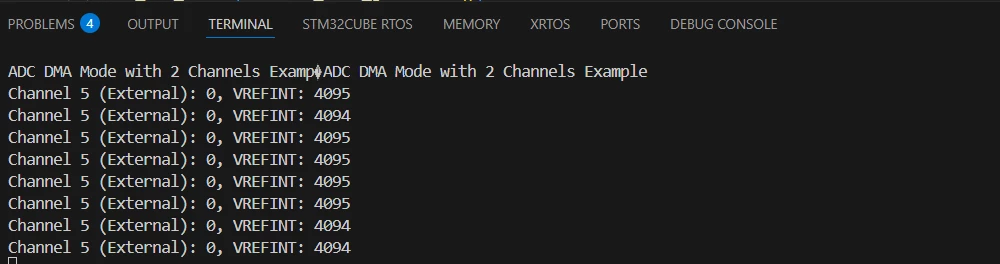
3.3.4 Additional notes
The HAL_ADC_REG_StartConv_DMA function expects the last parameter to be the actual byte count, thus the ADC_CHANNEL_COUNT* sizeof(uint32_t)
Conclusion
This tutorial demonstrates how to configure and use the STM32 ADC peripheral with two channels — an internal channel (VREFINT) and an external analog input — using STM32CubeMX2 and STM32Cube for Visual Studio Code. It covers polling, interrupt, and DMA modes, enabling flexible and efficient analog data acquisition for embedded applications.
