

How to create and run a minimal AES-GCM DMA example on STM32C5 using STM32CubeMX2
- 0 replies
- 452 views
Introduction
This article describes, in a practical and end-to-end manner, how to create and run a minimal AES-GCM example using DMA on an STM32C5 device configured using STM32CubeMX2. The goal is to provide the source code and document the full workflow from project setup and peripheral configuration through to flashing the device, running the demo, and validating the output.
- Introduction
- 1. Prerequisites
- 1.1 Hardware and software
- 1.2 Knowledge prerequisites
- 2. STM32CubeMX2 configuration
- 2.1 Create or open the project
- 2.2 Configure the system clock
- 2.3 Configure standard output for runtime logs
- 2.4 Configure the AES peripheral
- 2.5 Algorithm configuration
- 2.6 Key configuration
- 2.7 DMA for AES configuration
- 2.8 Enable AES register callback support
- 2.9 Generate the project code
- 3. Code implementation
- 3.1 Add the required header files
- 3.2 Define the application timeout
- 3.3 Declare AES configuration and handle variables
- 3.4 Add the AES-GCM test vectors
- 3.5 Add output buffers
- 3.6 Add DMA status flags
- 3.7 Add the local function prototypes
- 3.8 Initialize the system and basic I/O
- 3.9 Initialize the AES peripheral
- 3.10 Register the AES callbacks
- 3.11 Start AES-GCM encryption in DMA mode
- 3.12 Wait for DMA completion
- 3.13 Validate the encrypted output
- 3.14 Generate and validate the authentication tag
- 3.15 Reconfigure AES-GCM parameters for decryption
- 3.15 Start AES-GCM decryption in DMA mode
- 3.16 Wait for decryption completion
- 3.17 Validate the decrypted plaintext
- 3.18 Generate and validate the decryption tag
- 3.19 Clear sensitive buffers before exit
- 3.20 Add the DMA wait helper
- 3.21 Add the transfer-complete callback
- 3.22 Add the error callback
- 3.23 Build and flash
- 3.24 Expected console output
- Conclusion
- Related links
1. Prerequisites
1.1 Hardware and software
- NUCLEO-C562RE
- STM32CubeMX2
- STM32Cube extension for VS Code
- VS Code
- Tera Term or any terminal emulator application
1.2 Knowledge prerequisites
It is helpful if the reader already understands the basics of:
- STM32 peripheral initialization
- HAL-generated project structure
- Interrupt-driven firmware
- DMA principles
- AES-GCM concepts at a high level
Even without deep cryptography knowledge, the procedure remains understandable, since the demo uses fixed test vectors and does not require deriving cryptographic values manually.
2. STM32CubeMX2 configuration
2.1 Create or open the project
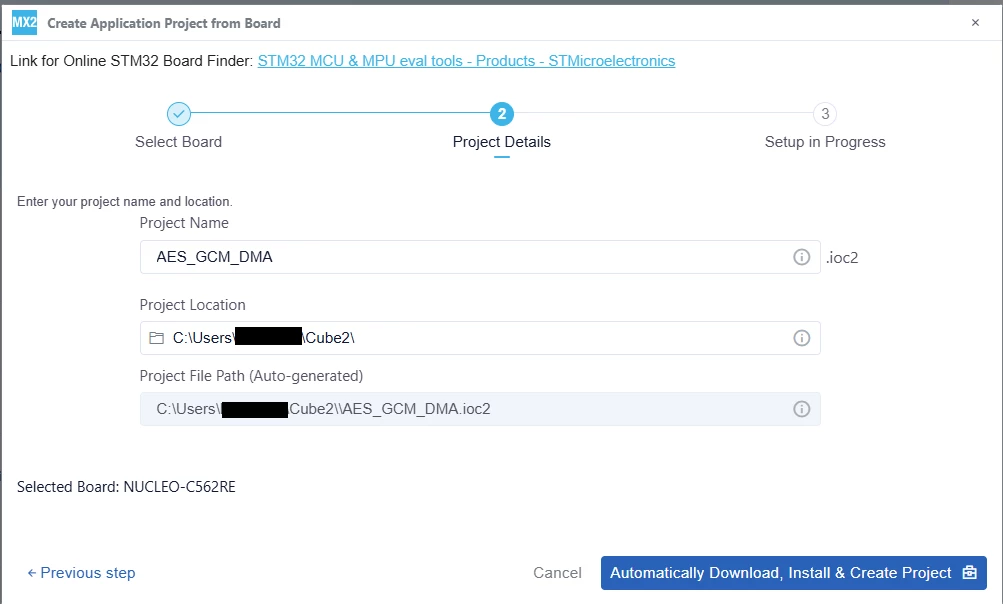
Begin by creating a new STM32C5 project or opening the existing one that will host the example. In this example, NUCLEO-C562RE is used as starting board.
2.2 Configure the system clock
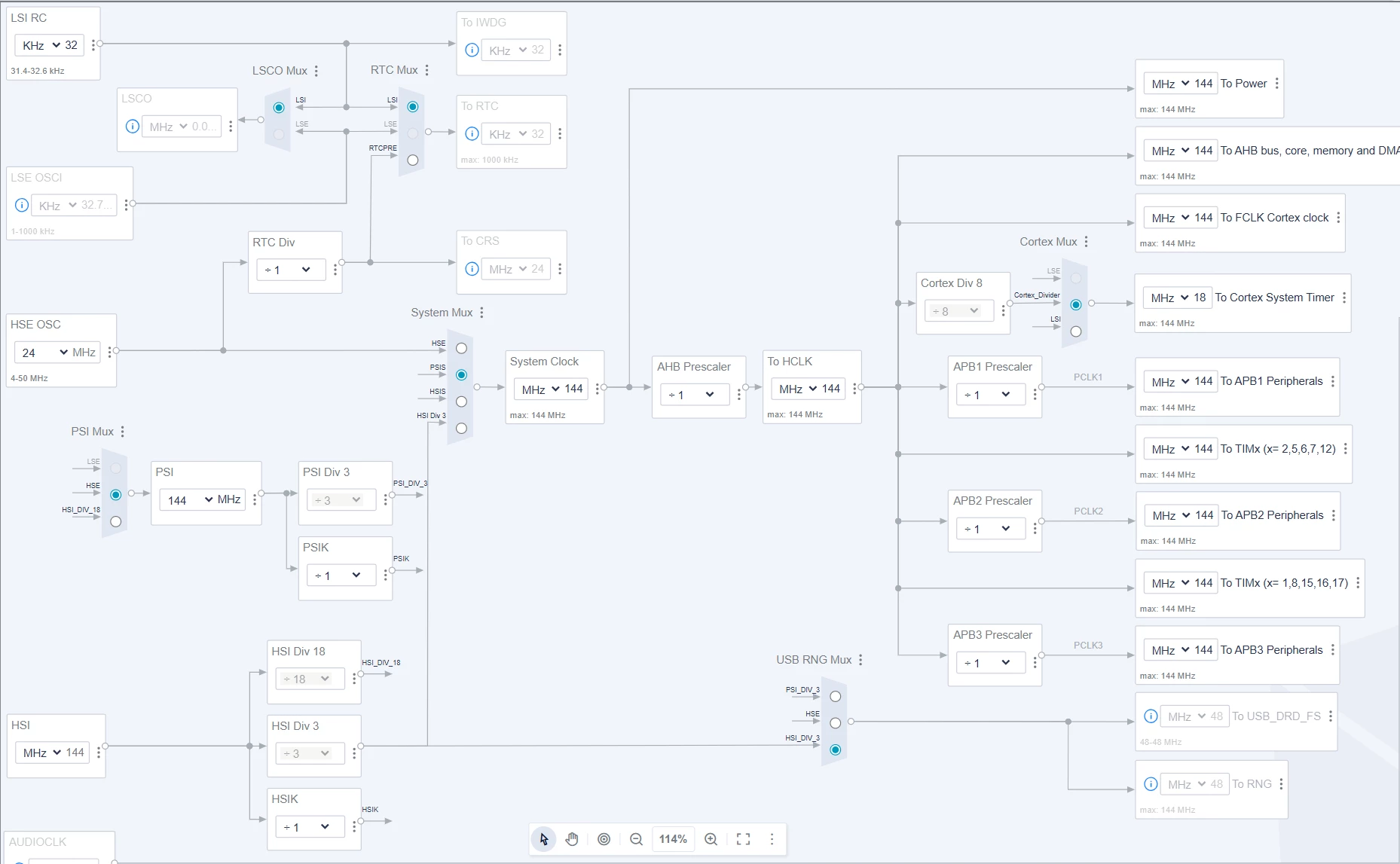
After the project is created, review the clock tree carefully. The clock configuration must be valid for the device and compatible with the intended runtime environment. Although this demo is not particularly sensitive to high throughput, an invalid or inconsistent clock configuration can still prevent the system from starting properly. Additionally, it can disable peripherals indirectly if bus clocks are not configured as expected.
In this example, the default clock configuration is kept.
2.3 Configure standard output for runtime logs
The example uses console messages to indicate whether each phase of the demo has passed. For that reason, it is useful to configure a standard output path early in the process. Depending on the project environment, this may be UART-based, a virtual COM port, semihosting, or another redirected standard I/O method.
The purpose of this step is not merely convenience. Visible logs dramatically reduce debug time during bring-up, especially when checking whether the code reached the encryption stage, got stuck waiting for DMA completion, or failed during result comparison.
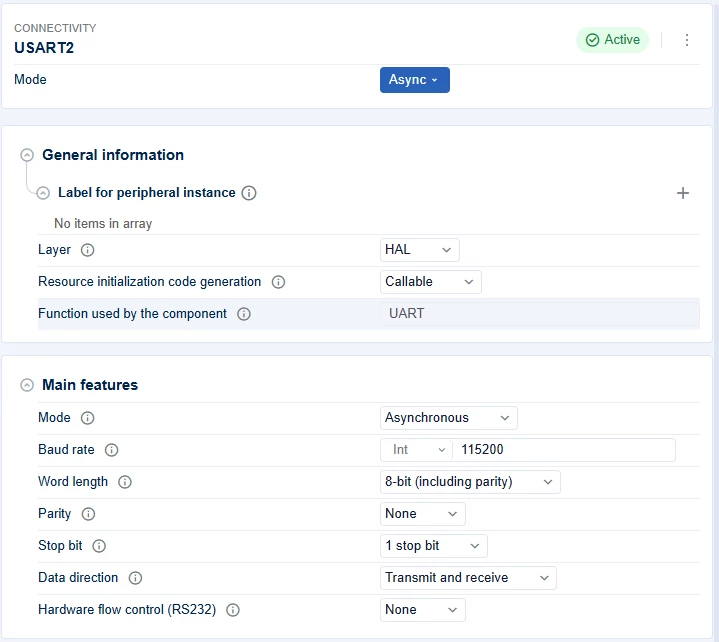
In this example, a virtual COM port is used. By inspecting the board schematics, USART2 is connected to the debug virtual COM port, so it is essential to enable that UART instance.

The default USART configuration is kept.
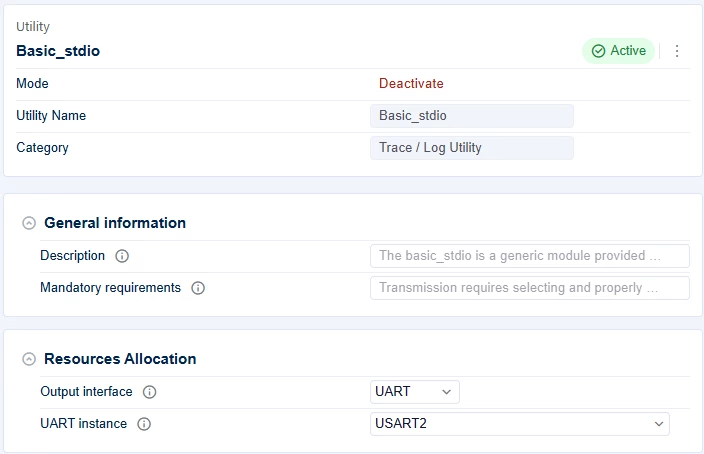
To simplify the COM port initialization process, the Basic STDIO utility is used. By specifying the USART instance and generating the code, calling mx_basic_stdio_init() inside the main() function takes care of overloading printf() and redirecting its output to UART so it can be displayed on the serial interface.
2.4 Configure the AES peripheral
This example uses the GCM test vector provided by NIST Test Patterns gcmEncryptExtIV256.rsp.
First, enable the AES peripheral in the peripheral tree. Then configure the AES-GCM parameters as follows:
2.5 Algorithm configuration
- [Enable] the Algorithm option.
- Set AES GCM GMAC as [AES algorithm].
- Set Header size to [48].
- Set Header to the snippet below:
0a682fbc6192e1b47a5e0868787ffdafe5a50cead3575849990cdd2ea9b3597749403efb4a56684f0c6bde352d4aeec5- Set the Initialization vector to the snippet below:
611ce6f9a6880750de7da6cb00000002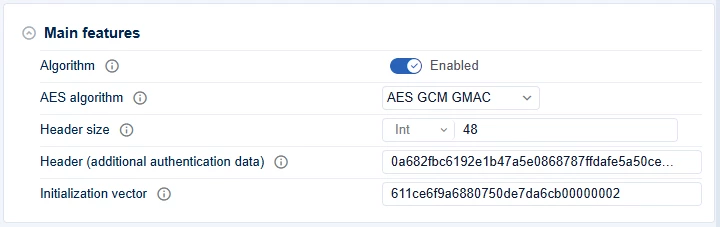
2.6 Key configuration
- [Enable] the Key option.
- Set Key type to [Normal Key].
- Set Key size set to [256 bits].
- Set the Encryption/decryption key to the snippet below:
463b412911767d57a0b33969e674ffe7845d313b88c6fe312f3d724be68e1fca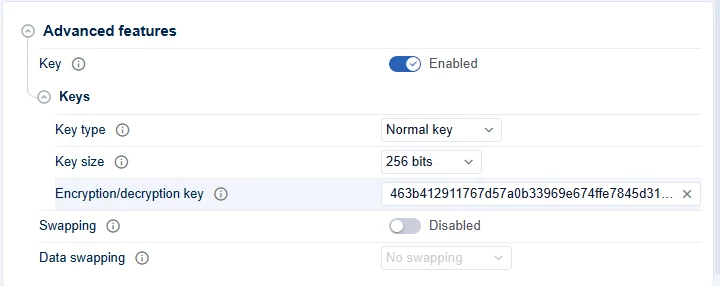
2.7 DMA for AES configuration
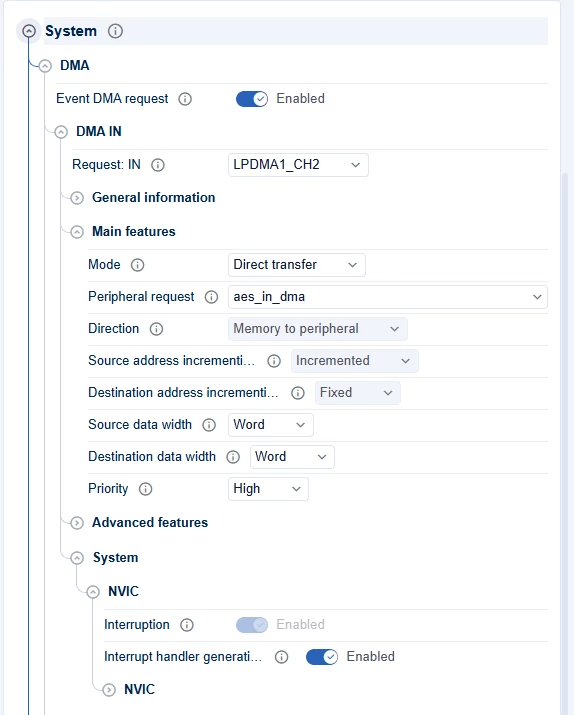
After AES is configured, set up the DMA channels used for the AES data path.
- [Enable] Event DMA request to allow the AES peripheral to trigger DMA transfers.
- Select [LPDMA1_CH2] for Request: IN. This channel transfers AES input data from memory to the peripheral.
- Use [Direct transfer] mode with [aes_in_dma] as the peripheral request and [Memory to peripheral] as direction.
- Set both data widths to [Word] and priority to [High].
- Select [LPDMA1_CH0] for Request: OUT. This channel transfers AES output data from the peripheral to memory.
- Use [Direct transfer] mode with [aes_out_dma] as peripheral request and [Peripheral to memory] as direction.
- Set both data widths to [Word] and priority to [High].
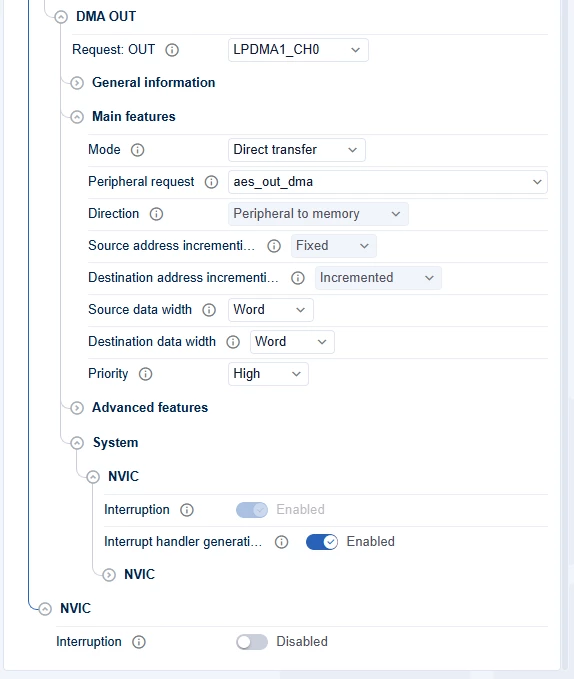
For both DMA channels, keep [Interrupt handler generation] enabled so that the required DMA support code is generated automatically.
2.8 Enable AES register callback support
Before generating the project code, enable the definition required to register custom AES callbacks. To do this:
- Open the project settings.
- Scroll down to Global Services.
- Click the [Cogwheel] icon on the right of HAL common definitions.
- Scroll down to the HAL AES section.
- Enable [Use register callback].
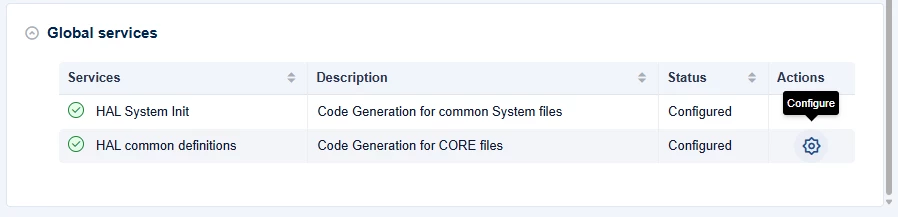
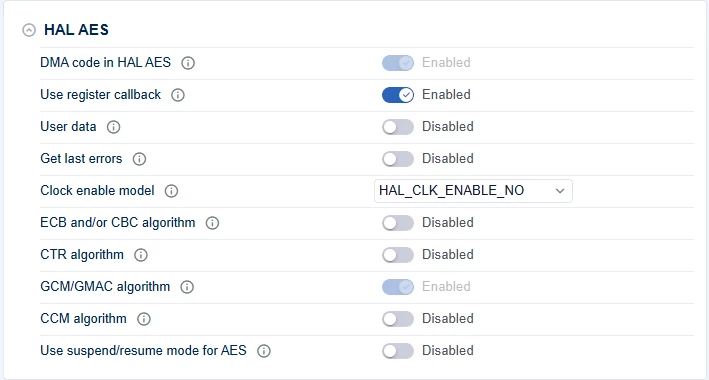
This step is required because the example registers custom AES callbacks for DMA completion and error handling.
2.9 Generate the project code
After the peripheral and interrupt configuration is complete, save the CubeMX2 project and generate the source code.
Once the generation is complete:
- Open the project in VS Code.
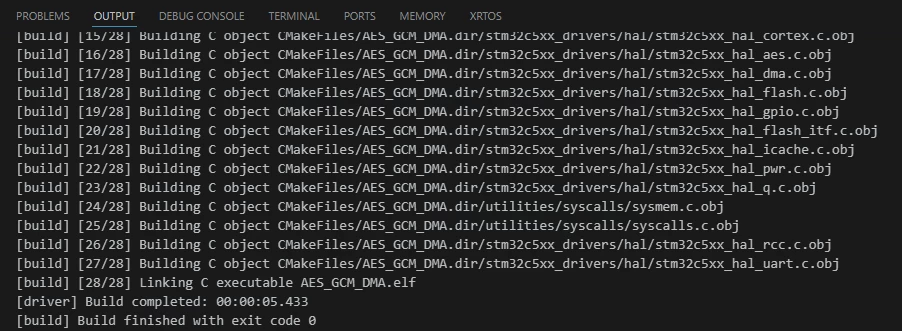
- Perform a clean build.
- Do this before adding the final application logic.
This intermediate build serves an important purpose. It confirms that the generated startup code, peripheral initialization code, includes, and linker setup are all coherent. If an issue exists here, solving it now avoids confusion later when application code is also present.
3. Code implementation
3.1 Add the required header files
Include the application, HAL, and standard C headers required by the example.
#include "main.h"
#include "mx_basic_stdio_app.h"
#include <string.h>- mx_basic_stdio_app.h enables console output through printf().
- string.h is required for memcmp() and memset().
3.2 Define the application timeout
Add a timeout used when retrieving the GCM authentication tag.
#define AES_TIMEOUT_MS 100- This value is used by the blocking tag-generation API.
- It prevents the application from waiting indefinitely in case of a failure.
3.3 Declare AES configuration and handle variables
Add the global variables used to configure and access the AES peripheral.
hal_aes_gcm_config_t p_gcm_config;
hal_aes_handle_t *pAES;- p_gcm_config holds the AES-GCM configuration parameters, such as IV and AAD.
- pAES is the AES HAL handle returned by the generated initialization function.
3.4 Add the AES-GCM test vectors
Use a known NIST AES-GCM test vector so the example can validate both encryption and decryption.
extern const uint32_t AESKey[8];
extern uint32_t InitVector[4];
extern uint32_t HeaderMessage[12];

uint32_t plainText[13] =
{
 0xe7d1dcf6, 0x68e28768, 0x61940e01, 0x2fe52a98,
 0xdacbd78a, 0xb63c0884, 0x2cc9801e, 0xa581682a,
 0xd54af0c3, 0x4d0d7f6f, 0x59e8ee0b, 0xf4900e0f,
 0xd8504200
};

const uint32_t expectedCipherText[13] =
{
 0x8886e196, 0x010cb384, 0x9d9c1a18, 0x2abe1eea,
 0xb0a5f3ca, 0x423c3669, 0xa4a8703c, 0x0f146e8e,
 0x956fb122, 0xe0d721b8, 0x69d2b6fc, 0xd4216d7d,
 0x4d375800
};

const uint32_t expectedTag[4] =
{
 0x2469cecd, 0x70fd98fe, 0xc9264f71, 0xdf1aee9a
};- AESKey, InitVector, and HeaderMessage are defined externally.
- plainText contains the input message.
- expectedCipherText and expectedTag are the reference results.
- The plaintext length is 51 bytes, so the last word is padded with zeros.
3.5 Add output buffers
Create buffers to store the generated ciphertext, decrypted plaintext, and authentication tag.
uint32_t computedCiphertext[13] = {0};
uint32_t computedPlaintext[13] = {0};
uint32_t Tag[4] = {0};- These buffers receive the output of the AES hardware during the test flow.
3.6 Add DMA status flags
Declare flags that will be updated by the AES callbacks.
volatile uint32_t OutTransferCpltCb = 0;
volatile uint32_t ErrorCb = 0;- OutTransferCpltCb indicates a successful DMA output transfer completion.
- ErrorCb indicates an AES or DMA error.
- volatile is required because the values are modified asynchronously by interrupt-driven callbacks.
3.7 Add the local function prototypes
Declare the helper functions used later in the file.
static void OutTransfertCpltCallback(hal_aes_handle_t *pAES);
static int WaitForAesDmaCompletion(void);
static void ErrorCallback(hal_aes_handle_t *pAES);- These functions are used for DMA synchronization and error detection.
3.8 Initialize the system and basic I/O
At the start of main(), initialize the system and the console output.
if (mx_system_init() != SYSTEM_OK)
{
 return (-1);
}

else
{
mx_basic_stdio_init();- mx_system_init() performs the target-level initialization generated by the project.
- mx_basic_stdio_init() enables console logging for runtime validation.
3.9 Initialize the AES peripheral
Retrieve the AES handle from the generated code.
pAES = mx_aes_init();
if (pAES == NULL)
{
 return (-1);
}
printf("[INFO] AES, DMA initialization and configuration to work with GCM DMA mode COMPLETED.\n");- mx_aes_init() initializes the AES peripheral using the CubeMX2 configuration.
- The returned handle is required by all HAL AES APIs.
- The log message confirms that the AES and DMA configuration is ready.
3.10 Register the AES callbacks
Register one callback for successful transfer completion and one for error handling.
if (HAL_AES_RegisterOutTransferCpltCallback(pAES, OutTransfertCpltCallback) != HAL_OK)
{
 return (-1);
}

if (HAL_AES_RegisterErrorCallback(pAES, ErrorCallback) != HAL_OK)
{
 return (-1);
}

printf("[INFO] Callbacks registration COMPLETED.\n");- The completion callback is used to signal the end of the DMA transfer.
- The error callback is used to detect runtime failures.
- Both are required by the wait mechanism implemented later.
3.11 Start AES-GCM encryption in DMA mode
Launch the encryption operation.
if (HAL_AES_Encrypt_DMA(pAES, plainText, 51, computedCiphertext) != HAL_OK)
{
 return (-1);
}- Starts AES-GCM encryption using DMA.
- Encrypts 51 bytes from plainText.
- Stores the result in computedCiphertext.
3.12 Wait for DMA completion
Wait until the encryption transfer completes or an error occurs.
if (WaitForAesDmaCompletion() != 0)
{
 return (-1);
}- This helper function blocks until one of the registered callbacks updates the status flags.
3.13 Validate the encrypted output
Mask the padded byte in the last word and compare the output with the expected ciphertext.
computedCiphertext[12] &= 0xFFFFFF00U;
if (memcmp(computedCiphertext, expectedCipherText, 51) != 0)
{
 return HAL_ERROR;
}- The input size is not word-aligned, so the final word contains one padded byte.
- The masking operation removes that byte before comparison.
- memcmp() verifies the encryption result against the NIST reference vector.
3.14 Generate and validate the authentication tag
Request the GCM authentication tag and compare it with the reference value.
if (HAL_AES_GCM_GenerateAuthTAG(pAES, Tag, AES_TIMEOUT_MS) != HAL_OK)
{
 return (-1);
}

if (memcmp(Tag, expectedTag, 16) != 0)
{
 return (-1);
}

printf("[INFO] AES-GCM encryption DMA test passed.\n");- Retrieves the 128-bit GCM authentication tag.
- Confirms that the AES hardware produced the expected authentication result.
3.15 Reconfigure AES-GCM parameters for decryption
Before starting the decryption phase, explicitly configure the AES peripheral again.
p_gcm_config.p_init_vect = (uint32_t *) InitVector;
p_gcm_config.p_header = HeaderMessage;
p_gcm_config.header_size_byte = 48;
HAL_AES_GCM_GMAC_SetConfig(pAES, &p_gcm_config);
HAL_AES_SetNormalKey(pAES, HAL_AES_KEY_SIZE_256BIT, AESKey);
HAL_AES_SetDataSwapping(pAES, HAL_AES_DATA_SWAPPING_NO);- Reapplies the IV, AAD, key, and data swapping configuration.
- Ensures the decryption phase uses the correct AES-GCM context.
3.15 Start AES-GCM decryption in DMA mode
Launch the decryption operation using the previously generated ciphertext.
if (HAL_AES_Decrypt_DMA(pAES, computedCiphertext, 51, computedPlaintext) != HAL_OK)
{
 return (-1);
}- Starts AES-GCM decryption using DMA.
- Decrypts 51 bytes from computedCiphertext.
- Stores the result in computedPlaintext.
3.16 Wait for decryption completion
Wait for the DMA-based decryption flow to finish.
if (WaitForAesDmaCompletion() != 0)
{
 return (-1);
}- Uses the same callback-based synchronization mechanism as the encryption phase.
3.17 Validate the decrypted plaintext
Mask the padded byte and compare the result with the original plaintext.
computedPlaintext[12] &= 0xFFFFFF00U;
if (memcmp(computedPlaintext, plainText, 51) != 0)
{
 return (-1);
}- Removes the unused byte in the padded last word.
- Confirms that the original plaintext is recovered correctly.
3.18 Generate and validate the decryption tag
Generate the tag after decryption and compare it against the expected reference.
if (HAL_AES_GCM_GenerateAuthTAG(pAES, Tag, AES_TIMEOUT_MS) != HAL_OK)
{
 return -1;
}

if (memcmp(Tag, expectedTag, 16) != 0)
{
 return -1;
}

printf("[INFO] AES-GCM decryption DMA test passed.\n");- Confirms that the decryption-side authentication result is also correct.
3.19 Clear sensitive buffers before exit
Erase the temporary cryptographic buffers before returning from the application.
memset(computedCiphertext, 0, sizeof(computedCiphertext));
memset(computedPlaintext, 0, sizeof(computedPlaintext));
memset(Tag, 0, sizeof(Tag));

printf("[INFO] Example completed successfully.\n");
return (0);- Clears RAM buffers that held ciphertext, plaintext, and tag values. This is a good practice even in a minimal example.
3.20 Add the DMA wait helper
Implement the helper function used to wait for completion or error.
static int WaitForAesDmaCompletion(void)
{
 OutTransferCpltCb = 0;
 ErrorCb = 0;
 while ((OutTransferCpltCb == 0U) && (ErrorCb == 0U))
 {
 __WFI();
 }
 return (ErrorCb != 0U) ? -1 : 0;
}- Resets the status flags.
- Waits until an interrupt occurs.
- Returns success if the transfer completed or failure if an error was reported.
3.21 Add the transfer-complete callback
Implement the callback triggered when the AES DMA transfer completes.
static void OutTransfertCpltCallback(hal_aes_handle_t *pAES)
{
 (void)pAES;
 OutTransferCpltCb = 1U;
}- Sets the transfer-complete flag used by the wait helper.
3.22 Add the error callback
Implement the callback triggered if the AES peripheral reports an error.
static void ErrorCallback(hal_aes_handle_t *pAES)
{
 (void)pAES;
 ErrorCb = 1U;
}- Sets the error flag used by the wait helper.
3.23 Build and flash
After completing the source code integration, build the project and program the target board.
3.24 Expected console output
When the example runs successfully, the console should print messages similar to the following:
[INFO] AES, DMA initialization and configuration to work with GCM DMA mode COMPLETED.
[INFO] Callbacks registration COMPLETED.
[INFO] AES-GCM encryption DMA test passed.
[INFO] AES-GCM decryption DMA test passed.
[INFO] Example completed successfully.
Conclusion
This article demonstrated how to configure and run a minimal AES-GCM DMA example on STM32C5 using STM32CubeMX2, from project setup to runtime validation. By following the described steps, you can verify both encryption and decryption against known reference data and use this project as a starting point for more advanced secure data-processing applications.