


Cache coherence and hit rate on STM32C5
- 0 replies
- 352 views
Summary
This article explores the concepts of cache, cache coherence, and hit rate in the context of STM32C5 and STM32CubeMX2. It explains the importance of enabling cache in an application, its impact on performance, configuration differences, and how to configure cache in a project.
- Summary
- Introduction
- 1. Prerequisites
- 2. Enabling and configuring the ICACHE
- 2.1 Configuring the project in Visual Studio Code
- 3. Measuring the ICACHE hit rate
- 3.1 Validation
- Conclusion
- Related links
Introduction
STM32C5 is designed as a high-performance microcontroller unit (MCU) and, like most other microcontrollers, includes a cache feature to address the gap between CPU and memory access times. This article provides the information needed to achieve optimal performance in STM32C5 by implementing the instruction cache (ICACHE) in STM32CubeMX2.
According to the device reference manual, four wait states must be added when the CPU runs at 144 MHz (the maximum frequency for STM32C562). This means that five flash memory clock cycles are required to perform a read operation from memory (refer to the device reference manual for requirements specific to your MCU). This requirement can reduce application performance by a factor of five, negating the benefits of a higher clock frequency. For external memories, additional latencies caused by access protocols and bus synchronization also decrease application performance.
To address this issue, combine the Cortex-M33 prefetch and ICACHE features to reduce instruction delays caused by flash memory. The Cortex®-M33 fetches instructions and literal pools (constants and data) over the C-Bus and through the ICACHE. This process allows the next sequential instruction line to be fetched from flash memory while the current instruction line is filled in the ICACHE and executed by the CPU.
Prefetch and ICACHE are efficient for sequential code stored sequentially in flash memory. When the application contains nonsequential code, such as jumps caused by conditionals and interrupts, the fetched code may not match the code to be executed. This situation is called a cache miss and requires the cache line to be refilled. When the CPU performs a transaction from the cache, it is called a cache hit.
STM32C5 includes a performance monitoring system based on the hit-miss concept, called cache hit rate. Two counters inside the cache peripheral block count the number of hits (32-bit register) and misses (16-bit register). By accessing these values, you can compute the hit-miss rate as a parameter for application performance. This metric can be used to improve routines and code architecture to achieve better performance.
Before proceeding to the tutorial, it is important to understand the ICACHE operating modes:
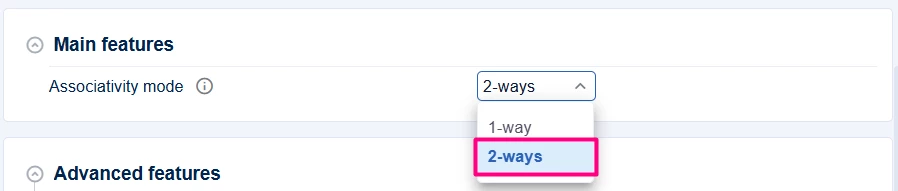
- 1-way (direct-mapped): Optimized for low-power consumption because only the necessary section of data memory is accessed for each request, minimizing energy use. However, it is less effective at reducing cache misses for code that cannot fit entirely in the cache.
- 2-way (set-associative): The default configuration, with the cache divided into two ways. Each memory address can map to either of two lines for a given index. This mode provides a better hit rate and overall performance, especially for code that cannot be fully loaded into the cache.
With this background, proceed to the tutorial to enable, configure, and measure the hit rate in your application using STM32CubeMX2.
For more information, refer to the ICACHE section in the device reference manual.
1. Prerequisites
Ensure that you have installed:
- STM32CubeMX2
- The latest STM32C5 HAL2 driver
- STM32CubeIDE extension for Visual Studio Code
The hardware used in this tutorial is the NUCLEO-C562RE board.
2. Enabling and configuring the ICACHE
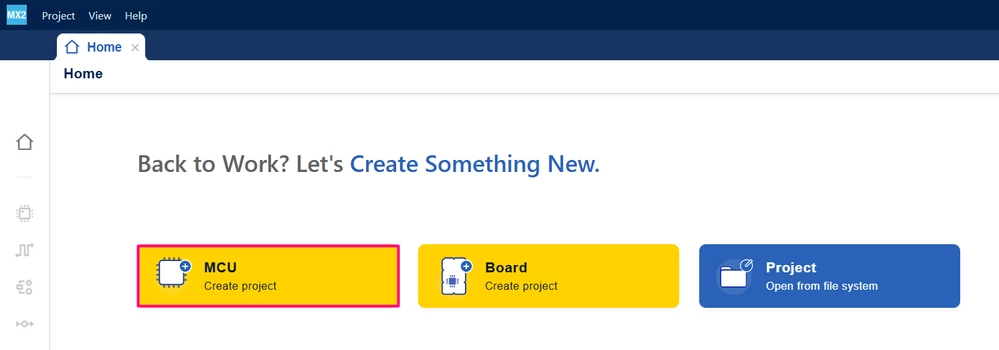
Open STM32CubeMX2. On the Home page, click the MCU square to create a new project.
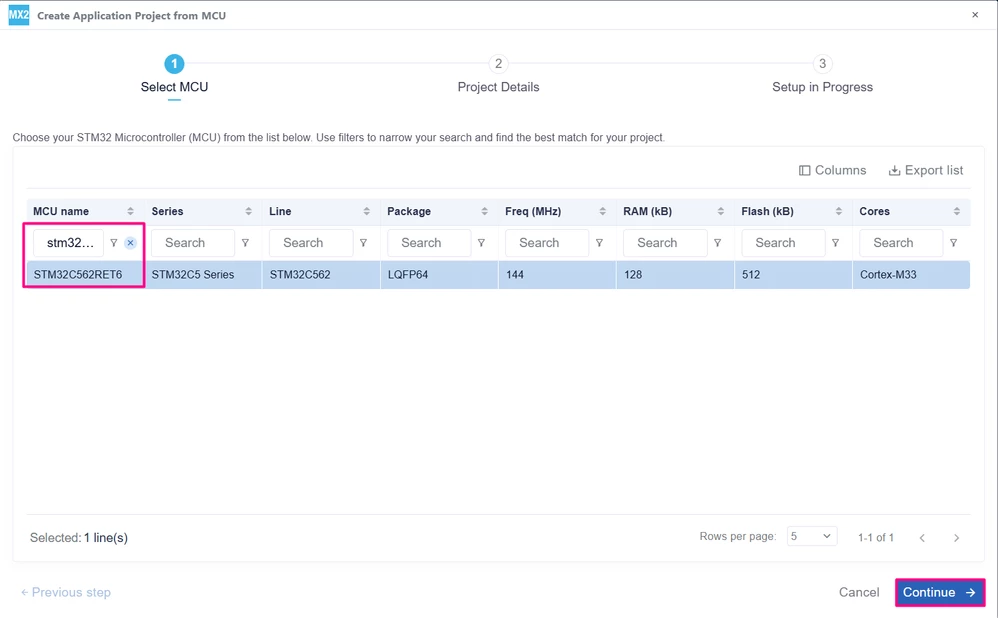
In the search field under MCU name, enter STM32C562RE and select the MCU. Click Continue.
Enter the project name and location. Click [Automatically Download, Install & Create Project] to finish project creation.
After creating the project, open the "Peripherals" menu and locate "ICACHE" under the System drop-down list.
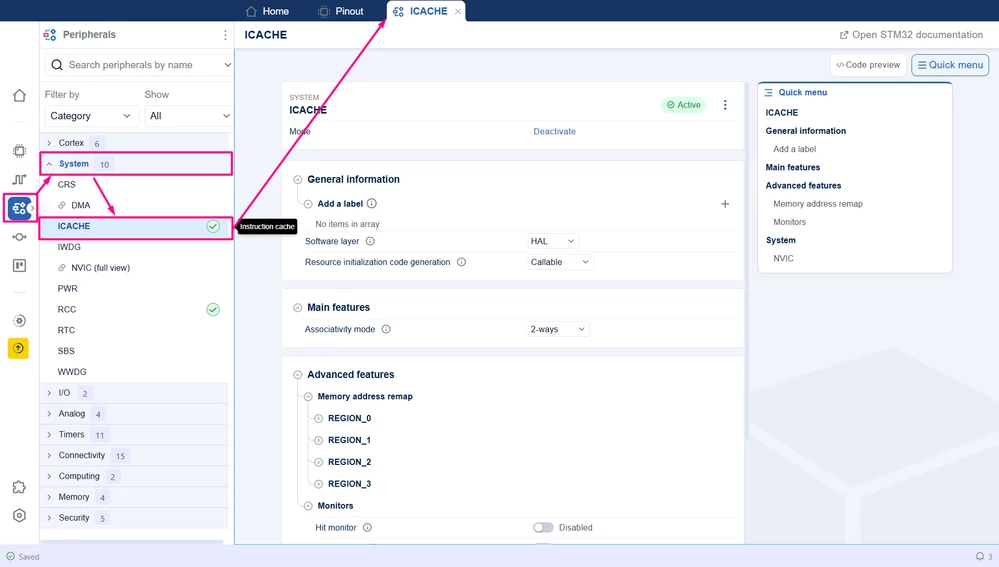
In this menu, you can view all settings for the ICACHE memory as discussed in the introduction.
Set the associativity mode. For this example, since power consumption is not a concern, set this to 2-ways.
Next, configure the advanced features. The first configuration is related to memory address remap. This feature is not covered in this article, but it should be used when caching external memory in your application.
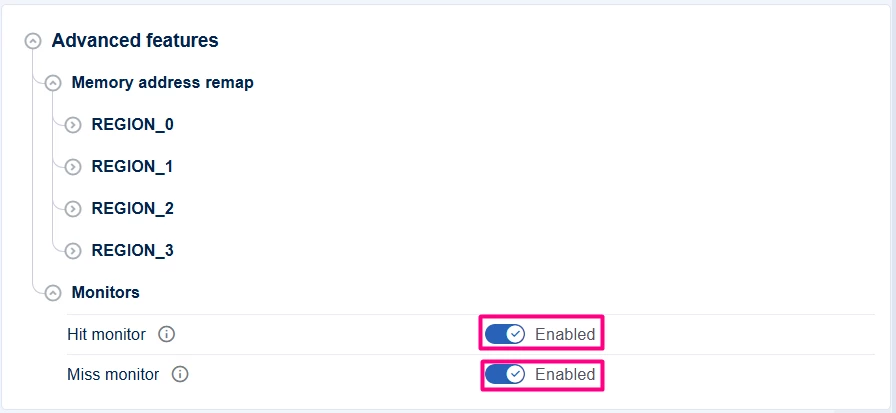
In the advanced features, enable the hit and miss monitors to measure the hit rate:
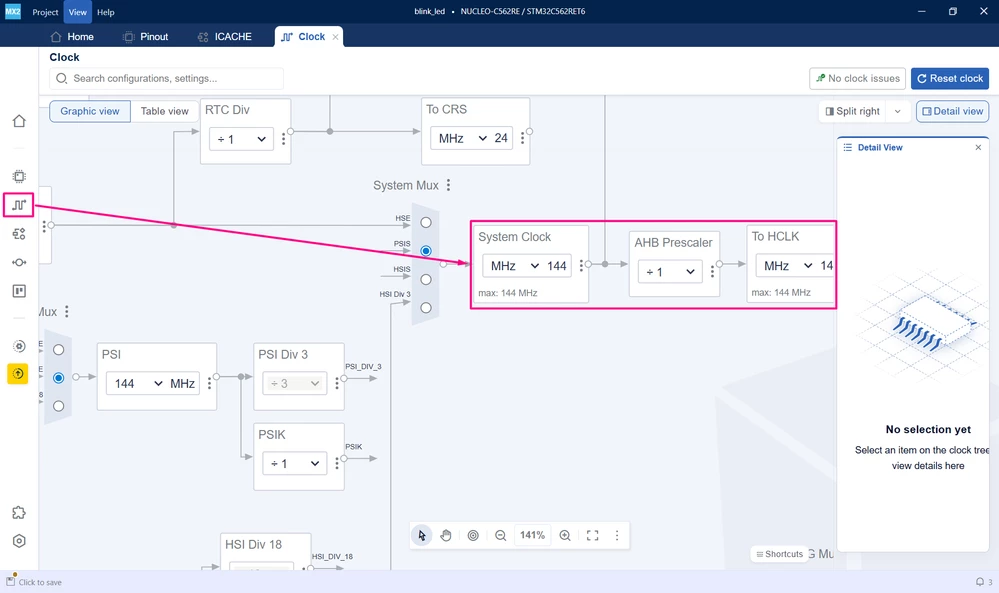
To maximize performance, increase the CPU clock frequency to 144 MHz in the clock tree.
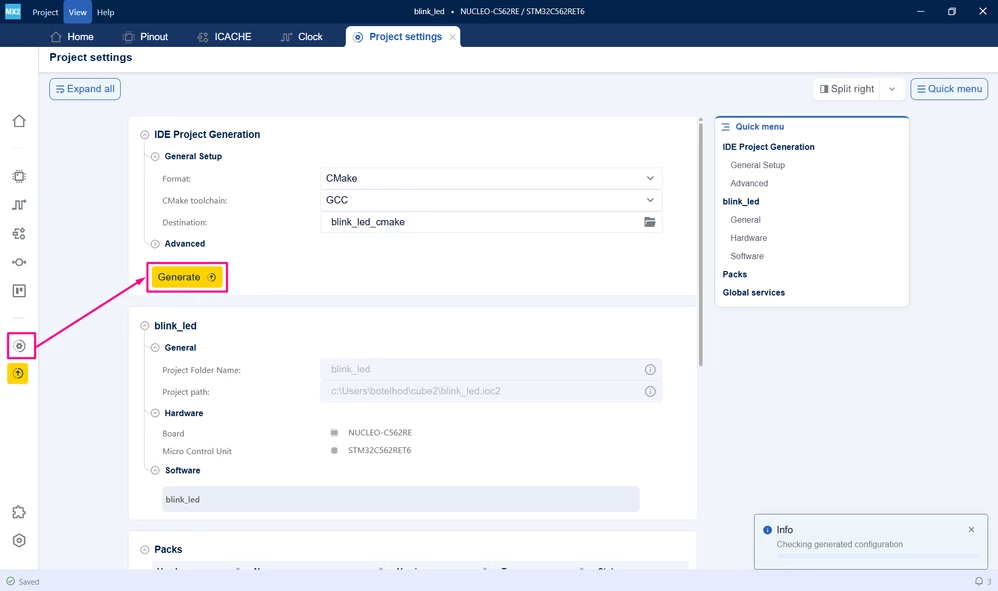
Configure the project generation settings to fit your environment. For this article, CMake is used to open the project in VS Code with the STM32Cube extension.
After completing these steps, generate the code and explore the application with the ICACHE feature enabled to achieve the best performance:
2.1 Configuring the project in Visual Studio Code
Open Visual Studio Code and open the project folder.
If prompted, select the configuration. If not prompted, press Ctrl+Shift+P, type CMake: Select Configure Preset, and choose the Debug configuration.
Press Ctrl+Shift+P again, type STM32Cube: Setup STM32Cube project(s), and select the appropriate options. For Board/Device select either the STM32C562RE or the NUCLEO-C562RE and then click Save and close
3. Measuring the ICACHE hit rate
To measure the hit rate for the application, call two HAL functions to read the hit and miss counter values from the ICACHE registers:
uint32_t hit_count = HAL_ICACHE_GetMonitorHitValue(mx_icache_gethandle);
uint32_t miss_count = HAL_ICACHE_GetMonitorMissValue(mx_icache_gethandle);
With these values, compute the hit rate using the following formula:
float hit_rate = ((float)hit_count/(float)(hit_count + miss_count)) *100.0;3.1 Validation
After building the application, locate the [Run and Debug] icon, create your debug session by selecting the [STM32Cube: STLINK GDB Server] option:
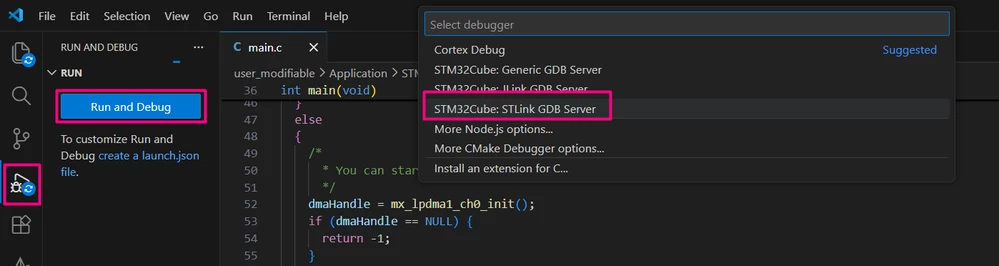
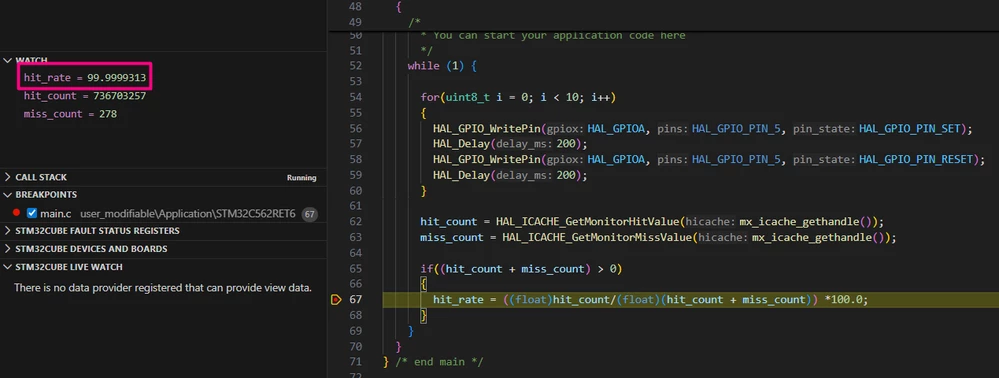
Add the hit_rate variable in the Watch and run the project. This code is using a simple blink LED code, and the hit rate of 99.999313% was achieved
Conclusion
This article explains how to use the cache efficiently and highlights the importance of hit rate monitoring for maximizing the performance of STM32C5 applications. Implementing advanced cache features, such as two-way set-associative architecture and hit-under-miss capability, significantly reduces memory access latency and processor stalls. Performance monitoring tools, including hit and miss counters, enable precise tracking and optimization of cache usage, ensuring that applications operate smoothly and efficiently.
Proper cache configuration and maintenance operations are also important for system reliability. STM32C5 supports software-managed cache coherency and flexible memory mapping, which help maintain data consistency and optimize power consumption. By carefully configuring cache settings and continuously monitoring hit rates, developers can achieve a robust balance between high-performance and low-power usage, making STM32C5 a strong platform for embedded applications.
Related links
- Reference manual RM0522: STM32C5 Arm®-based 32-bit MCUs
- Datasheet DS14927: STM32C562xx
- STM32Cube for Visual Studio Code
- NUCLEO-C562RE
- STM32CubeMX2
- STM32 embedded software documentation
- STM32CubeMX2 software documentation