Associate
July 4, 2026
Solved

STM32CubeMX clock validation regression: STM32H743VIHx VOS0 LDO HCLK 240 MHz incorrectly limited to 225 MHz

  • July 4, 2026
  • 3 replies
  • 159 views

MCU: STM32H743VIHx / STM32H743VIH
Power: PWR_LDO_SUPPLY
Voltage scale: Power Regulator Voltage Scale 0 / VOS0

Clock setting:
SYSCLK = 480 MHz
D1CPRE = /1
HPRE = /2
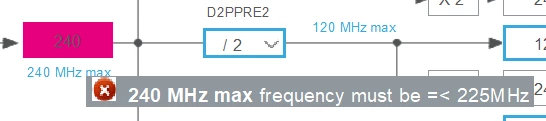
HCLK = 240 MHz
D2PPRE/D3PPRE = /2, PCLK = 120 MHz

Actual result:
STM32CubeMX marks HCLK 240 MHz as error:
"240 MHz max frequency must be <= 225 MHz"

Expected result:
According to STM32H743 datasheet, with VOS0 and LDO enabled,
fCPU max is 480 MHz and fHCLK max is 240 MHz.

This configuration was accepted before updating STM32CubeMX / STM32H7 MCU package.
 

Best answer by Mahmoud Ben Romdhane

Hello ​@darkblue 


Let me thank you for posting.

I suggest that you take a look at those posts:

CubeMX Version 6.18.0 introcudes wrong check of clock limits for STM32H753 | Community

Potential bug in CubeMX 6.18.0 – Clock Configuration error | Community

The issue has been already reported to the dedicated team (Internal Ticket number: CDM0064049).

I will keep you up to date until the issue is fixed.


Thanks.

Mahmoud

3 replies

AScha.3
Super User
July 4, 2026

Which chip revision is set?

Try: v .

...or: what's written on your CPU?

If older version, y , then some clock values are limited to lower limit.

If you feel a post has answered your question, please click on " Best Answer ".
darkblueAuthor
Associate
July 4, 2026

Thanks. I checked both.

In CubeMX, Product revision is set to rev.V.

I also read DBGMCU->IDCODE from the actual MCU:
DEV_ID = 0x450
REV_ID = 0x2003

So the device is configured/detected as Rev V, not Rev Y.

ST Technical Moderator
July 6, 2026

Hello ​@darkblue 


Let me thank you for posting.

I suggest that you take a look at those posts:

CubeMX Version 6.18.0 introcudes wrong check of clock limits for STM32H753 | Community

Potential bug in CubeMX 6.18.0 – Clock Configuration error | Community

The issue has been already reported to the dedicated team (Internal Ticket number: CDM0064049).

I will keep you up to date until the issue is fixed.


Thanks.

Mahmoud

To give better visibility on the answered topics, please click on Accept as Solution on the reply which solved your issue or answered your question.