Associate II
July 3, 2026
Solved

Potential bug in CubeMX 6.18.0 – Clock Configuration error

  • July 3, 2026
  • 2 replies
  • 106 views

Hello,

I wish to report what I believe to be a bug in the new version of CubeMX (6.18.0).

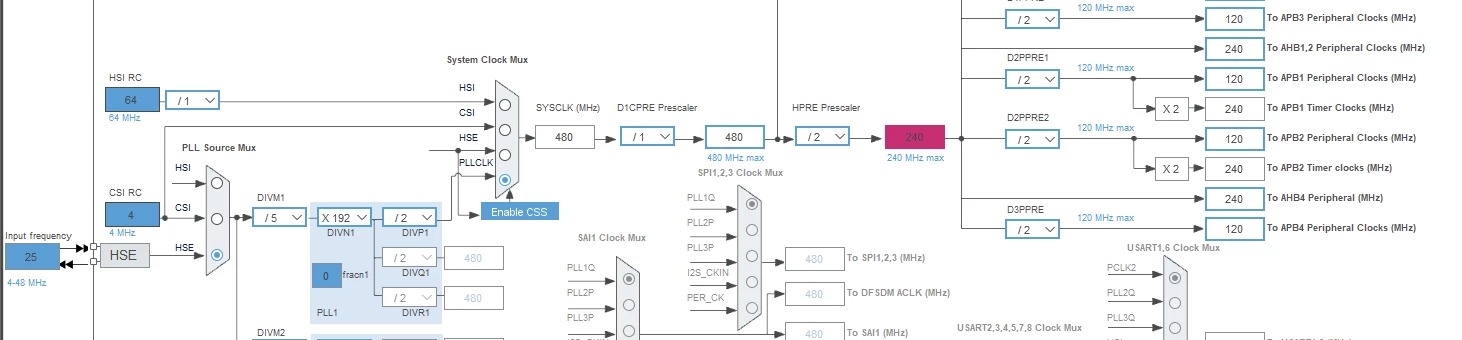
When configuring an STM32H743IIT6, I encounter an error in the Clock Configuration view (please refer to the attached screenshot). The same procedure carried out with CubeMX 6.17.0 works correctly.

I have therefore reverted to CubeMX 6.17.0, which is not a critical issue for me, but I thought it important to bring this to your attention.

Yours faithfully,
Philippe
 

Best answer by Mahmoud Ben Romdhane

Hello ​@Neel.SE 


In order to avoid the clock error above, I recommend that you try this workaround as follow:
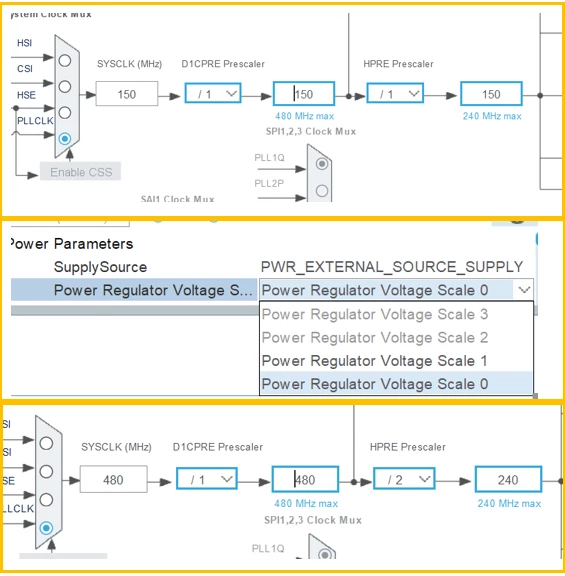
Set SYSCLK to 150 MHz, and go to RCC configuration and select "Power Regulator Voltage Scale 0". Then return to Clock configuration and set SYSCLK to 480 MHz


I will be waiting for your feedback.


Thanks.

Mahmoud

2 replies

ST Technical Moderator
July 3, 2026

Hello ​@DADD 


Let me thank you for posting.

I suggest that you take a look at this post:

CubeMX Version 6.18.0 introcudes wrong check of clock limits for STM32H753 | Community

The issue has been already reported to the dedicated team (Internal Ticket number: CDM0064049).

I will keep you up to date until the issue is fixed.


Thanks.

Mahmoud

To give better visibility on the answered topics, please click on Accept as Solution on the reply which solved your issue or answered your question.
Visitor
July 20, 2026

Hello ​@Mahmoud Ben Romdhane ,


Is there any update regarding this ticket? Please let us know if there is any workaround to resolve this issue with new CubeMX version 6.18.0.


Regards,

Neel

ST Technical Moderator
July 20, 2026

Hello ​@Neel.SE 


In order to avoid the clock error above, I recommend that you try this workaround as follow:
Set SYSCLK to 150 MHz, and go to RCC configuration and select "Power Regulator Voltage Scale 0". Then return to Clock configuration and set SYSCLK to 480 MHz


I will be waiting for your feedback.


Thanks.

Mahmoud

To give better visibility on the answered topics, please click on Accept as Solution on the reply which solved your issue or answered your question.