
How to create a bare metal HAL Ethernet application on STM32H563/STM32H723
Summary
To understand how middleware like NetXDuo and LwIP use the STM32 HAL Ethernet driver, this article demonstrates a bare metal application to send and receive Ethernet frames.
If you are not interested in following the step-by-step tutorial you can get the example on GitHub.
- Summary
- Prerequisites
- Objectives
- Step-by-step instructions
- 1. Board configuration using CubeMX
- 1.1 Board initialization
- 1.2 UART configuration
- 1.3 GPIO configuration
- 1.4 Ethernet peripheral configuration
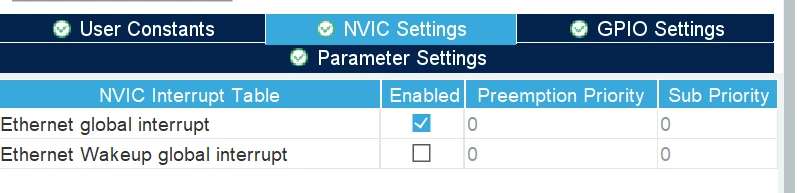
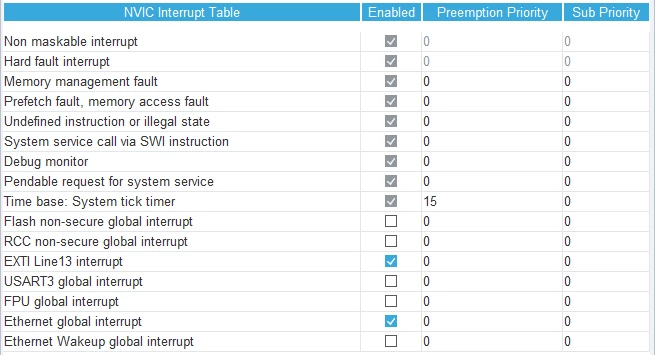
- 1.5 NVIC configuration
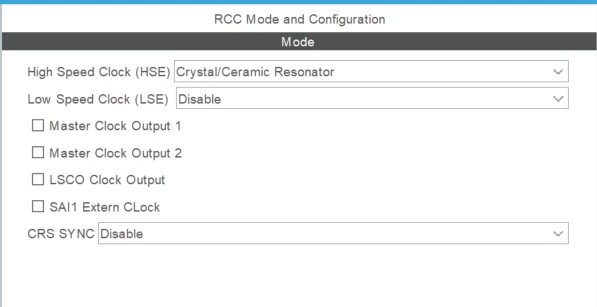
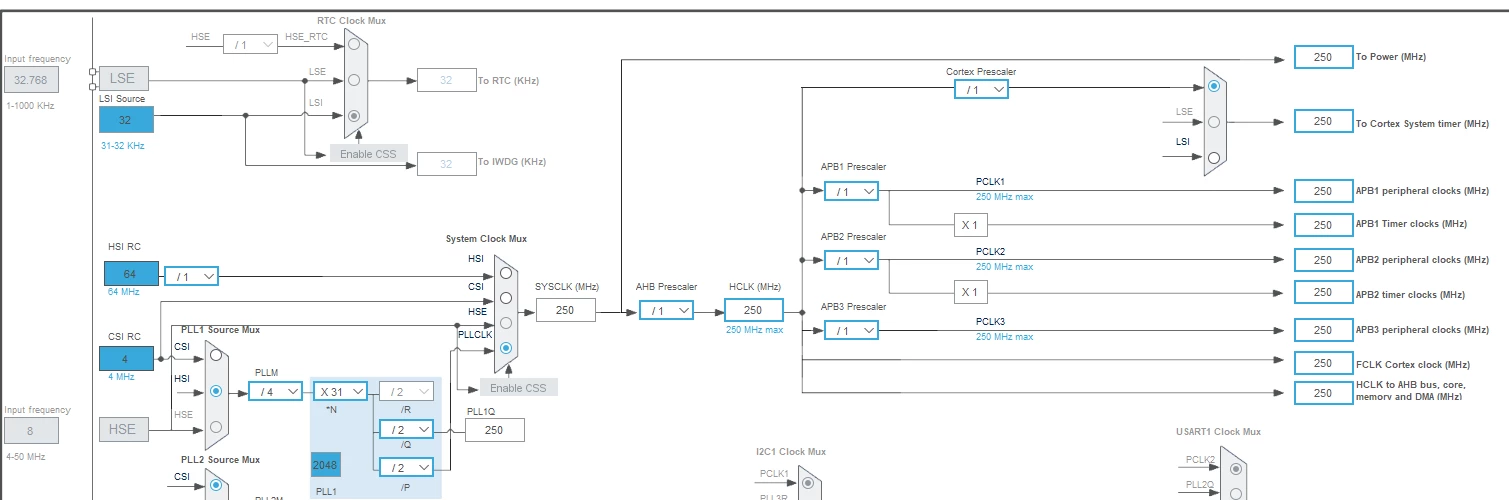
- 1.6 Clock configuration
- 1.7 Linker Settings
- 2. Application programming in STM32CubeIDE
- 2.1 Configure USART3
- 2.2 Configuring PHY
- 2.3 Configuring Ethernet
- 2.3.1 Buffers memory allocation
- 2.3.2 Frame organization
- 2.3.3 initialization sequence
- 3. Testing the application
- 4.1 Transmit configuration
- 4.2 Callback configuration
- 4.3 Demonstration
- Conclusion
- References
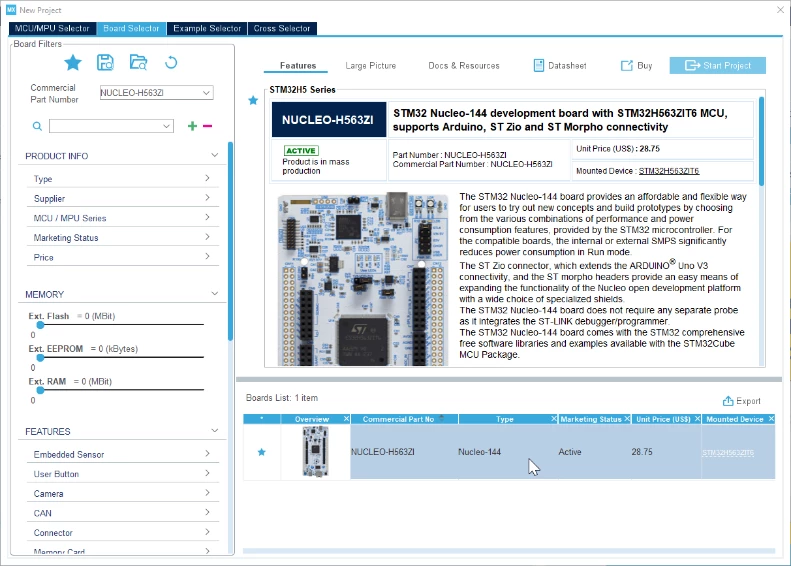
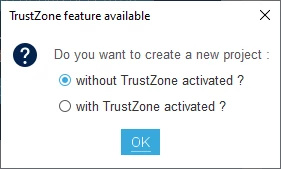
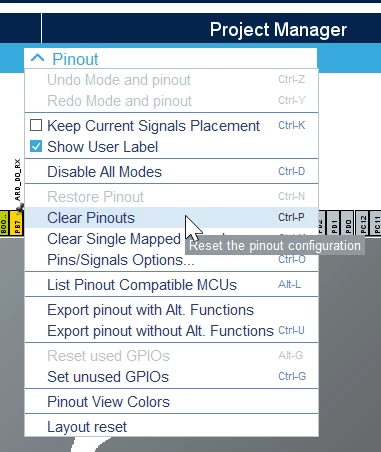
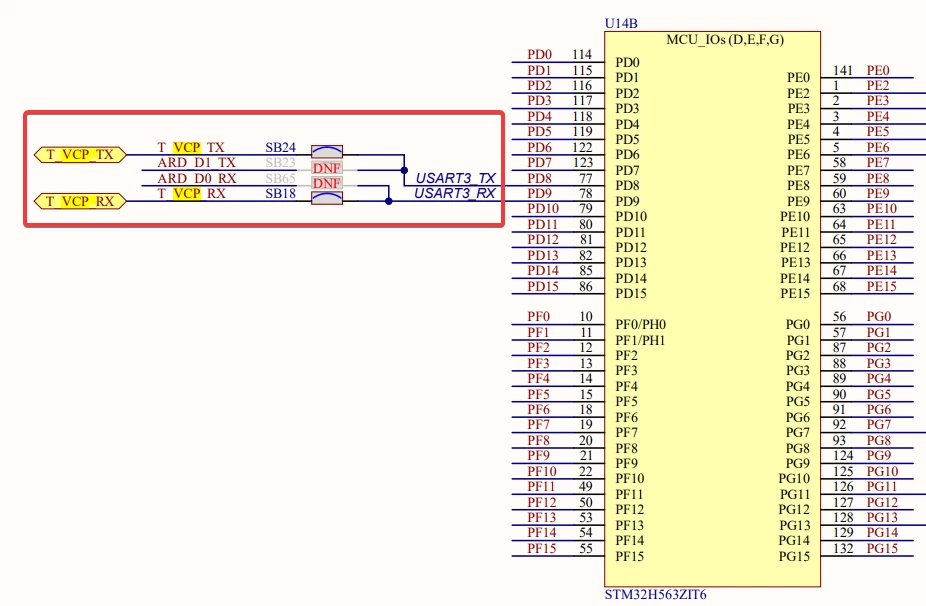
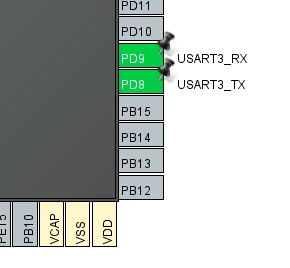
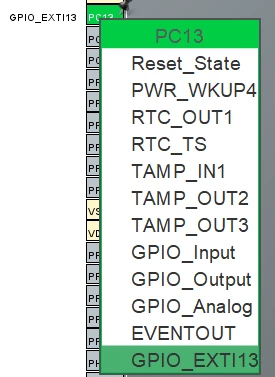
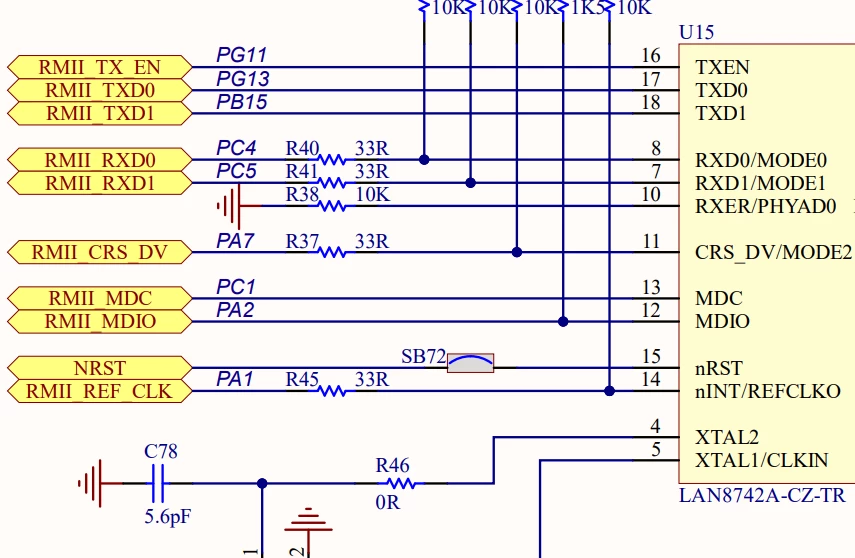
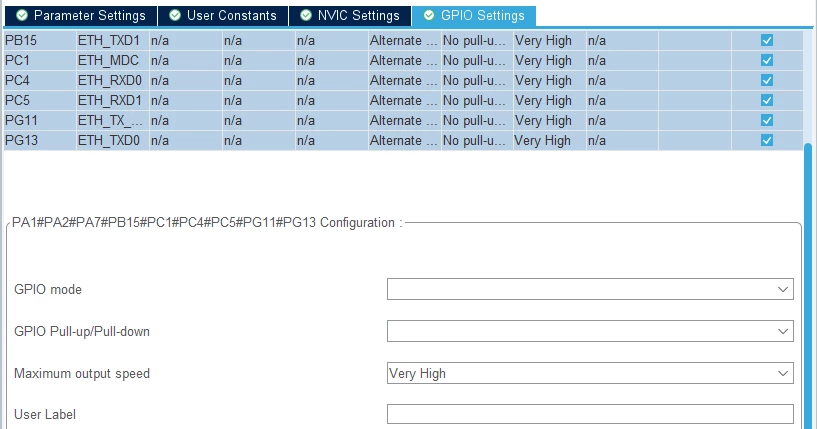
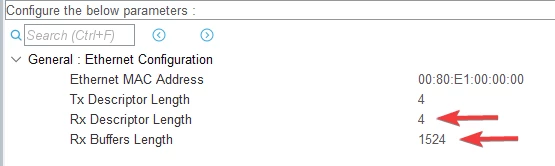
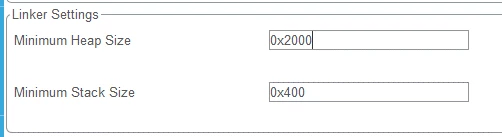
/* USER CODE BEGIN PD */
#ifdef __GNUC__
#define PUTCHAR_PROTOTYPE int __io_putchar(int ch)
#else
#define PUTCHAR_PROTOTYPE int fputc(int ch, FILE *f)
#endif
/* USER CODE END PD */
/* USER CODE BEGIN 0 */
int __io_putchar(int ch)
{
 /* Place your implementation of fputc here */
 /* e.g. write a character to the USART3 and Loop until the end of transmission */
 HAL_UART_Transmit(&huart3, (uint8_t *)&ch, 1, 0xFFFF);
 return ch;
}
/* USER CODE END 0 */
Don’t forget to include <stdio.h> since we are going to use printf.
2.2 Configuring PHY
Before configuring Ethernet descriptors, we must set up the physical interface. This involves importing the PHY library into our project and preparing the configuration for the initialization function. To import the source and header files:
- Drag lan8742.h into the Inc/ folder.
- Drag lan8742.c into the Src/ folder.
These files are typically located at:
C:\Users\%USERNAME%\STM32Cube\Repository\STM32Cube_FW_H5_V1.1.1\Drivers\BSP\Components\lan8742
If done correctly, your folder structure should now include:
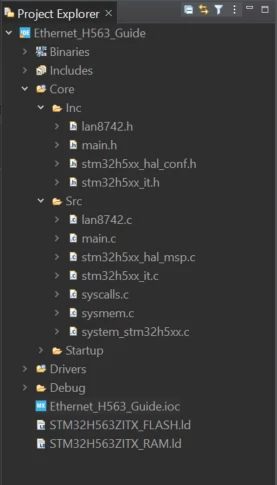
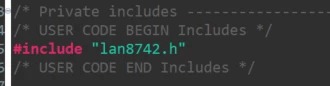
Once the files are in the correct folders, you can include lan8742.h in your project as follows:
For PHY initialization, declare a struct and assign private IO functions to it, enabling the following tasks:
- Initialize the MDIO clock, corresponding to the signal used for sending and receiving data to and from PHY registers.
- Deinitialize the PHY.
- Read the contents of a specific register.
- Write data to a specific register.
- Get the current tick value.
Declare the struct and write the function prototypes in the appropriate area as follows:
/* USER CODE BEGIN PFP */
int32_t ETH_PHY_INTERFACE_Init(void);
int32_t ETH_PHY_INTERFACE_DeInit (void);
int32_t ETH_PHY_INTERFACE_ReadReg(uint32_t DevAddr, uint32_t RegAddr, uint32_t *pRegVal);
int32_t ETH_PHY_INTERFACE_WriteReg(uint32_t DevAddr, uint32_t RegAddr, uint32_t RegVal);
int32_t ETH_PHY_INTERFACE_GetTick(void);
/* USER CODE END PFP */
/* Private user code ---------------------------------------------------------*/
/* USER CODE BEGIN 0 */
lan8742_Object_t LAN8742;
lan8742_IOCtx_t LAN8742_IOCtx = {ETH_PHY_INTERFACE_Init,
 ETH_PHY_INTERFACE_DeInit,
 ETH_PHY_INTERFACE_WriteReg,
 ETH_PHY_INTERFACE_ReadReg,
 ETH_PHY_INTERFACE_GetTick};
Now, implement the previously declared functions so they can be utilized when called. Copy the following implementations into your main file:
/* USER CODE BEGIN 4 */
int32_t ETH_PHY_INTERFACE_Init(void)
{
 /* Configure the MDIO Clock */
 HAL_ETH_SetMDIOClockRange(&heth);
 return 0;
}
int32_t ETH_PHY_INTERFACE_DeInit (void)
{
 return 0;
}
int32_t ETH_PHY_INTERFACE_ReadReg(uint32_t DevAddr, uint32_t RegAddr, uint32_t *pRegVal)
{
 if(HAL_ETH_ReadPHYRegister(&heth, DevAddr, RegAddr, pRegVal) != HAL_OK)
 {
 return -1;
 }
 return 0;
}
int32_t ETH_PHY_INTERFACE_WriteReg(uint32_t DevAddr, uint32_t RegAddr, uint32_t RegVal)
{
 if(HAL_ETH_WritePHYRegister(&heth, DevAddr, RegAddr, RegVal) != HAL_OK)
 {
 return -1;
 }
 return 0;
}
int32_t ETH_PHY_INTERFACE_GetTick(void)
{
 return HAL_GetTick();
}
/* USER CODE END 4 */
The last step in the PHY groundwork is to create a function for handling speed and duplex autonegotiation. This function will:
- Check if the PHY is properly initialized by reading the Link state.
- Assign the corresponding speed and duplex settings to the variables used to adjust the MAC configuration.
- Call the Ethernet start function in interrupt mode to initiate transmission/reception at the MAC and DMA layers.
Copy the code for this function below the PHY initialization functions within the /* USER CODE BEGIN 4 */ section, and do not forget to declare the function prototype above.
void ETH_StartLink()
{
 ETH_MACConfigTypeDef MACConf = {0};
 int32_t PHYLinkState = 0U;
 uint32_t linkchanged = 0U, speed = 0U, duplex =0U;
 PHYLinkState = LAN8742_GetLinkState(&LAN8742);
 if(PHYLinkState <= LAN8742_STATUS_LINK_DOWN)
 {
 HAL_ETH_Stop(&heth);
 }
 else if(PHYLinkState > LAN8742_STATUS_LINK_DOWN)
 {
 switch (PHYLinkState)
 {
 case LAN8742_STATUS_100MBITS_FULLDUPLEX:
 duplex = ETH_FULLDUPLEX_MODE;
 speed = ETH_SPEED_100M;
 linkchanged = 1;
 break;
 case LAN8742_STATUS_100MBITS_HALFDUPLEX:
 duplex = ETH_HALFDUPLEX_MODE;
 speed = ETH_SPEED_100M;
 linkchanged = 1;
 break;
 case LAN8742_STATUS_10MBITS_FULLDUPLEX:
 duplex = ETH_FULLDUPLEX_MODE;
 speed = ETH_SPEED_10M;
 linkchanged = 1;
 break;
 case LAN8742_STATUS_10MBITS_HALFDUPLEX:
 duplex = ETH_HALFDUPLEX_MODE;
 speed = ETH_SPEED_10M;
 linkchanged = 1;
 break;
 default:
 break;
 }
 if(linkchanged)
 {
 HAL_ETH_GetMACConfig(&heth, &MACConf);
 MACConf.DuplexMode = duplex;
 MACConf.Speed = speed;
 MACConf.DropTCPIPChecksumErrorPacket = DISABLE;
 MACConf.ForwardRxUndersizedGoodPacket = ENABLE;
 HAL_ETH_SetMACConfig(&heth, &MACConf);
 HAL_ETH_Start_IT(&heth);
 }
 }
}
Note that CRC checking is disabled in this example, as CRC calculation during transmission from the PC is not included. You are welcome to implement your own function and re-enable this feature in the MAC configuration. Additionally, for testing purposes with short payloads (size < 64 bytes), the ForwardRxUndersizedGoodPacket option should be enabled.
2.3 Configuring Ethernet
2.3.1 Buffers memory allocation
When HAL_ETH_START_IT() is called, it begins by constructing descriptors. It populates the previously zero-initialized descriptors with values corresponding to user-selected features, such as VLAN, TSO, PTP, etc. To build the receive descriptors, memory blocks must be allocated for each descriptor, necessitating the definition of the HAL_ETH_RxAllocateCallback function.
void HAL_ETH_RxAllocateCallback(uint8_t ** buff) {
 ETH_BufferTypeDef * p = malloc(100);
 if (p)
 {
 * buff = (uint8_t * ) p + offsetof(ETH_AppBuff, buffer);
 p -> next = NULL;
 p -> len = 100;
 } else {
 * buff = NULL;
 }
}
The HAL_ETH_RxAllocateCallback function begins by calling malloc (ensure to include <stdlib.h>) to allocate a block of 100 bytes. The buffer address is then aligned with the buffer address member in the ETH_AppBuff structure. This structure facilitates the organization of each frame and its contents in a forward-linked list. The struct is declared as follows:
/* USER CODE BEGIN PTD */
typedef struct {
 ETH_BufferTypeDef *AppBuff;
 uint8_t buffer[100]__ALIGNED(32);
} ETH_AppBuff;
/* USER CODE END PTD */
2.3.2 Frame organization
Since we are working with forward-linked lists, we need to define a function that constructs this chain of nodes, organizing it to ensure flawless frame reconstruction. In this case, we have HAL_ETH_RxLinkCallback(). The implementation is as follows:
void HAL_ETH_RxLinkCallback(void ** pStart, void ** pEnd, uint8_t * buff, uint16_t Length)
{
 ETH_BufferTypeDef ** ppStart = (ETH_BufferTypeDef ** ) pStart;
 ETH_BufferTypeDef ** ppEnd = (ETH_BufferTypeDef ** ) pEnd;
 ETH_BufferTypeDef * p = NULL;
 p = (ETH_BufferTypeDef * )(buff - offsetof(ETH_AppBuff, buffer));
 p -> next = NULL;
 p -> len = 100;
 if (! * ppStart)
 {
 * ppStart = p;
 } else
 {
 ( * ppEnd) -> next = p;
 }
 * ppEnd = p;
}
2.3.3 initialization sequence
Now that we have prepared all the necessary functions to operate the Ethernet on the STM32H5, all that remains is to call these functions in MX_ETH_Init() as shown below:
 /* USER CODE BEGIN ETH_Init 2 */
 /* Set PHY IO functions */
 LAN8742_RegisterBusIO(&LAN8742, &LAN8742_IOCtx);
 /* Initialize the LAN8742 ETH PHY */
 LAN8742_Init(&LAN8742);
 /* Initialize link speed negotiation and start Ethernet peripheral */
 ETH_StartLink();
 /* USER CODE END ETH_Init 2 */
We can also define callback functions for HAL_ETH_TxCpltCallback and HAL_ETH_RxCpltCallback to be executed upon successful transmission or reception, respectively.
void HAL_ETH_TxCpltCallback(ETH_HandleTypeDef * heth)
{
 printf("Packet Transmitted successfully!\r\n");
 fflush(0);
}
void HAL_ETH_RxCpltCallback(ETH_HandleTypeDef * heth)
{
 printf("Packet Received successfully!\r\n");
 fflush(0);
}
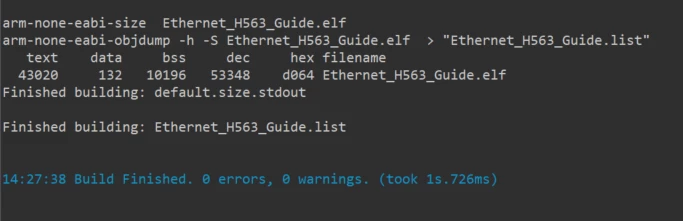
If all goes well, you should get no errors or warnings when you build the project.
3. Testing the application
To test our application, we construct a ping pong communication between an STM32H723 board and STM32H563 board. When one of the boards transmits a frame, the other board receives the data and sends a response. This process repeats itself until interrupted by the user.
4.1 Transmit configuration
We are going to construct a basic Ethernet frame, prepare the Tx Descriptor, and send it to another host. To do this, we start by creating a function that constructs an Ethernet frame from given arguments. A simple implementation might look like the following:
void ETH_ConstructEthernetFrame(ethernet_frame_t * frame, uint8_t * dest_mac, uint8_t * src_mac, uint8_t * type, uint8_t * payload, uint16_t payload_len)
{
 // Copy the destination MAC address
 memcpy(frame -> dest_mac, dest_mac, 6);
 // Copy the source MAC address
 memcpy(frame -> src_mac, src_mac, 6);
 // Set the Ethernet type field
 memcpy(frame -> type, type, 2);
 // Copy the payload data
 memcpy(frame -> payload, payload, payload_len);
}
To facilitate data placement in Ethernet frame fields, we create a struct that comprises these fields. It looks like the following:
typedef struct {
 uint8_t dest_mac[6];
 uint8_t src_mac[6];
 uint8_t type[2];
 uint8_t payload[100];
} ethernet_frame_t;
Next, we can construct our frame by calling the function we defined earlier with values of our choosing. Here, I have chosen to send a frame with a custom payload that I have encoded in hexadecimal and chose the STM32H723 board MAC address as the destination address.
 /* USER CODE BEGIN 1 */
 ETH_BufferTypeDef TxBuffer;
 ethernet_frame_t frame;
 uint8_t dest_mac[] = {0x00, 0x80, 0xE1, 0x00, 0x00, 0x10}; // Destination MAC Address
 uint8_t src_mac[] = {0x00, 0x80, 0xE1, 0x00, 0x00, 0x00}; // Source MAC Address
 uint8_t type[] = {0x08,0x00 }; // EtherType set to IPV4 packet
 uint8_t payload[] = {0x54,0x65,0x73,0x74,0x69,0x6e,0x67,0x20,0x45,0x74,0x68,0x65,0x72,0x6e,0x65,0x74,0x20,0x6f,0x6e,0x20,0x53,0x54,0x4d,0x33,0x32};
 uint16_t payload_len = sizeof(payload);
 /* USER CODE END 1 */
Now, we can call the frame construction function we just defined and prepare a transmit buffer, as illustrated in the example below.
/* USER CODE BEGIN 2 */
ETH_ConstructEthernetFrame(&frame, dest_mac, src_mac, type, payload, payload_len);
TxBuffer.buffer = (uint8_t *)&frame;
TxBuffer.len = sizeof(dest_mac) + sizeof(src_mac) + sizeof(type) + payload_len;
TxBuffer.next = NULL;
TxConfig.TxBuffer = &TxBuffer;
/* USER CODE END 2 */
Moving on, we utilize the user button configured in CubeMX to transmit a frame upon detecting a rising edge external interrupt. Therefore, we must define the HAL_GPIO_EXTI_Callback() function in the user section to be executed when the button is pressed.
void HAL_GPIO_EXTI_Callback(uint16_t GPIO_Pin)
{
 if (GPIO_Pin == GPIO_PIN_13) {
 HAL_ETH_Transmit_IT( & heth, & TxConfig);
 HAL_ETH_ReleaseTxPacket( & heth);
 HAL_ETH_ReadData( & heth, (void ** ) & frame_Rx);
 } else {
 __NOP();
 }
}
4.2 Callback configuration
To maintain the continuous exchange in the ping-pong communication protocol, it is essential to establish the appropriate callback functions corresponding to each event: Transmit complete and receive complete. In each of these functions, we perform a simple action: toggling an LED. Specifically, within the receive complete callback (denoted as RxCplt), we not only toggle an LED, but also initiate a new transmission upon the successful reception of data. This ensures that for every reception of a frame, another frame is transmitted in response, perpetuating the communication cycle. The following code snippet should be implemented identically on both boards to achieve the desired ping-pong effect:
void HAL_ETH_TxCpltCallback(ETH_HandleTypeDef * heth)
{
 printf("[%d] Packet Transmitted to H5!\r\n", ++inc);
 fflush(0);
 HAL_GPIO_WritePin(Led_Red_GPIO_Port, Led_Red_Pin, GPIO_PIN_RESET);
 HAL_GPIO_WritePin(Led_Green_GPIO_Port, Led_Green_Pin, GPIO_PIN_RESET);
 HAL_GPIO_WritePin(Led_Orange_GPIO_Port, Led_Orange_Pin, GPIO_PIN_RESET);
 HAL_GPIO_WritePin(Led_Green_GPIO_Port, Led_Green_Pin, GPIO_PIN_SET);
}
void HAL_ETH_RxCpltCallback(ETH_HandleTypeDef * heth)
{
 HAL_ETH_ReadData(heth, (void ** ) & frame_Rx);
 printf("[%d] Packet Received from H5!\r\n", ++inc);
 fflush(0);
 HAL_ETH_Transmit_IT(heth, & TxConfig);
 HAL_ETH_ReleaseTxPacket(heth);
 HAL_GPIO_WritePin(Led_Red_GPIO_Port, Led_Red_Pin, GPIO_PIN_RESET);
 HAL_GPIO_WritePin(Led_Green_GPIO_Port, Led_Green_Pin, GPIO_PIN_RESET);
 HAL_GPIO_WritePin(Led_Orange_GPIO_Port, Led_Orange_Pin, GPIO_PIN_RESET);
 HAL_GPIO_WritePin(Led_Orange_GPIO_Port, Led_Orange_Pin, GPIO_PIN_SET);
}
4.3 Demonstration
Finally, all that is left to do is to build the project and test it. To do that, we need to open a terminal emulator and connect to the serial COM port at the correct speed. After running our project and initializing all the necessary peripherals, we can attempt to send an Ethernet frame to the board. If successful, this triggers the callback function, which starts the ping pong communication between the two boards.
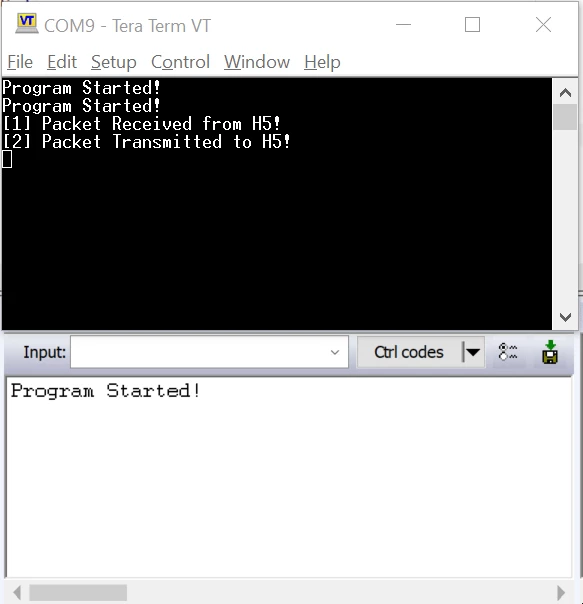
PS: This example does not handle memory management of received packets. It serves only as a mean to explain the programming process of ethernet to ease the setup when using middlewares
Conclusion
In this article, we tried to explain the necessary steps needed to implement a simple ethernet application that sends and receives frames and debug common problems. This example familiarizes the user with the Ethernet driver provided by ST and used by middleware.
