2026-04-27 10:12 AM
Hello,
I would like to learn if there is an easy way in STM32CubeMX2 to start a new project with an existing ioc2 file. It seems that the only way I can do this is make a copy of the ioc2 file, do a text find and replace for the name of the project and reopen the project in MX2.
In essence, I like to start a project from a working ioc2 configuration and modify it to work on a fork of the project. I don't want to recreate a complex configuration from scratch because I found the hard way that it is easy to make mistakes or to omit something.
Thank you,
-Gil
Solved! Go to Solution.
2026-04-27 10:26 AM - edited 2026-04-27 10:26 AM
Hello,
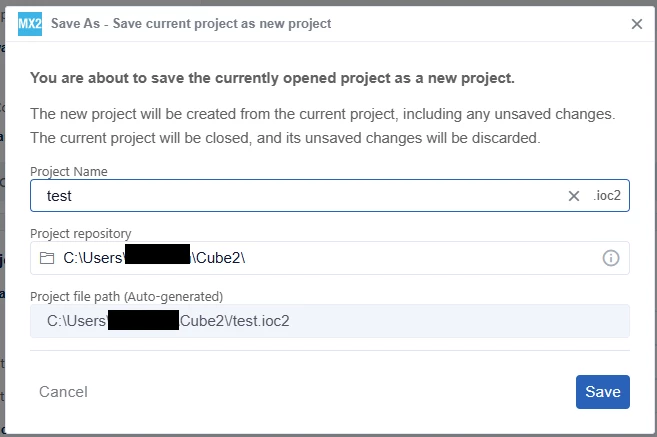
You can open the working ioc2 configuration and click Project > Save As. You will then be prompted to enter a new project name and a new directory.
Best regards,
2026-04-27 10:26 AM - edited 2026-04-27 10:26 AM
Hello,
You can open the working ioc2 configuration and click Project > Save As. You will then be prompted to enter a new project name and a new directory.
Best regards,
2026-04-27 10:29 AM
Thank you @STackPointer64!
2026-05-01 11:49 PM
Hi @STackPointer64 ,
I wanted to note one issue related to the 'Save As' feature.
After I enter the project name (I2C_new_project_name) and the project repository (/home/gil/.../I2C_new_project_name) I click the Save button. I open the newly created ioc2 file with a text editor and I notice that the source code path is the one of the old project:
"CMake": {
"outputPath": "I2C_old_project_name_cmake",
"toolchain": "GCC",
"exportSource": "include-packs-from-local",
"removeBoard": true
}
I was expecting to see the source code path of the new project. Sure enough if I generate the project with this ioc2 file it will write to the I2C_old_project_name_cmake directory.
I edited the ioc2 file to change the source code path to the new path to fix this issue.
Regards,
Gil