2025-11-07 2:13 AM
Hello,
if you are using macOS and STM32CubeIDE and need it productively you should currently refrain updating your macOS. Due to a bug in Eclipse (https://github.com/eclipse-platform/eclipse.platform.swt/issues/2621) text selection does no more work via dragging your mouse or using shift+arrows.
There is already a fix but STM32CubeIDE does not provide the fix as update as of now.
I already filed a case.

Solved! Go to Solution.
2025-11-07 6:00 AM
Hello @st_otto
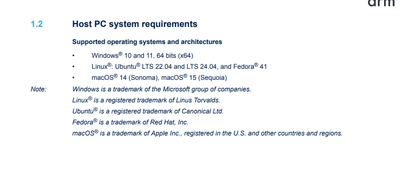
In the meantime, STM32CubeIDE 1.19.0 is not supported on macOS 26.1, according to release note RN0114.
To give better visibility on the answered topics, please click on Accept as Solution on the reply which solved your issue or answered your question.
2025-11-07 2:20 AM
Hello @st_otto
I'm currently checking this .I will get back to you as soon as possible
THX
Ghofrane
To give better visibility on the answered topics, please click on Accept as Solution on the reply which solved your issue or answered your question.
2025-11-07 2:34 AM
Thanks @Ghofrane GSOURI
If you need it, this is the case no. I created: 00247560
2025-11-07 6:00 AM
Hello @st_otto
In the meantime, STM32CubeIDE 1.19.0 is not supported on macOS 26.1, according to release note RN0114.
To give better visibility on the answered topics, please click on Accept as Solution on the reply which solved your issue or answered your question.
2025-12-06 3:53 AM
Same for me. Any update or workaround at all?
Thanks.
2025-12-28 2:36 PM
looking on update on this
2026-01-07 5:00 AM
This issue still not resolved even on v2.0.0..How can ST not resolve such a critical issue for months?
2026-01-07 5:28 AM
Just realized that even cmd+c & cmd+v (copy/paste) is not working as well..
2026-01-07 7:17 AM
To Be fare its not ST, its so called Eclipse part of the ST software. But indeed, a lot of frustrations.
2026-01-08 1:58 AM - edited 2026-01-08 2:35 AM
Well.. They should have done their work of integrating the new Eclipse which includes the fix.. I should not have wasted half a day...
Here is a work around that works on STM32CubeIDE v1.19.0.
SWT files inside STM32CubeIDE need to be updated. Do it at your own risk.. Backup your app and files in advance..
Download this file:
Inside the zip look for two SWT files under plugins folder:
org.eclipse.swt_3.132.0.v20251124-0642.jar
org.eclipse.swt.cocoa.macosx.x86_64_3.132.0.v20251124-0642.jar
Open your Applications folder, right click on STM32CubeIDE app and click on show package contents..
Go to Contents/Eclipse/plugins folder..
replace these two files with the ones you have extracted from the new Repository
org.eclipse.swt_3.127.0.v20240903-0618.jar
org.eclipse.swt.cocoa.macosx.x86_64_3.127.0.v20240903-0618.jar
Update the bundles.info File
This file is the "source of truth" for the IDE. We need to update it to point to the new files.
Navigate to: /Applications/STM32CubeIDE.app/Contents/Eclipse/configuration/org.eclipse.equinox.simpleconfigurator/
Open the file bundles.info with a text editor (like TextEdit).
Search for the line starting with org.eclipse.swt,. It will look something like this:
org.eclipse.swt,3.127.0.v20240903-0618,plugins/org.eclipse.swt_3.127.0.v20240903-0618.jar,4,false
Edit that line to match your new version and filename exactly:
org.eclipse.swt,3.132.0.v20251124-0642,plugins/org.eclipse.swt_3.132.0.v20251124-0642.jar,4,false
Search for the line starting with org.eclipse.swt.cocoa.macosx.x86_64
Edit that line as well:
org.eclipse.swt.cocoa.macosx.x86_64,3.132.0.v202511240642,plugins/org.eclipse.swt.cocoa.macosx.x86_64_3.132.0.v20251124-0642.jar,4,false
Save and close the file.
Remove macOS Quarantine
macOS often blocks JAR files downloaded from the internet. Run this in Terminal to ensure the IDE can "see" them:
xattr -d com.apple.quarantine "/Applications/STM32CubeIDE.app/Contents/Eclipse/plugins/org.eclipse.swt"*
Delete the folder: /Applications/STM32CubeIDE v1.19.0.app/Contents/Eclipse/configuration/org.eclipse.osgi/
Delete the SWT cache: rm -rf ~/.swt (in Terminal).
Launch with the -clean Flag
Open Terminal and launch the IDE with the clean flag to force the plugin registry to rebuild:
"/Applications/STM32CubeIDE.app/Contents/MacOS/stm32cubeide" -clean