Associate II
January 30, 2024
Solved

STM32H755 Nucleo M4 core debugging problem.

  • January 30, 2024
  • 4 replies
  • 7064 views

Hello, STM32 community,

I am currently working on a project using the STM32H755ZI-Q Nucleo board, and I've encountered a perplexing issue with the M4 core during debugging. I have written a basic code to toggle two onboard LEDs, and while the code seems to work as expected, the M4 core gets stuck at "Waiting for Debugger Connection" during debugging. Strangely, I can still add breakpoints in the M4 code and pause the LED toggling successfully. The project files are attached. Please can someone help me with resolving the debugging issue for M4? If you find this post irrelevant feel free to delete it.

Solutions I tried:

https://community.st.com/t5/stm32cubeide-mcus/stm32h755-dual-core-debugging-problem/m-p/608795#M22058

https://community.st.com/t5/stm32cubeide-mcus/how-can-i-remove-error-like-waiting-for-debugger-connection/td-p/250559/page/2 

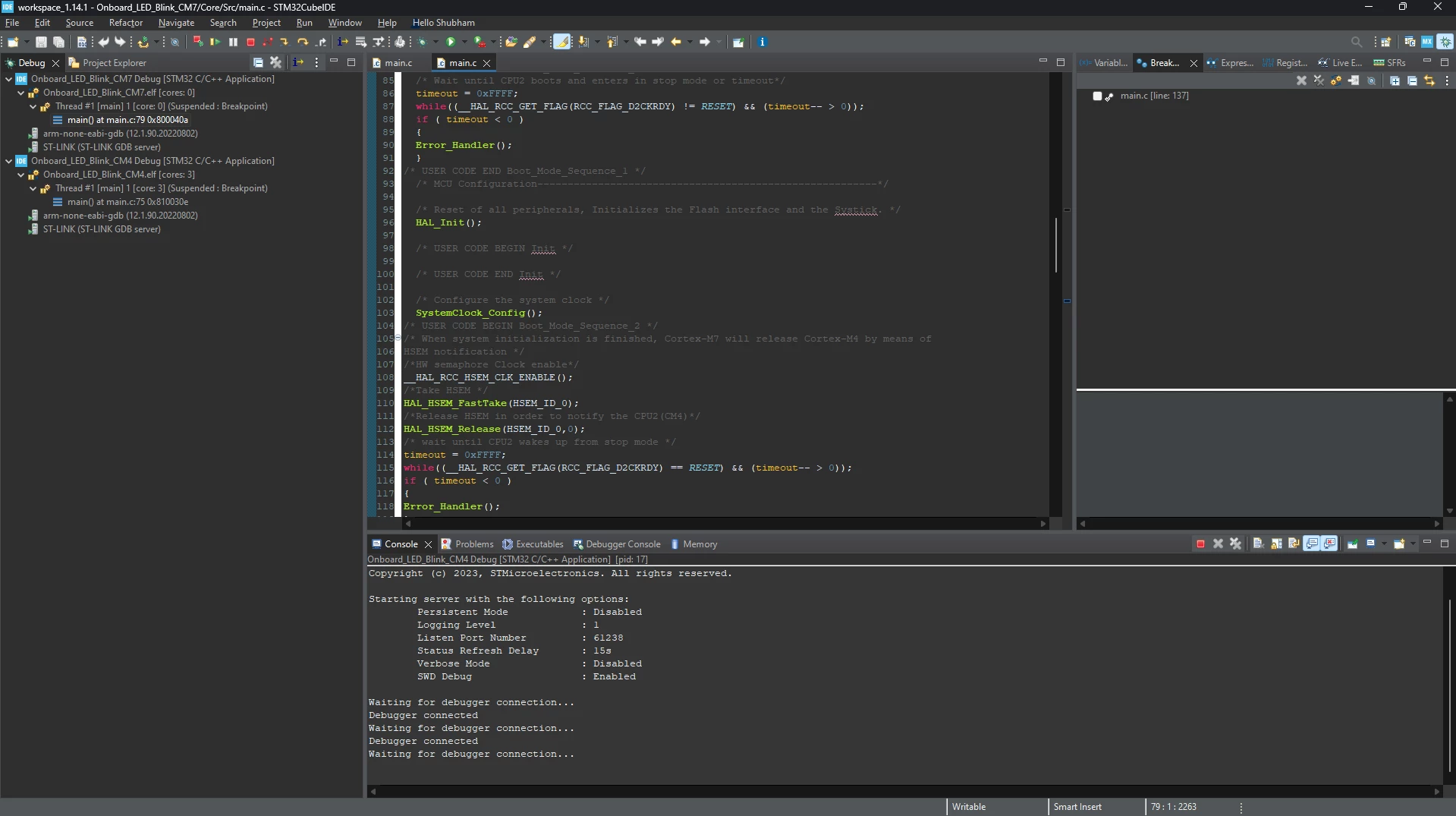
Snaps from my Cube IDE:

shubham_patayane_0-1706572107481.png

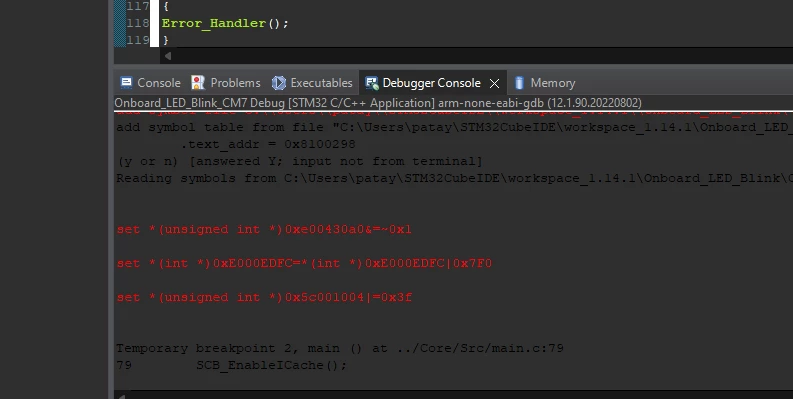
shubham_patayane_2-1706572362995.png


    This topic has been closed for replies.
    Best answer by mƎALLEm

    Hello,

    Not easy to determine the source of the error but from the project you've already posted at the beginning:

    I see two issues:

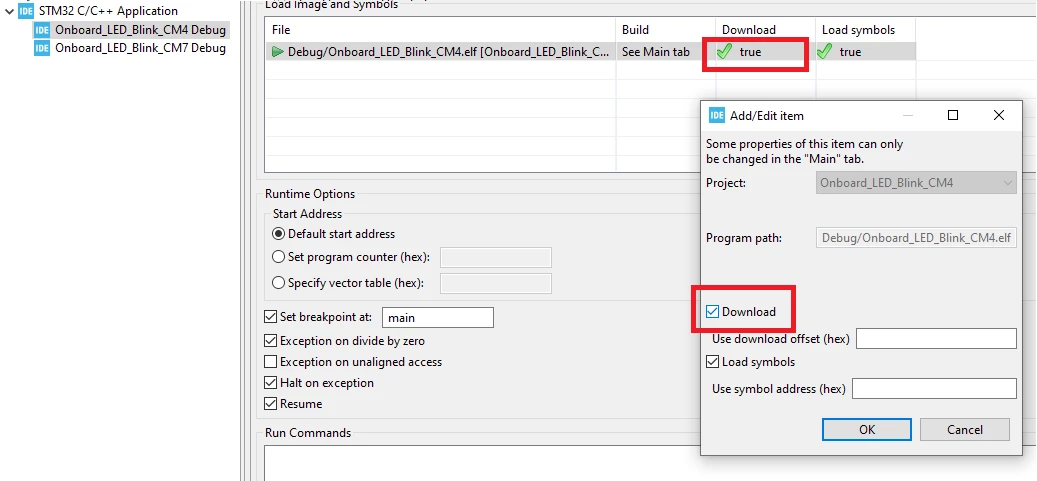
    1- You need to set "Download" in CM4 debug configuration as following: 

    SofLit_0-1710597056702.png

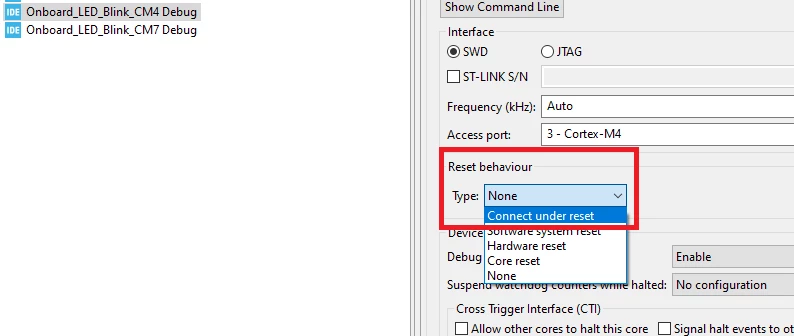
    2- You need to set the reset behavior at least with: Connect under reset:

    SofLit_1-1710597197290.png

    PS:

    1- debugging Dual core is a bit tricky mainly when CM4 is using low power mode:


    HAL_PWREx_EnterSTOPMode(PWR_MAINREGULATOR_ON, PWR_STOPENTRY_WFE, PWR_D2_DOMAIN);


    So if you need to debug CM4 side without issue, comment this line.

    2- You can use this example for your reference: https://github.com/STMicroelectronics/STM32CubeH7/tree/master/Projects/NUCLEO-H745ZI-Q/Examples/GPIO/GPIO_EXTI

    4 replies

    Associate II
    February 1, 2024

    Any Help?


    ST Technical Moderator
    February 1, 2024

    Hello @shubham_patayane and welcome to the Community :)

    Did you used the debugger pins for other purpose? Make sure that your debug pins are Free. 

    I advise you check this article: How to solve debugger connection issues?

    Check also this AN4989 (in sections: 9 Dual-Core microcontrollers debugging, 3. Low-power case) and the AN5361 which contains a checklist helping to avoid the most debug problems.

    In order to give better visibility on the answered topics, please click on 'Best answer' on the reply which solved your issue or answered your question. Thanks
    Associate II
    February 8, 2024

    @Imen.D Tried it all today. But getting the same prob! Left the M7 core running and tried to open the debugger for M4 but it's showing the same error. Is there any other thing I should try? And it sometimes comes and pops up this page (screenshot 2).

    Associate II
    March 16, 2024

    @Imen.D  Any help regarding this new error? M7 core works fine but I am not getting any response from M4.

    mƎALLEm
    mƎALLEmBest answer
    ST Technical Moderator
    March 16, 2024

    Hello,

    Not easy to determine the source of the error but from the project you've already posted at the beginning:

    I see two issues:

    1- You need to set "Download" in CM4 debug configuration as following: 

    SofLit_0-1710597056702.png

    2- You need to set the reset behavior at least with: Connect under reset:

    SofLit_1-1710597197290.png

    PS:

    1- debugging Dual core is a bit tricky mainly when CM4 is using low power mode:


    HAL_PWREx_EnterSTOPMode(PWR_MAINREGULATOR_ON, PWR_STOPENTRY_WFE, PWR_D2_DOMAIN);


    So if you need to debug CM4 side without issue, comment this line.

    2- You can use this example for your reference: https://github.com/STMicroelectronics/STM32CubeH7/tree/master/Projects/NUCLEO-H745ZI-Q/Examples/GPIO/GPIO_EXTI

    To give better visibility on the answered topics, please click "Best answer" on the reply which solved your issue or answered your question.
    Associate II
    March 16, 2024

    Thanks this works. @mƎALLEm