

F F
Associate III
December 8, 2022
Solved

STM32CubeIDE broke after update v1.11.0!

  • December 8, 2022
  • 13 replies
  • 12927 views

I just migrated to the latest v1.11 of STM32CubeIDE.

I was able to update successfully to the latest version, but now my environment is broken!

Issues I see now:

  • Build an stack analyzer gives the following output:

Could not create the view: com.st.stm32cube.ide.mcu.stackanalyzer.stackanalyzer.view

  • Unable to open the dedicated .ioc file:

Gives an NullPointerException

Also I'm unable to restore my environment downloading the latest installer file. The website is having issues and I'm unable to login / download content disappears after login.

Please ST help me with an urgent workaround!

EDIT: Website back online, "solved" by using the installer of v1.11. Please fix this ST!

Regards,
This topic has been closed for replies.
Best answer by Markus GIRDLAND

Copy-pasted from another thread:

Hello there!

I'm fairly certain that you are facing the new issue that my colleague Mattias is mentioning in this thread:

https://community.st.com/s/question/0D53W00001zeSZcSAM/stm32cubeide-intool-update-issue

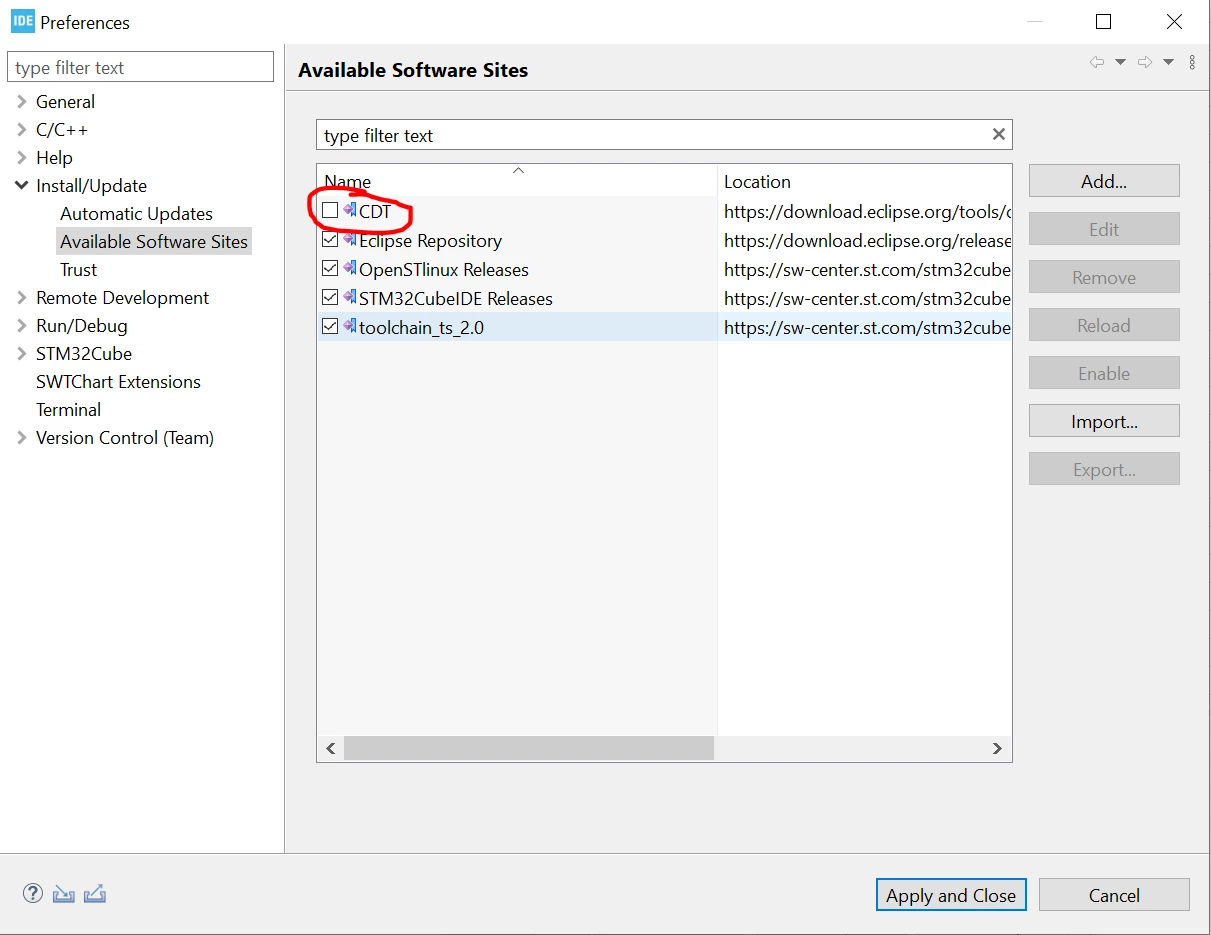
It might work if you remove CDT from the available software sites:

0693W00000WKsYFQA1.png 

We are currently investigating this issue further!

13 replies

EDeme.1
Associate
December 10, 2022

Hi,

I had exactly the same experience and had to remove the IDE and install it again from scratch.

for now it seems working as before

S.Ma
Principal
December 10, 2022

Always do a separated full install so you can backtrack on free sw tools.

JojoS
Associate III
December 11, 2022

I had the same issue, previous version was afaik 1.10.

Just before, I have installed EGit support. Could it be some incompatibility with EGit 6.3? In some other comment I have read that installing EGit broke the CubeIDE installation.

Update:

After reinstalling 1.11 it works. Then add EGit 6.3, works.

Add external toolchain gnu 9.2, after restart broken.Egit still works, ST Plugins are missing.

Exception is too long to post here...

AScha.3
Super User
December 11, 2022

>Add external toolchain gnu 9.2

why ??

"If you feel a post has answered your question, please click ""Accept as Solution""."
JojoS
Associate III
December 11, 2022

gcc 10 has changed to default -fno-common, and some third party code has used tentative definitions.

https://gcc.gnu.org/gcc-10/porting_to.html

Switching the toolchain versions was no problem in STM32CubeIDE 1.10

APagl
Associate III
December 11, 2022

I had the same issue plus some others: custom and default editor appearances are missing (code appears black on white, nothing else), all run/debug configurations exist on disk as before but are not found by the IDE, I cannot build, not only are all builder preference configs missing, but project nature and most other project related preferences as well.

I removed STMCubeIDE and reinstalled 1.11. I removed it again and installed the previous version that ran perfectly, 1.10. However, all broken still. Removed again and reinstalled 1.11. No luck.

I have a ticket in to ST and am waiting.

bully
Senior
December 11, 2022

Same experience. I cannot do anything - it's fully broken...

APagl
Associate III
December 11, 2022
I should have mentioned. Mac. Monterrey.
S.Ma
Principal
December 12, 2022

How much improductive time did cost you this upgrade?

F F
F FAuthor
Associate III
December 12, 2022

This cost me several hours (since I was also not able to reinstall my IDE). Not so happy with it.

Issue "solved" by installing the installer from the website (when it was up again).

APagl
Associate III
December 12, 2022

Update which I sent to support:

Thanks for all the info.

I'll catch you up with my latest attempts to fix things, which I believe is good news.

Okay, the latest....

I went back to a Time Machine backup from Dec. 6, a couple of days before I updated from 1.10 to 1.11. When I relaunched STM32CubeIDE, I had just about everything. It seemed that my build configs and such were back. Colors were iffy. And oddly the Outline view did not work. I tried restarting and this time, I had an Outline and after some more poking around, my customized colors were also back.

It may be that the only thing left is that in the Error Log view, i get what's below (which are only warnings, were probably there all along, and are likely related to the repositories' not using https).

So, I may be back to working again, but I am only on 1.10 and I am now very wary of upgrading, since I can't know what caused the chaos in the first place.

ERROR LOG WINDOW:

org.eclipse.equinox.p2.repository

Using unsafe http transport to retrieve http://anb0s.github.io/eclox/doxygen, see CVE-2021-41033. Consider using https instead.

org.eclipse.equinox.p2.repository

Using unsafe http transport to retrieve http://download.eclipse.org/egit/updates/content.xml.xz, see CVE-2021-41033. Consider using https instead.

org.eclipse.equinox.p2.repository

Using unsafe http transport to retrieve http://anb0s.github.io/eclox, see CVE-2021-41033. Consider using https instead.

Markus GIRDLAND
Markus GIRDLANDBest answer
ST Employee
December 13, 2022

Copy-pasted from another thread:

Hello there!

I'm fairly certain that you are facing the new issue that my colleague Mattias is mentioning in this thread:

https://community.st.com/s/question/0D53W00001zeSZcSAM/stm32cubeide-intool-update-issue

It might work if you remove CDT from the available software sites:

0693W00000WKsYFQA1.png 

We are currently investigating this issue further!

Associate
December 13, 2022

Hi there,

waiting for an ST solution, I was able to recover the issue by reverting the following references in the file ..\STM32CubeIDE\configuration\org.eclipse.equinox.simpleconfigurator\bundles.info:

  • org.eclipse.launchbar.core,2.5.0.202211062329,plugins/org.eclipse.launchbar.core_2.5.0.202211062329.jar,4,false
  • org.eclipse.launchbar.ui,2.5.0.202211062329,plugins/org.eclipse.launchbar.ui_2.5.0.202211062329.jar,4,false
  • org.eclipse.tools.templates.core,1.3.0.202211062329,plugins/org.eclipse.tools.templates.core_1.3.0.202211062329.jar,4,false
  • org.eclipse.tools.templates.ui,1.4.0.202211062329,plugins/org.eclipse.tools.templates.ui_1.4.0.202211062329.jar,4,false
  • org.eclipse.tools.templates.freemarker,1.3.0.202211062329,plugins/org.eclipse.tools.templates.freemarker_1.3.0.202211062329.jar,4,false

to the original references:

  • org.eclipse.launchbar.core,2.4.200.202106071539,plugins/org.eclipse.launchbar.core_2.4.200.202106071539.jar,4,false
  • org.eclipse.launchbar.ui,2.4.400.202201122357,plugins/org.eclipse.launchbar.ui_2.4.400.202201122357.jar,4,false
  • org.eclipse.tools.templates.core,1.2.0.202008310315,plugins/org.eclipse.tools.templates.core_1.2.0.202008310315.jar,4,false
  • org.eclipse.tools.templates.ui,1.3.0.202110311121,plugins/org.eclipse.tools.templates.ui_1.3.0.202110311121.jar,4,false
  • org.eclipse.tools.templates.freemarker,1.2.200.202110311121,plugins/org.eclipse.tools.templates.freemarker_1.2.200.202110311121.jar,4,false

I highly recommend making a copy of the file before changing it to be sure you can restore it if you make a mistake

In my case the change was generated during the upgrade to v.1.11.0 by the update of Wittestein StateViewer plugin, but it is possible that the update of other plugins would do the same.