

Associate III
February 3, 2025
Solved

Can't connect to the MCU via STLinkV2 [ST-LINK error (DEV_CONNECT_ERR)]

  • February 3, 2025
  • 7 replies
  • 3425 views

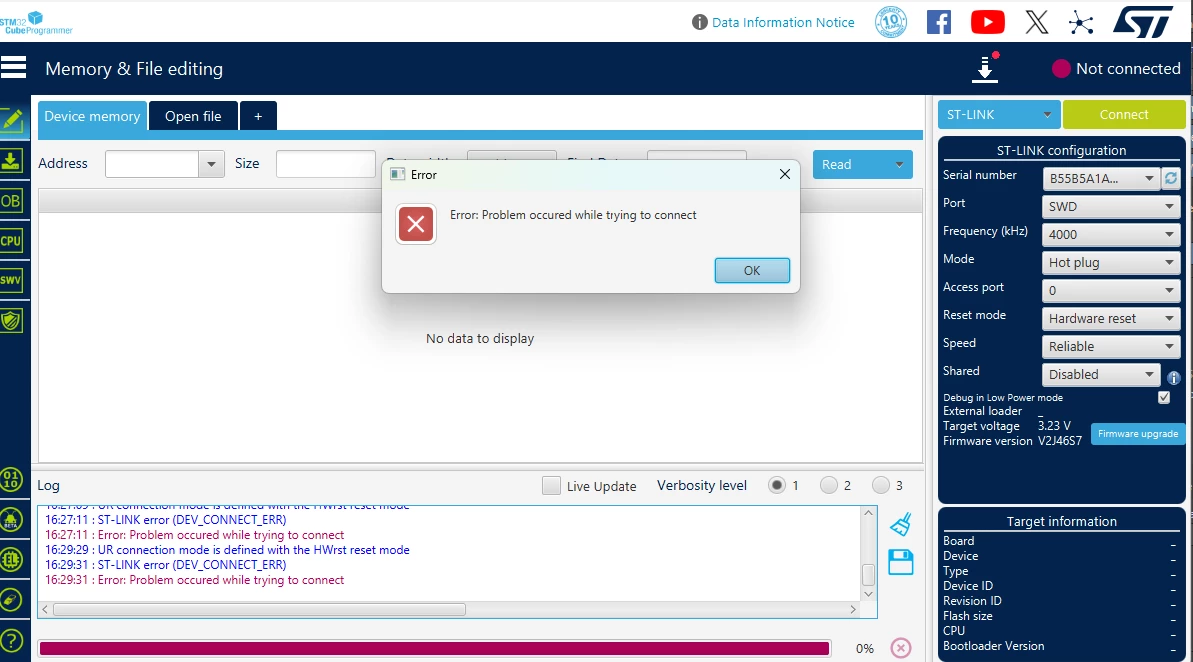
I have made a PCB with the STM32C011F6P6 on it and am trying to program it via an ST-LinkV2. While trying it out yesterday, it connected just fine with the cube programmer. Now I am trying to do the same thing again, but both the cube programmer and the cube ide tell me that they can't connect.
DavidL__0-1738596581482.png

I have already upgraded the firmware via "stsw-link004".

Does someone have an idea what might be causing this?

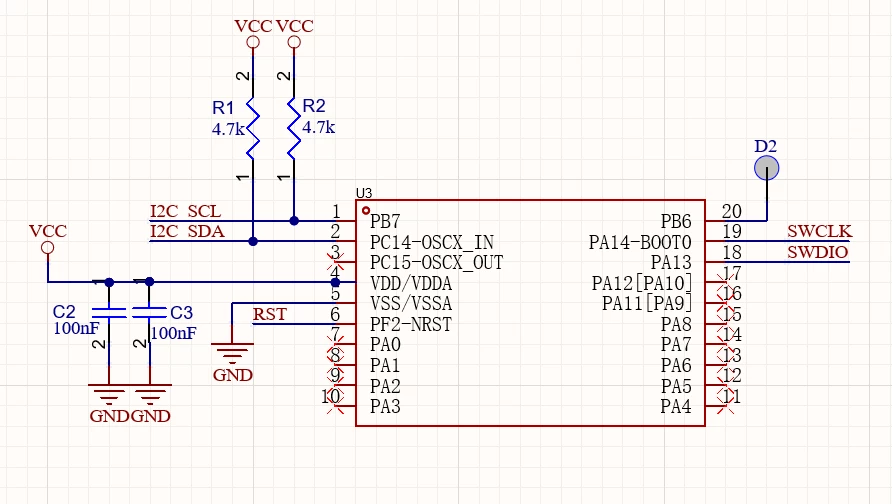
Schematic of my MCU wiring:
DavidL__1-1738596722358.png


This topic has been closed for replies.
Best answer by DavidL_

There was an issue with the power supply that causes the errors. Fixed that and it worked just fine.

7 replies

STTwo-32
ST Technical Moderator
February 3, 2025

Hello @DavidL_ 

First, stsw-link004 is obsolete. So, please make sure to use the STM32CubeProgrammer last version (V2.18.0).

Also, could you please share a picture of your ST-Link. It may be a Clone. More details on this article: How to recognize a genuine ST-LINK/V2 versus a clo... - STMicroelectronics Community

Best Regards.

STTwo-32


To give better visibility on the answered topics, please click on Accept as Solution on the reply which solved your issue or answered your question.
DavidL_Author
Associate III
February 3, 2025

I don't have access to an original one, the one I have access to is this:

DavidL__1-1738597816299.png


STTwo-32
ST Technical Moderator
February 3, 2025

Unfortunately, we can't guarantee anything about a Clone ST-Link. So, I suggest you command a new genuine one if you are looking for good working performance.

Best Regards.

STTwo-32

To give better visibility on the answered topics, please click on Accept as Solution on the reply which solved your issue or answered your question.
AScha.3
Super User
February 3, 2025

in CubeProgrammer:

set mode: normal

+ reset: software reset

-- then try again + show result.

++

put a cap (100nF) on rst to GND !

If you feel a post has answered your question, please click on " Best Answer ".
DavidL_Author
Associate III
February 3, 2025

DavidL__0-1738597770051.png

 Seems to be the same error.

AScha.3
Super User
February 3, 2025

But still pic shows hw reset:

AScha3_0-1738598172544.png

++

on CPU: put a cap (100nF) on rst to GND !!!!!!!

If you feel a post has answered your question, please click on " Best Answer ".
DavidL_AuthorBest answer
Associate III
February 4, 2025

There was an issue with the power supply that causes the errors. Fixed that and it worked just fine.