cancel
Showing results for 
Search instead for 
Did you mean: 

Bug Report: STM32F0xx_DFP 3.1.1 — Registers missing in System Viewer (Keil MDK 5.43a)

Kent
Associate II

Hello ST Support Team,
I am reporting a regression issue with the latest STM32F0xx Device Family Pack (DFP) version 3.1.1 when used with Keil MDK 5.43a.
Problem Description:
Installation Issue: The DFP 3.1.1 often fails to install via the Pack Installer, showing validation errors or failing to resolve dependencies.
Missing Registers: Even when successfully installed, the System Viewer in Debug mode is empty. Peripheral registers (GPIO, RCC, etc.) do not appear for the STM32F030 series.
Environment:
IDE: Keil uVision v5.43a.0
Device: STM32F030xx (all variants)
Pack: Keil::STM32F0xx_DFP.3.1.1
OS: Windows 11
Observations:
The issue seems to be related to the new SVD (System View Description) file structure or pathing in the 3.x.x branch.
Manually pointing to an older SVD file (from DFP v2.2.3) restores the register visibility.
The "System Viewer" list in the "Peripherals" menu remains blank when using the default settings of the 3.1.1 pack.
Request:
Please verify the compatibility of the SVD files in the 3.1.1 pack with the classic Keil uVision debugger interface and check for possible pathing errors in the .pdsc file.
Best regards,
[Kent]
1 ACCEPTED SOLUTION

Accepted Solutions
KDJEM.1
ST Employee

Hello @Kent;


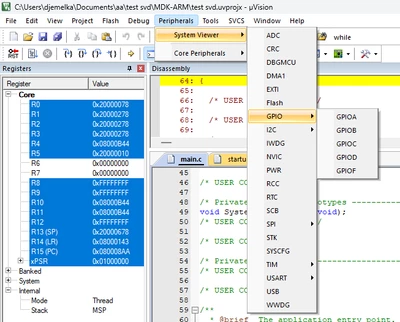
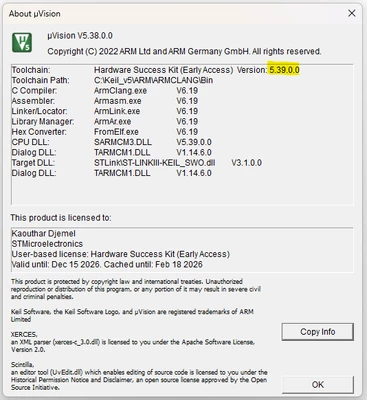
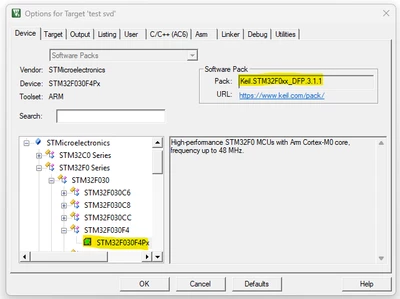
I tested the issue with MDK KEIL version 5.38 and STMF0xx_DFP 3.1.1 version and I can see the peripherals registers as shown in the below figures:

KDJEM1_1-1770800218765.png

KDJEM1_2-1770800435931.png


KDJEM1_0-1770800171730.png


I think the issue is related to KEIL version or KEIL installation.

Could you please try to reinstall the toolchain.

Thank you.

Kaouthar


To give better visibility on the answered topics, please click on Accept as Solution on the reply which solved your issue or answered your question.

View solution in original post

4 REPLIES 4
KDJEM.1
ST Employee

Hello @Kent and welcome to the community;


Could you please try to download the svd file from STM32F0 - Arm Cortex-M0 - USB Microcontrollers - STMicroelectronics.

Then follow the steps shared in this article "How to add or update the SVD file in different toolchains: An example using Nucleo-U575I-Q board" to add the svd file in your project.

Is your issue solved?


Thank you.

Kaouthar

To give better visibility on the answered topics, please click on Accept as Solution on the reply which solved your issue or answered your question.

Hello!

Problem not solved. Peripheral registers (GPIO, RCC, etc.) do not appear for the STM32F030F4P6 series.

2026-02-04 1.png2026-02-04 2.png2026-02-04 3.png2026-02-04 4.pngMDK Keil 5.38a + STM32F0xx_DFP.2.1.1 all working.

Kent
Associate II
Why STM32F0xx_DFP.3.1.1 has size 567kB, STM32F0xx_DFP.2.1.1 but has size 66.07mB. Maybe there is a problem in this?


KDJEM.1
ST Employee

Hello @Kent;


I tested the issue with MDK KEIL version 5.38 and STMF0xx_DFP 3.1.1 version and I can see the peripherals registers as shown in the below figures:

KDJEM1_1-1770800218765.png

KDJEM1_2-1770800435931.png


KDJEM1_0-1770800171730.png


I think the issue is related to KEIL version or KEIL installation.

Could you please try to reinstall the toolchain.

Thank you.

Kaouthar


To give better visibility on the answered topics, please click on Accept as Solution on the reply which solved your issue or answered your question.