Explorer
May 11, 2024 7:38 AM UTC
Solved

STM32CubeProgrammer cannot connect to MCU using j-link

Version: v2.16.0

I`ve downloaded and installed the latest application and was told that the CubeProgrammer could support J-Link now.

the GUI shows that JLink device can be selected:
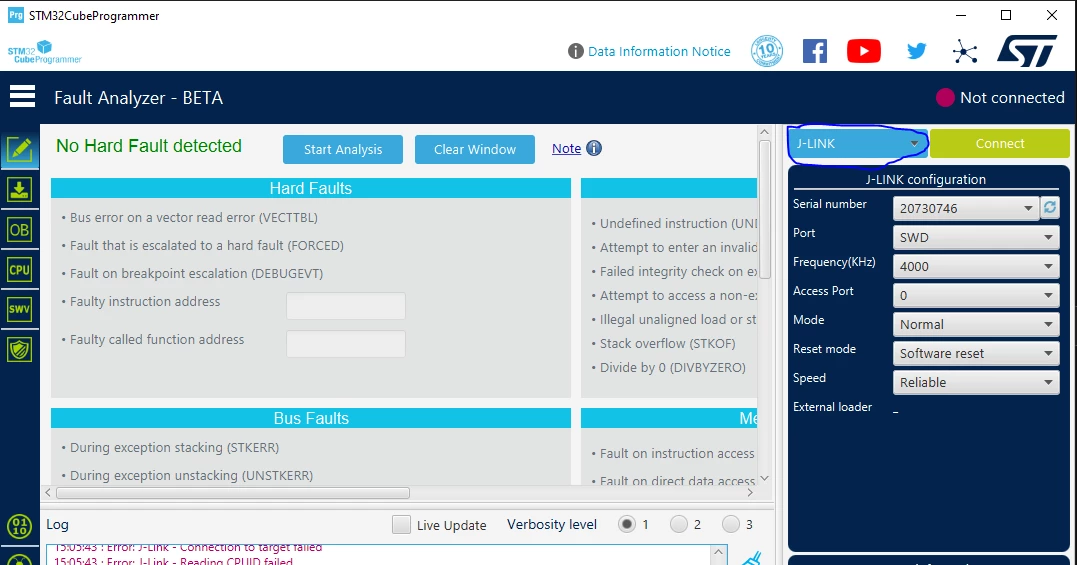
UniverGao_0-1715412382353.png


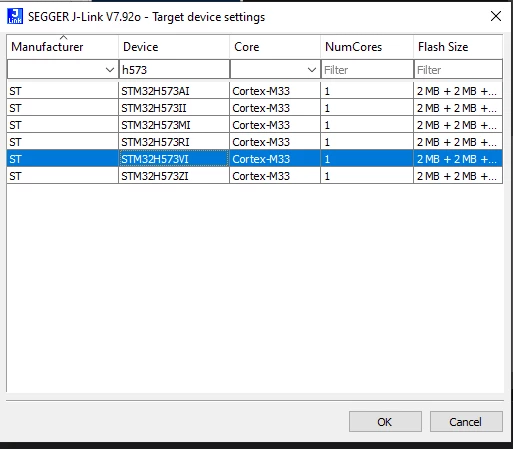
I clicked the connect bottom, the chip select window of JLink was popped out:
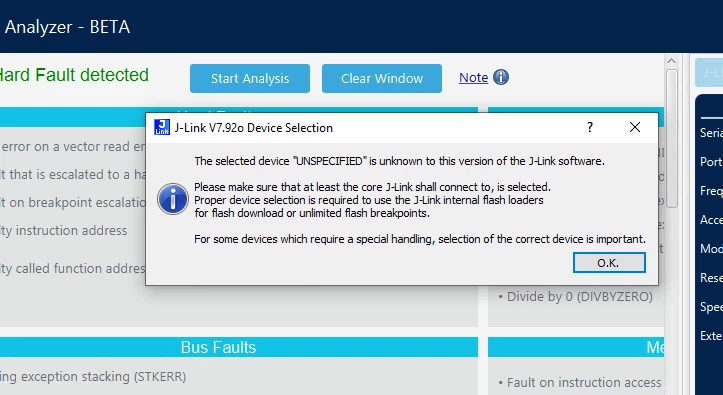
UniverGao_1-1715412644768.png

UniverGao_2-1715412669475.png

after correct chip was selected, the error window showed below:
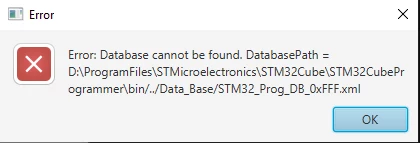
UniverGao_3-1715412735928.png

the error logs like this:


 15:30:23 : UR connection mode is defined with the HWrst reset mode
 15:30:23 : 20730746
 15:30:23 : Error: J-Link - Connection to target failed
 15:30:23 : Error: J-Link - Reading CPUID failed
 15:30:23 : Voltage : 3.30V
 15:31:20 : Error: Database cannot be found. DatabasePath = D:\ProgramFiles\STMicroelectronics\STM32Cube\STM32CubeProgrammer\bin/../Data_Base/STM32_Prog_DB_0xFFF.xml
 15:31:20 : Error: flash loader cannot be loaded. FlashLoaderPath = D:\ProgramFiles\STMicroelectronics\STM32Cube\STM32CubeProgrammer\bin/FlashLoader/0xFFF.stldr
 15:31:20 : Error: Database cannot be found. DatabasePath = D:\ProgramFiles\STMicroelectronics\STM32Cube\STM32CubeProgrammer\bin/../Data_Base/STM32_Prog_DB_0xFFF.xml


 I wander if the app support jlink probe, if not, why I can select it?

This topic has been closed for replies.
AScha.3
AScha.3Best answer
Super User
May 11, 2024 8:50 AM UTC

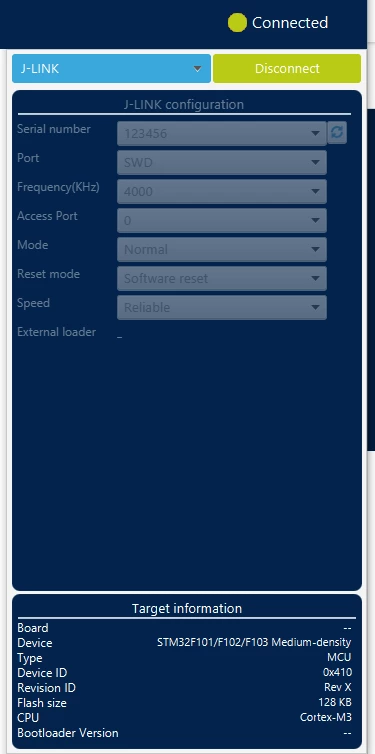
I just tried on my Laptop here, no problem :

AScha3_0-1715417232756.png

AScha3_1-1715417283031.png

Its on Win 10 pro, 22H2 .

ed 

Just i remember : my J-link refused to connect to new H7 series, needs some update to connect to this.

So try connect with an "old" cpu, like the F103 i tested here, to check: problem with J-link version or other.

If you feel a post has answered your question, please click on " Best Answer ".

19 replies

AScha.3
AScha.3Best answer
Super User
May 11, 2024 8:50 AM UTC

I just tried on my Laptop here, no problem :

AScha3_0-1715417232756.png

AScha3_1-1715417283031.png

Its on Win 10 pro, 22H2 .

ed 

Just i remember : my J-link refused to connect to new H7 series, needs some update to connect to this.

So try connect with an "old" cpu, like the F103 i tested here, to check: problem with J-link version or other.

If you feel a post has answered your question, please click on " Best Answer ".
Andrew Neil
Super User
May 11, 2024 8:55 AM UTC

So can the J-Link connect using Segger's utilities?


A complex system that works is invariably found to have evolved from a simple system that worked.A complex system designed from scratch never works and cannot be patched up to make it work.
Explorer
May 14, 2024 11:41 AM UTC

Hello,


I'm having the same problem:

13:24:21 : STM32CubeProgrammer API v2.16.0 | Windows-64Bits
13:26:41 : UR connection mode is defined with the HWrst reset mode
13:26:41 : 52006738
13:26:41 : Error: J-Link - Connection to target failed
13:26:41 : Error: Unable to get Access port number
13:26:41 : Voltage : 3.30V
13:27:04 : Error: Database cannot be found. DatabasePath = C:\Program Files\STMicroelectronics\STM32Cube\STM32CubeProgrammer\bin/../Data_Base/STM32_Prog_DB_0xFFF.xml
13:27:04 : Error: flash loader cannot be loaded. FlashLoaderPath = C:\Program Files\STMicroelectronics\STM32Cube\STM32CubeProgrammer\bin/FlashLoader/0xFFF.stldr
13:27:04 : Error: Database cannot be found. DatabasePath = C:\Program Files\STMicroelectronics\STM32Cube\STM32CubeProgrammer\bin/../Data_Base/STM32_Prog_DB_0xFFF.xml


I found out that the correct database for the STM32 that I'm using (STM32L052K8) should be 0x417, not 0xFFF. Why does it want to choose 0xFFF?


You'll find the configuration I use below:

Meganita_0-1715686849910.png


Andrew Neil
Super User
May 14, 2024 12:05 PM UTC

@Meganita wrote:

I'm having the same problem:


So again the same question: 

Can the J-Link connect using Segger's utilities?

If not, Segger have some help on 'Cannot connect to Target' problems:

https://wiki.segger.com/J-Link_cannot_connect_to_the_CPU


See also this ST knowledgebase article on the subject:

https://community.st.com/t5/stm32-mcus/how-to-solve-debugger-connection-issues/ta-p/49693


A complex system that works is invariably found to have evolved from a simple system that worked.A complex system designed from scratch never works and cannot be patched up to make it work.
Explorer
May 14, 2024 2:55 PM UTC

As you can see below, the connection between the PC and the J-Link is ok, but not the connection to the target. 

SEGGER J-Link Commander V7.96e (Compiled Apr 17 2024 16:26:32)
DLL version V7.96e, compiled Apr 17 2024 16:25:43

Connecting to J-Link via USB...O.K.
Firmware: J-Link V12 compiled Apr 15 2024 17:37:25
Hardware version: V12.00
J-Link uptime (since boot): 0d 00h 00m 03s
S/N: 52006738
License(s): GDB
USB speed mode: High speed (480 MBit/s)
VTref=3.300V (fixed)


Type "connect" to establish a target connection, '?' for help
J-Link>connect
Please specify device / core. <Default>: STM32L052K8 (ALLOW OPT. BYTES)
Type '?' for selection dialog
Device>
Please specify target interface:
 J) JTAG (Default)
 S) SWD
 T) cJTAG
TIF>S
Specify target interface speed [kHz]. <Default>: 4000 kHz
Speed>
Device "STM32L052K8 (ALLOW OPT. BYTES)" selected.


Connecting to target via SWD
InitTarget() start
SWD selected. Executing JTAG -> SWD switching sequence.
Error: Failed to initialized DAP.
Can not attach to CPU. Trying connect under reset.
SWD selected. Executing JTAG -> SWD switching sequence.
Error: Failed to initialized DAP.
Connecting to CPU via connect under reset failed.
InitTarget() end - Took 308ms
Connect failed. Resetting via Reset pin and trying again.
InitTarget() start
SWD selected. Executing JTAG -> SWD switching sequence.
Error: Failed to initialized DAP.
Can not attach to CPU. Trying connect under reset.
SWD selected. Executing JTAG -> SWD switching sequence.
Error: Failed to initialized DAP.
Connecting to CPU via connect under reset failed.
InitTarget() end - Took 308ms
Error occurred: Could not connect to the target device.
For troubleshooting steps visit: https://wiki.segger.com/J-Link_Troubleshooting
J-Link>

I suppose that "DAP" is "Database Path". 

As per the first link you provided, I have checked VTREF. It is 3.3 V.

I have also reduced the speed down to 100 kHz, but I still have the same error.

As per the second link you provided, SWDIO and SWCLK are "used by the debug".

Andrew Neil
Super User
May 14, 2024 3:29 PM UTC

@UniverGao - did you resolve your issue?

A complex system that works is invariably found to have evolved from a simple system that worked.A complex system designed from scratch never works and cannot be patched up to make it work.
Explorer
May 15, 2024 12:46 PM UTC

I didn't solve the issue with the J-Link, but I can now program the STM32. I actually found a Nucleo-L433RC and have been able to program the STM32(L052K8) via ST-Link. 

Andrew Neil
Super User
May 15, 2024 1:39 PM UTC

So there is something wrong with your J-link and/or its setup and/or connections.

Probably best to take that up with Segger:

https://forum.segger.com/index.php/Board/3-J-Link-Flasher-related/ 

A complex system that works is invariably found to have evolved from a simple system that worked.A complex system designed from scratch never works and cannot be patched up to make it work.
Visitor II
Nov 4, 2024 3:20 AM UTC

This can happen if the board is not being powered. It wont be by the j-link.

Visitor II
Nov 8, 2024 8:02 PM UTC

I have the same problem as the original post, there is definitely a bug with the H7S3/programmer/JLink combination.

Windows 11 23H2
STM32CubeProgrammer v2.17.0
J-Link software V8.10f
J-Link V9.40 firmware 2021 May 7 16:26
Board 1: NUCLEO-H755ZI-Q / chip STM32H755ZIT6
Board 2: NUCLEO-H7S3L8    / chip STM32H7S3L8H6

On the H755 board, my J-Link works great. It recognizes the Device ID 0x450:

lro_0-1731092929109.png

And on the NUCLEO-H7S3L8 (Device ID 0x485) the onboard ST-LINK also connects:

lro_1-1731093176603.png

Then, I can change the power supply to leave the ST-LINK unpowered and power on only the H7S3 and connect the J-Link by cable (I double checked the pinout, it's all correct!). The software shows me the same errors as the original post:

lro_2-1731093592167.pnglro_3-1731093642669.png

Apparently it fails to read the Device ID and looks for Device ID 0xFFF which does not exist. Connecting to Access Port 1 instead returns 0xAAA which also does not exist.
Connecting with J-Link Commander software is fine. Reading DBGMCU_IDCODE (@ 0x5C001000) returns the expected Device ID 0x485.

lro_4-1731096130210.png


Visitor II
Mar 10, 2025 11:28 PM UTC

I'm having a similar issue with one of the chip.  It seems to be working fine with the second chip.

TS5_0-1741649152155.pngTS5_1-1741649196464.png

TS5_2-1741649264926.png


Visitor II
May 25, 2025 8:44 AM UTC

jlink.PNG

I just add this tick then it work

FeherAron
Associate II
Sep 26, 2025 5:40 AM UTC

Hello everyone!

I just dropped in, since I had the same problem with J-Link EDU Mini V2.00 and STM32G431 MCU. Updates did not help, and I could connect to the MCU with ST-Link. What solved my connection issue was changing the driver.

For some reason, the J-Link came configured using WinUSB driver. In the J-Link configuration program, I've switched the USB Driver (Windows) to SEGGER, and it instantly worked.