Associate II
July 9, 2026
Solved

How to use PA5 for OPAMP pin in CubeMx for NUCLEO-G431RB

  • July 9, 2026
  • 3 replies
  • 90 views

Thank you for your replies. Good for me to know, that this marking should have been LD2. I wondered that, I may had got something else wrong about this.

It seems to me, that CubeMX assumes, that the SB6 jumper is installed, so you cannot use CubeMX to set the PA5 as input for OPAMP2. But I guess, that you can use some HAL function to do it. Am I right?


CubeMx doesn’t care if SB6 is soldered or not. So remove SB6 and configure PA5 for OPAMP function either in CubeMx or using directly the HAL.

When I look the PIN-out view, PA5 is marked red. When I look the reference manual about OPAMPS:
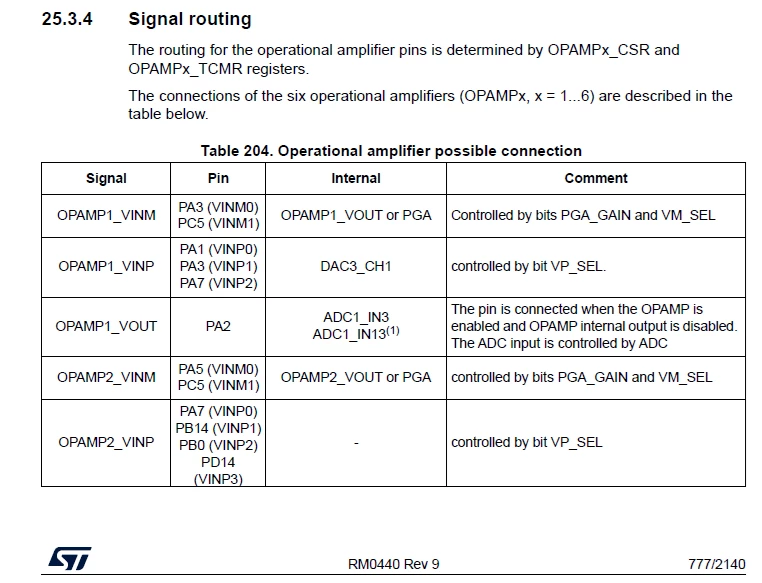
Then it seems possible to have OPAM2 use PA5. In CubeMX I look at OPMP2 mode pull down menu, you got “Standalone Internally connected_IO”. But it is marked red and cannot be selected.

Post split from this thread for a newer question.

    Best answer by mƎALLEm

    Hello,

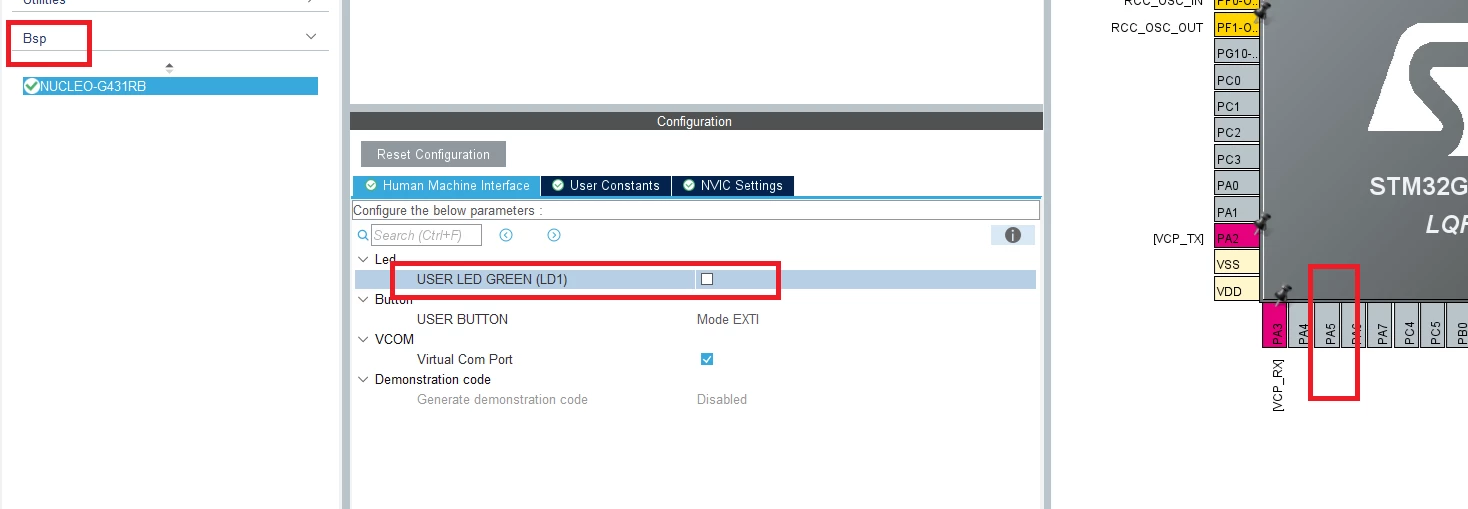
    You can go to the Bsp menu and uncheck the user LED option, as the following:

    As you can see PA5 is no more allocated to the user LED.

    Then configure the Opamp in the Analog menu.

    Hope I’ve answerd your question.

    3 replies

    mƎALLEm
    mƎALLEmBest answer
    ST Technical Moderator
    July 9, 2026

    Hello,

    You can go to the Bsp menu and uncheck the user LED option, as the following:

    As you can see PA5 is no more allocated to the user LED.

    Then configure the Opamp in the Analog menu.

    Hope I’ve answerd your question.

    To give better visibility on the answered topics, please click "Best answer" on the reply which solved your issue or answered your question.
    BackflipAuthor
    Associate II
    July 9, 2026

    Thank you! 

    I was not aware of the Bsp menu. Yes, now it is possible.

    mƎALLEm
    ST Technical Moderator
    July 9, 2026

    Glad to hear your question has been answred.

    In this community, when a question has been answerd you need to mark as Best Answer the comment that has answred your original question.

    Need also to close this thread by marking as Best Answer the post that helped you the most.

    Thank you.


    To give better visibility on the answered topics, please click "Best answer" on the reply which solved your issue or answered your question.