


Prawit Korsri
Visitor II
May 23, 2018
Question

CubeMX: Project generation have problem

Posted on May 23, 2018 at 12:53
Hello guy. 

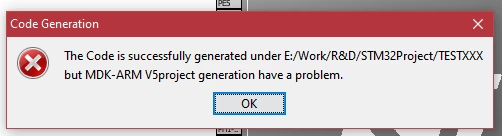
   I' upgrade my CubeMX software to V.4.25.1 every thing is clear no problem. But when we try to generate MDK project CubeMX show an project generate problem ( see in attach pic.) 

   Please tellme how to fix it 

0690X0000060BDBQA2.png

Thank you

EDIT!!:: TrueStudio has the same problem.

#cubemx-4.25 #mdk-arm
This topic has been closed for replies.

33 replies

psanyi
Associate
July 23, 2020

If you still have this issue in version 5.6.1 try to install OpenJDK instead of Java(SE)

FIX: Downloaded the OpenJDK from here:

https://adoptopenjdk.net/

SAlek.3
Visitor II
August 4, 2020

Today I noticed this problem too (CubeMX version 6.0.0). I was sure that the problem was in Java and was not mistaken. I reinstalled Java several times using the installer downloaded from the Java.com website but did not help. Then I downloaded the full installation (offline version), reinstalled it and the problem was solved.

AVerm.2
Visitor II
August 7, 2020

i'm facing this problem after updating to ver 6.0.0. I tried reinstalling it on other folder location

but the problem was not solved. need to fix as the projproject is stuck.

SSaxe.1
Visitor II
August 29, 2020

Hello All,

I faced the same issue and I solved my problem on my own.

You guys might be facing the issue due to same reason.

Please Follow these steps.

  1. Whatever version it is, please read the Readme.html for that particular version and check the java requirements.
  2. Say for example i downloaded v 6.0.1 and hence it was not supporting the java version which was installed in my PC.
  3. See this

0693W000002li0gQAA.jpg4. After matching the java version, please restart the PC(This is important).

5 Still doesn't work ? Uninstall completely including program data and settings and follow the above steps.

Kind Regards

Sandeep Saxena

EMoeh.1
Visitor II
October 3, 2020

The problem depends on the Path, where to create the MKD or TrueStudio files.

For example,

This works: D:\7--COMPILER..........

This does not work: D:\7 COMPILER....................

(double space behind the 7)

Some ASCII symbols are not accepted in the path.

PKulk.2
Visitor II
December 31, 2020

I was facing the same issue for many days & I also tried to switch from versions of STMCubeMx & diferent IDEs.

But it is very silly issue & solution to it also very easy.

You just have to install the Java Run Time Environment (JRE) 8 or below JRE 10 & boom!!! it will work properly with any IDE.

Uninstall the JRE latest versions if you have any(e.g. JRE 14 or JRE 15) & keep only one JRE10 or below v10.

I'm using JRE8. STMCubeMx doesn't support JRE above 10.

You don't have to change anything else. (Project directory, names etc)

DHolz.1
Visitor II
January 26, 2021

I have had the same problem. Witch Java version did you have? If you update the version to the newest version it should work

Associate III
October 25, 2021

Hello friends, problem fixed installation new version CubeMX V6.3.0 for Windows 10. That solved my problem with generating code for Keil.

If you want to open an older project on a newer version of CubeMx, it will have the same problem. so I recommend that for older versions of the project done in CubeMX use v5.2.0.

Also, try some more solutions like reinstalling the Java version older than 11 or short the path to the storage location in CubeMX folder.

Also, pay attention to the Firmware version of the location (Use Default Firmware Location) as some older ones may be incompatible with newer Firmware versions, which can later cause a programming and runing code problem.

By from A.R. :)