Prawit Korsri
Visitor II
May 23, 2018
Question

CubeMX: Project generation have problem

  • May 23, 2018
  • 28 replies
  • 16607 views
Posted on May 23, 2018 at 12:53

Hello guy. 

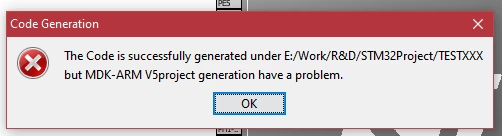
   I' upgrade my CubeMX software to V.4.25.1 every thing is clear no problem. But when we try to generate MDK project CubeMX show an project generate problem ( see in attach pic.) 

   Please tellme how to fix it 

0690X0000060BDBQA2.png

Thank you

EDIT!!:: TrueStudio has the same problem.

#cubemx-4.25 #mdk-arm
This topic has been closed for replies.

28 replies

Houda GHABRI
ST Employee
May 28, 2018
Posted on May 28, 2018 at 13:19

Hi@

Korsri.Prawit

Thanks for your feedback.

I'm not able to reproduce this problem, could you give me more details about the scenario to reproduce this issue(MCU, FW package version, MDK version).

Could you also send me the ioc?

regards,

Houda

Jonas
Visitor II
September 5, 2018

Can you try generating the code while your .ioc file is closer to the root folder? Like in E:/Work/ in your case? I have had the same error when my project file was too deep in a nested folder structure. I am thinking that the '&'-symbol in your path could cause an issue.

Greets,

Jonas

RKAHR
Visitor II
March 30, 2019

if you save on your desktop this this trouble will solve. I had same trouble and I tried a lot of thing. right now I use but only this conditional.(save on your desktop). take easy..

RNage
Visitor II
June 27, 2019

My repository had some files (.cproject, .project, .settings) owned by root. After I changed the ownership to my own user, I could generate my files through CubeMX smoothly.

User.39
Visitor II
August 15, 2019

I have met this problem as you are today,Then I solve this problem by changing "Project Location�? of my Stm32cubeMX's Project to a folder which have pure English.

IAdak.1
Visitor II
January 20, 2020

For Me the issue has been solved for me by returning back to MXCube 5.2 version

VBekv.1
Visitor II
February 1, 2020

Dear CubeMX developers please resolve this issue !!!,

I have tried so many things like run as admin and put the folders in root with short names, nothing helps,

the project can be generated for any IDE but not the MDK-ARM.

I am on windows 10 with latest Java version updated.

DKorz.1
Associate
February 13, 2020

I tried everything described above nothing helps. Now I write under several microcontrollers nrf52, TI, Silicon labs. Nowhere was there such a situation(there were other ha ha:) but at least described solutions) and here in General it is somehow bad. I got to the point where keil opens a project using this manual https://www.keil.com/pack/doc/STM32Cube/General/html/cubemx_proj.html

and imports settings from CubeMx but writes the following errors

0690X00000DAHLDQA5.png

STM32G071RBT6 - Nucleo board (noBSP)

LL tried

HAL tried

Keil version 5.29.0.0

CubeMX 5.5.0

VBekv.1
Visitor II
February 13, 2020

looks like ST doesn't care about fixing this bug.

(I found workaround for this. I installed windows 7 on virtual box, and installed latest version of CubeMX and Java Runtime Environment in this virtual machine,

and generating projects inside virtual machine. This works for me).

GammaSigma
Associate II
February 14, 2020

Same here; like other users, I've tried everything to no avail. The strange aspect is that code generation for ARM-Keil under CubeMX works perfectly on my desktop PC, but it fails every time I try on my Surface2 laptop. The setup is identical for the two machines, even the folders are the same (i.e. they have the same name, with no diacritics or peculiar symbols). On the Surface 2 machine, code generation is successful for every IDE/toolchain with the exception of Keil uVision, which is exactly what I need to use for my university project. It would be a serious problem for me to not being able to work from my laptop.

Edit: reverting to CubeMX version 5.3 on the Surface2 PC solves the error during code generation, but then another issue appears: once Keil uVision is started, it cannot locate the board (the error message is something on the lines on "device not found"). Not very surprisingly, if I generate the exact same Keil code with CubeMX 5.5 installed on my desktop PC and then copy the folder on the Surface PC, Keil works perfectly!

Urbite
Visitor II
February 20, 2020

I had the same issue with the '...project generation have a problem' when using CubeMX v5.4. Reverting CubeMX v5.2 resolved the error issue, but I experienced the same issue as you - a 'device not found' error when opening the project in Keil. Taking a look a the Keil .uvprojx file generated by CubeMX shows that the device parameter is blank!??? This is shown below in the snippet from the beginning of the .uvprojx file.

<?xml version="1.0" encoding="UTF-8" standalone="no"?><Project xmlns:xsi="http://www.w3.org/2001/XMLSchema-instance" noNamespaceSchemaLocation="project_projx.xsd">
  <SchemaVersion>2.1</SchemaVersion>
  <Header>### uVision Project, (C) Keil Software</Header>
  <Targets>
  <Target>
  <TargetName>blinky</TargetName>
  <ToolsetNumber>0x4</ToolsetNumber>
  <ToolsetName>ARM-ADS</ToolsetName>
  <pCCUsed>5060750::V5.06 update 6 (build 750)::ARMCC</pCCUsed>
  <uAC6>0</uAC6>
  <TargetOption>
  <TargetCommonOption>
  <Device/>
  <Vendor>STMicroelectronics</Vendor>
  <PackID>Keil.STM32F4xx_DFP.2.14.0</PackID>

After opening a support case and sending files back and forth, the support person asked me to send my java version (which was 13). I did some more searching and found the following user guide for CubeMX.

https://www.st.com/resource/en/user_manual/dm00104712.pdf

The solution was in this document. Specifically, the following section states the java version requirements.

3.1.3 Software requirements


The Java Run Time Environment 1.8 must be installed.


Note that Java 9 and Java 10 are not supported and there is limited validation done with Java 11.

Note that I had version 13 installed. After uninstalling v13 and installing v1.8 x64, everything started working! After running 'Generate Code' in CubeMX, clicking the 'Open Project' button in CubeMX caused the project to successfully open in Keil, and the build of the project succeeded.

Kudos to ST support - they definitely helped to resolve this issue. Hope it helps someone out there. If it does, be sure to post your success so others with this issue will be pointed in the right direction.