Associate II
August 22, 2026
Solved

Unable to import examples which stm32 provided for reference .
  • August 22, 2026
  • 15 replies
  • 8 views

d8abeb2d-1160-0047-a792-2fac2b402929.png

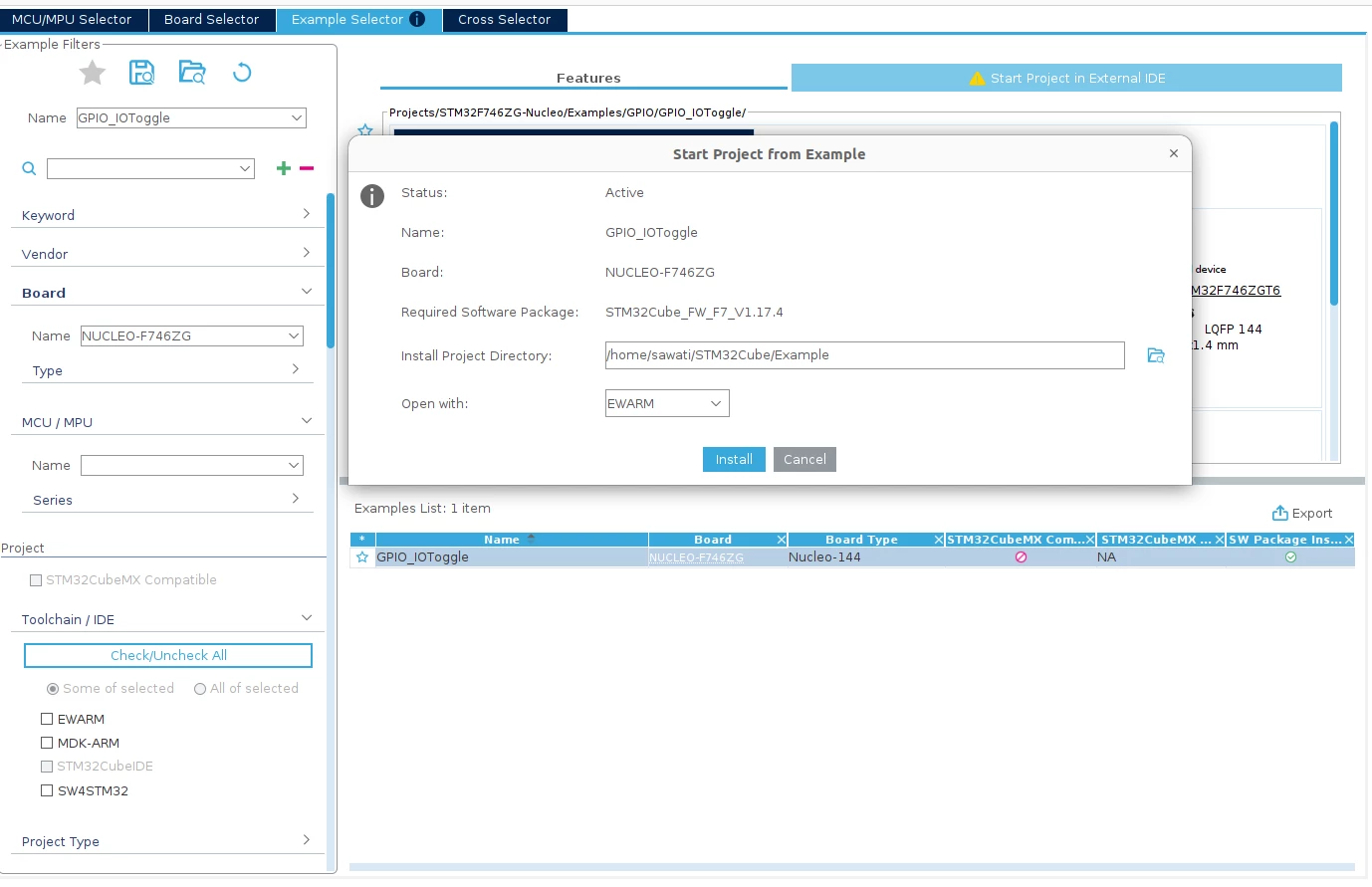
Above image you can see in toolchain option STM32IDE is disable . also i am facimng issure i =n import examples which stm32 provided for reference . you can also refer my shared video.
Best answer by Mahmoud Ben Romdhane

Hello  @shreya_awati  

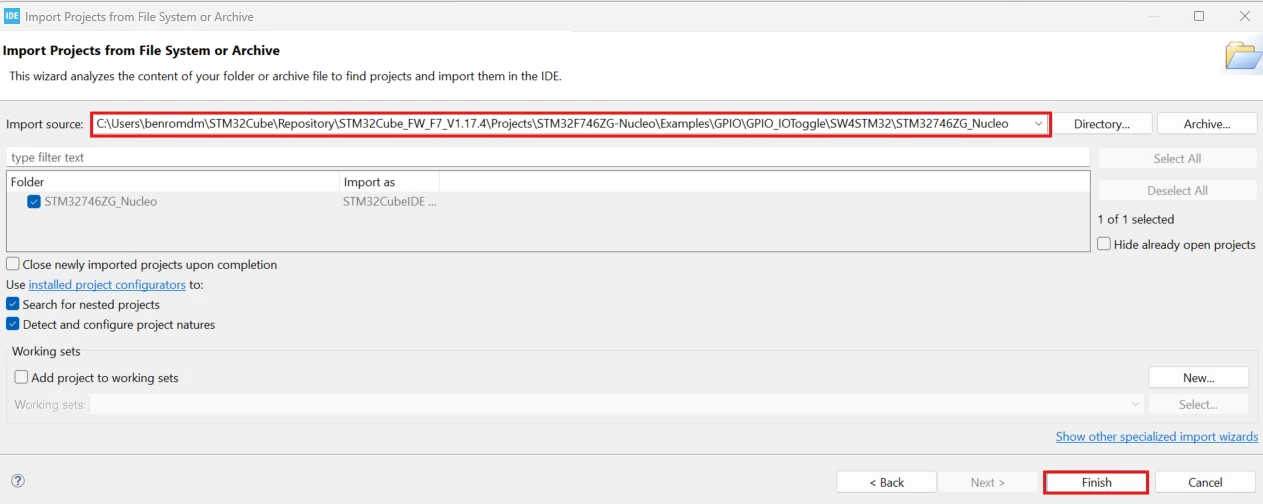
Open STM32CubeIDE 2.1.1.

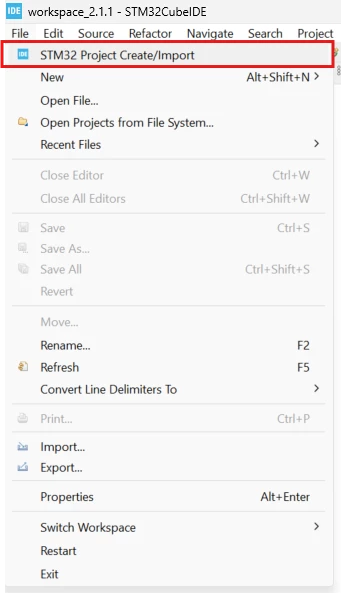
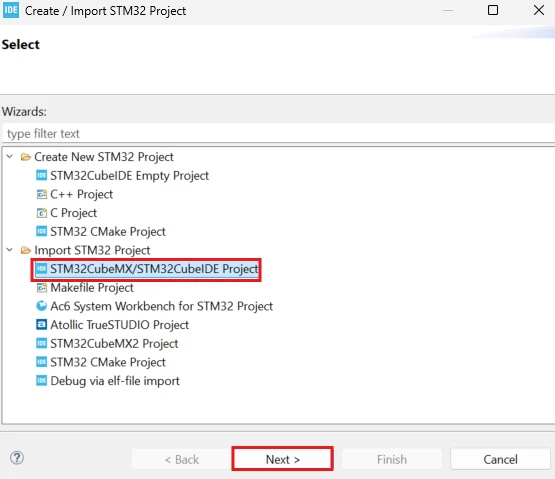
Right Click on File, then click on STM32 Project Create/Import : 

448e8a5e-3a48-efa1-cec1-e356b8c07034.png

03455759-5907-b8ba-de56-10ffd753f4b4.png

d7c14fa7-48fe-6d6e-7222-89f2edfd2846.png

Thanks.

Mahmoud


15 replies

Pavel A.
August 22, 2026

Try exporting for SW4STM32, then convert by CubeIDE project import.

dcadc1db-9785-1d7b-c683-9b31acc4cf15.png


Associate II
August 22, 2026

Can you please provide steps from scratch . 


Associate II
August 22, 2026

which version of IDE you using . i am using MX is 6.17.0 and IDE is Version: 2.1.1 
I am importing package from MX for F7 latest . In image you can see package is successfully installed . 

Please tell me in detail steps how can i import .

44937e2c-8029-ac6d-5ff2-fcd57fc141ee.png


Associate II
August 22, 2026

7924f2f5-1f68-eb7e-7d10-80cfe16c5d12.png

git this error.


Pavel A.
August 22, 2026

Hmm. As  @TDK commented, conversion from SW4STM32 is not perfect. Looks like you have to check and fix include paths and other project settings after conversion. This may be, unfortunately, too confusing for a beginner, and you may use some help.

For a simple project such as GPIO blinky, better create a new project with CubeMX (or CubeIDE 1.9) or find existing example for CubeIDE.

ST Technical Moderator
August 22, 2026

Hello  @shreya_awati  

Open STM32CubeIDE 2.1.1.

Right Click on File, then click on STM32 Project Create/Import : 

448e8a5e-3a48-efa1-cec1-e356b8c07034.png

03455759-5907-b8ba-de56-10ffd753f4b4.png

d7c14fa7-48fe-6d6e-7222-89f2edfd2846.png

Thanks.

Mahmoud


To give better visibility on the answered topics, please click on Accept as Solution on the reply which solved your issue or answered your question.
Associate II
August 22, 2026

Its working fine.

Thanks 

Associate II
August 22, 2026

i want to use other examples not gpio . i didnt study ADC and other components so i need imported examples for reference . above you shared "use some help" link not useful for me .

please help me find out solutions

Pavel A.
August 22, 2026

AI tool such as Github Copilot or Claude Code can be asked to fix include paths in CubeIDE project.


Associate II
August 22, 2026

For only GPIO example is working


other not able to import 

/home/sawati/STM32Cube/Repository/STM32Cube_FW_F7_V1.17.4/Projects/STM32F746ZG-Nucleo/Examples/ADC/ADC_RegularConversion_Interrupt/SW4STM32/STM32746ZG_Nucleo

9b942b1b-76c7-0375-c91e-37e2ea6b383b.png


Associate II
August 22, 2026

I import GPIO toggle example , after that i am trying to import another example but it is not showing build option . directly it is showing run option . Then i deleted gpio example and tried to import another example then is is showing build option . 

how can i resolve this issue ??