


FranzCreva
Associate II
November 21, 2022
Solved

STM32G0 bought with level 2 protection

  • November 21, 2022
  • 63 replies
  • 18105 views

Hi all, I'm new to this STM32 community.

I have a small problem: I bought some STM32G0P0.. for my project, also making the PCB and the rest. But after soldering the various components, I try to program one and see that the level 2 protection is active, I try to program another and there is the same thing.

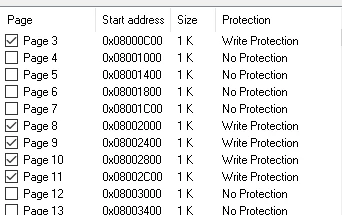
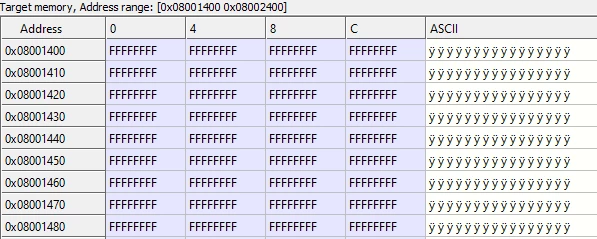
What I see from the STM32 St-LINK program is that only some memory pages have protection, while others don't, but then going to view the memory areas I see that they have all been set to FFFFFFFF.

Below I can see that the memory on the address 0x08001400 is free, but..
0693W00000WIxGqQAL.png 

..here I see that is protected! How can I program it?
0693W00000WIxHFQA1.png 

My question now is: what the hell do I do? Do I ask for a return? Is this a normal thing of STM32G0...? Trying to write a bootloader that makes me jump from one address to another when the memory to read is full?

Thank you for your availability and attention

This topic has been closed for replies.
Best answer by FranzCreva

Hi @mattias norlander​ .

You're right, I had already intended to select the best answer, but I think it's better to make a small summary with the answer as well?

We can say that the title "STM32G0 bought with level 2 protection" has nothing to do with the final solution, but I can explain that I thought the MCU has level 2 protection because the STM32 ST-LINK Utility" program is outdated, so using STM32CubeIDEProgrammer was able to connect to the MCU correctly.

After that I tried to debug with STM32CubeIDE, but I couldn't. This was due to the fact that the nBOOT0 entry (in the "user configuration option byte" section) had not been flagged (for your MCU look at the Boot Mode configuration even though almost all MCUs have the same configurations).

The nBOOT0 flag fixed the problem and it was thanks to the advice of @Piranha​ .

I also have to thank @Community member​ , @AScha.3​ and the others (@mattias norlander​ you are included).

63 replies

thundertronics.com
Visitor II
November 21, 2022

It does not look like RDP2 to me. Please show option bytes page.

Possible solution:

1) Try to uncheck write protection

or

2) From option bytes page set "RDP level 1" and then "RDP level 0".

FranzCreva
Associate II
November 21, 2022

This is my Option Byte page:

0693W00000WJ9E8QAL.png 

I can't uncheck the write protection

Tesla DeLorean
Guru
November 21, 2022

Don't use the ST-LINK Utilities, been deprecated for years.

F​or G0 parts use STM32 Cube Programmer

Tips, Buy me a coffee, or three.. PayPal Venmo (See Profile) Up vote any posts that you find helpful, it shows what's working..
Javier1
Principal
November 21, 2022

good one, im afraid untill some windows update f***s up STlink utility crashing it, is going to continue to be used.

And maybe then people downgrades windows only to use stlink utility.

Try convincing a plant manager that has been using same the tool for 10 years XD

hit me up in https://www.linkedin.com/in/javiermuñoz/
FranzCreva
Associate II
November 27, 2022

Hi @Community member​ and everyone else.

I'm still trying to debug and upload the code via STM32CubeIDE, but I always get the same error and I don't understand what settings I need to change. Do I have to make my own bootloader?

These are the errors I see:

STMicroelectronics ST-LINK GDB server. Version 7.0.0
Copyright (c) 2022, STMicroelectronics. All rights reserved.
 
Starting server with the following options:
 Persistent Mode : Disabled
 Logging Level : 1
 Listen Port Number : 61234
 Status Refresh Delay : 15s
 Verbose Mode : Disabled
 SWD Debug : Enabled
 InitWhile : Enabled
 
Waiting for debugger connection...
Debugger connected
Waiting for debugger connection...
Debugger connected
Waiting for debugger connection...
 -------------------------------------------------------------------
 STM32CubeProgrammer v2.11.0 
 -------------------------------------------------------------------


Log output file: C:\Users\offic\AppData\Local\Temp\STM32CubeProgrammer_a08760.log
ST-LINK SN : 56FF6F067878545228250567
ST-LINK FW : V2J40S7
Board : --
Voltage : 3.23V
Error: No STM32 target found!
Encountered Error when opening C:\ST\STM32CubeIDE_1.10.1\STM32CubeIDE\plugins\com.st.stm32cube.ide.mcu.externaltools.cubeprogrammer.win32_2.0.301.202207041506\tools\bin\STM32_Programmer_CLI.exe
Error in STM32CubeProgrammer
Shutting down...
Exit.

and this one:

0693W00000WJZPlQAP.pngI rely on you because I really don't know where to put my hands.

Thank you all for your availability

Tesla DeLorean
Guru
November 27, 2022

@Sara BEN HADJ YAHYA​ can you look at this with the team, these seem to be recurrent issues.

I don't understand where the double slashes '\\' in the paths come from.

I don't really understand why the tools and the error messages can't work seamlessly, and test for failing conditions ahead of time with more helpful and specific reasoning.

You should be able to check if the file you're spawning exists.

You should be able to check if the file you're trying to open exists.

Perhaps fix some of the evident issues, and sanity check and fix problems manifesting in the project/workspace files.

Tips, Buy me a coffee, or three.. PayPal Venmo (See Profile) Up vote any posts that you find helpful, it shows what's working..
FranzCreva
Associate II
November 27, 2022

Now I'll answer @Community member​ . Right now I was trying to create a new project with a new debug configuration, but nothing to do, it gives me other errors that I can't solve:

Open On-Chip Debugger 0.11.0+dev-00449-g53fa0f7 (2022-06-09-09:42) [https://github.com/STMicroelectronics/OpenOCD]
Licensed under GNU GPL v2
For bug reports, read
	http://openocd.org/doc/doxygen/bugs.html
Info : Listening on port 6666 for tcl connections
Info : Listening on port 4444 for telnet connections
Info : STLINK V2J40S7 (API v2) VID:PID 0483:3748
Info : Target voltage: 3.217824
Info : Unable to match requested speed 8000 kHz, using 4000 kHz
Info : clock speed 4000 kHz
Info : stlink_dap_op_connect(connect)

and this:

0693W00000WJZX6QAP.png

AScha.3
Super User
November 27, 2022
  1. you set wrong speed: set it to 4MHz, 4000 kHz . (not 8000 .)
  2. set debug to : software system reset .
  3. debug : find no connection. try: stlink on USB , but no target connected. what message then ?
If you feel a post has answered your question, please click on " Best Answer ".
FranzCreva
Associate II
November 27, 2022

@AScha.3​ 

1-2) Nothing changed

3) The error messages with two different configurations are these:

With Debug Probe set to ST_LINK (OpenOCD)

Open On-Chip Debugger 0.11.0+dev-00449-g53fa0f7 (2022-06-09-09:42) [https://github.com/STMicroelectronics/OpenOCD]
Licensed under GNU GPL v2
For bug reports, read
	http://openocd.org/doc/doxygen/bugs.html
Info : Listening on port 6666 for tcl connections
Info : Listening on port 4444 for telnet connections
Info : STLINK V2J40S7 (API v2) VID:PID 0483:3748
Info : Target voltage: 3.242988
Info : clock speed 4000 kHz
Info : stlink_dap_op_connect(connect)

and

0693W00000WJZY9QAP.png 

With the Debug Probe set to ST-LINK (ST-LINK GDB server)

STMicroelectronics ST-LINK GDB server. Version 7.0.0
Copyright (c) 2022, STMicroelectronics. All rights reserved.
 
Starting server with the following options:
 Persistent Mode : Disabled
 Logging Level : 1
 Listen Port Number : 61234
 Status Refresh Delay : 15s
 Verbose Mode : Disabled
 SWD Debug : Enabled
 
Waiting for debugger connection...
Debugger connected
Waiting for debugger connection...
Debugger connected
Waiting for debugger connection...
 -------------------------------------------------------------------
 STM32CubeProgrammer v2.11.0 
 -------------------------------------------------------------------


Log output file: C:\Users\offic\AppData\Local\Temp\STM32CubeProgrammer_a04348.log
ST-LINK SN : 56FF6F067878545228250567
ST-LINK FW : V2J40S7
Board : --
Voltage : 3.21V
Error: No STM32 target found!
Encountered Error when opening C:\ST\STM32CubeIDE_1.10.1\STM32CubeIDE\plugins\com.st.stm32cube.ide.mcu.externaltools.cubeprogrammer.win32_2.0.301.202207041506\tools\bin\STM32_Programmer_CLI.exe
Error in STM32CubeProgrammer
Shutting down...
Exit.

and these two

0693W00000WJZYEQA5.png 0693W00000WJZYJQA5.png

AScha.3
Super User
November 27, 2022

so on 1 : found no stm cpu to connect. on 2: found, but break to...1fffxxx

seem: the bootloader or watchdog is active .

boot0 is lo ?

get connection with STM32CubeProgrammer to cpu ?

If you feel a post has answered your question, please click on " Best Answer ".
FranzCreva
Associate II
November 27, 2022

My STM32Programmer can see the MCU.

I haven't any Watchdog active in this moment.

The pin boot0 is the same of SYS_SWCLK. I don't know if it is high or low

AScha.3
Super User
November 27, 2022

is it secret , which cpu we talking abaut ? case, pins ...?

ah, ok, i see...what is the user option byte ? nboot-sel + nboot0 ?

0693W00000WJZegQAH.png

If you feel a post has answered your question, please click on " Best Answer ".
FranzCreva
Associate II
November 27, 2022

Is a STM32G050F6P6

AScha.3
Super User
November 27, 2022

i am not shure...but try:

set nboot0 , checked.

and then... ?

If you feel a post has answered your question, please click on " Best Answer ".
FranzCreva
Associate II
November 27, 2022

I tried but nothing to do

FranzCreva
Associate II
November 28, 2022

Hi @Community member​  and @AScha.3​.

Now I was trying to debug with another board I have, still with the same MCU, and something went on and I don't know what.

Debugging has started, but always hangs at this point:

0693W00000WJgNSQA1.png 

The messages I see in the console are these:

Open On-Chip Debugger 0.11.0+dev-00449-g53fa0f7 (2022-06-09-09:42) [https://github.com/STMicroelectronics/OpenOCD]
Licensed under GNU GPL v2
For bug reports, read
	http://openocd.org/doc/doxygen/bugs.html
Info : Listening on port 6666 for tcl connections
Info : Listening on port 4444 for telnet connections
Info : STLINK V2J40S7 (API v2) VID:PID 0483:3748
Info : Target voltage: 3.255118
Info : clock speed 950 kHz
Info : stlink_dap_op_connect(connect)
Info : SWD DPIDR 0x0bc11477
Info : STM32G050F6Px.cpu: Cortex-M0+ r0p1 processor detected
Info : STM32G050F6Px.cpu: target has 4 breakpoints, 2 watchpoints
Info : starting gdb server for STM32G050F6Px.cpu on 3333
Info : Listening on port 3333 for gdb connections
Info : accepting 'gdb' connection on tcp/3333
Info : device idcode = 0x10006456 (STM32G05/G06xx - Rev A : 0x1000)
Info : RDP level 0 (0xAA)
Info : flash size = 32kbytes
Info : flash mode : single-bank
Warn : GDB connection 1 on target STM32G050F6Px.cpu not halted
undefined debug reason 8 - target needs reset
Info : accepting 'gdb' connection on tcp/3333
Warn : GDB connection 2 on target STM32G050F6Px.cpu not halted
undefined debug reason 8 - target needs reset
target halted due to debug-request, current mode: Thread 
xPSR: 0xf1000000 pc: 0x1fff1654 msp: 0x20000e48
Info : Padding image section 0 at 0x0800184c with 4 bytes (bank write end alignment)
target halted due to debug-request, current mode: Thread 
xPSR: 0xf1000000 pc: 0x1fff1654 msp: 0x20000e48
Info : STM32G050F6Px.cpu: external reset detected

What can I do?

Tesla DeLorean
Guru
November 28, 2022

Connects at a lower speed (watch CM0+ devices)

Subsequently starts listening on port 3333 that the other component want to connect with.

Set connection speed LOWER, not 4 MHz or 8 MHz

Is NRST connected between TARGET and ST-LINK ??

Tips, Buy me a coffee, or three.. PayPal Venmo (See Profile) Up vote any posts that you find helpful, it shows what's working..
FranzCreva
Associate II
November 29, 2022

The NRST is connected between my MCU and the ST-LINK.

I'm using 950khz as connection speed, because I can connect to my device with that speed on STM32Programmer.

I'll try to set the port 3333

Andrei Chichak
Lead
November 29, 2022

The erased value of FLASH memory is 0xFFFFFFFF. If your processor was locked, RDP would have a value of 0xCC, in that case you've got a bunch of useless chips.

From what we're all seeing, you've got a bunch of chips that haven't been used yet.

Load some code into them and report back.

FranzCreva
Associate II
November 29, 2022

I can program it only via STM32Programmer, with STM32CubeIDE I can't