


MB_Inv
Associate II
June 6, 2019
Solved

STM32CubeIDE: How to enter commands in the debug configuration as in TrueStudio?

  • June 6, 2019
  • 33 replies
  • 14106 views

Hello,

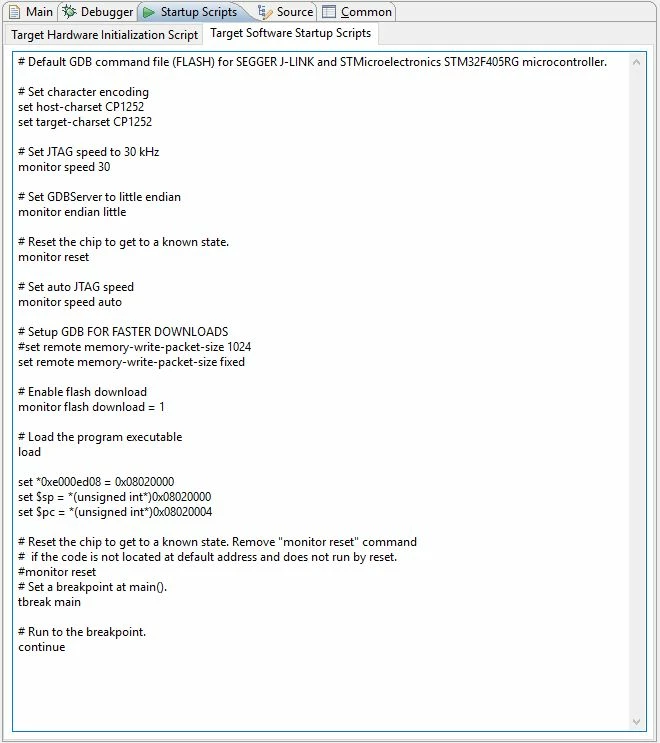
I used the following "Target Software Startup Script" in the debug configuration in Atollic TrueStudio (this is necessary since we're using a bootloader and our application binary which I would like to debug is not placed at the beginning of the STM32 flash):
0690X000008iJtzQAE.jpg

How to enter this in STM32CubeIDE?

I would really need to debug my firmware, but can't figure out how to do the required settings...

Any ideas?

Kind regards,

Markus
This topic has been closed for replies.
Best answer by MB_Inv

I just solved the issue...

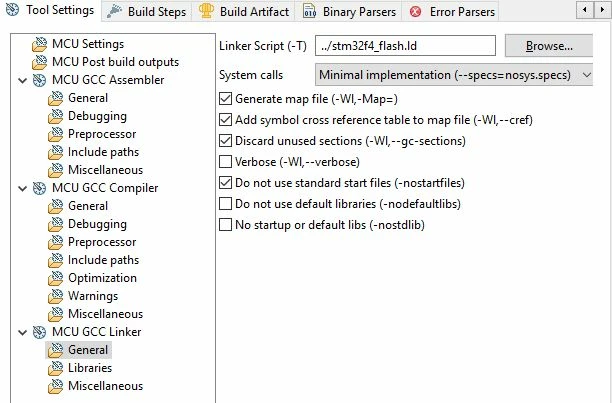
It turned out that the linker setting "-Wl,--cref" (Add symbol cross reference table to map file) was missing. Checking the corresponding box in the linker settings, debugging now also works also with ST-Link in CubeIDE!

0690X000008j2alQAA.jpg

Kind regards,

Markus

33 replies

MB_Inv
MB_InvAuthor
Associate II
June 6, 2019

When I use e.g.

x Load image

Use project binary

x Load symbols

Use project binary

and under "Run commands":

--

set *0xe000ed08 = 0xC000

set $sp = *(unsigned int*)0xC000

set $pc = *(unsigned int*)0xC004

set *0xE0042004 = (*0xE0042004) | 0x7

tbreak main

continue

---

the binary is flashed correctly to the MCU, but then the (ST-Link V2) debugger connection is lost:

---

Download verified successfully

Error! Failed to read target status

Debugger connection lost.

Shutting down...

---

Any ideas?

Kind regards,

Markus

June 11, 2019

Is this a new project in STM32CubeIDE or migrated?

Maybe you can consider adding in the scripts line by line and see which one causes your connection to crap out?

MB_Inv
MB_InvAuthor
Associate II
June 11, 2019

Hello,

this is a project from Atollic TrueStudio migrated to STM32CubeIDE.

I will try adding the scripts line by line.

Kind regards,

Markus

MB_Inv
MB_InvAuthor
Associate II
June 11, 2019

It seems setting stack pointer and program counter makes problems:

Failed to execute MI command:

set $sp = *(unsigned int*)0xC000

Error message from debugger back end:

Selected thread is running.

Failed to execute MI command:

set $pc = *(unsigned int*)0xC004

Error message from debugger back end:

Selected thread is running.

So my question is how I can make these settings with the STM32CubeIDE dialog.

Kind regards,

Markus

June 11, 2019

set *0xe000ed08 = 0xC000

set $sp = *(unsigned int*)0xC000

set $pc = *(unsigned int*)0xC004

I have the above 3 commands in my initialization commands and it seems to run fine.

  • Can I check that if you don't have any of your initialization commands, your debugger connection is ok?
  • If you just put in the above 3 commands only, do you still face the same connection problem?
MB_Inv
MB_InvAuthor
Associate II
June 11, 2019

Hello,

I now put these commands in the "Initialization Commands" field (previously used the "Run commands" field) and now I don't get the error messages any more. So thanks for the hint!

However, now execution is always trapped in "Default_Reset_Handler" and doesn't get out of the loop

for(pulDest = &_sdata; pulDest < &_edata; )

 {

   *(pulDest++) = *(pulSrc++);

 }

Trying to figure out what is missing here...

Kind regards,

Markus

MB_Inv
MB_InvAuthor
Associate II
June 11, 2019

Using the SEGGER J-Link, it works.

For some reason, using the same startup settings, it doesn't work with the ST-Link v2 showing the followin error:

---

Download verified successfully

Error! Failed to read target status

Debugger connection lost.

Shutting down...

---

Kind regards,

Markus

June 11, 2019

Your initial posts include some speed settings. I didn't have to do any speed settings for ST-Link to work.

Did you choose the Debug probe to be ST-Link?

MB_Inv
MB_InvAuthor
Associate II
June 11, 2019

My last tests with SEGGER J-Link didn't include the speed settings.

I also tried with the same three initialization commands (yes, I had initially picked the wrong addresses which came from some old debug config setup that I had)

---

set *0xe000ed08 = 0x08020000

set $sp = *(unsigned int*)0x08020000

set $pc = *(unsigned int*)0x08020004

---

Yes, I selected ST-Link as debug probe:

0690X000008iT7ZQAU.jpg

June 12, 2019

Try creating a new project and copy over your sources. See if that helps.

MB_Inv
MB_InvAuthor
Associate II
June 12, 2019

Just tried to create a new project in CubeIDE, copied over the sources and adapted the build settings and the linker script. But still, debugging works with J-Link, but not with ST-Link. After downloading the binary, the latter can't read out the target...

June 12, 2019

Do you have any projects in CubeIDE other than the one you are currently working on that works with ST-Link?

If you have, you could compare and see what is the difference?

If you don't, maybe create a very simple CubeIDE project for your hardware and see if you can program it using ST-Link?