


MB_Inv
Associate II
June 6, 2019
Solved

STM32CubeIDE: How to enter commands in the debug configuration as in TrueStudio?

  • June 6, 2019
  • 33 replies
  • 14106 views

Hello,

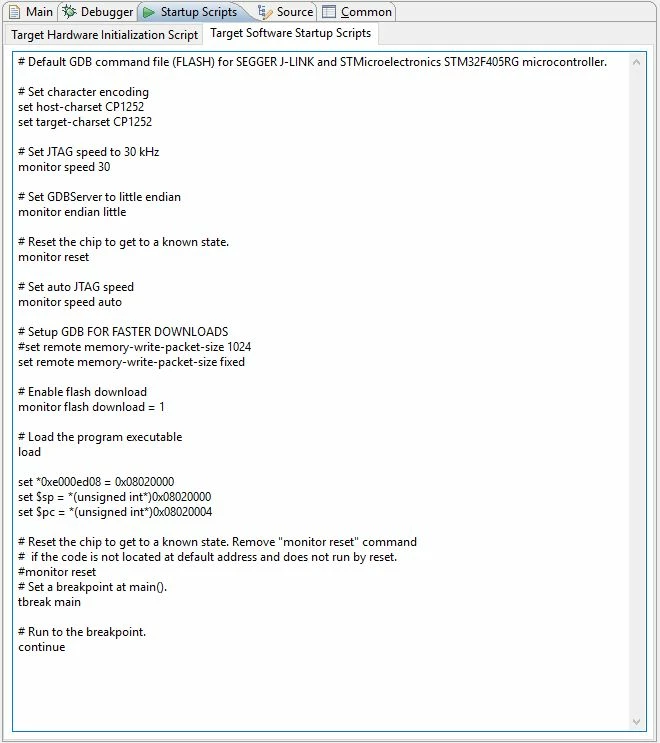
I used the following "Target Software Startup Script" in the debug configuration in Atollic TrueStudio (this is necessary since we're using a bootloader and our application binary which I would like to debug is not placed at the beginning of the STM32 flash):
0690X000008iJtzQAE.jpg

How to enter this in STM32CubeIDE?

I would really need to debug my firmware, but can't figure out how to do the required settings...

Any ideas?

Kind regards,

Markus
This topic has been closed for replies.
Best answer by MB_Inv

I just solved the issue...

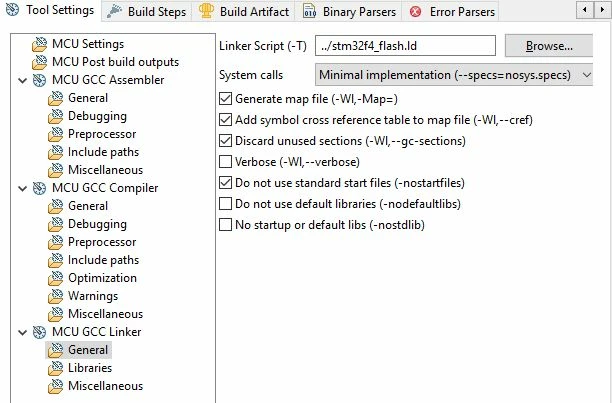
It turned out that the linker setting "-Wl,--cref" (Add symbol cross reference table to map file) was missing. Checking the corresponding box in the linker settings, debugging now also works also with ST-Link in CubeIDE!

0690X000008j2alQAA.jpg

Kind regards,

Markus

33 replies

June 12, 2019

I am assuming your ST-Link works with Atollic?

MB_Inv
MB_InvAuthor
Associate II
June 12, 2019

Yes, the ST-Link works with Atollic TrueStudio 9.2.0 - just rechecked it.

Will also try with another project in CubeIDE.

MB_Inv
MB_InvAuthor
Associate II
June 12, 2019

Have now also tried with an STM32F4DISCOVERY board and example project using CubeIDE and debugging works without any problems using ST-Link (onboard of the eval board).

But I can't figure out what the difference is here (except from the fact that my own program is located at another flash position and thus needs the additional initialization commands)...

Using the following initialziation commands, the execution of the command is always trapped in the Default_Reset_Handler:

---

set host-charset CP1252

set target-charset CP1252

set *0xE000ED08 = 0x08020000

set $sp = *(unsigned int*)0x08020000

set $pc = *(unsigned int*)0x08020004

tbreak main

continue

---

So I thought that maybe there's some problem with my linker file, but in Atollic TrueStudio it worked without problems - likewise with the J-Link in CubeIDE...

Any ideas?

June 12, 2019

I wonder if it is a project settings issue...

If you make a copy of the example project that works, and replace the source code with the one that is having issues, does it work?

MB_Inv
MB_InvAuthor
Associate II
June 12, 2019

I just tried that. I copied my sources and linker script to the working project and set the corresponding includes. However, the effect is the same - Debugging with J-Link works, but using the ST-Link execution hangs in the Default_Reset_Handler...

June 14, 2019

Maybe try testing with just your bootloader. Are you able to debug your bootloader with ST-Link?

MB_Inv
MB_InvAuthor
Associate II
June 14, 2019

Unfortunately, I can't debug my bootloader with CubeIDE since it has been developed with another IDE and its (closed) library...

June 14, 2019

Are you able to test your application without the bootloader? Which means you can use the default settings without this linker script? Think that will at least allow you to verify that your application can work with ST-Link?

MB_Inv
MB_InvAuthor
Associate II
June 14, 2019

Yes, debugging the non-shifted application works with ST-Link in CubeIDE.

So it's obviously a problem with the gdb commands needed for the shifted version...

June 14, 2019

Hmm, yea. Cause if the non-shifted version works, it means that your CubeIDE project is able to talk to ST-Link fine. I shall assume u updated the linker script accordingly for the shifted version from the non-shifted version?

I noticed your gdb commands have changed from your earlier posts? The offsets are different now?

Sorry, I just noticed your ST-Link execution hangs in Default_Reset_Handler? So it is different from your previous error? "Error! Failed to read target status"? So you are able to debug now but it get stuck in the Default_Reset_Handler?