Associate III
Jul 7, 2025 12:05 PM UTC
Solved

stm32 targeted project type is empty and its not generating .ioc file
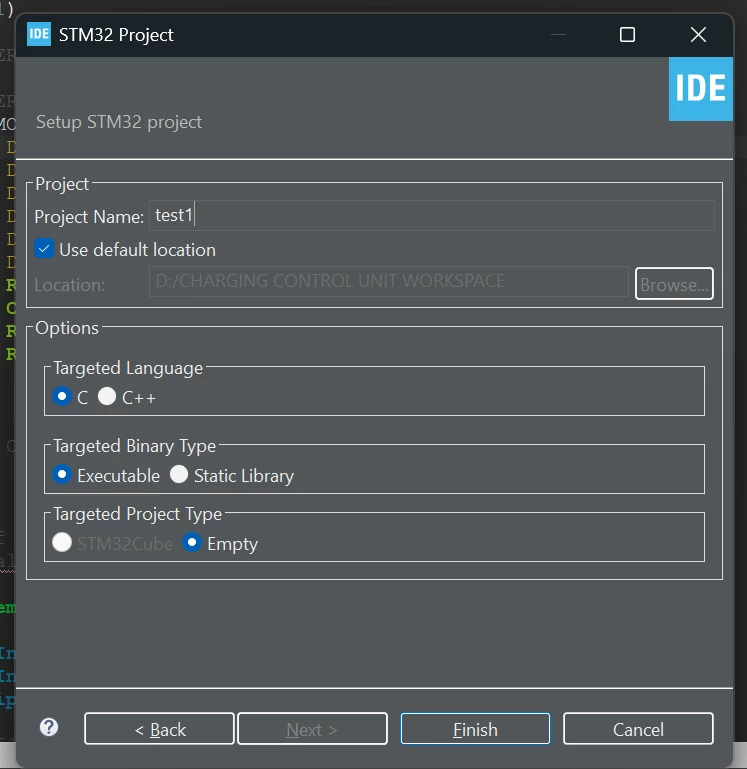
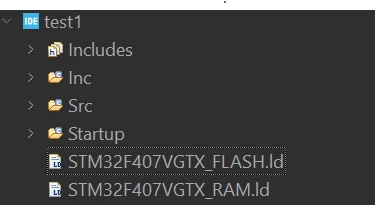
_kalpesh_0-1751889721909.png_kalpesh_1-1751889757616.png


#include <stdint.h>

#if !defined(__SOFT_FP__) && defined(__ARM_FP)
 #warning "FPU is not initialized, but the project is compiling for an FPU. Please initialize the FPU before use."
#endif

int main(void)
{
 /* Loop forever */
	for(;;);
}

Hi Im trying to generate new project with CUBE IDE 1.13 which was working fine this morning but somehow its not generating .ioc file anymore when i searched it says FPU not initialized & generates only files which are present in the second picture
plz help me on this

Souhaib MAZHOUDBest answer
ST Technical Moderator
Jul 8, 2025 10:01 AM UTC

To resolve this problem, you should update your STM32CubeIDE to the latest version 1.19.0, which is available under this link.

To give better visibility on the answered topics, please click on 'Best answer' on the reply which solved your issue or answered your question.

52 replies

_kalpeshAuthor
Associate III
Jul 7, 2025 12:07 PM UTC

The stm32CUBE option is not selectable its grey
checked the correct version on the PC its present and working how to fix this


Visitor II
Jul 8, 2025 9:43 AM UTC

I'm also having the same problem now. I'm using 1.18.1. Have you solved your problem now? Could you tell me how it was solved?

Visitor II
Jul 9, 2025 3:01 AM UTC

I update to the latest version 1.19.0,it is even worse,now I hit the new stm32 project button but no response at all.

Visitor II
Jul 7, 2025 12:30 PM UTC

The same here with 1.18.1. However on 1.19.0 which released yesterday the option is available

Visitor II
Jul 8, 2025 12:11 PM UTC

Its due to old version. Please update to latest version 1.19.0 to solve this problem, also you have to update the firmware pack to FW-V1.18.1 so that you can execute all your codes ( old projects) w/o any problem.

ST Technical Moderator
Jul 7, 2025 12:47 PM UTC

Hello @_kalpesh 

Thank you for bringing this issue to our attention.
I will get back to you as soon as I have any updates.

KR,

Souhaib

To give better visibility on the answered topics, please click on 'Best answer' on the reply which solved your issue or answered your question.
Associate
Jul 7, 2025 12:58 PM UTC

Hello,


I had the same problem. I started using v1.19.0. The problem was solved when i upgraded to v1.19.0

Associate II
Jul 7, 2025 5:16 PM UTC

I also started experiencing this same problem today. My cube IDE version is 1.16

WGend.15
Associate II
Jul 7, 2025 8:41 PM UTC

Is this like a server issue?


Karl Yamashita
Principal
Jul 7, 2025 10:52 PM UTC
If a reply has proven helpful, click on Accept as Solution so that it'll show at top of the post.CAN Jammer an open source CAN bus hacking toolCANableV3 Open Source
Explorer
Jul 8, 2025 5:57 AM UTC

I have the same issue, The Targeted Project type is by default selecting to "Empty", and STM32cube option greyed out.

Screenshot from 2025-07-08 11-27-22.png

Associate III
Jul 8, 2025 6:36 AM UTC

@_kalpesh Hey, I was facing the same issue with STM32CubeIDE version 1.18. One other comment in this thread has mentioned it working with version 1.19. So I tried updating my cube version to 1.19 and now it all works fine(the STM32cube project type is selectable and the ioc file is being generated now). Just update your cube version to the latest.

Graduate
Jul 22, 2025 12:19 PM UTC

I updated to 1.19 and am still experiencing the issue. STM32Cube is greyed out.

Andrew Neil
Super User
Jul 22, 2025 1:00 PM UTC

The pinned thread also covers issues with 1.19:

STM32CubeIDE STM32Cube project creation issue

A complex system that works is invariably found to have evolved from a simple system that worked.A complex system designed from scratch never works and cannot be patched up to make it work.
Souhaib MAZHOUDBest answer
ST Technical Moderator
Jul 8, 2025 10:01 AM UTC

To resolve this problem, you should update your STM32CubeIDE to the latest version 1.19.0, which is available under this link.

To give better visibility on the answered topics, please click on 'Best answer' on the reply which solved your issue or answered your question.
Associate II
Jul 8, 2025 12:52 PM UTC

Are there plans for a solution that doesn't require updating our CubeIDE? Our group would really prefer to not update if we don't have to, even if we have to wait. Let me know!

_kalpeshAuthor
Associate III
Jul 8, 2025 1:05 PM UTC

i have updated cubeIDE to the latest 1.19 version and its working fine for now
but if there is something work around to get earlier version working pls comment here!!
Thank you.