


Question
RIVERDI H757 dual core from TouchGFX to CubeIDE
Hi there!
My goal is to use the RIVERDI example provided in Touch GFX and import it into the CubeIDE to add some peripherial features as ADC and CANFD. When the .ioc file is imported into CubeIDE all the generated folders are empty and even the .ioc file is missing despite the fact that all folders are present in the file system.
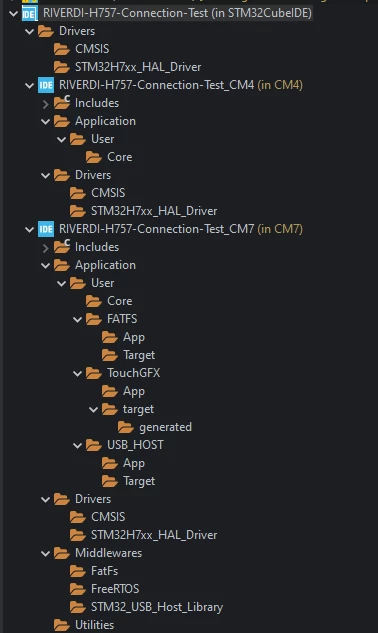
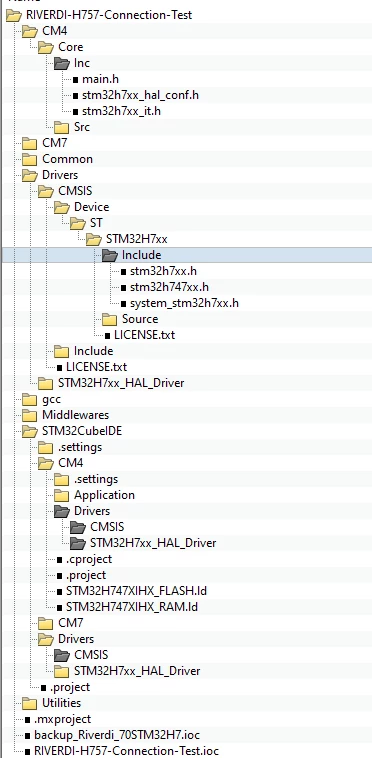
so far I 've
- created an new project named "RIVERDI-H757-Connection-Test" based on the Riverdi STM32 Embedded 7" Display example project provided in TouchGFX 4.32.2 Designer
- added two screens to show the GUI is compiling (OK) and runs in the TouchGFX simulator (OK)
- used this article How to clone a dual core project in STM32CubeIDE - STMicroelectronics Community provided by STM and reanmed all occureneces of "Riverdi_70STM32H7" to "RIVERDI-H757-Connection-Test" within the
- .ioc
- .project
- CM4 .project
- CM4 .cproject
- CM7 .project
- CM7 .cproject files
- renamed "Riverdi_70STM32H7.ioc" into "RIVERDI-H757-Connection-Test.ioc"

- opened the .ioc file in CubeMX 6.10.0. changed the project name and checked the latest firmware package V1.11.2
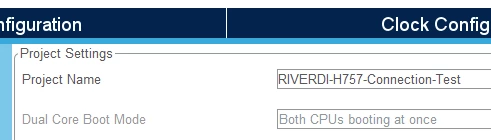
- generated the code without any errors in CubeMX
- used this article Getting started with projects based on dual-core STM32H7 microcontrollers in STM32CubeIDE - Application note section 2.3. provided by STM to import the .ioc file into CubeIDE without any error
Thanks for your help.
Cheers!