

Associate
March 4, 2024
Solved

No ST-link detected - problem when HP thunderbolt 3 dock station is connected

  • March 4, 2024
  • 14 replies
  • 6695 views

Hello, I know what the problem is but I can't solve it.
Hardware: HP Zbook G3 Workstation + HP Thunderbolt 3 dock station like thi one:
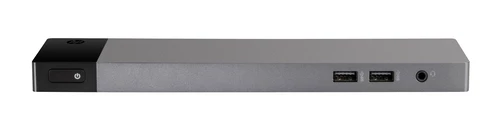
 

thundebolt3dockjpg.jpg

When I am connected to the station, an error occurs: No ST-link detected! Please connect ST-LINK and restart debug session. Without the docking station it works normally. The problem is the HP docking station and probably something with the ports. Has anyone encountered a similar problem and know how to solve it?

    This topic has been closed for replies.
    Best answer by Andrew Neil

    @rutrap wrote:

    @Pavel A. wrote:

     Is the "virtual disk drive" function enabled on the ST-Link?


    Where can I find this option in CUBE IDE? 

    When connecting the nucleo board via the USB port, a file explorer starts with a folder with some content, is that what it's about?


    I don't think it's in the IDE but, as @Tesla DeLorean said, it is in the ST-Link firmware updater - see:

    https://community.st.com/t5/stm32-mcus-products/question-can-i-disable-the-nucleo-onboard-stlink-mass-storage/m-p/464705


    14 replies

    AScha.3
    Super User
    March 4, 2024

    Hi,

    Can you connect direct to Zbook USB?

    St-link not working with some hubs or docking station.


    If you feel a post has answered your question, please click on " Best Answer ".
    rutrapAuthor
    Associate
    March 4, 2024

    It doesn't matter whether I connect it to the USB ports directly on the laptop or via the dock. If the dock is connected, it does not detect the board.

    Andrew Neil
    Super User
    March 4, 2024

    @rutrap wrote:

     it does not detect the board.


    What do you mean by "it" ?

    Again, does the ST-Link appear in the Device Manager?

    If the PC itself isn't seeing the ST-Link (ie, it doesn't appear in the Device Manager), then no app will be able to see it.

    Do you get any errors (from Windows) about "unrecognised device" or similar when you plug the ST-Link in?

    A complex system that works is invariably found to have evolved from a simple system that worked.A complex system designed from scratch never works and cannot be patched up to make it work.
    Andrew Neil
    Super User
    March 4, 2024

    Does the ST-Link appear in Device Manager?

    AndrewNeil_0-1709548292139.png


    If it's not there, then the PC can't see it - so it's never going to be detected!

    #CheckDeviceManager #STLink

    A complex system that works is invariably found to have evolved from a simple system that worked.A complex system designed from scratch never works and cannot be patched up to make it work.
    rutrapAuthor
    Associate
    March 4, 2024

    Yes, the device manager detects st-link, but I don't know if it is visible in the universal serial bus as debug. I'll check it tomorrow at work. CubeIDE itself sees the board and reads the serial number correctly.
    Zrzut ekranu 2024-03-04 115848.png

    Pavel A.
    March 4, 2024

    Any software that can mess with USB devices installed there? Anything like "endpoint security", "device control" and so on? Is the "virtual disk drive" function enabled on the ST-Link?

    rutrapAuthor
    Associate
    March 4, 2024

    @Pavel A. wrote:

    Any software that can mess with USB devices installed there? Anything like "endpoint security", "device control" and so on? Is the "virtual disk drive" function enabled on the ST-Link?

    Probably not, unless it's the laptop's built-in fingerprint scanner.

    Everything works properly when the docking station is not connected. There is no information about missing or non-working drivers in the device manager.


    @Pavel A. wrote:

     Is the "virtual disk drive" function enabled on the ST-Link?


    Where can I find this option in CUBE IDE? 

    When connecting the nucleo board via the USB port, a file explorer starts with a folder with some content, is that what it's about?

    Tesla DeLorean
    Guru
    March 4, 2024

    The MSC functionality can disabled as part of the ST-Link firmware update method, through STM32 Cube Programmer.

    Tips, Buy me a coffee, or three.. PayPal Venmo (See Profile) Up vote any posts that you find helpful, it shows what's working..
    rutrapAuthor
    Associate
    March 5, 2024

    My device manager looks like this:

    menadzerurzadzen.png