

Associate III
November 24, 2023
Solved

I can not see any printf in screen using Tera Term

  • November 24, 2023
  • 6 replies
  • 10103 views

I am trying to write something using printf with STM32-nucleo-h743zi board, windows 10. I can run programs that make a led turn on, and make connections via uart and all the things, but when i open tera term or Putty, i can not see any word in there.. I link my nucleo with other stm32  chip to do other stuff and it works via uart, but nothing about writing in Tera term or Putty.

My COM configuration is ok for sure, and i use the same baud that is written in my code.
rubenles_0-1700834163759.png

I just use this method, i saw this tutorial: https://community.st.com/t5/stm32-mcus/how-to-redirect-the-printf-function-to-a-uart-for-debug-messages/ta-p/49865

I saw different videos in youtube and all the people do it in the same way.

I connect my board using USB. It must be simple, but i can't reach this thing...

Any suggestions??


Thank you.



    This topic has been closed for replies.
    Best answer by Peter BENSCH

    Well, you don't see anything via Putty or Teraterm because you parameterised USART3 correctly (asynch, 115200 Bits/s, etc) but accidentally stumbled over the pin multiplexing. In the STM32H743, PB11/PB10 is unfortunately selected as the default for USART3 RX/TX, but in the NUCLEO-H743ZI (MB1364) PD9/PD8 are connected to T_VCP_RX/_TX via SB12/SB19. So the USART3 permanently writes the data to the TX channel - but you have checked on a different TV channel... :smiling_face_with_smiling_eyes:

    Solution: simply remap the alternative pins for USART3_RX/TX in the CubeMX overview of the STM32H743ZITx as described in UM1718, section 4.45:

    To manually remap a function to another pin, follow the sequence below:

    1. from the Pinout view, hold down the CTRL key then left-click on the pin and hold: if any pins are possible for relocation, they are highlighted in blue and blinking.
    2. drag the function to the target pin.

    ...i.e. drag them one after the other to PD9/PD8.

    Hope that helps?

    Regards
    /Peter

    6 replies

    Peter BENSCH
    Technical Moderator
    November 24, 2023

    Welcome @rubenles, to the community!

    The Knowledge base article mentioned uses USART2 - your NUCLEO-H743ZI uses USART3. Have you perhaps forgotten to adjust this?

    Regards
    /Peter

    In order to give better visibility on the answered topics, please click on Accept as Solution on the reply which solved your issue or answered your question.
    rubenlesAuthor
    Associate III
    November 27, 2023

    Hi! I am trying to fix it... I created a new project just using the things i need to do this.

    So first i make a new project in stm32cubemx, i choose my board, then i go to connectivity and i configure it like in the photo:

    rubenles_0-1701067245970.png

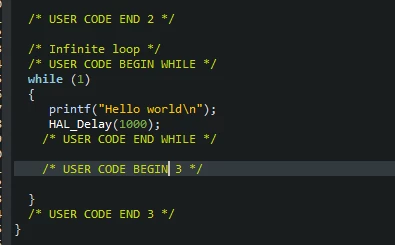
    Then i generate code, i write between /* USER CODE BEGIN 3 */ and /* USER CODE END 3 */ the next lines:

    rubenles_1-1701067456415.png


    Then i build my project, open tera term clicking on new connection with the same baud as in the upper photo here and nothing appears in the screen...


    What am i doing wrong?


    Thank you!

    Peter BENSCH
    Technical Moderator
    November 27, 2023

    Well, you haven't posted an IOC file, so you can't see where the error might lie.
    By the way, you can also insert source code instead of screenshots if you click on the three dots in the text field at the top right and select </>.

    I have thrown your three lines of code into an otherwise empty project for a NUCLEO-F767ZI as a test - it works, both with Teraterm and other terminal programs if you have selected the correct port (STMicreoelectronics STLink Virtual COM Port):


    /* USER CODE BEGIN WHILE */
    while (1)
    {
     /* USER CODE END WHILE */
    
     /* USER CODE BEGIN 3 */
     uint8_t Test[] = "Hello World!\r\n"; // should be placed in the block PV
     HAL_UART_Transmit(&huart3, Test, sizeof(Test)-1, 10);
     HAL_GPIO_TogglePin(LD1_GPIO_Port, LD1_Pin); // make the while loop visible via LD1
     HAL_Delay(1000);
    }
    /* USER CODE END 3 */


    There are two notes on this, but they do not change the fact that it works in principle:

    • after sizeof(), -1 must be used to reduce by 1, because a string in C is zero-terminated and otherwise this zero is also sent. sizeof() is actually only used for arrays, strlen() is typically used for strings.
    • you have probably inserted the string in the while loop for the sake of clarity, although it actually belongs in the variable definitions block

    Regards
    /Peter

    In order to give better visibility on the answered topics, please click on Accept as Solution on the reply which solved your issue or answered your question.
    rubenlesAuthor
    Associate III
    November 27, 2023

    Sorry, i'm starting in here, i am not familiarized with these things. I am not sure if i can upload a project, but i will do it. I am not able to find the error, i think it is something about knowledge but i cant fix it...


    Thank you so much for your time and patience


    LCE
    Principal II
    November 27, 2023

    > By the way, you can also insert source code instead of screenshots if you click on the
    > three dots in the text field at 
    the top right and select </>.

    @Peter BENSCH the "insert source code" thingy should be in the first line in a forum where lots of code is posted, that's really annoying that it isn't. Especially the new people here never find this...
    Could you please foward that?!

    Sorry for OT... 

    Peter BENSCH
    Technical Moderator
    November 27, 2023

    Thanks, @LCE, that's exactly what we've been rebuilding for some time.

    Regards
    /Peter

    @Lina_DABASINSKAITE 

    In order to give better visibility on the answered topics, please click on Accept as Solution on the reply which solved your issue or answered your question.
    rubenlesAuthor
    Associate III
    November 28, 2023

    Am i doing something wrong in the forum? @Peter BENSCH @LCE 

    rubenlesAuthor
    Associate III
    November 28, 2023

    Any more recommendations that i can see anything getting out from Putty or Tera term?? I have no idea what to do :(

    Peter BENSCH
    Peter BENSCHBest answer
    Technical Moderator
    November 28, 2023

    Well, you don't see anything via Putty or Teraterm because you parameterised USART3 correctly (asynch, 115200 Bits/s, etc) but accidentally stumbled over the pin multiplexing. In the STM32H743, PB11/PB10 is unfortunately selected as the default for USART3 RX/TX, but in the NUCLEO-H743ZI (MB1364) PD9/PD8 are connected to T_VCP_RX/_TX via SB12/SB19. So the USART3 permanently writes the data to the TX channel - but you have checked on a different TV channel... :smiling_face_with_smiling_eyes:

    Solution: simply remap the alternative pins for USART3_RX/TX in the CubeMX overview of the STM32H743ZITx as described in UM1718, section 4.45:

    To manually remap a function to another pin, follow the sequence below:

    1. from the Pinout view, hold down the CTRL key then left-click on the pin and hold: if any pins are possible for relocation, they are highlighted in blue and blinking.
    2. drag the function to the target pin.

    ...i.e. drag them one after the other to PD9/PD8.

    Hope that helps?

    Regards
    /Peter

    In order to give better visibility on the answered topics, please click on Accept as Solution on the reply which solved your issue or answered your question.
    rubenlesAuthor
    Associate III
    November 28, 2023

    That's right, that was the problem, stm32cubemx automatically assigns pins pb11 and pb10..., and i needed pd9 and pd8 as you said...


    Hundreds of thanks @Peter BENSCH !!

    Peter BENSCH
    Technical Moderator
    November 28, 2023

    Always happy to help.

    However, you only got the problem because you started with the bare STM32H743ZI. However, as mentioned, it was on a PCB (a NUCLEO) that was already populated, so you would have been better off using the tab Board Selector instead of the tab MCU Selector to create a new project, as this takes the existing wiring into account.

    In order to give better visibility on the answered topics, please click on Accept as Solution on the reply which solved your issue or answered your question.
    rubenlesAuthor
    Associate III
    November 29, 2023

    That is a nice point..., as you said i was choosing my board in the MCU selector and using the board selector tab, i can select the active nucleo with the correct usart 3 pins.

    Thank you so much once again!