Visitor II
July 27, 2024
Solved

How to switch MCU by CubeIDE?

Hi,

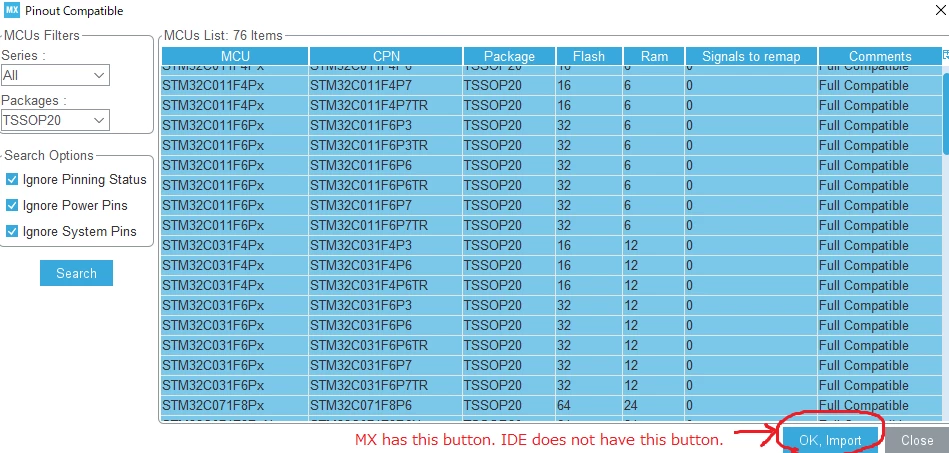
When I used CubeMX, MCU could be switched to select

[Pinout]→[List pinout compatible MCUs]→[OK, Import]

However, in case of CubeIDE, the [OK, Import] button is not appeared.

Is the "switch MCU function" deleted?

Thanks your help,
 

import button.png


    This topic has been closed for replies.
    BarryWhit
    BarryWhitBest answer
    Lead
    July 27, 2024

    https://community.st.com/t5/stm32-mcus/how-to-switch-from-one-stm32-to-another-using-stm32cubemx/ta-p/49884

    https://community.st.com/t5/stm32-mcus/mcu1-to-mcu2-migration-option-within-stm32cubeide/ta-p/49650

    "- If someone's post helped resolve your issue, please thank them by clicking ""Accept as Solution"".- Please post an update with details once you've solved your issue. Your experience may help others."

    1 reply

    BarryWhit
    BarryWhitBest answer
    Lead
    July 27, 2024
    "- If someone's post helped resolve your issue, please thank them by clicking ""Accept as Solution"".- Please post an update with details once you've solved your issue. Your experience may help others."