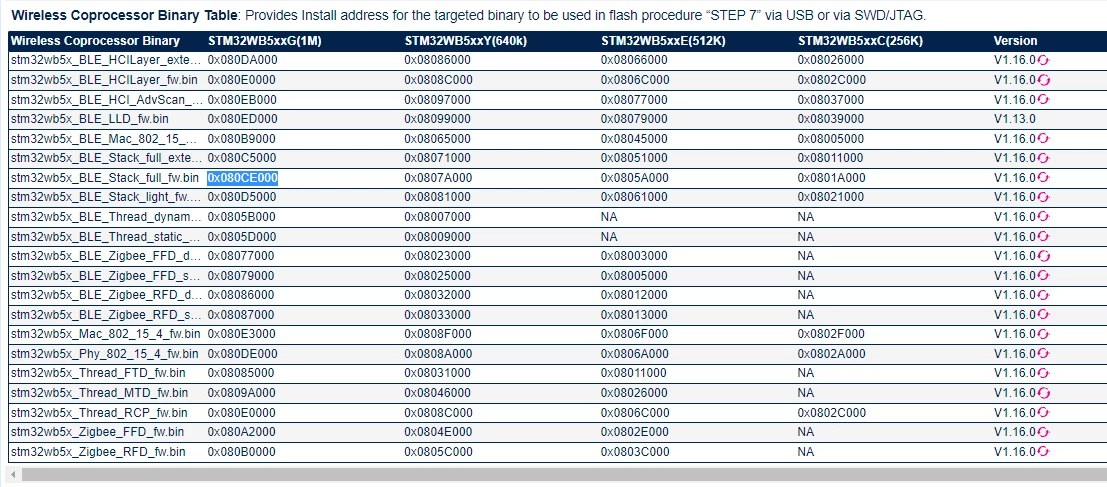
Flashing stm32wb5x_BLE_Stack_full_fw.bin start address
Hello. I am following document:
on how to flash STM32WB firmwares.
I am going through steps:
How to flash the Wireless Coprocessor Binary via SWD/JTAG by ST-LINK (STM32CubeProgrammer GUI)
- Inside the below procedure, the references to binaries name and install address are provided in the section Main Changes of this file.
- STEP 1: Use STM32CubeProgrammer GUI
- Version 2.7.0 or higher.
- It gives access to Firmware Upgrade Service (FUS) (AN5185 : ST firmware upgrade services for STM32WB Series.) through Bootloader.
- It is currently available as Graphical User Interface (GUI) mode (or Command Line Interface (CLI) mode).
- STEP 2: Access to SWD Interface (system flash)
- For P-NUCLEO-WB55.Nucleo :
- Power ON via ST-LINK and Jumper JP1(USB_STL)
- For P-NUCLEO-WB55.USBDongle :
- remain switch SW2 to Boot1
- Connect P-NUCLEO-WB55.USBDongle
- remain switch SW2 to Boot1
- For STM32WB5MM-DK :
- Power ON via ST-LINK and Jumper JP2(USB_STL)
- open STM32CubeProgrammer GUI and select “ST-LINK�?
- in ST-LINK configuration: (Port: SWD) then select “Connect�?
- STEP 3: select “Start FUS�? in Firmware Upgrade Services
- STEP 4: Read and upgrade FUS Version
- it can been obtained selecting “Read FUS infos�?
- 00050300: FUSv0.5.3 => Must be updated using STEP 5.
- 01020000: FUSv1.2.0 => Up to date, you can download the new wireless stack using STEP 7.
- 010X0Y00: FUSv1.x.y => Must be updated using STEP 6 (when x < 2).
- 00050300: FUSv0.5.3 => Must be updated using STEP 5.
- STEP 5: Download latest FUS for only FUSv0.5.3 upgrade
- in Firmware Upgrade Services: (File Path: [stm32wb5x_FUS_fw_for_fus_0_5_3.bin], Start Address: [Install@])
- then select “Firmware Upgrade�? Please check Firmware Upgrade Services Binary Table for Install@ parameter depending of the binary.
- STEP 6: Download latest FUS or Safeboot
- in Firmware Upgrade Service: (File Path: [FUS_Binary], Start Address: [Install@])
- then select “Firmware Upgrade�? Please check Firmware Upgrade Services Binary Table for Install@ parameter depending of the binary.
- STEP 7: Download new wireless stack (after “FW Delete�? if requested)
- in Firmware Upgrade Service: (File Path: [Wireless_Coprocessor_Binary], Start Address: [Install@])
- then select “Firmware Upgrade�? (with “Verify download�? and “Start stack after upgrade�?) Please check Firmware Upgrade Services Binary Table for Install@ parameter depending of the binary. (optional: activate “Anti-Rollback�? on downloaded binary) If you need to perform FUS related manipulations, you always need to START the FUS in case the FUS is not running.
- STEP 8: Revert to default configuration: in Option Bytes menu for User Configuration set: nSWboot0=1 (checked) nboot1=1 nboot0=1
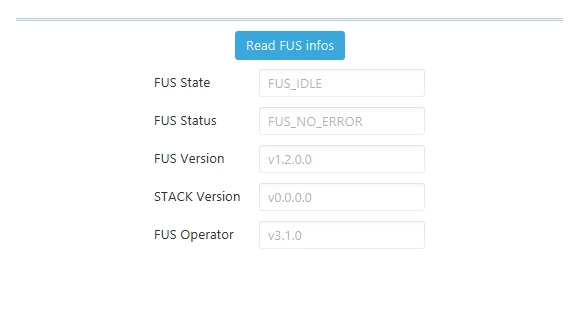
at STEP 4, I have read FUS Version:
and evertyhing seems fine:
I then go to STEP 7:
It says I must now download new wireless stack (I have stm32wb5x_BLE_Stack_full_fw.bin)
The instruction say:
- in Firmware Upgrade Service: (File Path: [Wireless_Coprocessor_Binary], Start Address: [Install@])
The document says: [Install@]. What does that supposed to mean?
I am very confused on what should be Start Address. I tried looking everywhere but cannot find such information. Could someone point me in the right direction please?
UPDATE
I have found some information regarding flashing stm32wb here:
https://blog.davidbramsay.com/getting-started-with-stm32wb-and-ble-communications/
In that blog, the guy suggest flashing to the following offsets:
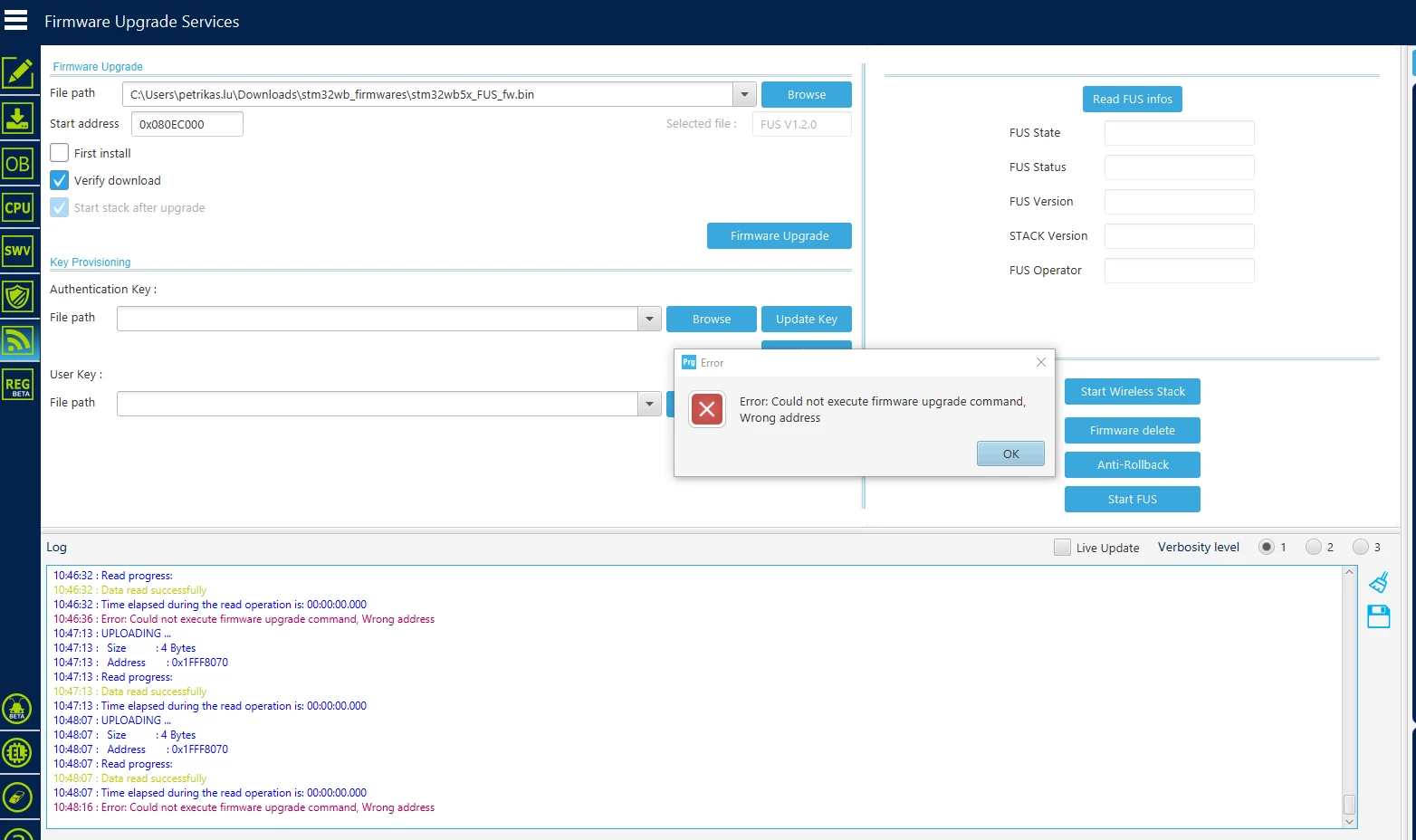
FUS V 1.0.2: 0x080EC000
BLE FULL STACK : 0x080CB000
I have tried flashing via Firmware Upgrade Services but it does not seem to allow:
UPDATE2
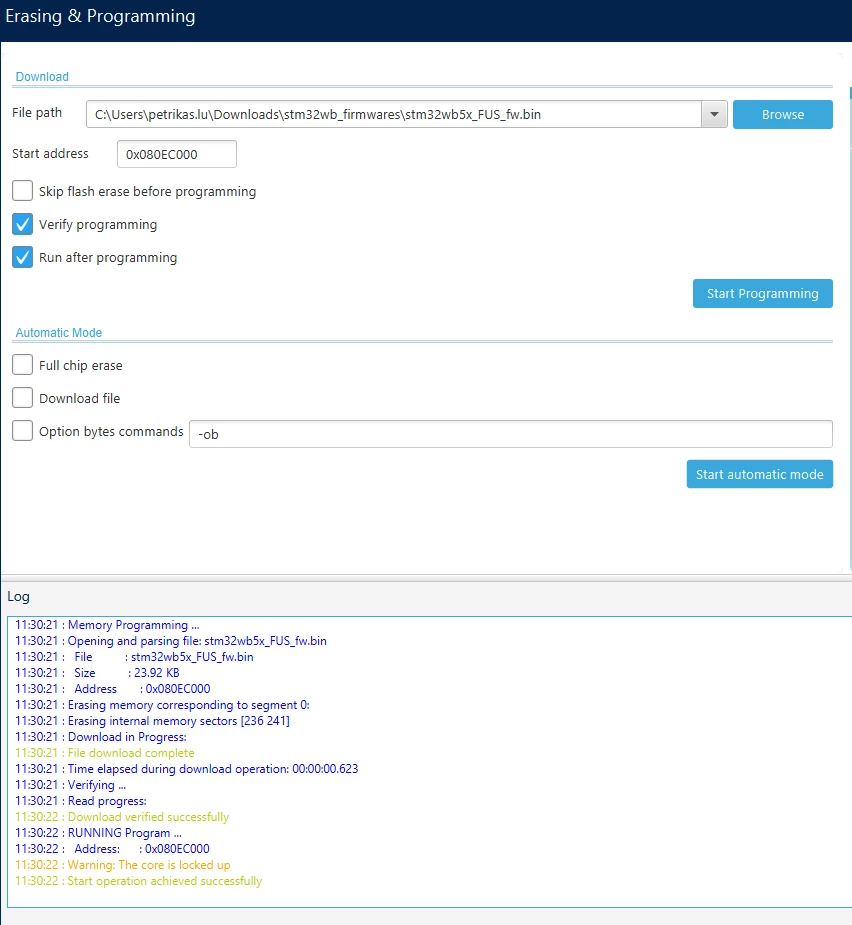
I have tried to flash the firmware via the Erasing & Programming section of STM32CubeProgrammer instead of Firmware Upgrade Services.
I was able to succesfully flash the FUS firmware:
I then moved to BLE stack firmware:
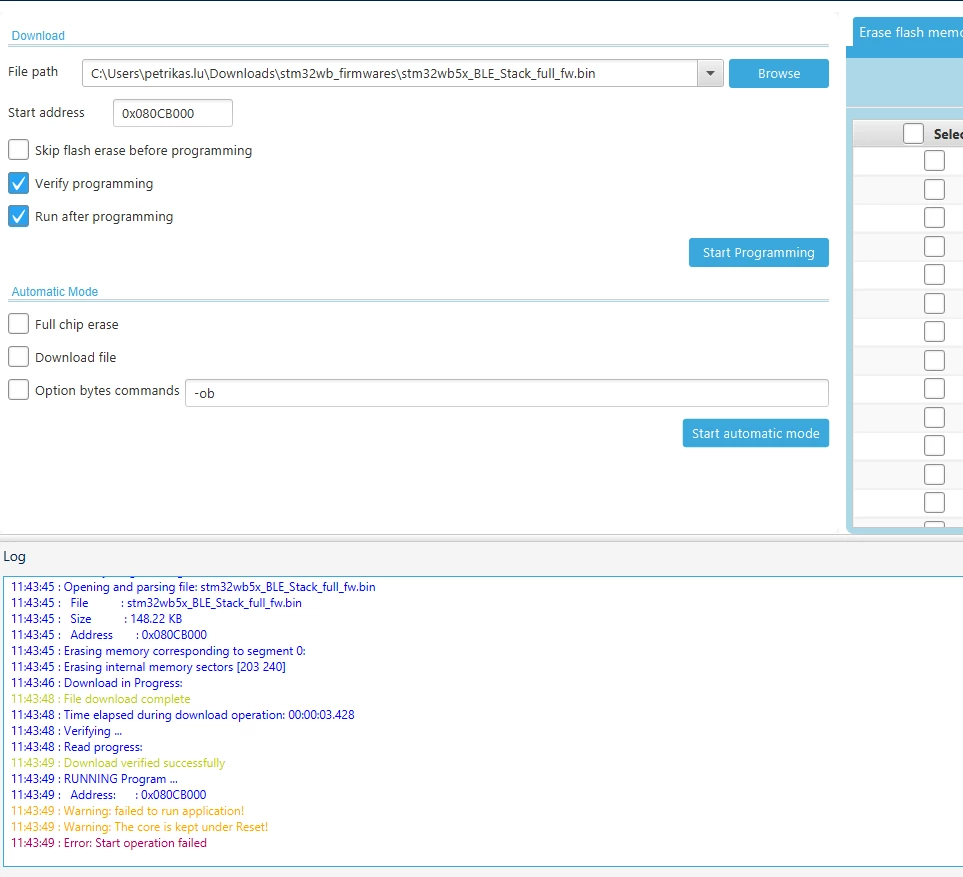
It seems that flashing is successfull apart from a couple of warnings (I am not sure if they are relevant.
I want to know why I am able top flash via Erase & Programming menu and not Firmware Upgrade services.
Also, Since I have flashed all the firmwares, how can I now check if everything is ok?