Karan 123
Senior
April 16, 2020
Solved

Struggling with TouchGFX Generated Code Building on STM32Cube IDE.

  • April 16, 2020
  • 34 replies
  • 7177 views

Hi,

I am struggling Struggling with TouchGFX Generated Code Building on STM32Cube IDE.

I am working on below setup:

Software Tool Chain:

STM32CubeMX 5.6.0

TouchGFX 4.13.0 Designer

STM32CubeIDE 1.3.0

Hardware:

STM32F746G-DISCO (Discovery Board)

I have created GUI on TouchGFX 4.13.0. worked fine on simulator and Discovery Board as well.

I am doing as below :

Open TouchGFX:

1. File->New

2. Select Application Template STM32F746G Discovery Kit

3. Select UI Template -> Blank UI

4. Name the project TestHardware and Click Create

5. Add a Red box that fills with rectangle and the entire canvas.

6. Add a button that I can click

7. Click Generate Code

8. Click Run Target

This does work, and I get the desired Red box and single button that I can click.

When I am trying to Open In STM32CubeIDE 1.3.0 and Import as per below:

C:\TouchGFXProjects\TestHardware\STM32CubeIDE

Binary File Created in Too Large ..

1) STM32F746G_DISCO.bin        2.12 GB

STM32F746G_DISCO.elf         239 KB

STM32F746G_DISCO.hex         99 KB

2) STM32CubeIDE Debugger Error !!

(Read) Failed determine breakpoint type

Error ! Failed to read target status

Debugger connection lost.

Shutting down . . .

3) STM32CubeProgrammer 2.4.0 also have Error while programming .But The TouchGFX Generated File works Well.

4) Changing the STM32F746NGHx_FLASH.ld (from Repository Demo of specific board ) reduce the file size to 35KB . But Code did not work on target either Debug Mode receive error at mention 2) nor the STM32CubeProgrammer/ST-Link.

Is this is Bug or I am using something wrong. ? Please advice me ..

Thanks in advance

--

Karan

This topic has been closed for replies.
Best answer by Alexandre RENOUX

No it's not a bug. It's normal. You shouldn't use the .bin file.

The only interesting files are .elf file and .hex file to download you project into your board.

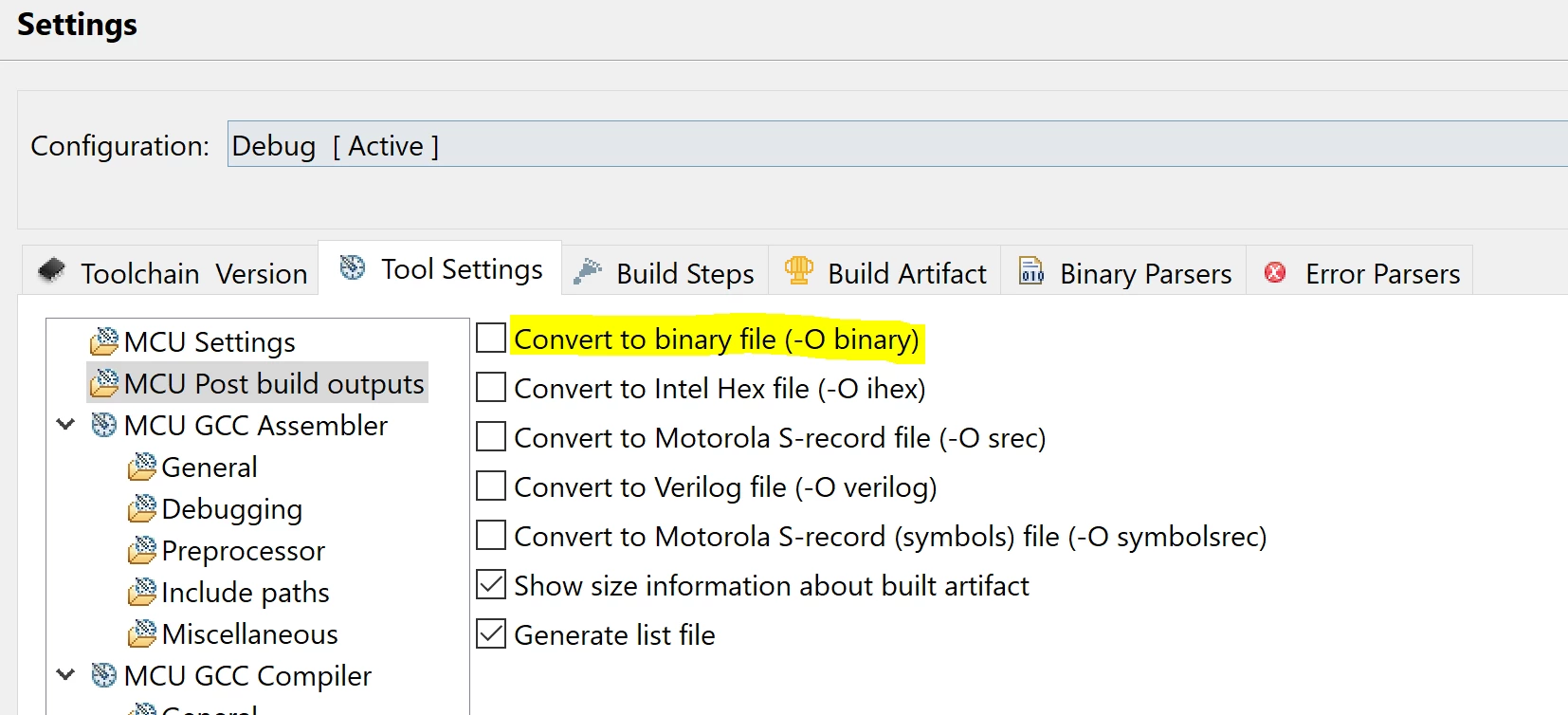
You can remove the generation of the .bin file by unchecking the option in the project settings.

0693W000000WUq6QAG.png

/Alexandre

34 replies

chaaalyy
Senior II
April 16, 2020

You have to debug the *.elf, not the *.bin... There´s also the possibility to switch off the building of the *.bin files, if they´re not needed. (can´t take a closer look, where exactly to do so :( my laptop is not within reach right now... It was somewhere in Properties, c/c++ build...)

For now it should work to go to your debug configuration and choose the correct file (the *.elf) :)

Karan 123
Karan 123Author
Senior
April 17, 2020

Thanks for update ... But Still same result ..

(Read)Failed determine breakpoint type

Error! Failed to read target status 

Debugger connection lost.

Shutting down...

0693W000000VzysQAC.bmp

Anybody from ST please Advice ?

chaaalyy
Senior II
April 17, 2020

Take a look at Project -> Properties -> Run/Debug Settings. In the right pane double click on your debug configuration. Tab "Main": Is the correct file set up there ? (Normally "Debug\<ProjectName>.elf")

Alexandre RENOUX
Visitor II
April 17, 2020

Hello,

"When I am trying to Open In STM32CubeIDE 1.3.0 and Import as per below" -> What do you mean by You tried to import ?

"Changing the STM32F746NGHx_FLASH.ld" -> What sort of change did you do to the linker file ?

The steps you described are correctly done. And it's proven by the fact that it works using the Designer. So the issue comes to what you did right after to go to CubeIDE.

Normally, you just need to double-click on the .project in the STM32CubeIDE/ folder and build since you started from the AT.

/Alexandre

Karan 123
Karan 123Author
Senior
April 17, 2020

@chaaalyy (Community Member) Thanks .. Yes.. This is exactly same . But Still not working..

@Alexandre RENOUX (ST Employee)

Thanks you too .

I have tried to open .project as well .

Binary File Created in Too Large ..

STM32F746G_DISCO.bin        2.12 GB

STM32F746G_DISCO.elf         239 KB

STM32F746G_DISCO.hex         99 KB

2) STM32CubeIDE Debugger Error !!

(Read) Failed determine breakpoint type

Error ! Failed to read target status

Debugger connection lost.

Shutting down . . .

Then I have Just replaced linker file from

C:\Users\Abc\STM32Cube\Repository\STM32Cube_FW_F7_V1.16.0\Projects\STM32746G-Discovery\Applications\Display\LTDC_PicturesFromSDCard\SW4STM32\STM32746G-DISCOVERY

to

C:\TouchGFXProjects\MyApplication_11\STM32CubeIDE

Output After Changing linker file

STM32F746G_DISCO.bin        45Kb

STM32F746G_DISCO.elf        1682 KB

But Code not working in Debug/release mode as well.

Can you checked Internally ? What is issue/bug/mistake while compiling/running code on target?

--

Karan

chaaalyy
Senior II
April 17, 2020

Ok, at the moment it´s a little bit like fortune telling, what exactly happened at your side to give you that behaviour of your toolchain...

So i would recommend to restart from scratch (could be done within 10 minutes...). Take a look at this video:

https://www.youtube.com/watch?v=12KXreXaLp0

Be sure to follow the instructions carefully and slowly. When it comes to differences because you have a newer version of firmware package etc., just answer yes or "migrate" at that point. Be really sure, not to miss any of the points from the video !

Good Luck and i wish you success =)

Edit: In some cases, if it won´t build... Generate code within touchGFX designer again, afterwards do a right click on the project and choose "refresh", so it can recognize all of the generated files ;)

Karan 123
Karan 123Author
Senior
April 18, 2020

Thanks for Link ..

But This video ..

This is Just a trick to run TouchGFX 4.13.0 on STM32CubeIDE 1.3.0

It does not a relevant method (I think) .

There is definitely is Bug from STM32CubeIDE/STMC32Cube/TouchGFX Side while integration.

Any way, I have made document to

How_to_Configure_STM32F746_Discovery_TouchGFX_4.13.0_STM32CubeIDE_1.3.0 . . . .

Hope this may help others..

@Alexandre RENOUX (ST Employee)

Did you get some time to check at your end? with your team Martin KJELDSEN (ST Employee) 

--

Karan

chaaalyy
Senior II
April 18, 2020

Nice to see a crippled project ... It may build, but anyway not run correctly. You missed TWO very important parts: QSPI setup in Linker Script and also MPU configuration. But as far, as i see, you are the expert here and i´m just a stupid enough to watch any videos ;)

Maybe next time i also should forget about that stuff. As long, as this video provides a method, doable for (nearly...) everybody, i´ll keep on watching and have a lot of respect for the people, who are providing them and share their knowledge ;)

btw: exceptionally i have to say, this time it´s not the fault of ST or the tGFX team...

I also did a complete integration and hardware setup manually (the hard way...). Just to learn, what´s going on below the surface... And i have to say, it´s no problem, if you know the settings, you have to provide. These generators are no fortune tellers about any hardware, somebody wants to get up and running

Alexandre RENOUX
Visitor II
April 20, 2020

Hello,

To have the same setup and be on the same track in order to avoid unwanted steps that we would not be aware of, please follow these steps:

  1. Open TouchGFX Designer
  2. Select Application Template STM32F746G Discovery Kit v3.0.0 (with the ToucGFX generator and CubeMX logo)
  3. Select UI Template -> Blank UI
  4. Click Create
  5. Add a Red box that fills the entire canvas.
  6. Add a button
  7. Click Generate Code
  8. Click Run Target
  9. Check if it works (it should)
  10. Go to STM32Cube/ folder and double-click on .project
  11. It opens automatically CubeIDE
  12. Create new workspace
  13. Right-click on the project and refresh (not really necessary but we never know)
  14. Build project - If errors, please post them here
  15. Verify that the .launch file is created (right-click on project > Properties > Run/Debug settings, you should see a launch configuration), if not please post it and I will give you the steps to follow.
  16. When .launch is correctly set, click on the debug button (spider logo), report any errors

/Alexandre

Martin KJELDSEN
Principal III
April 20, 2020

@Community member​,

You simply need the stm32f746*.s file in your CubeIDE project. It's missing from the AT. I fixed it but forgot to upload the AT - I'll rectify this asap. Until then, just include the .s file - it's because Eclipse based ides define weak symbols for parts of the .s file including reset_handler

/Martin