Karan 123
Senior
April 16, 2020
Solved

Struggling with TouchGFX Generated Code Building on STM32Cube IDE.

  • April 16, 2020
  • 34 replies
  • 7272 views

Hi,

I am struggling Struggling with TouchGFX Generated Code Building on STM32Cube IDE.

I am working on below setup:

Software Tool Chain:

STM32CubeMX 5.6.0

TouchGFX 4.13.0 Designer

STM32CubeIDE 1.3.0

Hardware:

STM32F746G-DISCO (Discovery Board)

I have created GUI on TouchGFX 4.13.0. worked fine on simulator and Discovery Board as well.

I am doing as below :

Open TouchGFX:

1. File->New

2. Select Application Template STM32F746G Discovery Kit

3. Select UI Template -> Blank UI

4. Name the project TestHardware and Click Create

5. Add a Red box that fills with rectangle and the entire canvas.

6. Add a button that I can click

7. Click Generate Code

8. Click Run Target

This does work, and I get the desired Red box and single button that I can click.

When I am trying to Open In STM32CubeIDE 1.3.0 and Import as per below:

C:\TouchGFXProjects\TestHardware\STM32CubeIDE

Binary File Created in Too Large ..

1) STM32F746G_DISCO.bin        2.12 GB

STM32F746G_DISCO.elf         239 KB

STM32F746G_DISCO.hex         99 KB

2) STM32CubeIDE Debugger Error !!

(Read) Failed determine breakpoint type

Error ! Failed to read target status

Debugger connection lost.

Shutting down . . .

3) STM32CubeProgrammer 2.4.0 also have Error while programming .But The TouchGFX Generated File works Well.

4) Changing the STM32F746NGHx_FLASH.ld (from Repository Demo of specific board ) reduce the file size to 35KB . But Code did not work on target either Debug Mode receive error at mention 2) nor the STM32CubeProgrammer/ST-Link.

Is this is Bug or I am using something wrong. ? Please advice me ..

Thanks in advance

--

Karan

This topic has been closed for replies.
Best answer by Alexandre RENOUX

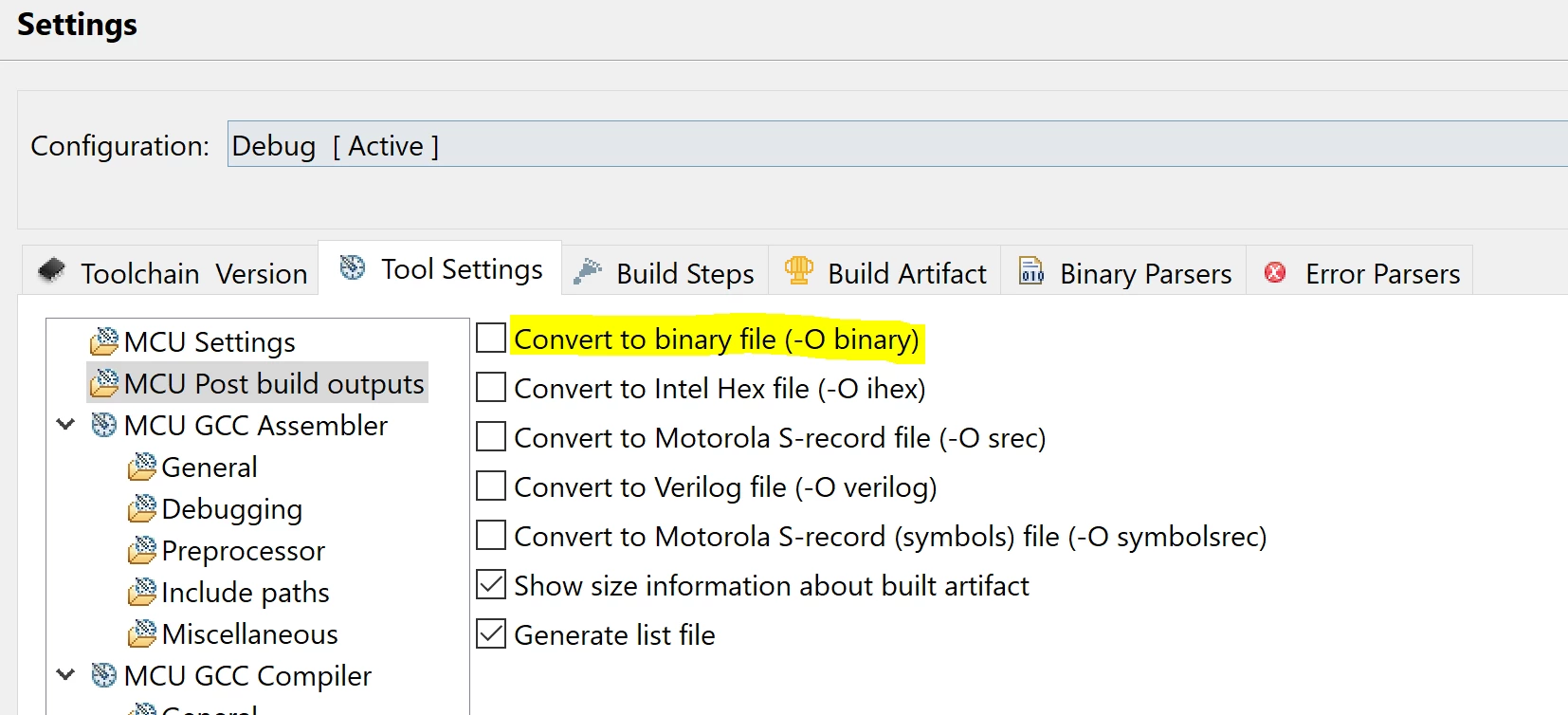
No it's not a bug. It's normal. You shouldn't use the .bin file.

The only interesting files are .elf file and .hex file to download you project into your board.

You can remove the generation of the .bin file by unchecking the option in the project settings.

0693W000000WUq6QAG.png

/Alexandre

34 replies

Martin KJELDSEN
Principal III
April 20, 2020

Unfortunately i'm missing an F746G-DISCO board at home so i can't test it - I think that's why i hadn't uploaded it yet :)

But if you're interested in helping me test it, let me know.

Karan 123
Karan 123Author
Senior
April 20, 2020

@Martin KJELDSEN (ST Employee)

Sure I will ..

Can you let me know where should I copy startup_stm32f746nghx.s from ?

As for now .. I have just copied

 from 

C:\TouchGFXProjects\MyApplication_9\gcc

to

C:\TouchGFXProjects\MyApplication_9\STM32CubeIDE

Debugger Start .. Now .. But Reached on HardFault..

Seen Old Complied Project on Screen

Thanks for your concern ..

--

Karan0693W000000W5jjQAC.png

0693W000000W5iHQAS.png

Martin KJELDSEN
Principal III
April 20, 2020

Just get it from a CubeMX generated F746 project. Or from Cube FW packs.

It's not 100% clear to me how you created this project. Check that CRC is enabled in CubeMX - otherwise it will hardfault.

/Martin

Karan 123
Karan 123Author
Senior
April 20, 2020

@Martin KJELDSEN (ST Employee)

OK .

startup_stm32f746xx copied from.

C:\Users\Gurpreet\STM32Cube\Repository\STM32Cube_FW_F7_V1.16.0

I have created Project from TouchGFX 4.13.0 . The Steps Mentioned by Alexandre RENOUX (ST Employee)

Yes .. CRC is Already Enabled ..

Still Having HardFault ..

0693W000000W64rQAC.png

Karan 123
Karan 123Author
Senior
April 20, 2020

@Martin KJELDSEN (ST Employee)

Also Please more attention on the size of .bin in screenshot..

--

Karan

Martin KJELDSEN
Principal III
April 20, 2020

.bin files will be huge because they're covering memory area all the way up to external flash 0x90000000. That's a lot of 0s !

Karan 123
Karan 123Author
Senior
April 20, 2020

Is this a Bug or What ?? How do I resolved that .. ?

or In which version TouchGFX team will be corrected ?

Karan 123
Karan 123Author
Senior
April 24, 2020

@Martin KJELDSEN (ST Employee)

Hi,

Will it possible to resolve the issue ? with me remotely ..Thanks.

0693W000000WBreQAG.png

--

Karan

Karan 123
Karan 123Author
Senior
April 26, 2020

Hi

Alexandre RENOUX (ST Employee) @Martin KJELDSEN (ST Employee)

2) STM32CubeIDE Debugger Error !!

(Read) Failed determine breakpoint type

Error ! Failed to read target status

Debugger connection lost.

Shutting down . . .

Problem Solves with Select Application Template STM32F746G Discovery Kit v3.0.1

0693W000000WSnKQAW.png

But .bin Still Nearly GB .

0693W000000WSnPQAW.png

Why So ?

--

Karan

Alexandre RENOUX
Visitor II
April 27, 2020

Hello,

As Martin KJELDSEN already explained previously : ".bin files will be huge because they're covering memory area all the way up to external flash 0x90000000. That's a lot of 0s !"

You can also find the explanation on the following thread : https://community.st.com/s/question/0D50X00009XkYIP/bin-file-generated-by-gcc-too-large

What is your current status ?

/Alexandre

Karan 123
Karan 123Author
Senior
April 27, 2020

Thanks to you...

Karan 123
Karan 123Author
Senior
April 27, 2020

Hi,

@Alexandre RENOUX​ 

Thanks for link..

What is your current status ?

Same .. Approximately 2GB.

Is It Bug or What ? Is there any need to resolve that or not?

0693W000000WSnPQAW.png

--

Karan

--

Alexandre RENOUX
Alexandre RENOUXBest answer
Visitor II
April 27, 2020

No it's not a bug. It's normal. You shouldn't use the .bin file.

The only interesting files are .elf file and .hex file to download you project into your board.

You can remove the generation of the .bin file by unchecking the option in the project settings.

0693W000000WUq6QAG.png

/Alexandre

Karan 123
Karan 123Author
Senior
April 27, 2020

Thanks for your time .. and New Application Template STM32F746G Discovery Kit v3.0.1