


SPrik
Associate II
October 22, 2022
Solved

[SOLVED] STM32F469I-Disco and TouchGfx 4.20.0. I bought STM32F469IDisco. Version MB1189-F469NIH6-B08-A222300689. When I try start new project with TouchGFX, result is black screen.

  • October 22, 2022
  • 23 replies
  • 8785 views

I tried both "Run Target" from TouchGFX Designer, and Cube IDE (Cube MX) compile / debug result is black screen. Compile, debug and run is without errors.

This topic has been closed for replies.
Best answer by Osman SOYKURT

Hello,

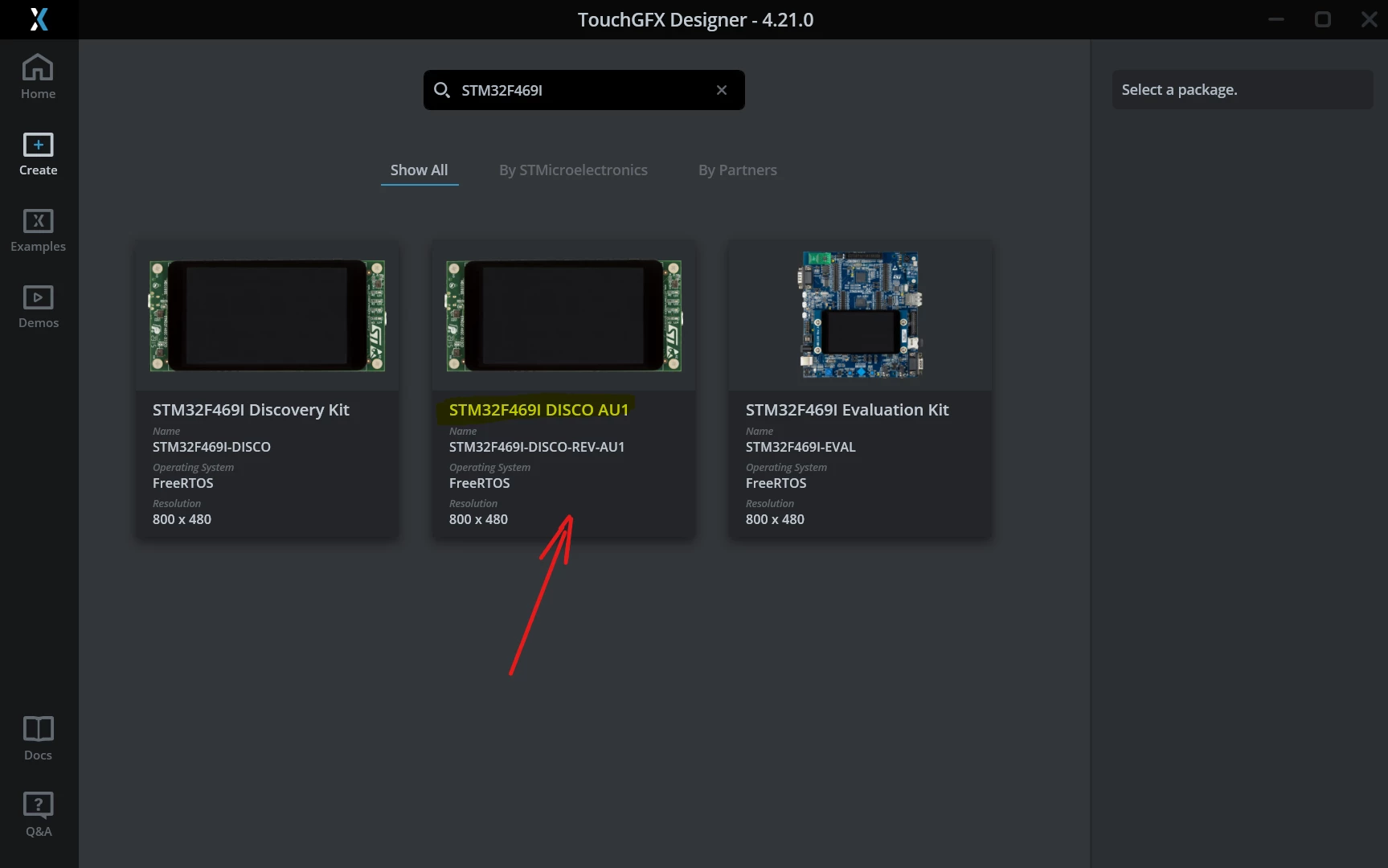
A new TBS is now available on TouchGFX Designer 4.21.0 for this STM32F469I-Disco $AU1 revision (B08)

0693W00000Y7iYHQAZ.png 

It should resolve the issue with the black screen.

/Osman

23 replies

Osman SOYKURT
Technical Moderator
October 25, 2022

Hello SPrik,

Have you tried to run your project on debug mode with STM32CubeIDE ? What happens if you run your app step by step ?

Can you try to run an example on your board from TouchGFX Designer? (Animated Image Example for instance)

0693W00000UoluuQAB.pngThen send us the logs when you press run on target.

(You might need to plug-unplug your board from your computer after the binary is uploaded on your STM32F469I-Disco board).

/Osman

Osman SOYKURTST Software Developer | TouchGFX
SPrik
SPrikAuthor
Associate II
October 26, 2022

Hi Oskts,

Thanks for answer.

Simply step by step:

1. Start TouchGFx 4.20.0

2. Click on Example – select Animated Image

3. Click on Select Board

4. Select STM32F469i Discovery Kit

5. Click On Generate Code

6. Log – Finished with Done – no errors

7. Click on Run Simulator – working witout problems

8. Click On Run Target- compile without problems, finish with Done

9. Unplug / Plug – Screen remain black.

10. Open folder TouchGFX – Folder MyApplication

11. Click On „STM32F469I-DISCO.ioc“

12. Start CubeMX

13. System open alert window

„This project was setup with STMCubeMX V6.5.0 – using FW_F4 V1.27.0

STMCubeMX V6.6.1 can work only with STM32Cube FW_F4 V1.27.1

14. Click on Migrate

15. Click on „Generate Code : STMCubeMX open warning:

„- The USE_NEWLIB_REENTRANT must be set in order to make sure that newlib is fully reentrant.

The option will increase the RAM usage. Enable this option under FreeRTOS > Advanced Settings > USE_NEWLIB_REENTRANT“

16. Select USE_NEWLIB_REENTRANT – Enabled

17. Generate project – without problems

18. Successfully imported into CubeIde

19. Project Build All

20. Start Debug – screen is black.

21. The first problem is in :

When system call „MX_LTDC_Init();“

Call stack:

0693W00000VO8w6QAD.png (stm32f4xx_hal_dsi.c)

while ((hdsi->Instance->GPSR & DSI_GPSR_CMDFE) == 0U)
 
 {
 
 /* Check for the Timeout */
 
 if ((HAL_GetTick() - tickstart) > DSI_TIMEOUT_VALUE)
 
 {
 
 return HAL_TIMEOUT;
 
 }
 
 }

  This function „MX_LTDC_Init�? take almost 2min time.

And next: 

System is freezing in:


(STM32TouchController.cpp)

void STM32TouchController::init()
{
 
 /**
 
 * Initialize touch controller and driver
 
 *
 
 */
 
 if (BSP_TS_Init(800, 480) == TS_OK) 
 {
 
 bsp_ts_initialized = true;
 }
 
 assert(bsp_ts_initialized);
 
}

Its invoke:

(syscalls.c)

void _exit (int status)
 
{
 
 _kill(status, -1);
 
 while (1) {} /* Make sure we hang here */
 
}

Call stack:

0693W00000VO8xwQAD.png

Best regards Stanislav P.

SPrik
SPrikAuthor
Associate II
October 26, 2022

For complette info:

Attachments Logs:

  • Run On Target
  • CubeIde - Build
  • CubeIde - Debug

Ebby
Visitor II
November 2, 2022

I am facing the same issue. I guess this happens with the Rev C boards. Apparently the board has a new screen on it with a new NT35510MH lcd driver but the same old FT6336G touch controller.

As a part of the touch controller initialization,

"I2C1_Read" function in stm32469i_discovery.c calls the "HAL_I2C_Mem_Read" which returns HAL_ERROR

I am not sure what the underlaying issue is.

SPrik
SPrikAuthor
Associate II
November 2, 2022

Hi Ebby,

thanks for answer, I also suspect HW, but in this time I have not solution.

St.

SPrik
SPrikAuthor
Associate II
November 14, 2022

Hi Ebby,

I have found old LCD - ST Part - B-LCD40-DSI1 in my office. Try to replace mounted LCD on 469i-Discovery with old LCD and everything working. In this time I will continue with configuration new board + old LCD. I hope, that ST remove this problem in new TOUCH-GFX version.

St.

Ebby
Visitor II
November 14, 2022

Hello @SPrik​ 

Thanks for letting me know. Unfortunately I do not have an older version of the LCD screen. I guess I will wait for ST to provide a fix for this problem.

SPrik
SPrikAuthor
Associate II
November 14, 2022

Farnell:

Item: B-LCD40-DSI1

OrderCode: 2664590

"Littlebit expensive solution."

Osman SOYKURT
Technical Moderator
November 14, 2022

Hello SPrik and Ebby,

Thanks for your investigation! We're currently trying to debug it. We do not have this particular revision here for the moment (I've ordered it) but we're facing similar issue with revision B-01 and B-08. I'll get back to you when I'll have more info about it.

/Osman

Osman SOYKURTST Software Developer | TouchGFX
EXUE.2
ST Employee
November 15, 2022

Ebby is right that the board has a new screen on it with a new NT35510MH lcd driver but the same old FT6336G touch controller. but I am not sure if the new LCD has implemented in your STM32F469-DISC board. the driver for old OTM8009A and new NT35510 is different, can you check which LCD is applied in your board?

  1. new LCD NT35510: FPC-400B25025V1

0693W00000WIL93QAH.png 2. old LCD OTM8009A: FRD397B2509V20693W00000WIL9DQAX.png

SPrik
SPrikAuthor
Associate II
November 15, 2022

LCD originaly mounted on delivered 469i-Disco Board:

BL40220-005-A

400050W8 BBJBBC

FRD400B25025-A-CTK

BBJDJG

(Flex PCB)

FPC-400B25025V2

New LCD - (working LCD)

BL40200-001-A

400013W8 BAJAE

FRD337B250009-0-CTK

BAJBBB (I am not sure - there is thick layer of glue)

EXUE.2
ST Employee
November 15, 2022

the originally LCD FRD400B25025-A-CTK is NT35510 driver, so you should used NT35510 driver in code.