


SPrik
Associate II
October 22, 2022
Solved

[SOLVED] STM32F469I-Disco and TouchGfx 4.20.0. I bought STM32F469IDisco. Version MB1189-F469NIH6-B08-A222300689. When I try start new project with TouchGFX, result is black screen.

  • October 22, 2022
  • 36 replies
  • 8982 views

I tried both "Run Target" from TouchGFX Designer, and Cube IDE (Cube MX) compile / debug result is black screen. Compile, debug and run is without errors.

This topic has been closed for replies.
Best answer by Osman SOYKURT

Hello,

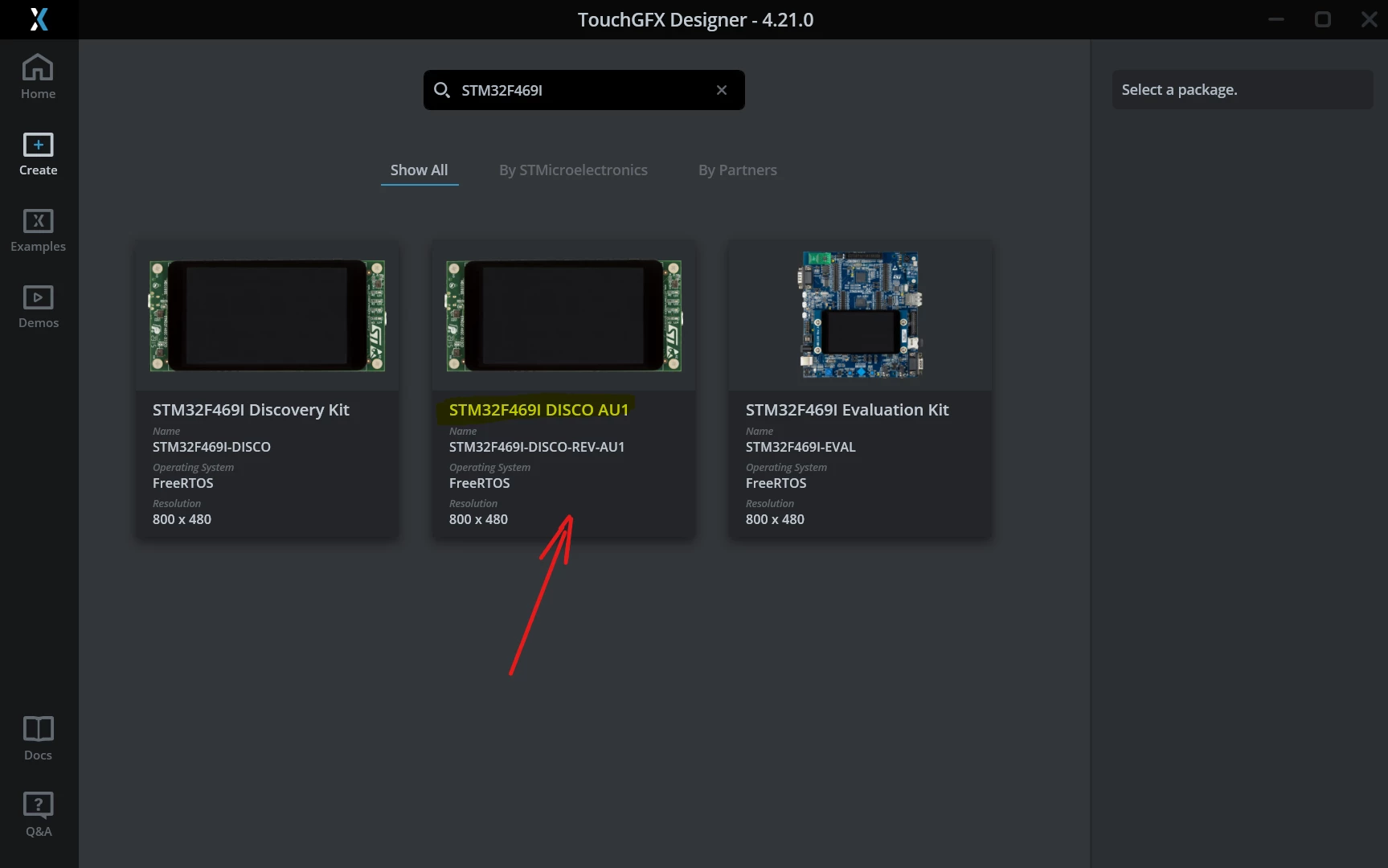
A new TBS is now available on TouchGFX Designer 4.21.0 for this STM32F469I-Disco $AU1 revision (B08)

0693W00000Y7iYHQAZ.png 

It should resolve the issue with the black screen.

/Osman

36 replies

SPrik
SPrikAuthor
Associate II
November 16, 2022

Thanks for answer,

I tried replace driver OTM8009A by new driver NT35510.

Display is black.

Try change parameters (community.st link)

STM32F469I-DISCO NEW LCD Driver Missing NT35510

  1. PeriphClkInitStruct.PeriphClockSelection = RCC_PERIPHCLK_LTDC;
  2. PeriphClkInitStruct.PLLSAI.PLLSAIN = 144; //384
  3. PeriphClkInitStruct.PLLSAI.PLLSAIR = 2; //7
  4. PeriphClkInitStruct.PLLSAIDivR = RCC_PLLSAIDIVR_2;//RCC_PLLSAIDIVR_2
  5. HAL_RCCEx_PeriphCLKConfig(&PeriphClkInitStruct);

But still is black.

Final debug screen:

0693W00000WIZPKQA5.jpg 

EXUE.2
ST Employee
November 17, 2022

Hi Sprik, can you download attached "STM32F469I-DISCO_tst_V2.9.4.hex" file to your board firstly to check if the display is OK?

This .hex file is OK in my STM32F469I-DISCO board with NT35510 LCD.

SPrik
SPrikAuthor
Associate II
November 17, 2022

Hi,

Thanks for file.

Board is OK - LCD and others peripherals working.

//Nice picture on 800x480//

I tried make new project.

  1. Start TouchGFX and make new proj. (Select board, Place some buttons on canvas, ...)
  2. Generate code - (simulator working)
  3. Open *.ioc file - CubeMX and generate code
  4. Open CubeIDE
  5. From Drivers/BSP/ Components delete link to OTM8009a/OTM8009a.c
  6. Make new link to NT35510/35510.c
  7. In project files replace all otm8009a by NT35510
  8. Build project => no errors
  9. Debug project. LCD is black.

EXUE.2
ST Employee
November 17, 2022

I don't familiar with your compile tool environment, and I guess maybe the 35510.c is not matching the new NT35510 LCD? you can try the replace 35510.c and 35510.h by below files

SPrik
SPrikAuthor
Associate II
November 17, 2022

Hi, EXUE_2,

I replaced nt35510.c and nt35510.h files - no change - black screen.

My SW:

STM32CubeIDE - 1.10.1

STM32CubeMX - 6.6.1

TouchGFX - 4.20.0

Could you send me any simple working demo based on TouchGFX + CubeIDE + (CubeMX) ? Source code, I will try compile it.

Thanks.

EXUE.2
ST Employee
November 18, 2022

Hi SPrik, I only have one demo project based IAR, if you want to get it, please give me your email.

JKim.27
Associate
December 30, 2022

Can I get a demo project? E-mail address is eyefor@naver.com. Thank you.

SPrik
SPrikAuthor
Associate II
November 18, 2022

Thanks for offer.

Is it TouchGFX based app?

EXUE.2
ST Employee
November 19, 2022

no, it just is one LCD display example code

Ebby
Visitor II
November 21, 2022

stm32469i_discovery_lcd.h interface from the latest Cube F4 package works just fine. But only the touchgfx applications does not seem to work(even after replacing the OTM8009a code)

By the way, any idea why the TouchController initialization fail in touchgfx. Maybe the touch controller's I2C address is different?

SPrik
SPrikAuthor
Associate II
November 19, 2022

Thanks fo offer.

I will try it. Pleae send this project to PTI485@seznam.cz

I placed new question to TouchGFX forum, if anybody has TouchGFX project with driver NT35510.

SPrik
SPrikAuthor
Associate II
November 22, 2022

Hi,

Debug from stm32469i_discovery_ts.c file, function BSP_TS_Init

I2C_address = 112 = 0x70

PH7 - with or without PULL UP - not working.

I found, function BSP_TS_INIT return error 0x03 = TS_DEVICE_NOT_FOUND

Important this funtion is calling approx 15 sec after program debug started.

RRoma.5
Visitor II
November 29, 2022

Hello,

I have the same problem with my STM32F469I-DISCO

DK32F469I$AU1

QR code:

MB1189-F469NIH6-B08

A222301588

EmbDev
Senior
November 30, 2022
Romain DIELEMAN
ST Employee
December 1, 2022

Thank you for sharing your example, it is very helpful to all of us :thumbs_up:

/Romain

SPrik
SPrikAuthor
Associate II
November 30, 2022

Thanks for app.

Your Elf file working.

Small question: HOW DID YOU DO THAT?

When I tried open project, rebuild it, or make some changes, display remain black.

How did you do that?

Can you explain step by step: From new project in TOUCHGFX to DEBUG in STM32CubeIDE

is it possible?

EmbDev
Senior
November 30, 2022

You need to checkout the B08 branch: https://github.com/RTwTools/STM32F469I-Discovery/tree/feature/B08-nt35510

The main branch is the default app for the older display.

You can see the required changes in this commit: https://github.com/RTwTools/STM32F469I-Discovery/commit/26085432aa213f7dd75b59c06e9b40c444992ffa

Ebby
Visitor II
November 30, 2022

Thank you very much. This fixed my issue.