SGasp.1
Associate III
April 20, 2023
Solved

Cyrillic language on touch gxf on stm32f7

  • April 20, 2023
  • 5 replies
  • 2274 views

Hi community.. I am doing an application to display some text in a display 5 inches..

I am using stm32cubeide and touch gfx..

They are asking me to support the cyrillic and hebrew language.

When i Set the text on the gui and i try to watch it statically it is working..


_legacyfs_online_stmicro_images_0693W00000biVUNQA2.png 

But when i try to do somethin shown below with the code i see ony question marks ?? in the display...

textArea4.setColor(touchgfx::Color::getColorFrom24BitRGB(236, 209, 18));//extra time?
				Unicode::strncpy(textArea4Buffer, parArea4[tipolingua][5], Unicode::strlen(parArea4[tipolingua][5])+1);
				textArea4.invalidate();

where parArea4 it is the following and it is giving problems when the language is cyrillic or hebrew..

const char* parArea4[5][6] = {
 		 { "Preheating",
 								"Ready",
									" ",
									"Baking",
									"Extra time",
									"Extra time?"
 },
 						 { 	"Preriscaldo",
 							 "Pronto",
								 " ",
									 "Cottura",
									 "Extra time",
									"Extra time?"
 							 },
								 { 	"Prechauffage",
								 "Pret",
						 " ",
									 "Cuisson",
									 "Extra time",
									"Extra time?"
								 },
								 { 	"Предварительный нагрев",
									"Готовый",
								 " ",
									 "Выпечка",
									 "дополнительное врем�?",
									 "дополнительное врем�??"
								 },
								 { 	"חימו�? מוקד�?",
									"מוּכָן",
						 " ",
									"�?ֲפִיָה",
								 "זמן נוסף",
									"זמן נוסף"
								 }
 };

Any idea why about this strange behaviour ?

Thanks a lot

This topic has been closed for replies.
Best answer by Osman SOYKURT

Hello SGasp.1,

For the range, based on this website the range should be something like this: Ѐ-ԯ (0x0400 to 0x052F)

So you can put this as a wildcard range value (either in letters or the Unicode).

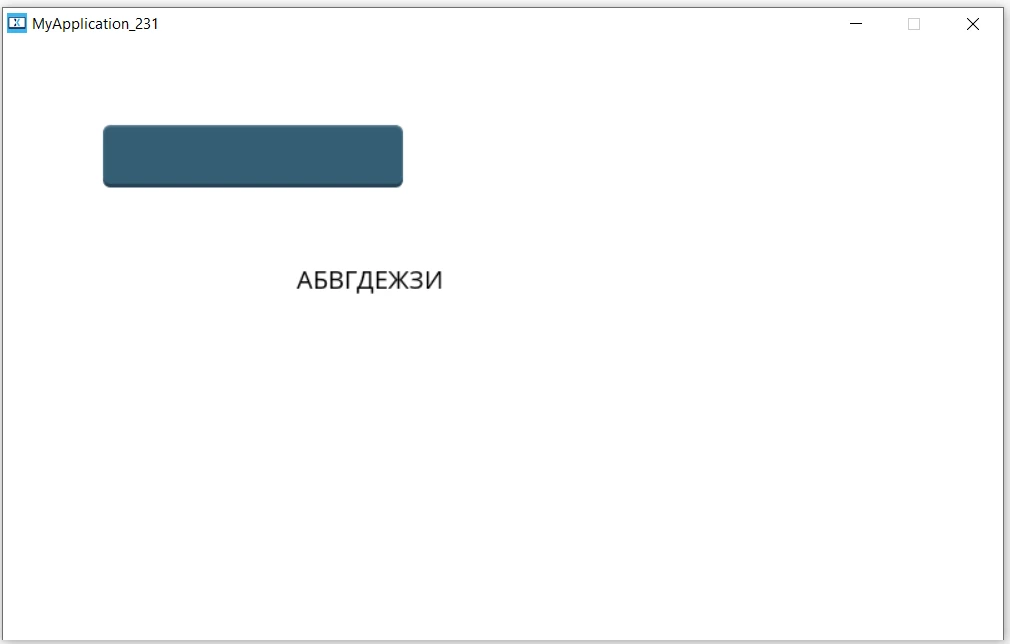
Also, you can't use the Cyrillic letters in your code directly without converting it into Unicode because your C++ code is encoded in UTF-8.

To use them, you can convert your string like this :

void Screen1View::fillText(){
 const uint8_t* Mystring = (const uint8_t*)"�?БВГДЕЖЗИ";
 Unicode::fromUTF8(Mystring, textArea1Buffer, TEXTAREA1_SIZE);
 textArea1.invalidate();
}


_legacyfs_online_stmicro_images_0693W00000bjhGtQAI.png 

/Osman

5 replies

Yoann KLEIN
ST Employee
April 26, 2023

Hello @SGasp.1​,

Since you are using wildcards in your TextArea, you also need to specify the characters and data you wanna pass to your wildcard. For that, go to TouchGFXDesigner > Texts > Typography, then select the typography you are using for your wildcards and fill the Wildcard Ranges section.

E.g. if I want to pass both latin alphabet letters, and numbers to the wildcard :


_legacyfs_online_stmicro_images_0693W00000biqWFQAY.png 

I'm not sure that will resolve all the problems, but could be something that you forgot to do.

Hope it helps,

/Yoann

Yoann KLEINST Software Developer | TouchGFX
SGasp.1
SGasp.1Author
Associate III
April 26, 2023

Hi @yoann KLEIN​ ..

Thanks for your answer..

My situation is the following for the textArea4


_legacyfs_online_stmicro_images_0693W00000biqmmQAA.png 

So if i am understanding right i have to check arial_bold_20..

This is my situation


_legacyfs_online_stmicro_images_0693W00000biqnkQAA.png 

Is it correct ?

Shall I change something here ?

Thanks for the support

Yoann KLEIN
ST Employee
April 26, 2023

Hello,

I think that you have to put your cyrillic alphabet "first letter-last letter" in the Wildcard Ranges pane.

You also have to ensure that the font you use (here Arial Bold) supports the characters you want to display.

/Yoann

Yoann KLEINST Software Developer | TouchGFX
SGasp.1
SGasp.1Author
Associate III
April 26, 2023

Hi @Yoann KLEIN​ .. can you make an example about how to put cyrillic alphabet "first letter-last letter" ?

Did you check and can you check also please this post ?

https://community.st.com/s/question/0D53W000007Vy0TSAS/cyrillic-symbos-utf8-and-touchgfx

In any case I have tried to change the first letter last letter in cyrillic but nothing happened.

Thanks a lot

Osman SOYKURT
Osman SOYKURTBest answer
ST Technical Moderator
May 9, 2023

Hello SGasp.1,

For the range, based on this website the range should be something like this: Ѐ-ԯ (0x0400 to 0x052F)

So you can put this as a wildcard range value (either in letters or the Unicode).

Also, you can't use the Cyrillic letters in your code directly without converting it into Unicode because your C++ code is encoded in UTF-8.

To use them, you can convert your string like this :

void Screen1View::fillText(){
 const uint8_t* Mystring = (const uint8_t*)"�?БВГДЕЖЗИ";
 Unicode::fromUTF8(Mystring, textArea1Buffer, TEXTAREA1_SIZE);
 textArea1.invalidate();
}


_legacyfs_online_stmicro_images_0693W00000bjhGtQAI.png 

/Osman

ST Software Developer | TouchGFX