Associate
March 24, 2025
Solved

VDD12DSI pins in STM32H747BIT6

  • March 24, 2025
  • 6 replies
  • 990 views

Hello everyone,

I am working on a system based on the STM32H747BIT6 MCU and do not plan to use the DSI interface. I have searched through various forums but still have some doubts about the proper power pin configuration when DSI is not in use. Here is what I have so far:

  • VSSDSI: Connected to GND
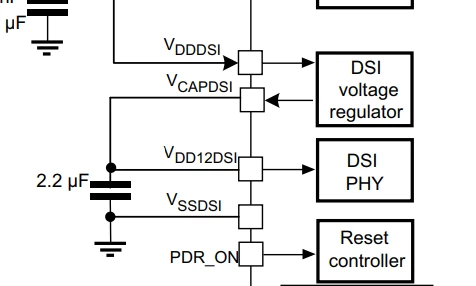
  • VCAPDSI: Connected to VDD12DSI (capacitor not required)
  • VDD12DSI: Uncertain about the correct connection. I would like to avoid using an LDO to step down from 3.3V to 1.2V

Does anyone have experience with this setup or any recommendations on the best approach for VDD12DSI?

Thanks in advance.

This topic has been closed for replies.
Best answer by mƎALLEm

Hello,

The same configuration as for STM32F777:

mALLEm_1-1742812588562.png

No need for external regulator. You need just to connect VDD12DSI to VCAPDSI.

mALLEm_0-1742812379579.png

Hope that answers your question.

6 replies

mƎALLEm
mƎALLEmBest answer
ST Technical Moderator
March 24, 2025

Hello,

The same configuration as for STM32F777:

mALLEm_1-1742812588562.png

No need for external regulator. You need just to connect VDD12DSI to VCAPDSI.

mALLEm_0-1742812379579.png

Hope that answers your question.

To give better visibility on the answered topics, please click "Best answer" on the reply which solved your issue or answered your question.
Associate
May 17, 2025

Hi,

I'm still confused about the details. The reference manual says to connect VDDDSI to the global VDD. Then after connecting VDD12DSI and VCAPDSI, should I connect those to VDD global? That sounds little weird to connect the (1.2V?) to my global 3.3V VDD.

TDK
May 18, 2025

No, you should not connect VDD12DSI and VDD. Why would you? They are clearly disconnected in the figure and there is no text instructing you to connect them.

"If you feel a post has answered your question, please click ""Accept as Solution""."
TDK
March 24, 2025
"If you feel a post has answered your question, please click ""Accept as Solution""."
Associate
March 24, 2025

Thank you for your answers!