

ashishkv29
Associate
Jun 29, 2025 12:50 PM UTC
Solved

Unable to Connect to Custom Target STM32F412CEU6 via SWD

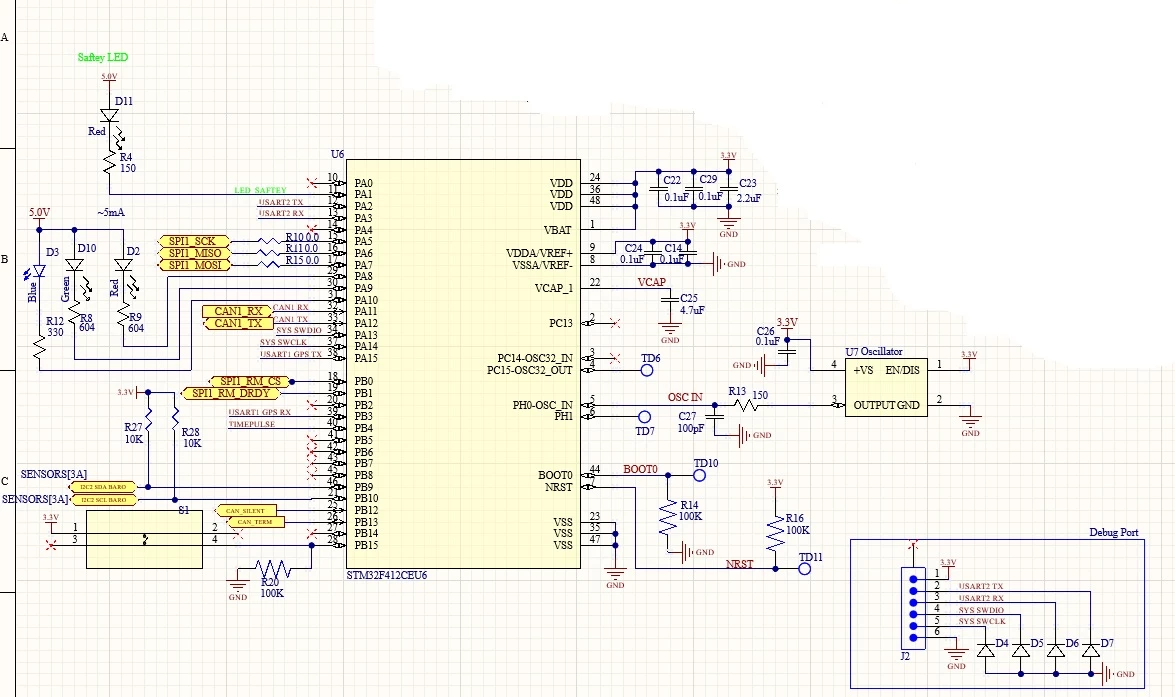
Hi , I am also making custom board for GPS, and same issue I am facing, unable to connect via SWD, Please help to debug.

MCU.jpg

This topic has been closed for replies.
ashishkv29
ashishkv29Best answer
Associate
Jul 11, 2025 6:48 AM UTC

Solved, Issue was on ST-Link v3 Mini, via connector pin head able to access but not via solder pads.


Thanks.

5 replies

Associate
Jul 2, 2025 12:05 PM UTC

Remove the diodes on the debug port, it will work. 

ashishkv29
Associate
Jul 3, 2025 2:19 PM UTC

Removed all 4, but still same issue

Andrew Neil
Super User
Jul 3, 2025 2:33 PM UTC

How are you trying to connect and how, exactly, is it failing? Show logs & screenshots.

Has this board ever worked?

If it's brand new, have you checked basics: power supplies; component orientations; current draw; etc?

You don't have NRST on your debug header; Have you tried adding that, and then connecting under hardware reset?

How to solve connection errors when connecting and programming the STM32 target board.

How to solve debugger connection issues

A complex system that works is invariably found to have evolved from a simple system that worked.A complex system designed from scratch never works and cannot be patched up to make it work.
ashishkv29
Associate
Jul 3, 2025 6:12 PM UTC

How are you trying to connect and how, exactly, is it failing? Show logs & screenshots.

Ans: Connected ST-Link v3 SWDIO to MCU SWDIO and CLK to CLK, and GND and VCC from MCU Board.

ST-Link Log

Screenshot 2025-07-03 230946.png

Traces and Component Placement :

Screenshot 2025-07-03 224429.png

Red is top layer and Blue is Bottom layer

Screenshot 2025-07-03 232512.png

Schematic:

MCU.jpg

Board Stackup:

ashishkv29_0-1751565756566.png

Also maintaned impedance for signal = 50 and for CAN=120

Has this board ever worked?

Ans: No.

If it's brand new, have you checked basics: power supplies; component orientations; current draw; etc?

Ans: Yes MCU & Oscillator placed in correct orientation. and current draw is 6.84 mA ( While not coneting ST-Link USB to PC) and 6 mA ( while connecting ST-Link USB to PC).

You don't have NRST on your debug header; Have you tried adding that, and then connecting under hardware reset?

Ans: Yes I tired MCU NRST(Pull High SCH - test point TD11) Joining directly to ST-Link RST pin and even by MCU NRST (pull low joing -SCH test point TD11 to GND )

ashishkv29
ashishkv29AuthorBest answer
Associate
Jul 11, 2025 6:48 AM UTC

Solved, Issue was on ST-Link v3 Mini, via connector pin head able to access but not via solder pads.


Thanks.