Rita
Visitor II
Dec 16, 2025 4:29 PM UTC
Solved

STM32L051: select LSE as LPUART clock source for wakeup from stop mode?

Can STM32L051 set LSE be LPUART clock source to wake up the MCU? If yes, how to configure.
Gyessine
GyessineBest answer
ST Technical Moderator
Dec 18, 2025 9:28 AM UTC

Hello @Rita 
Based on your product Datasheet, yes, a 32.768 kHz clock (LSE) is needed to allow LPUART communication up to 9600baud. Therefore, even in Stop mode, the LPUART can wait for an incoming frame while having an extremely low energy consumption. 
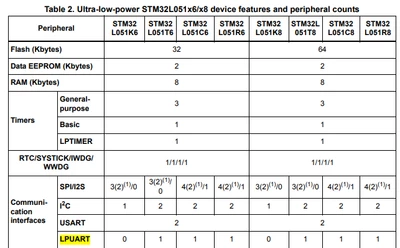
except if you have the STM32L051K6, it does not support LPUART
Gyessine_0-1766049438748.png

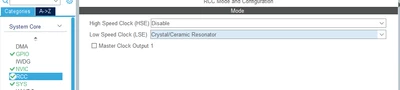
to configure it, just enable your LSE in your RCC configuration
Gyessine_1-1766049894534.png

enable your LPUART

Gyessine_2-1766049928739.png

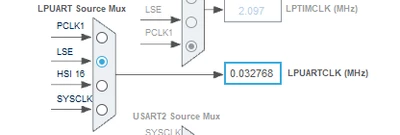
and select LSE as input for LPUART in clock configuration
Gyessine_3-1766049981767.png

this article maybe helpful for you also
Hope that answered your question, if yes please mark it as solution to close this thread
Gyessine


In order to give better visibility on the answered topics, please click on 'Best answer' on the reply which solved your issue or answered your question.


2 replies

KnarfB
Super User
Dec 16, 2025 9:13 PM UTC
Gyessine
GyessineBest answer
ST Technical Moderator
Dec 18, 2025 9:28 AM UTC

Hello @Rita 
Based on your product Datasheet, yes, a 32.768 kHz clock (LSE) is needed to allow LPUART communication up to 9600baud. Therefore, even in Stop mode, the LPUART can wait for an incoming frame while having an extremely low energy consumption. 
except if you have the STM32L051K6, it does not support LPUART

Gyessine_0-1766049438748.png

to configure it, just enable your LSE in your RCC configuration

Gyessine_1-1766049894534.png

enable your LPUART

Gyessine_2-1766049928739.png

and select LSE as input for LPUART in clock configuration

Gyessine_3-1766049981767.png

this article maybe helpful for you also
Hope that answered your question, if yes please mark it as solution to close this thread
Gyessine


In order to give better visibility on the answered topics, please click on 'Best answer' on the reply which solved your issue or answered your question.