


Vincent Doyon
Associate
February 23, 2018
Solved

STM32F072-EVAL CDC won't work

  • February 23, 2018
  • 3 replies
  • 1002 views
Posted on February 23, 2018 at 17:55

Hi,

      I tried to run the example on STM32F072-EVAL found in  STMicroelectronics\STM32Cube_FW_F0_V1.9.0\Projects\STM32072B_EVAL\Applications\USB_Device\CDC_Standalone.

When I plug CN4 USB connector to my PC, I see a STMicroelectronics Virtual COM Port (COM3) appear but with an exclamation mark. I have the error code 'This device cannot start. (Code 10))

My PC has Windows 10.

1) I tried to reinstall the drivers (even if it is not necessary for Windows 10)

2) I tried to increase the stack and the heap

3) I tried to change my bDeviceClass and bDeviceSubClass to 2

Unfortunately, I had no success with those modifications. Can somebody help me with that problem ?

Vincent 

#stm32f072-eval-cdc
This topic has been closed for replies.
Best answer by Vincent Doyon
Posted on March 02, 2018 at 20:10

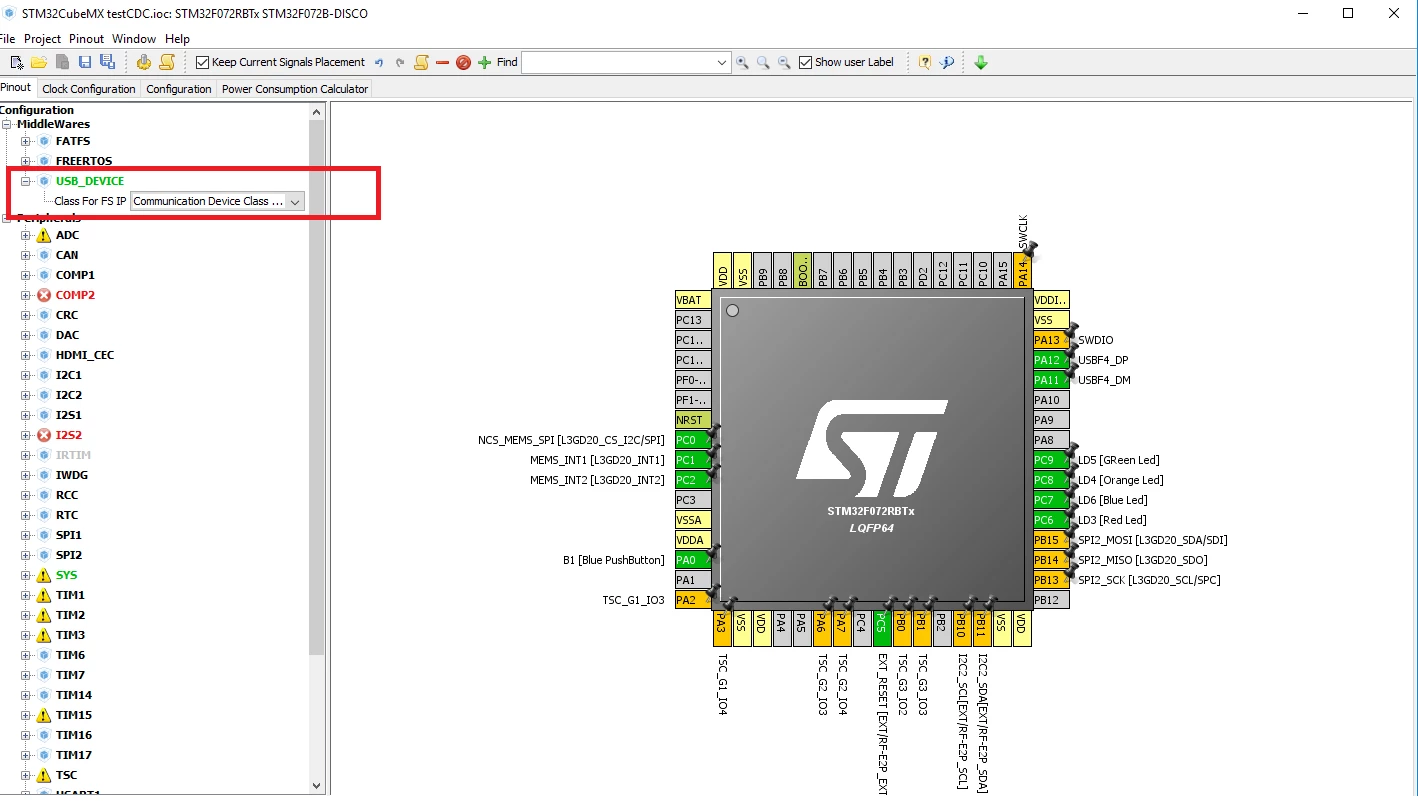
After few hours of debugging I found that there is a problem within the example provided by ST. Instead of using their examples, I tried to generate the code with CubeMX and it worked.

There is a thread that help me in my debug :

https://community.st.com/0D50X00009XkgkoSAB

Here a printscreenof CubeMX Configuration :

0690X00000609sMQAQ.png

So, like ST says on their web site, you no longer need to install the Drivers when your using Windows The Driver USBSER.sys will handle the CDC communication. I also tried with the ST VCP 1.4.0 Driver and it work well too.

Vincent

3 replies

Vincent Doyon
Associate
February 23, 2018
Posted on February 23, 2018 at 19:59

I just tested the same setup with my old Windows XP laptop and after the driver installation, everything works fines.

So it seems to be a windows 10 compatibility issue ....

VK Verma
Associate III
February 25, 2018
Posted on February 25, 2018 at 15:43

Hi !,

We are also having similar problem on windows 10, we even tried with STM32L053 discovery kit and STM32L4 eval boards.

These examples are pre-build with the cubeL0 and cubeL4.

Please help.

VK Verma

Vincent Doyon
Vincent DoyonAuthorBest answer
Associate
March 2, 2018
Posted on March 02, 2018 at 20:10

After few hours of debugging I found that there is a problem within the example provided by ST. Instead of using their examples, I tried to generate the code with CubeMX and it worked.

There is a thread that help me in my debug :

https://community.st.com/0D50X00009XkgkoSAB

Here a printscreenof CubeMX Configuration :

0690X00000609sMQAQ.png

So, like ST says on their web site, you no longer need to install the Drivers when your using Windows The Driver USBSER.sys will handle the CDC communication. I also tried with the ST VCP 1.4.0 Driver and it work well too.

Vincent