


deep
Associate II
October 25, 2023
Solved

slave spi on stm32f4 receives incorrect data

  • October 25, 2023
  • 13 replies
  • 9911 views

I have an jetson xavier driving STM32F407G-DISC1 on SPI1 default pins : PA4/5/6/7 .
The SPI_FLAG_RXNE flag behaviour is very strange, resulting in wrong values being received.
Config used:

/* SPI1 parameter configuration*/
hspi1.Instance =         SPI1;
hspi1.Init.Mode =        SPI_MODE_SLAVE;
hspi1.Init.Direction =   SPI_DIRECTION_2LINES;
hspi1.Init.DataSize =    SPI_DATASIZE_8BIT;
hspi1.Init.CLKPolarity = SPI_POLARITY_LOW;
hspi1.Init.CLKPhase =    SPI_PHASE_1EDGE;
hspi1.Init.NSS =         SPI_NSS_HARD_INPUT;
hspi1.Init.FirstBit =    SPI_FIRSTBIT_MSB;
hspi1.Init.TIMode =      SPI_TIMODE_DISABLE;


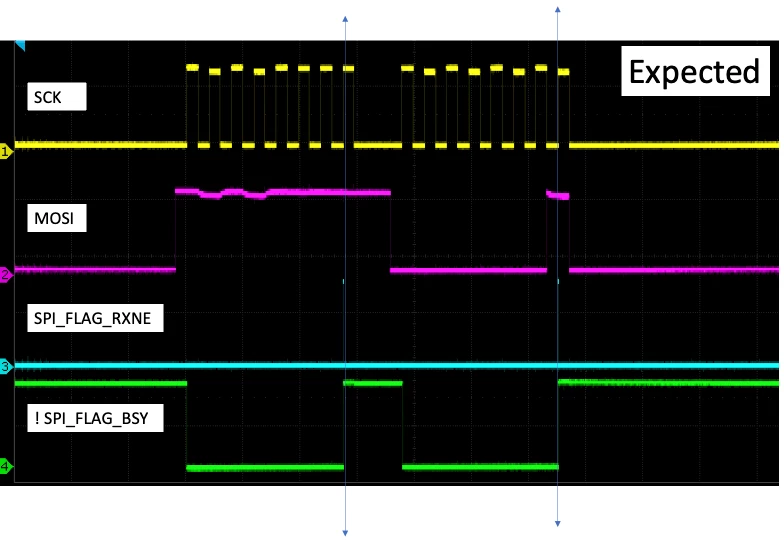
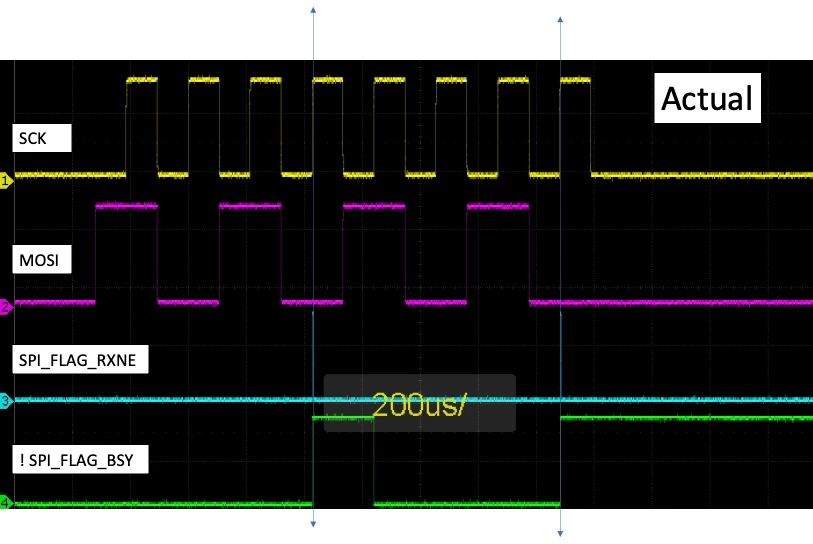
In these plots CH3 is connected to a gpio that tracks SPI_FLAG_RXNE, while CH4 is connected to !SPI_FLAG_BSY .
What I expect to see is SPI_FLAG_RXNE firing with the rising edge of SCK on the reception of the 8th bit like this:
spi_expected.png

 However with this SPI driver the SPI_FLAG_RXNE signal seems to look like this:
 

spi_actual.png

Result is wrong data received.  This happens independent of SCK speed.  Validated the STM32 slave inputs using a simple bitbang SPI slave, and data is received with no errors.

SPI_FLAG_RXNE and !SPI_FLAG_BSY were brought out to gpio with something like:

volatile uint8_t rxd = 0;
while(true) {
  uint32_t spiFlags = hspi->Instance->SR;
  bool is_free = ! (spiFlags & SPI_FLAG_BSY);
  bool is_rx_buffer_ready = (spiFlags & SPI_FLAG_RXNE);

  set_gpio_led(led_orange, is_free);
  set_gpio_led(led_green, is_rx_buffer_ready);

  if (is_rx_buffer_ready) {
    small_delay();
    rxd = hspi->Instance->DR;
  }
}

This topic has been closed for replies.
Best answer by waclawek.jan

> single bit flip errors

The previous errors looked like bit shifts, and that's definitively caused by the spike in the edge, usually due to reflections. You should've experimented with OSPEEDR settings before adding the serial resistors.

Bit flips, however, are something else.

Ground/return should be every other line in the ribbon cable, and every signal should have its own return. Remeber the 80-wire "high speed" PATA cable?

JW

13 replies

TDK
October 25, 2023

Looks like the master and slave are out of sync. The CS pin is typically used to ensure byte-alignment between the interfaces. It doesn't look like you're using a CS pin.

While the above may also be relevant, looks like it's accepting a byte after 4 bits, and not 8. I wonder if there's some bouncing on the SCK line that would be causing duplicate bits. That would be quite odd, but I don't see what else it could be. Maybe try using slower GPIO speeds.

How far away are master and slave? Are they connected with long jumper wires?

The SPI on the F4 doesn't support 4 bit words, so it can't be that.

"If you feel a post has answered your question, please click ""Accept as Solution""."
deep
deepAuthor
Associate II
October 25, 2023

Both SPI_NSS_SOFT and SPI_NSS_HARD_INPUT give similar results. 

Reducing SCK speed down to 256Hz (!) also gives very similar results..

Master<->Slave is connected with a short ribbon cable which has few errors up to 1MHz spi communication using bitbang version of SPI on stm32 side.

Increasing word size does have an impact, but the clock counter on slave still seems to be off...

Slide6.png

Slide7.png

TDK
October 25, 2023

I meant to suggest slower GPIO speeds, not SPI speeds. When you initialize the pins used for SPI in HAL_SPI_MspInit (or wherever if not using HAL), you give them a frequency. It's probably set to GPIO_SPEED_FREQ_VERY_HIGH which is default. Set it to GPIO_SPEED_FREQ_LOW instead which will still support up to ~2 MHz clocks. Doing this lowers the drive strength of the pin, which slows the edge down, which will be less prone to causing the line to bounce. A terminating resistor on the slave side would also help.

Edit: Oh, the STM32 is a slave so this isn't relevant. Well, maybe you can do something similar on the master side.

"If you feel a post has answered your question, please click ""Accept as Solution""."
waclawek.jan
Super User
October 25, 2023

I believe TDK is right and this is consequence of SCK bounce; maybe inadequate ground/return.

Decreasing bitrate won't help, this is all about the SCK edges.

JW

deep
deepAuthor
Associate II
October 26, 2023

Terminating the SCK on slave stm side seems to help a LOT:

Slide9.png

after adding a terminating resistor on sink of SCK:

Slide8.png

much better--thanks TDK and waclawek.jan .

However the performance is still pretty poor--starts having errors around 200kHz .  The Slave SPI receiver must use analog logic to process SCK for this termination to make such a difference. Perhaps the termination scheme needs to be further optimized--over the exact same cable and setup the following bitbang version of SPI slave gets to around 1.2MHz :

   https://github.com/d-e-e-p/stm32-bitbang-spi/blob/main/slave/Core/Src/spi.cpp


waclawek.jan
Super User
October 26, 2023

 What kind of errors, exactly? Bit shift, byte loss?

JW

TDK
October 26, 2023

I don't understand how your plots look so perfect but yet the problem suggests the signal integrity is awful.

> Master<->Slave is connected with a short ribbon cable

Short ribbon cable should be good to tens of MHz at least.

The STM32 SPI peripheral is well used and well tested. There aren't glaring issues with interpreting signals. There are schmitt triggers for hysteresis on the input.

Is there a solid ground connection between the chips? Are they powered from different power supplies? Are you operating inside of a microwave?

"If you feel a post has answered your question, please click ""Accept as Solution""."
deep
deepAuthor
Associate II
October 27, 2023

with and without termination signals look like this on slow clocks:

Slide10.png


around 200KHz there are single bit flip errors in about 10% of the data: if hardware slave select is enabled in receiver then the bit flip errors are the last bit.  otherwise they're the first bit.  at around 250KHz and above errors are equally distributed across bits. grounds are shared and no microwave, however a powerful subwoofer under the unit :)

ONadr.1
Senior III
October 27, 2023

Try to measure the AC part of the supply voltage on the next channel of the oscilloscope for the circuit that generates the CLK signal. It could be insufficient decoupling on the power rails.

waclawek.jan
waclawek.janBest answer
Super User
October 27, 2023

> single bit flip errors

The previous errors looked like bit shifts, and that's definitively caused by the spike in the edge, usually due to reflections. You should've experimented with OSPEEDR settings before adding the serial resistors.

Bit flips, however, are something else.

Ground/return should be every other line in the ribbon cable, and every signal should have its own return. Remeber the 80-wire "high speed" PATA cable?

JW

deep
deepAuthor
Associate II
October 27, 2023

SPI master is Jetson Orin -- which has plenty of power decoupling but no slew rate controls on GPIO.  

The bit flips are always 1->0 

Replaced ribbon cable with shielded ground return pairs with no improvement. 

Couldn't use the 80-wire "high speed" 40-pin cable unfortunately, because I found it has a missing connection:

sata.png

I guess that's how they key it in. too bad :(

With a target of 2MHz sq wave, we need to 250ns high + 250ns low, so:

98% setting time =>
  4RC = 250ns
   RC = 50ns (about)
 if R = 500ohm => C = 0.1nF
    R = 100ohm => C = 0.5nF

No sure what the existing stm32f407 pcb + package cap is...should be 20-30pF ?

waclawek.jan
Super User
October 28, 2023

Just to be sure: the bit flips are at MOSI, i.e. Orin->STM32 direction, right?

What are the voltage levels and what's the STM32 VDD?

On the 'F407 Disco, the MEMS accelerometer is connected to PA4..PA7. Make sure it's inactive; or just choose a different set of pins, those which are not connected to on-board devices.

JW