DYann.1
Senior II
March 3, 2023
Solved

I would like to know how to configure RCC on my evaluation Board STM32L552E-EV.

  • March 3, 2023
  • 18 replies
  • 8063 views

I connect my I2C but when I connect an oscilloscope I have nothing on the clock signal. So probably I misconfigured my clock. Could you give me the information? Thanks in advance.

In this picture below I've a warning, do you know how to remove this warning please ?
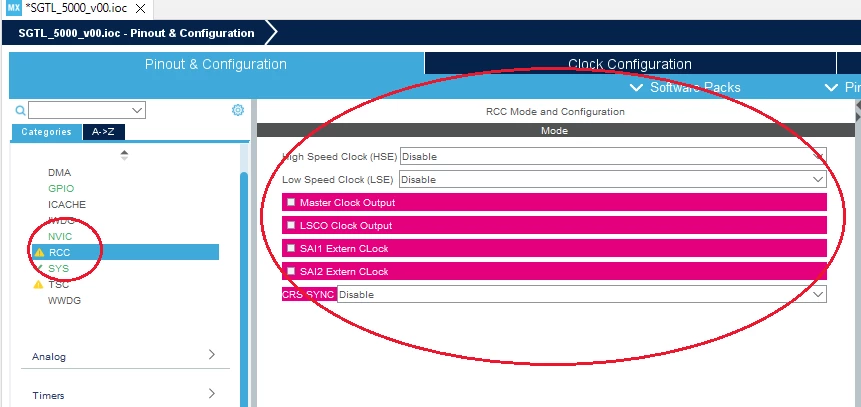
0693W00000aI9LSQA0.pngThank you for your helps.

Regards

Yann DO

    This topic has been closed for replies.
    Best answer by Foued_KH

    Hello @DYann.1​ ,

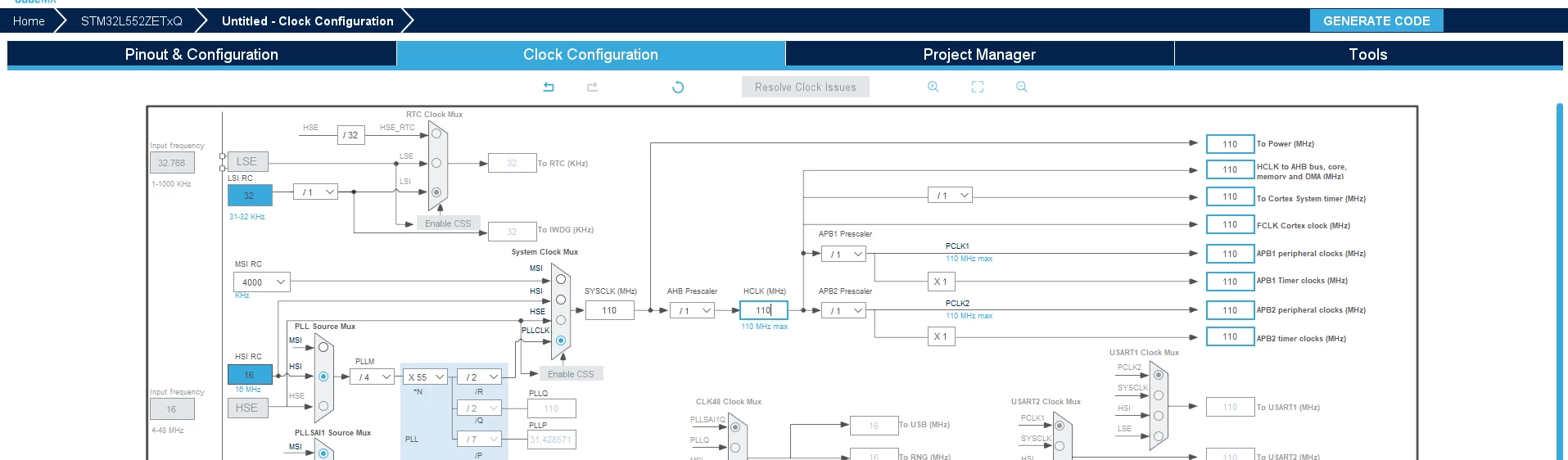
    For the clock configuration, you can manager your clock with the tab "Clock Configuration"

    0693W00000aIG9YQAW.pngYou have to choose your Source:

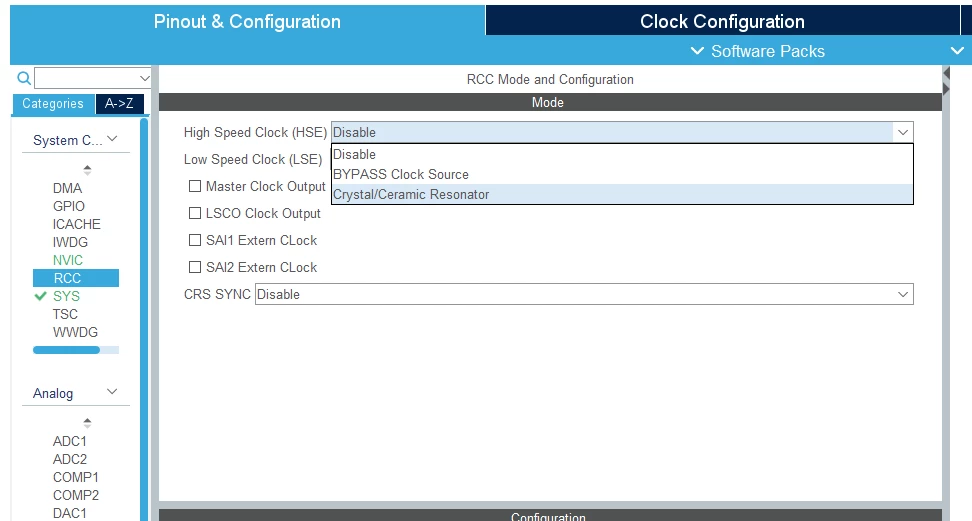
    • for the HSE source, please follow this step :

    0693W00000aIFp6QAG.pngIf you select the MCU selector, you will have all peripherals without default mode.

    Hope my answer helped you!

    Foued

    18 replies

    Foued_KH
    Foued_KHBest answer
    ST Employee
    March 6, 2023

    Hello @DYann.1​ ,

    For the clock configuration, you can manager your clock with the tab "Clock Configuration"

    0693W00000aIG9YQAW.pngYou have to choose your Source:

    • for the HSE source, please follow this step :

    0693W00000aIFp6QAG.pngIf you select the MCU selector, you will have all peripherals without default mode.

    Hope my answer helped you!

    Foued

    To give better visibility on the answered topics, please click on Accept as Solution on the reply which solved your issue or answered your question.
    DYann.1
    DYann.1Author
    Senior II
    March 6, 2023

    Hi,

    Thank you for your helps, I have STM32L552E-EV evaluation Board and in your first screenshot I can't see the bottom of the screenshot, could you send me a complete copy of the screenshot please ? Why in the left of your picture all is green and for me I have the yellow color with exclamation marks, I'm afraid something is wrong that why I don't have the Clock of I2C. Normally it's automatic.

    Thank you for your helps.

    Foued_KH
    ST Employee
    March 6, 2023

    Hello,

    Please find the screenshot in the attached file.

    0693W00000aIGovQAG.png 

    Foued

    To give better visibility on the answered topics, please click on Accept as Solution on the reply which solved your issue or answered your question.
    DYann.1
    DYann.1Author
    Senior II
    March 6, 2023

    Hi,

    Thank you but I can see only the picture above but I can't see the one below

    0693W00000aIHUSQA4.pngCan you please show me of the rest of the picture.

    Thank you

    Foued_KH
    ST Employee
    March 6, 2023

    Hello,

    0693W00000aIHYtQAO.pngFoued

    To give better visibility on the answered topics, please click on Accept as Solution on the reply which solved your issue or answered your question.
    DYann.1
    DYann.1Author
    Senior II
    March 6, 2023

    Thank you, I'll do the same configuration with my evaluation board and I hope I don't have any warning again.

    DYann.1
    DYann.1Author
    Senior II
    March 6, 2023

    Now with STM32cube i selected my evaluation board like this picture

    0693W00000aIH88QAG.pngI don't slected by default, because my configuration is probably not the same as default.

    0693W00000aIHtIQAW.pngI don't have the possibilty to do the same as your configuration.

    0693W00000aIHt8QAG.pngDo you also have the STM32L5 card? Or else it's not very important. And When I want to generate the code it shows me errors.

    0693W00000aIHlzQAG.pngDo you know where this error comes from ?

    DYann.1
    DYann.1Author
    Senior II
    March 6, 2023

    I have always the warning about RCC.

    0693W00000aII09QAG.pngSomething is wrong ?

    Foued_KH
    ST Employee
    March 6, 2023

    I f you try with MCU selector and select the STM32L552ZE MCU:

    0693W00000aIHxuQAG.pngFoued

    To give better visibility on the answered topics, please click on Accept as Solution on the reply which solved your issue or answered your question.
    DYann.1
    DYann.1Author
    Senior II
    March 6, 2023

    I'll try it tomorrow. Thank you for your patience.

    DYann.1
    DYann.1Author
    Senior II
    March 7, 2023

    Hello,

    I come back again, after having listened to your advice, I do not encounter any warnings or errors.

    0693W00000aILo2QAG.png 0693W00000aILnnQAG.pngAfter, this step how can I check if my clock is running correctly on my evaluation board? For example, can I test the HAL delay function ?

    I just to check this step before continuing to configure the I2C and then SAI.

    Thank you for your helps

    Regards

    DYann.1
    DYann.1Author
    Senior II
    March 7, 2023

    I also configure I2C and no warning and no errors.

    0693W00000aILtbQAG.png

    DYann.1
    DYann.1Author
    Senior II
    March 7, 2023

    After configuring the RCC, I2C and SAI I still have an error at the I2C level

    0693W00000aIMVfQAO.png 

    0693W00000aIMVuQAO.pngSomething is wrong but I don't know where it could come from

    Foued_KH
    ST Employee
    March 7, 2023

    Transmits in master mode an amount of data in blocking mode:

    HAL_I2C_Master_Transmit(I2C_HandleTypeDef *hi2c, uint16_t DevAddress, uint8_t *pData, uint16_t Size,uint32_t Timeout)

    • hi2c Pointer to a I2C_HandleTypeDef structure that contains the configuration information for the specified I2C.
    • DevAddress Target device address: The device 7 bits address value in datasheet must be shifted to the left before calling the interface
    • pData Pointer to data buffer
    • Size Amount of data to be sent
    • Timeout Timeout duration

    To give better visibility on the answered topics, please click on Accept as Solution on the reply which solved your issue or answered your question.