JShah.7
Associate II
June 7, 2023
Solved

Facing issue in read ADC with GPDMA in STM32U585ZIT6Qwith trust zone option enabled

Hi;

I am using STM32U585ZIT6Q controller in my current project. I am enabled Trust Zone option.

I have configured ADC 1 (4 channel) in non secure with GPDMA.I am not able to read ADC data. I have attached all configuration. I have used HCLK(160MHz) for ADC.

if i got working example then it will more helpful.

Please help me for same.

This topic has been closed for replies.
RomainR.
RomainR.Best answer
ST Employee
June 12, 2023

Here attached my previous project with ADC1 in non secure context (NS) and in 12bit resolution.

I also added ADC1 channel computation en mV for VREFINT, VBAT and Degree Celsius for TempSensor.

I do not implemented ADC4, it's up to you for its implementation where you want.

_legacyfs_online_stmicro_images_0693W00000dDcOSQA0.pngAs explained before, I just changed ADC1 secure context as following.
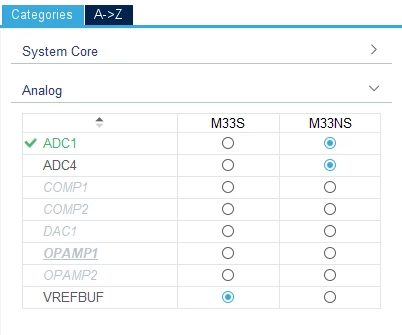

_legacyfs_online_stmicro_images_0693W00000dDcQnQAK.png

  • Regenerated the projet
  • Move ADC1 user code and callback from \secure\main.c to \Nonsecure\main.c

Good luck.

Romain,

To give better visibility on the answered topics, please click on Accept as Solution on the reply which solved your issue or answered your question.


17 replies

RomainR.
ST Employee
June 7, 2023

Hi @JShah.7 (Community Member)

According Datasheet DS13086 Rev 7 the Table 104. 14-bit ADC1 characteristics indicates the max ADC1 frequency is 55MHz. You must increase ADC clock prescaler input.

Check also you enabled internal VDDA switch before using ADC1 with:

HAL_PWREx_EnableVddA();

Let me know if it helps?

Regards,

romain,

To give better visibility on the answered topics, please click on Accept as Solution on the reply which solved your issue or answered your question.
JShah.7
JShah.7Author
Associate II
June 7, 2023

Hi @RomainR.​ 

Thanks for suggestion. As per your suggestion i use HAL_PWREx_EnableVddA(); function and 16MHz(HSI) clock but still result is same.

RomainR.
ST Employee
June 7, 2023

Is it a custom board?

Are you able to have ADC1 conversion working in these conditions:

  • Without TZ enable?
  • Without GPDMA transfer?
To give better visibility on the answered topics, please click on Accept as Solution on the reply which solved your issue or answered your question.

JShah.7
JShah.7Author
Associate II
June 7, 2023

Yes,

I have tested with STM32U575ZIT6Q and it is working in both condition. Also it is working with GPDMA. But if i enable TZ it is not working.

RomainR.
ST Employee
June 7, 2023

In your case, TZ security is active. so, ADC Peripheral, SRAM memory for GPDMA transfer and GPIO are either securable or TrustZone-aware.

In this case you must use Global TrustZone controller (GTZC) to configure your application in secure mode.

Refer to AN5347 - Rev 6 chapter 4 and 11.

To give better visibility on the answered topics, please click on Accept as Solution on the reply which solved your issue or answered your question.
JShah.7
JShah.7Author
Associate II
June 7, 2023

Hi,

I have configured GTZC but still result is same. Can you please share me example code for ADC with Trustzone enable?

RomainR.
ST Employee
June 7, 2023

Sorry, example your are requesting is actually not available.

But, share your project, I will check your ADC1, GPDMA channel linked-list and GTZC configuration.

regards,

romain,

To give better visibility on the answered topics, please click on Accept as Solution on the reply which solved your issue or answered your question.
JShah.7
JShah.7Author
Associate II
June 8, 2023

Shared. Please check message.

RomainR.
ST Employee
June 9, 2023

Hello @JShah.7 (Community Member)

Here attached a STM32CubeIDE project with Trust zone enabled using ADC1 in following context.

The project was designed for B-U585I-IOT02A board, but it should works on your device.

Secure context:

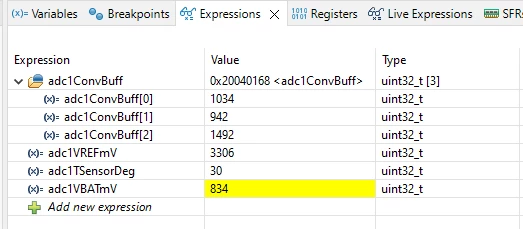
The ADC1 use GPDMA1 CH10 to convert Internal channel VBAT, TEMP_SENSOR and VREF (see watch expression capture below).

PH7 use a Led light on/off to show ADC+GPDMA activity.


_legacyfs_online_stmicro_images_0693W00000dDUHxQAO.pngadc1ConvBuff[0] = ADC_CHANNEL_VBAT DIV4 ~1034lsb with ADC1 in 12b resolution.

adc1ConvBuff[1] = ADC_CHANNEL_TEMPSENSOR ~941lsb

adc1ConvBuff[2] = ADC_CHANNEL_VREFINT ~1427lsb

Then the secure code start the non-secure code below

Non-Secure context:

A second LED controled by PH6 in non-secure is toggling in while(1) loop.

You should see in U585I-IOT02A_ADC_GPDMA.ioc the correct configuration for GPDMA transfer and compare with your project.

This video could also help you.

https://www.youtube.com/watch?v=R9DsR-qF3bw&t=1189s

Regards,

Romain,

To give better visibility on the answered topics, please click on Accept as Solution on the reply which solved your issue or answered your question.
JShah.7
JShah.7Author
Associate II
June 12, 2023

Hi @RomainR.​

Thanks for support. I test above code and its working fine. ADC with GPDMA in secure zone works fine. 

I have two ADC ,one in secure zone and other in non secure. 

Can you suggest me what changes need to do in above code to run adc in non secure zone?

 I follow below configuration steps to run ADC in non secure zone.

 1)Take above code as reference.

 2)Configure ADC1 in non secure.

 3)Configure GPDMA for non secure (Security tab->attached pic).

 4)only one time get GPDMA interrupt after that not getting.

 
_legacyfs_online_stmicro_images_0693W00000dDZi5QAG.png Please guide me for same or please provide example code for ADC_GPDMA in non secure.  

ChintaN1
Associate III
June 8, 2023

Hello @RomainR.​ 

Thanks for your support.

Here I have a query regarding supported peripherals for the secure firmware.

Is secure firmware support ADC or not?


_legacyfs_online_stmicro_images_0693W00000dDPE5QAO.pngThanks,

Chintan Patel

RomainR.
ST Employee
June 9, 2023

Hi @ChintaN (Community Member)

Yes, based to RM0456, Table 4. Securable peripherals by TZSC, you can see all the peripheral can be either securable or TrustZone-aware.

BR

Romain,

To give better visibility on the answered topics, please click on Accept as Solution on the reply which solved your issue or answered your question.