Richard Lowe
Senior II
January 27, 2018
Solved

CubeMX CAN Config Fails in 4.24

  • January 27, 2018
  • 4 replies
  • 1342 views
Posted on January 27, 2018 at 08:21

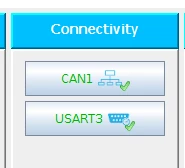
Using an STM32L4xx MCU in CubeMX. Enable the CAN peripheral. Go to configuration and click CAN1 ->

0690X00000609THQAY.png

You'll notice that no dialog box ever appears.

Same with migrating an STM32L4xx based project to the new 1.11 framework. PC CPU stays at about 50% usage and stays there for infinite time ( Well, I only let it run for 7 hours, so.... )

    This topic has been closed for replies.
    Best answer by stm32cube-t
    Posted on February 21, 2018 at 10:15

    Sorry for the inconvenience. This problem will be solved in next STM32CubeMX 4.25 release coming out in few weeks from now.

    4 replies

    hendrikk
    Associate
    January 29, 2018
    Posted on January 29, 2018 at 17:30

    https://community.st.com/0D70X000006Sw4SSAS

    Abdelmalek BELLOULA
    Associate III
    January 29, 2018
    Posted on January 29, 2018 at 19:54

    For the problem of migrating programs to the new version STM32CubeMX 4.24.0, I think that the problem is in the change of the names of the structures in the file stm32l4xx_hal_can.h of the new STM32cube_L4_V1.11.0:

    in stm32l4xx_hal_can.h 

    CanRxMsgTypeDef;  changed to CAN_RxHeaderTypeDef;

    CanTxMsgTypeDef; changed to  CAN_TxHeaderTypeDef;

    CAN_FilterConfTypeDef; changed to CAN_FilterTypeDef;

    it is not only the names that have changed but even the parameters of the structures have changed too

    I think it is necessary to write again the code for the part CAN because the file stm32l4xx_hal_can.c to completely changed in the new version

    Szymon PANECKI
    Senior III
    January 29, 2018
    Posted on January 29, 2018 at 20:25

    Hello Abdelmalek,

    You are right, let me comment this shortly. 

    Recently ST developed from scratch a completely new CAN HAL driver. The new HAL CAN driver has been introduced to bypass limitations in old version. Latest CubeL4 (v.1.11.0) already provides this new driver. New driver means also new API: C structures and functions.

    New driver is located in Drivers/STM32xxxx_HAL_Driver/Src and Drivers/STM32xxxx_HAL_Driver/Inc folders. It can be enabled through switch HAL_CAN_MODULE_ENABLED in stm32l4xx_hal_conf.h.

    The legacy HAL CAN driver is also present in the latest CubeL4 in Drivers/STM32L4xx_HAL_Driver/Src/Legacy and Drivers/STM32L4xx_HAL_Driver/Inc/Legacy folders for software compatibility reasons. If user want to use legacy driver, it can be enabled through switch HAL_CAN_LEGACY_MODULE_ENABLED in stm32l4xx_hal_conf.h.

    Regards

    Szymon

    Abdelmalek BELLOULA
    Associate III
    January 29, 2018
    Posted on January 29, 2018 at 20:35

    thank you for your reply

    Technical Moderator
    January 29, 2018
    Posted on January 29, 2018 at 20:23

    Hello,

    Thank your for your reported issue. 

    We will forward your issue to CubeMx team and keep you informed about the taken actions.

    Kind Regards,

    Imen

    In order to give better visibility on the answered topics, please click on 'Best answer' on the reply which solved your issue or answered your question. Thanks
    Abdelmalek BELLOULA
    Associate III
    January 29, 2018
    Posted on January 29, 2018 at 20:52

    thank you for your reply

    stm32cube-t
    stm32cube-tBest answer
    ST Employee
    February 21, 2018
    Posted on February 21, 2018 at 10:15

    Sorry for the inconvenience. This problem will be solved in next STM32CubeMX 4.25 release coming out in few weeks from now.