Anil3
Associate III
July 4, 2024
Solved

STM32F401CCU6 EEPROM Emulation

  • July 4, 2024
  • 2 replies
  • 2118 views

Hi!!!

I am want to implement Emulation of EEPROM for STM32F401CCU6 Controller which is having 256kb of flash memory. but not sure of how exactly that i have to use it. I have downloaded X-CUBE-EEPROM software but in that there is no any project related to STMF4 series for reference. 

Can anyone provide me an example code for STM32F401 series controller.

Thank you,

regards,

ANIL.

Best answer by Andrew Neil

The so-called "Virtual Addresses" are just arbitrary tags to identify the data items:

https://community.st.com/t5/stm32-mcus-embedded-software/eeprom-emulation-virtual-addresses/m-p/675788#M47886

The data items are a fixed size.

EDIT:

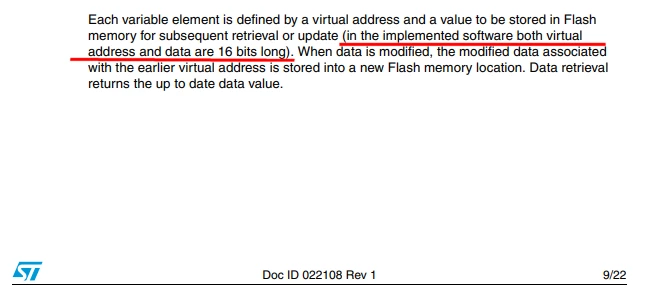
In the AN3969 code, the data items are 16-bit:

AndrewNeil_0-1720181001139.png

So, if you want to store 32-bit data, you will have to split it across 2 "variables" in the emulated EEPROM - each with its own "Virtual Address".

Or re-write the code. 


2 replies

mƎALLEm
Technical Moderator
July 4, 2024
To give better visibility on the answered topics, please click "Best answer" on the reply which solved your issue or answered your question.
Anil3
Anil3Author
Associate III
July 5, 2024

Hi @mƎALLEm and @Andrew Neil 

In the application note i have observed that they have assigned 3 virtual address for 3 variable, could you explain me that how these virtual address are to be assigned? and is it like if i am tring to write  32 bit variable then i need to assign 32bit address??

Thank you!!

regards,

ANIL.

Andrew Neil
Andrew NeilBest answer
Super User
July 5, 2024

The so-called "Virtual Addresses" are just arbitrary tags to identify the data items:

https://community.st.com/t5/stm32-mcus-embedded-software/eeprom-emulation-virtual-addresses/m-p/675788#M47886

The data items are a fixed size.

EDIT:

In the AN3969 code, the data items are 16-bit:

AndrewNeil_0-1720181001139.png

So, if you want to store 32-bit data, you will have to split it across 2 "variables" in the emulated EEPROM - each with its own "Virtual Address".

Or re-write the code. 


A complex system that works is invariably found to have evolved from a simple system that worked.A complex system designed from scratch never works and cannot be patched up to make it work.
Andrew Neil
Super User
July 4, 2024

@Anil3 wrote:

I have downloaded X-CUBE-EEPROM software but in that there is no any project related to STMF4 series for


X-CUBE-EEPROM doesn't support the F4 Series (nor F1, F2, F3 nor WB):

https://community.st.com/t5/stm32-mcus-embedded-software/x-cube-eeprom-not-for-stm32f0/m-p/684685/highlight/true#M48486

There are separate Application Notes & Firmware Packs for those series - for F4, you require AN3969.

A complex system that works is invariably found to have evolved from a simple system that worked.A complex system designed from scratch never works and cannot be patched up to make it work.