

Associate
October 26, 2023
Solved

AN2606 ST Bootloader using FDCan with STM32H563 -> Bug in GPIOx or FDCANx Mapping?

Hello all,

I would like to use the ST Bootloader which is described in the Application Note AN2606.

https://www.st.com/resource/en/application_note/an2606-stm32-microcontroller-system-memory-boot-mode-stmicroelectronics.pdf.

The used controller is the STM32H563. Under point 50.1 it is described that FDCAN1 must be used. As FDCAN1_Rx pin PB5 and FDCAN1_Tx pin PB13 is defined. But these two GPIOs go to FDCAN2 and not to FDCAN1.
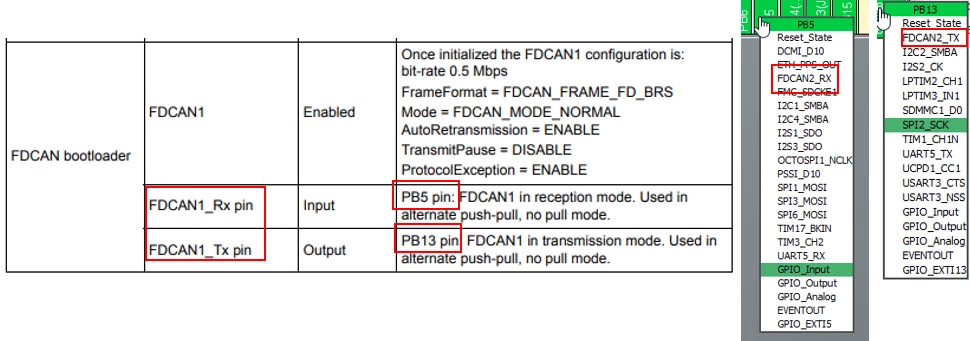
AN2606_STM32H563_FDCAN_Problem.png

Can you help me further on this, which pins or which FDCANx should be used?

Thanks in advance!

Jannik

This topic has been closed for replies.
TDK
TDKBest answer
October 26, 2023

The correct FDCAN and pins are:

  • FDCAN2_RX : PB5
  • FDCAN2_TX : PB13

https://community.st.com/t5/stm32-mcus-products/stm32h5-need-bootloader-pins/td-p/595584


"If you feel a post has answered your question, please click ""Accept as Solution""."

3 replies

TDK
TDKBest answer
October 26, 2023

The correct FDCAN and pins are:

  • FDCAN2_RX : PB5
  • FDCAN2_TX : PB13

https://community.st.com/t5/stm32-mcus-products/stm32h5-need-bootloader-pins/td-p/595584


"If you feel a post has answered your question, please click ""Accept as Solution""."
KDJEM.1
ST Technical Moderator
October 26, 2023

Hello @jherrmann1 and welcome to the Community :),

This is already reported here.

For FDCAN bootloader, you should use FDCAN2 with correct pins are : 
FDCAN2_RX : PB5
FDCAN2_TX : PB13

Thank you.

Kaouthar

To give better visibility on the answered topics, please click on "Best answer" on the reply which solved your issue or answered your question.
Associate
October 26, 2023

thank you for the quick reply, that helped me a lot!