


KMINH.1
Associate II
October 16, 2023
Question

Cannot get stm32 nucleo board to work again after system format

  • October 16, 2023
  • 17 replies
  • 9648 views

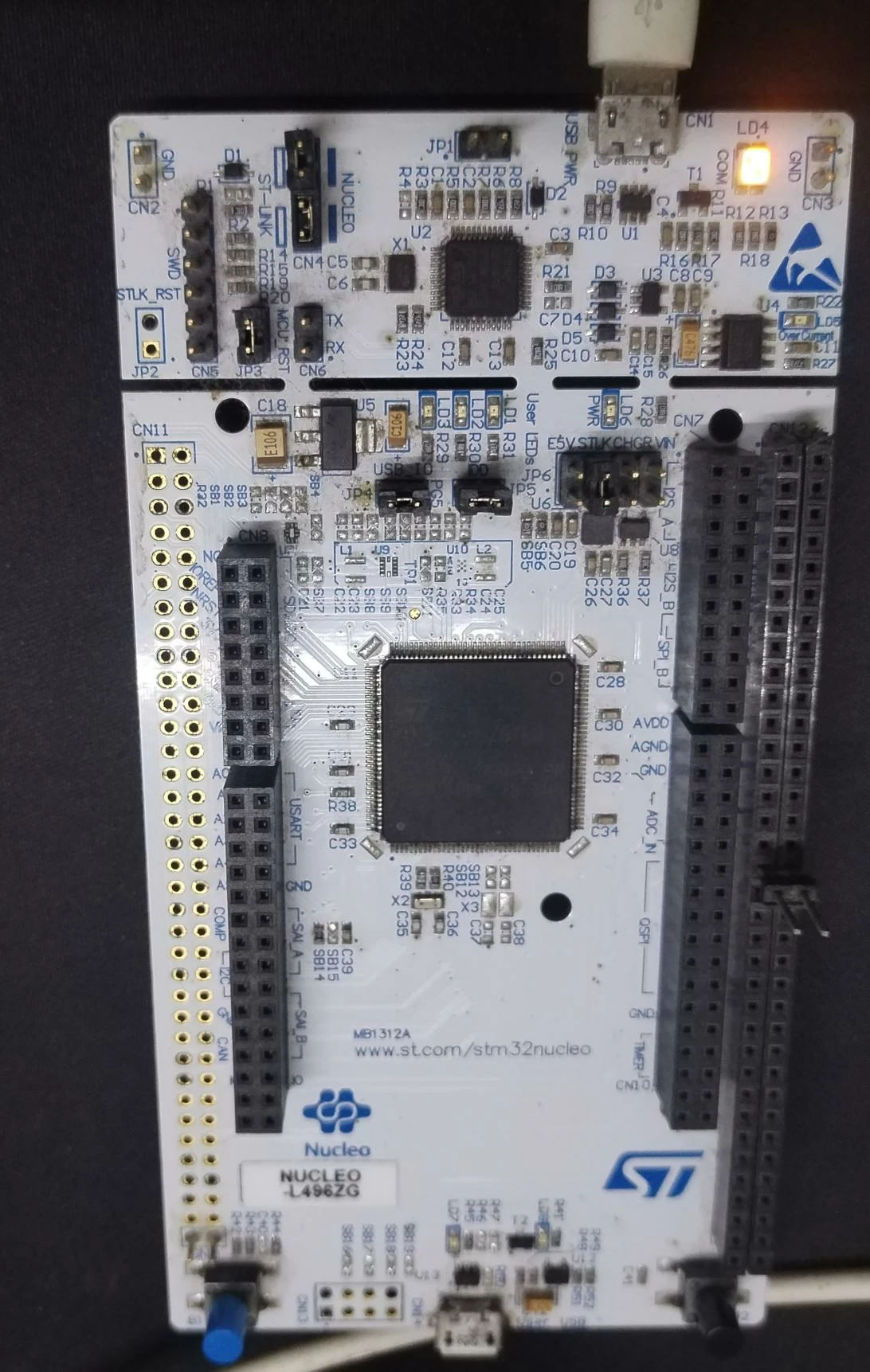
I am using stm32L496zg nucleo board. It got started and worked well. But after I formatted my system, the latop does not recognize it; USB Device not recognized. The last USB device you connected to this computer malfunctioned. Windows does not recognize it. I tried installing drivers of st link again, but still its not recognized. 
  

KMINH1_0-1697463681628.jpeg


Can anyone plz advice me, whether the board's working or it can be resolved with drivers? 
Thanks in advance


This topic has been closed for replies.

17 replies

AScha.3
Super User
October 16, 2023

But after I formatted my system

what did you format exactly ?

If you feel a post has answered your question, please click on " Best Answer ".
KMINH.1
KMINH.1Author
Associate II
October 16, 2023

The laptop I mean. But I checked the stm nucleo board on another laptop too, but same response, USB device not recognized.

AScha.3
Super User
October 16, 2023

try other cables...

+

check power supply on board ( i see no power led ...LD6 green )


If you feel a post has answered your question, please click on " Best Answer ".
KDJEM.1
ST Technical Moderator
October 17, 2023

Hello @KMINH.1 ,

Could you please check Jumpers, for that I advise you to refer to UM2179 and precisely section 5.4 Embedded ST-LINK/V2-1.

May this FAQ How to solve debugger connection issues - STMicroelectronics Community will help you.

Thank you.

Kaouthar

To give better visibility on the answered topics, please click on "Best answer" on the reply which solved your issue or answered your question.
KMINH.1
KMINH.1Author
Associate II
October 23, 2023

Power is ok at input, but does not appear at any of the power supply points. 
Also, reinstalled st link v2 program as well as programmer.
Will try to disconnect embedded st link(thru jumpers) & and connect external st link v2 usb .

QSHAO.1
ST Employee
October 25, 2023

it's normal that no power on the board if STLINKV2 is not work well. As a power switch controlled by STLINKV2 embedded if OFF by default. if your board is not work also with another PC (it should work well before with STLINKV2?), I suggest you to upgrade STLINKV2 FW and try again.  

Pavel A.
October 25, 2023

@KMINH.1 What exactly shows the device manager? You don't need to upgrade the firmware.


KMINH.1
KMINH.1Author
Associate II
October 26, 2023

Hi @Pavel A. 

      I am testing in 2 ways,

1. With in built stLink, to which laptop does not recognize the USB.

2. With external ST Link V2 USB dongle. 

                  The device manager shows this for 2nd approach;

KMINH1_0-1698293645425.png

                   But, stLink utility sw responds with this; cannot connect to target.

KMINH1_1-1698294051744.png

Thanks


KMINH.1
KMINH.1Author
Associate II
October 27, 2023

Is it possible to interface nucleo board with external st link, when it has inbuilt st link?
Anyone plz advice.
Also, I am trying to connect same thru st cube programmer.

KMINH.1
KMINH.1Author
Associate II
November 1, 2023

@QSHAO.1  Is st cube programmer licensed?  Is it required to be purchased before usage?

MM..1
Super User
November 1, 2023

NO isnt licensed go back to start. You write reinstall windows = your windows miss somethink, sometimes i see trouble with missed VCRedist right version installed, try install too older ST Link utility...

For your Q can connect external stlink = yes ofcourse, you maybe see on nucleo precut part top side on your image. You can cut this onboard stlink completely... Too if your stlink on nucleo isnt detected maybe you reconnect jumpers to fail config or kill stlink ... or full board.

KMINH.1
KMINH.1Author
Associate II
November 1, 2023

Thanks @MM..1  for quick answer. 
The microcontroller side of the board looks ok. But, STLink part doesn't seem to get detected. 

However, when I connect external StLink v2 clone, it doesn't get detected by st link utility sw. 
Attaching image:

KMINH1_0-1698841172805.png

If this setup works at least, its enough for me to get started.
Can u check where it could go wrong?
Thanks

Pavel A.
November 1, 2023

Try another computer. And another USB cable.