ST Employee
June 27, 2023

How to regress from RDP level 2 to RDP level 0 on the STM32U5 series

Summary

This article allows the process to regress from RDP 2 to RDP 0 on the STM32U5 series.

This example uses the STM32U5 Nucleo board with STM32U5A5ZJT6Q and STM32CubeProgrammer V2.13.
Note:

To regress from RDP2 to RDP0, you must be sure that your password has been defined in OEM2KEY. Otherwise, case regression is not possible. 

1. How to define an OEM password

To define an OEM2 password, you must do the following:

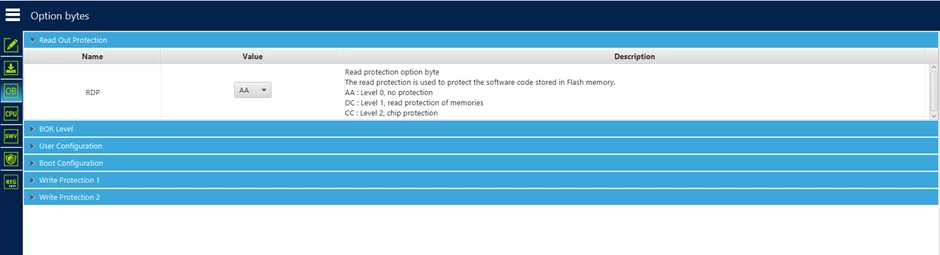
           1.Check if your sample is on RDP level 0 (no protection).

 
DianePOMABIA_11-1687166346156.png       
          2. In the "secure programming" menu, define your password.
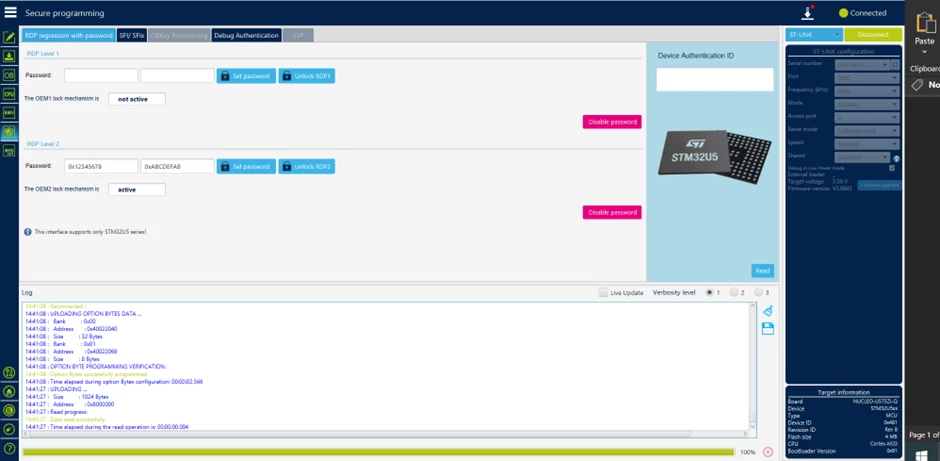
 
DianePOMABIA_12-1687166411203.png
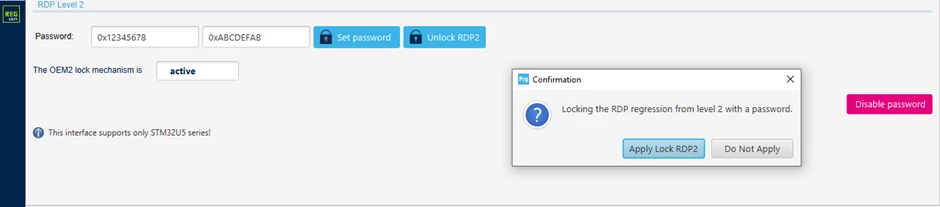
  3. Click on "set password" and after on "apply lock RDP2."
DianePOMABIA_14-1687166508811.png
 
At this point, you are sure that the OEM2Key is correctly defined.


2. How to take the RDP from level 0 to level 2

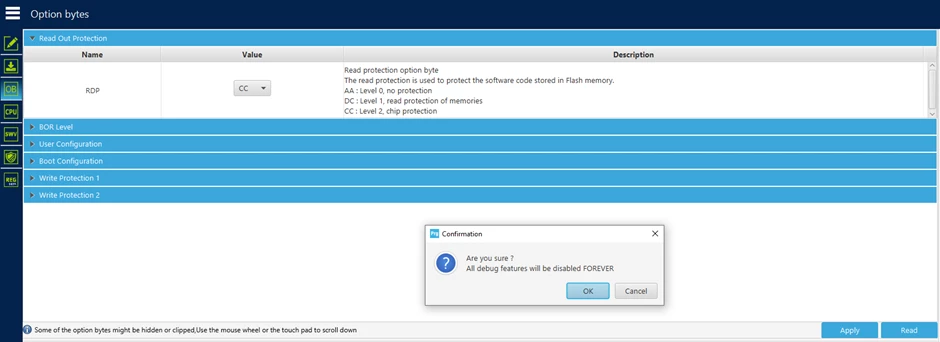
1. In the "read out protection" menu, select the value “CC" then click on apply.
DianePOMABIA_15-1687166557851.png

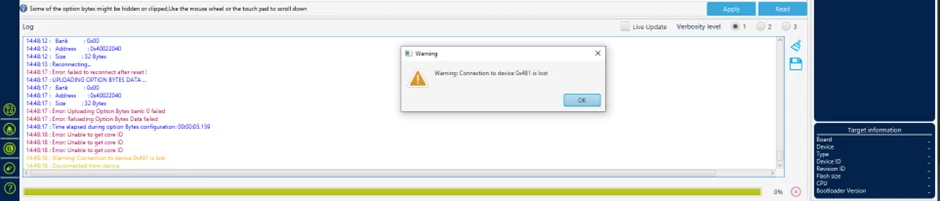
After clicking on "ok" you will lose your connection with STLINK. This is normal behavior.

DianePOMABIA_16-1687166608972.png

3. How to regress from RDP level 2 to level 0

Go back to the "secure programming" menu:

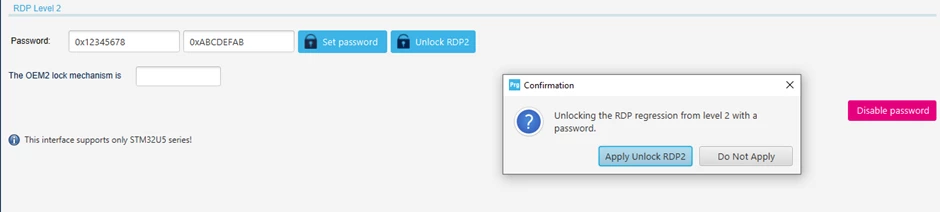
1. Click on "Unlock RDP2" and after on "Apply unlock RDP2."
DianePOMABIA_17-1687166657124.png
 
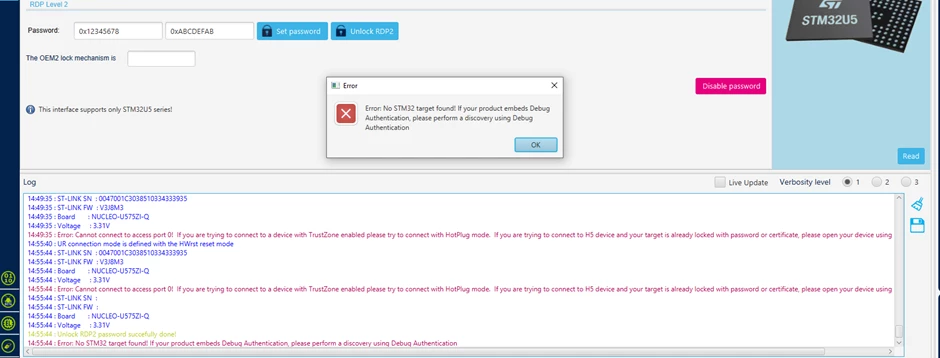
You receive an error message but in your log window, you can read "Unlock RDP2 password successfully done."
 
DianePOMABIA_18-1687166696045.png
 
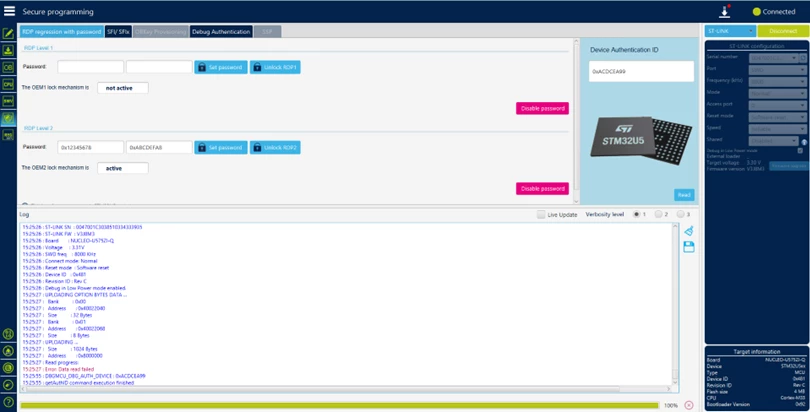
2. After clicking on "ok" reconnect your card with STLINK, then check the device authentication ID by clicking on "Read."
 
DianePOMABIA_20-1687166740110.png
 
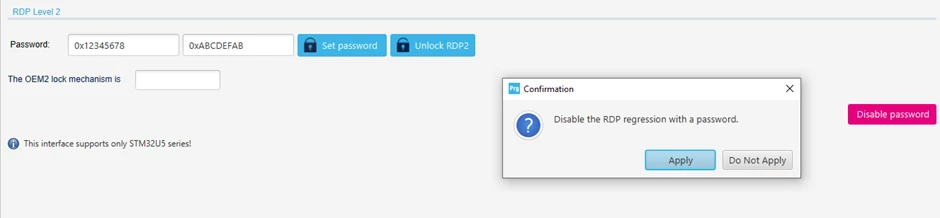
3. Disable the RDP regression with a password.
 
DianePOMABIA_21-1687166775555.png
 
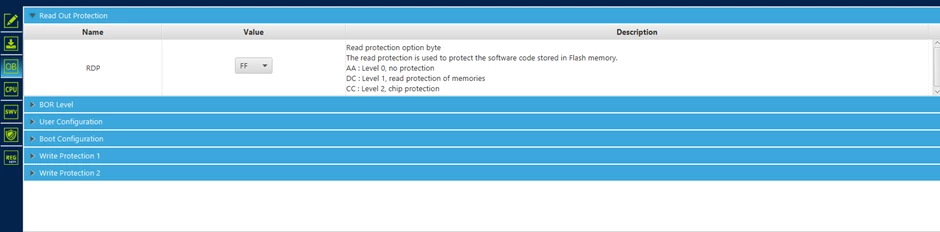
4. Go back to the "Read Out Protection" menu and check the value of the RDP. 
 
DianePOMABIA_22-1687166804803.png
 
5. Change the RDP value to “AA” then click on apply.
 
 
DianePOMABIA_23-1687166831869.png

You have correctly downgraded the RDP from level 2 to level 0.

25 replies

Associate III
July 18, 2023

@Diane POMABIA

In this how-to I read:

"After clicking on "ok" you will lose your connection with STLINK. This is normal behavior."

Then in step 3 I should go back to the "secure programming" menu and Click on "Unlock RDP2" and after on "Apply unlock RDP2."

But I was disconnected, should I connect again before this step? With what configuration: JTAG or SWD? Which mode? Which Reset mode?

I followed the procedure, but I bricked another chip: at the moment if I try to conect to the chip I get the following error:

Error: No STM32 target found! If your product embeds Debug Authentication, please perform a discovery using Debug Authentication

How can I regress from RDP2 to RDP0 if I can't connect to the chip?

Associate III
July 18, 2023

Errata: I did connect the STLINK wrong. Now I fixed the connection, but still getting an error, this is the log:

13:10:01:707 : UR connection mode is defined with the HWrst reset mode
13:10:01:935 : ST-LINK SN : REDACTED
13:10:01:936 : ST-LINK FW : V2J40S7
13:10:01:936 : Board : --
13:10:01:936 : Voltage : 3.35V
13:10:01:936 : ST-LINK error (DEV_UNKNOWN_MCU_TARGET)
13:10:01:936 : ST-LINK SN : REDACTED
13:10:01:937 : ST-LINK FW : V2J40S7
13:10:01:937 : Board : --
13:10:01:937 : Voltage : 3.38V
13:10:01:937 : Error: ST-LINK error (DEV_UNKNOWN_MCU_TARGET)
13:10:01:957 : Disconnected
13:10:01:962 : halt ap 0
13:10:01:963 : ST-LINK SN :
13:10:01:964 : ST-LINK FW :
13:10:01:964 : Board : --
13:10:01:965 : Voltage : 3.38V

RCana.2
Associate
July 19, 2023

@Manuel Ferrero The error (DEV_UNKNOWN_MCU_TARGET) usually goes away if I disconnect the st-link usb connector


Associate III
July 19, 2023

@RCana.2 I tried, but no luck

ST Employee
July 19, 2023

Hello @Manuel Ferrero @RCana.2 

DianePOMABIA_0-1689753479371.png

This is a tool bug where step 1 has to be done twice.
Workaround :

Can you retest on your two boards by doing step 1 <<Go back to the "secure programming" menu and Click on "Unlock RDP2" and after on "Apply unlock RDP2">> 2 times before moving on to step 2?

if you have correctly defined your password, no worries, go back directly from this step, you can regress to level 0.

Internal ticket has been created to solve this bug.

Internal ticket number: 157559 (This is an internal tracking number and is not accessible or usable by customers).

Regards

Diane

Associate III
July 20, 2023

Hello Diane.
At the moment the issue is that I cannot connect to the board anymore. If I try to connect I get an error.

This log is when I tried to connect with the following connection settings:
Port: JTAG
Frequencyt: 9000
Mode: Under reset
Reset mode: Hardware reset

09:19:35:487 : UR connection mode is defined with the HWrst reset mode
09:19:35:507 : ST-LINK SN : 53FF71068389505253152567
09:19:35:507 : ST-LINK FW : V2J40S7
09:19:35:507 : Board : --
09:19:35:508 : Voltage : 3.36V
09:19:35:508 : ST-LINK error (DEV_UNKNOWN_MCU_TARGET)
09:19:35:508 : ST-LINK SN : 53FF71068389505253152567
09:19:35:508 : ST-LINK FW : V2J40S7
09:19:35:508 : Board : --
09:19:35:509 : Voltage : 3.39V
09:19:35:509 : Error: ST-LINK error (DEV_UNKNOWN_MCU_TARGET)
09:19:35:526 : Disconnected

I also tried to change Mode and Reset mode to all the available values and I still got the same result.


And this one is with the following settings:
Port: SWD
Frequencyt: 4000
Mode: Under reset
Reset mode: Hardware reset

09:20:23:518 : UR connection mode is defined with the HWrst reset mode
09:20:23:540 : ST-LINK SN : 53FF71068389505253152567
09:20:23:540 : ST-LINK FW : V2J40S7
09:20:23:540 : Board : --
09:20:23:540 : Voltage : 3.35V
09:20:23:540 : Error: No STM32 target found! If your product embeds Debug Authentication, please perform a discovery using Debug Authentication
09:20:23:565 : Disconnected

I tried to change Mode and Reset mode settings with the same result.

If I try to follow your procedure and press "Unlock RDP2" and then "Apply unlock RDP2", I get the same error.

Explorer
August 9, 2023

@Diane POMABIA , @Jocelyn RICARD  hello, I'm working on a STM32U595 and I encountered the same issue (not being able to do the regression from RDP2 to RDP1 even with my OEMKEY1 and 2 set etc.

First of all I configured OEMKEY1 and 2 : 

eSenKaa_0-1691588050000.png

Then I followed the full process using Reference Manual + a nice tutorial by ST

eSenKaa_1-1691588091483.png


:https://www.youtube.com/watch?v=B3l6iuA7U8Q&list=PLnMKNibPkDnEkeKd_fytwc_9x2Ht2gRUn&index=2&ab_channel=STMicroelectronics

However, it doesn't work, I have two weird behavior :

If I use STM32CubeProgrammer I can read the Auth device ID :

eSenKaa_2-1691588120420.png


But I can't unlock RDP2 (By the way I tried twice as you answered above): 

eSenKaa_4-1691588167278.png


I tried in command line and what a surprise to see " Unlock RDP2 password failed!"

eSenKaa_5-1691588183288.png


At some point, I was like "oh it's me, I typed the wrong password", so I tried on an other STM32U595, we were two doing it, so double check. Same issue happened.

Could you help me regarding this issue. By the way I was using STM32CubeProgrammer 2.14 (last version), I was Under Reset for unlock sequence, and hotplug mode to get auth device. I also tried to save my chip by putting 3.3V on BOOT0 pin, but looks like I can't connect to debugger or do anything more.

Kind regards


Associate III
August 9, 2023

@Diane POMABIA 

I am having some progress on this topic using only the command line, but I still have regular issues when trying to make the process repeatable: quite often I have errors in writing the option bytes, typically in the reading back the expected values:  


 -------------------------------------------------------------------
 STM32CubeProgrammer v2.14.0
 -------------------------------------------------------------------


ST-LINK SN : 36FF70065648343817460843
ST-LINK FW : V2J40S7
Board : --
Voltage : 3.36V
SWD freq : 4000 KHz
Connect mode: Hot Plug
Reset mode : Software reset
Device ID : 0x482
Revision ID : Rev W
Device name : STM32U575/STM32U585
Flash size : 2 MBytes (default)
Device type : MCU
Device CPU : Cortex-M33
BL Version : 0x0
Debug in Low Power mode enabled


UPLOADING OPTION BYTES DATA ...


 Bank : 0x00
 Address : 0x40022040
 Size : 36 Bytes


▒▒▒▒▒▒▒▒▒▒▒▒▒▒▒▒▒▒▒▒▒▒▒▒▒▒▒▒▒▒▒▒▒▒▒▒▒▒▒▒▒▒▒▒▒▒▒▒▒▒
Error: Uploading Option Bytes bank: 0 failed
Error: Initializing the Option Bytes failed


And right after that I get a connection error:


 -------------------------------------------------------------------
 STM32CubeProgrammer v2.14.0
 -------------------------------------------------------------------


ST-LINK SN : REDACTED
ST-LINK FW : V3J8M3B5S1
Board : STLINK-V3SET
Voltage : 3.49V
Error: No STM32 target found! If your product embeds Debug Authentication, please perform a discovery using Debug Authentication
2nd connect tentative with frequency (8MHz)
ST-LINK SN : REDACTED
ST-LINK FW : V3J8M3B5S1
Board : STLINK-V3SET
Voltage : 3.49V
Error: ST-LINK error (DEV_TARGET_NOT_HALTED)


Please note that those are the output of two different commands sent on the command line by my script.

At this point I cannot write option bytes anymore, via the script or the cube programmer.

ST Employee
August 10, 2023

Hello @Manuel Ferrero 

Can you try this little test by using STM32_Programmer_CLi and share with me your result ?

@ECHO OFF


SETLOCAL
SET TOOLDIR=c:\Program Files\STMicroelectronics\STM32Cube\CubeProgrammer1.14\bin
SET TOOL=%TOOLDIR%\STM32_Programmer_CLI.exe

SET MY_CURR_DIR=%cd%

@ECHO ON
cd %TOOLDIR%
"%TOOL%" -c port=SWD mode=HOTPLUG -ob displ
"%TOOL%" -c port=SWD mode=HOTPLUG -lockRDP2 0x12345678 0xABCDEFAB
"%TOOL%" -c port=SWD mode=HOTPLUG -lockRDP1 0x12345678 0xABCDEFAB
"%TOOL%" -c port=SWD mode=HOTPLUG -ob RDP=0xCC
"%TOOL%" -c port=SWD mode=UR -unlockRDP2 0x12345678 0xABCDEFAB
"%TOOL%" -c port=SWD mode=UR -unlockRDP1 0x12345678 0xABCDEFAB
"%TOOL%" -c port=SWD mode=UR -ob RDP=0xAA
"%TOOL%" -c port=SWD mode=UR -unlockRDP1 0xFFFFFFFF 0xFFFFFFFF
"%TOOL%" -c port=SWD mode=UR -ob displ
cd %MY_CURR_DIR%

@ENDLOCAL
@PAUSE


Regards

Diane

Explorer
August 10, 2023

Thanks to @Diane POMABIA  I solved my issue. The problem was just my STLink version not up-to-date, you must have at least V2J38 STLink FW Version to process regression! Now with V2J42S7 everything is fine!