


How to port Mbed TLS to STM32H573-DK with hardware acceleration
Summary
This article provides a practical guide to integrating Mbed TLS v3.6.6 with STM32CubeIDE and enabling hardware-accelerated cryptographic operations on the STM32H5.
Using the STM32H573I-DK as the reference platform, the article covers:
- Integrating Mbed TLS into an STM32CubeIDE project.
- Adding the STM32H5-specific mbedtls_alt implementations.
- Configuring Mbed TLS to use the available hardware cryptographic accelerators.
- Running the self-tests provided by the Mbed TLS library to verify the configuration.
The complete configuration files are provided with this article.
Note:
- This article focuses on the Mbed TLS API and hardware acceleration. A PSA cryptography API example is not covered.
- This article can be easily adapted on other STM32 series (U3, WBA6).
- The article is valid for all Mbed TLS versions in the LTS branch v3.6.x, meaning it will also apply to future releases such as v3.6.7.
- Further evolution is planned for 2027 with the TF-PSA-Crypto drivers from Arm, starting with Mbed TLS v4.x.
This article is an updated version of the previous article, Porting Mbed TLS to the STM32H5 platform with hardware crypto acceleration.
The previous article was based on an earlier Mbed TLS release, while this version updates the procedure to Mbed TLS v3.6.6 and demonstrates the integration and hardware acceleration setup on the STM32H573I-DK.
Introduction
Mbed TLS provides a reference implementation of the cryptographic interfaces defined by the Arm Platform Security Architecture (PSA).
It acts as a cryptographic middleware layer and provides two main interfaces:
- PSA cryptography API: provides a standardized interface for accessing cryptographic services.
- Mbed TLS API: provides the traditional Mbed TLS interface, commonly used by applications such as TLS.
Mbed TLS is designed to be hardware-agnostic. However, it is also extensible. It allows hardware-accelerated implementations to replace software cryptographic operations. The alternative implementations are commonly identified by the _ALT suffix.
For STM32H5 devices, ST provides mebdtsl_alt implementations that allow several cryptographic operations to use the MCU's hardware accelerators instead of the software implementations provided by the standard Mbed TLS library.
The table below presents ST the supported hardware acceleration function:
| Algorithms | Mbed TLS | STM32 Mbed TLS Alt |
| AES (ECB, CTR, CBC) | YES | YES |
| AES (GCM, CCM) | YES | YES |
| ChachaPoly | YES | NO |
| ECDH | YES | YES |
| ECDSA | YES | YES |
| HASH (SHA2, SHA1) | YES | YES |
| CMAC | YES | NO |
| HMAC | YES | YES |
| RSA PKCS(v1.5, v2.2) | YES | YES |
This allows applications to retain the Mbed TLS API while taking advantage of the cryptographic hardware available on the STM32H5.
The following cryptographic functions are tested using hardware acceleration:
- Entropy
- SHA-256
- AES
- CCM
- ECP
- RSA
The procedure can also be applied to other STM32 devices, provided that the corresponding mbedtls_alt hardware-acceleration implementations are available.
1. Prerequisites
At the time of writing, this article was tested with the following versions:
- STM32CubeMX v6.18.1
- STM32CubeIDE v2.2.0
- STM32CubeH5 v1.7.0: The STM32H5 mbedtls_alt implementation is available in: Middlewares/ST/mbedtls_alt
Mbed TLS: v3.6.6, available from the STMicroelectronics Mbed TLS repository
2. Instructions
In this section, the instruction needed to port Mbed TLS are provided.
2.1 STM32CubeMX configuration
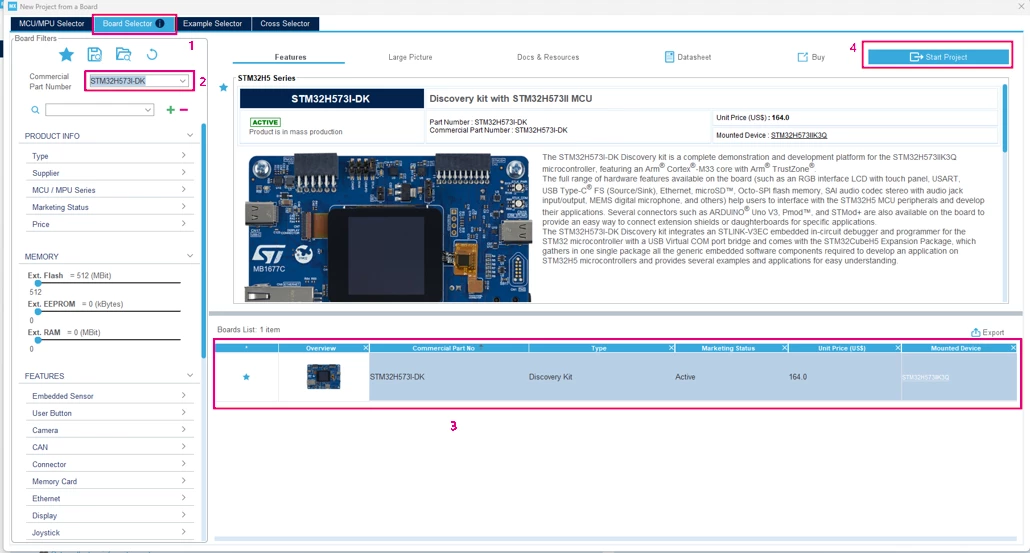
Open STM32CubeMX and navigate to the Board selector: Search for and select STM32H573I.
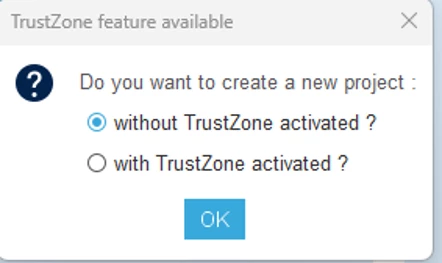
- Create a project without TrustZone® activated.
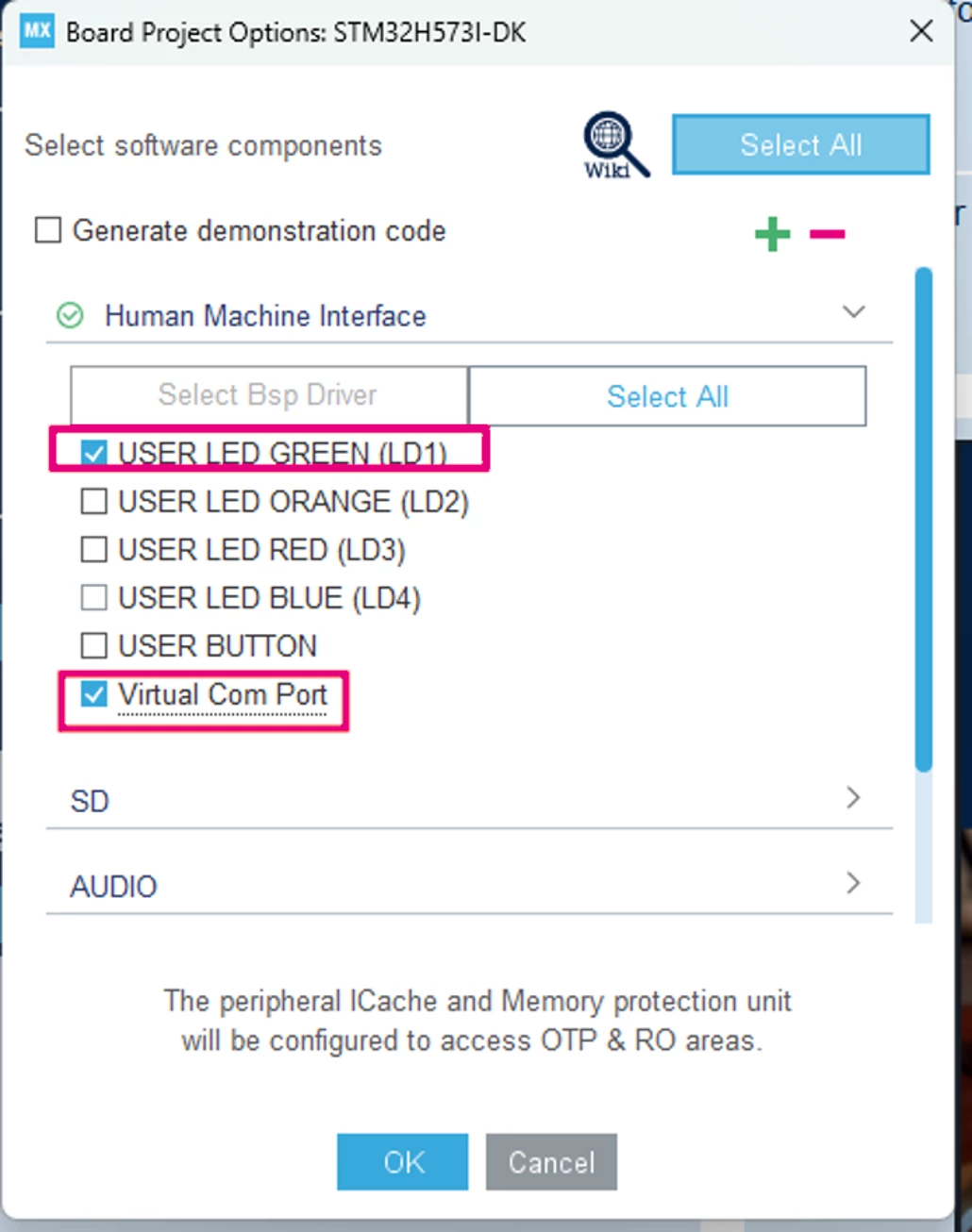
- For the BSP configuration, configure it as follows. In the software components, click unselect all, then enable only the Green LED and the virtual COM, then click ok.
- Navigate to the security section and enable RNG.
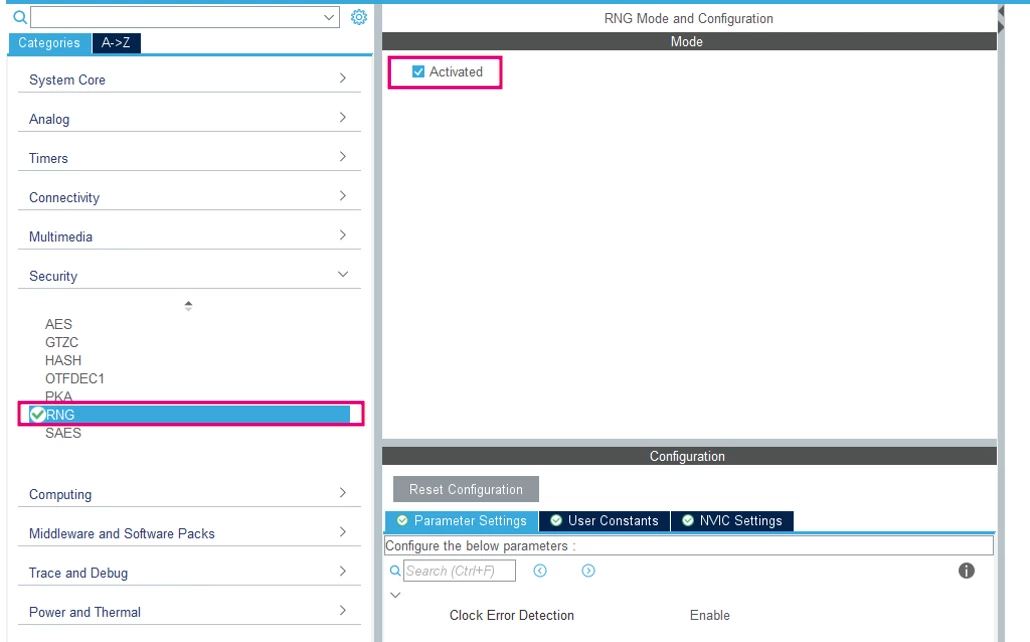
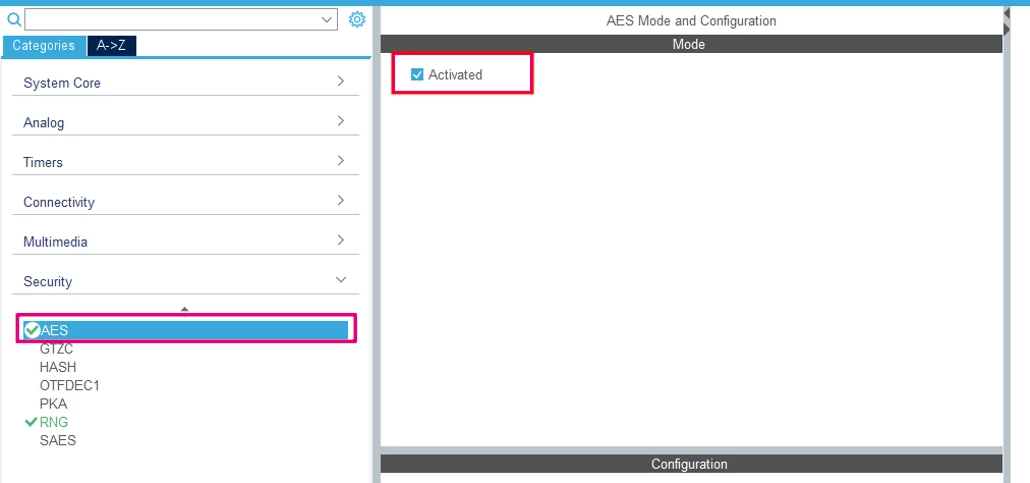
- Enable the AES.
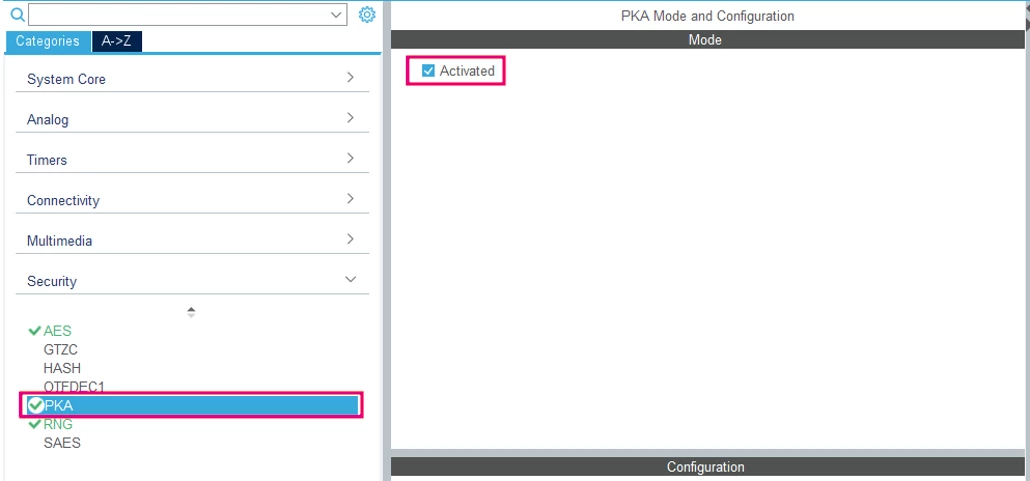
- Enable PKA.
- Enable HASH.
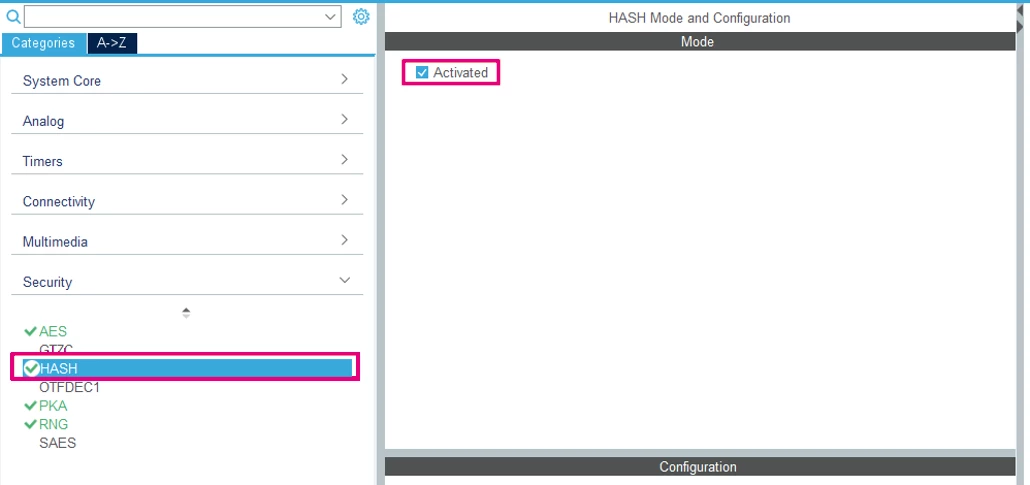
- These peripherals provide the hardware acceleration used by the STM32H5 mbedtls_alt implementations.
2.2 Project management
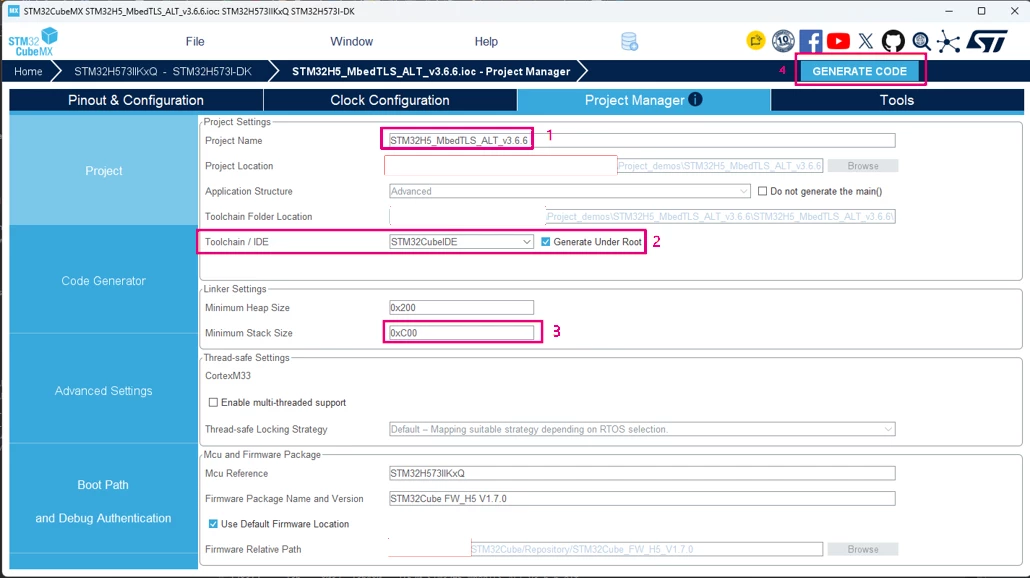
- Set a project name
- Configure the IDE to be STM32CubeIDE
- Update the minimum stack size from 0x0400 ~ (1 KB) to 0x0C00 (3 KB)
- Click generate
Refer to the memory limitations at the end for more information, then click generate code.
- Open the project in STM32CubeIDE.
- The stm32_mw_mbedTLS version 3.6.6 should be installed, and we import it now to our project.
- Right click on the project and create an empty folder named Middleware.
- Unzip the stm32_mw_mbedtls.zip, then copy it under the Middleware directory.
- Right-click and refresh the project, we renamed it to stm32-mw-mbedtls.
- Include the mbedtls_alt, locate the installation of STM32CubeH5 firmware and copy it to the Middleware directory.
STM32Cube\Repository\STM32Cube_FW_H5_V1.7.0\Middlewares\ST\mbedtls_alt
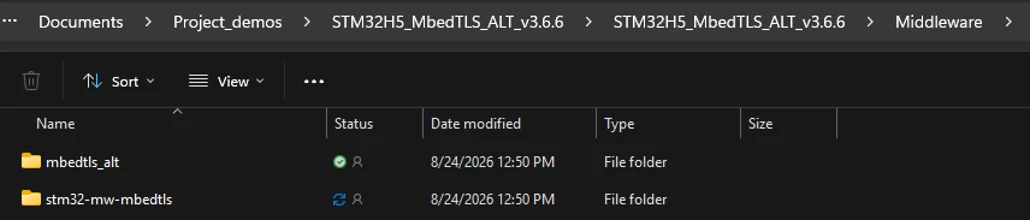
The resulting project structure should look like the following:
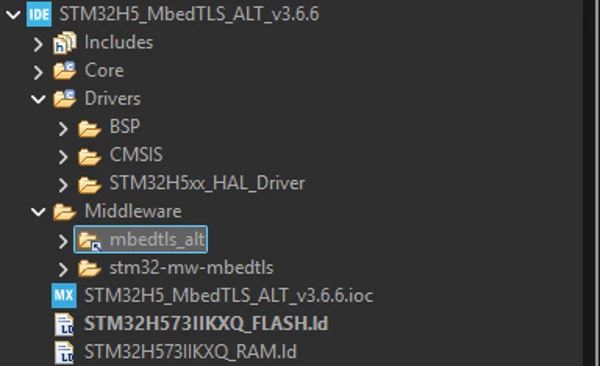
2.3 Project configuration
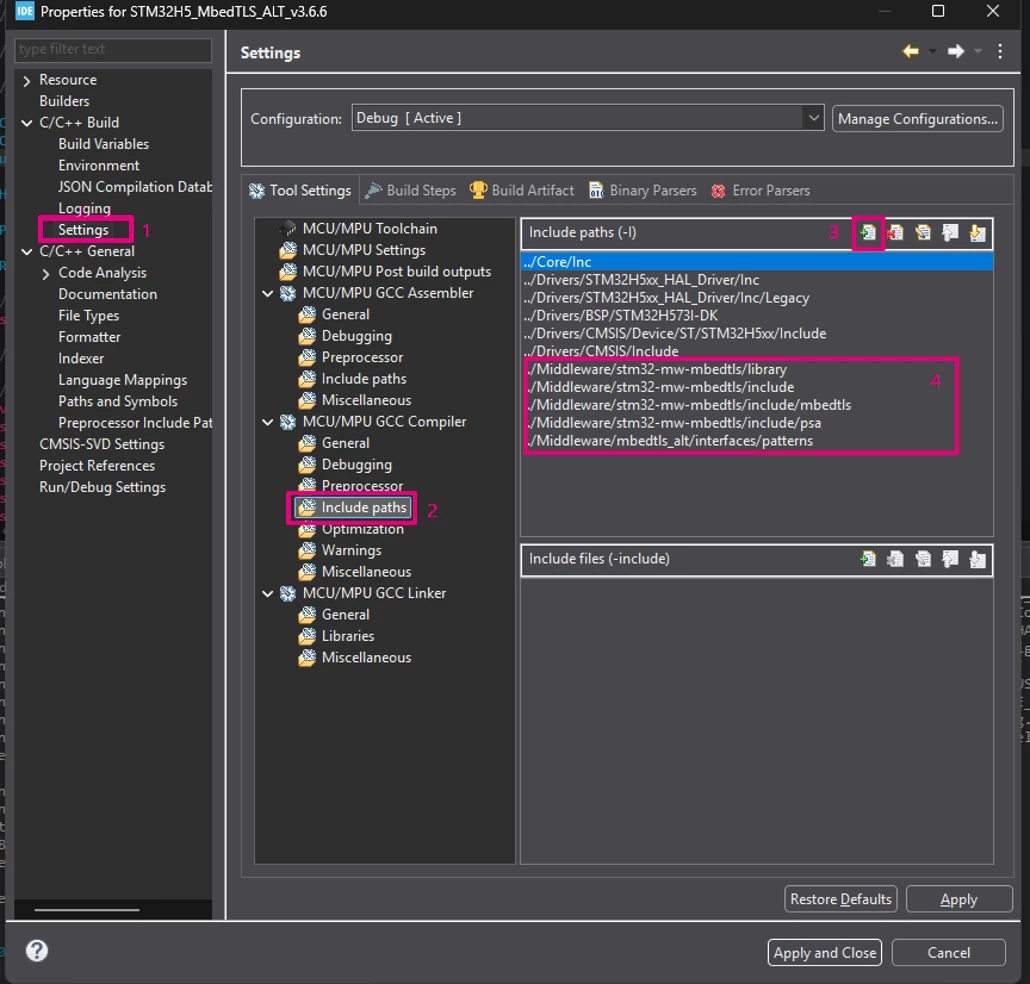
- Now, go to project properties → settings → include paths, and add these paths:
../Middleware/stm32-mw-mbedtls/include
../Middleware/stm32-mw-mbedtls/include/mbedtls
../Middleware/stm32-mw-mbedtls/include/psa
../Middleware/mbedtls_alt/interfaces/patterns
../Middleware/stm32-mw-mbedtls/library
• In the preprocessor, add: MBEDTLS_CONFIG_FILE=<mbedtls_config.h>
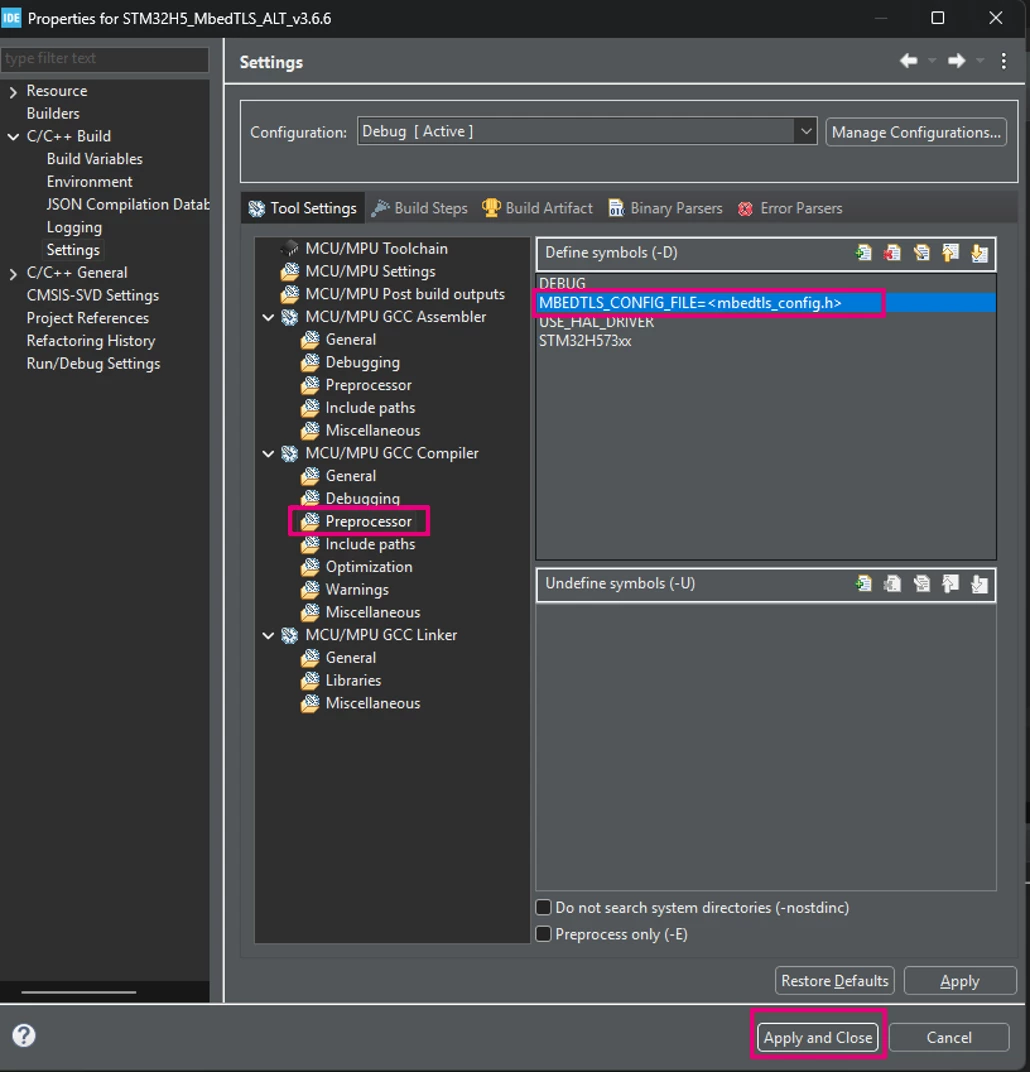
- Click apply and close.
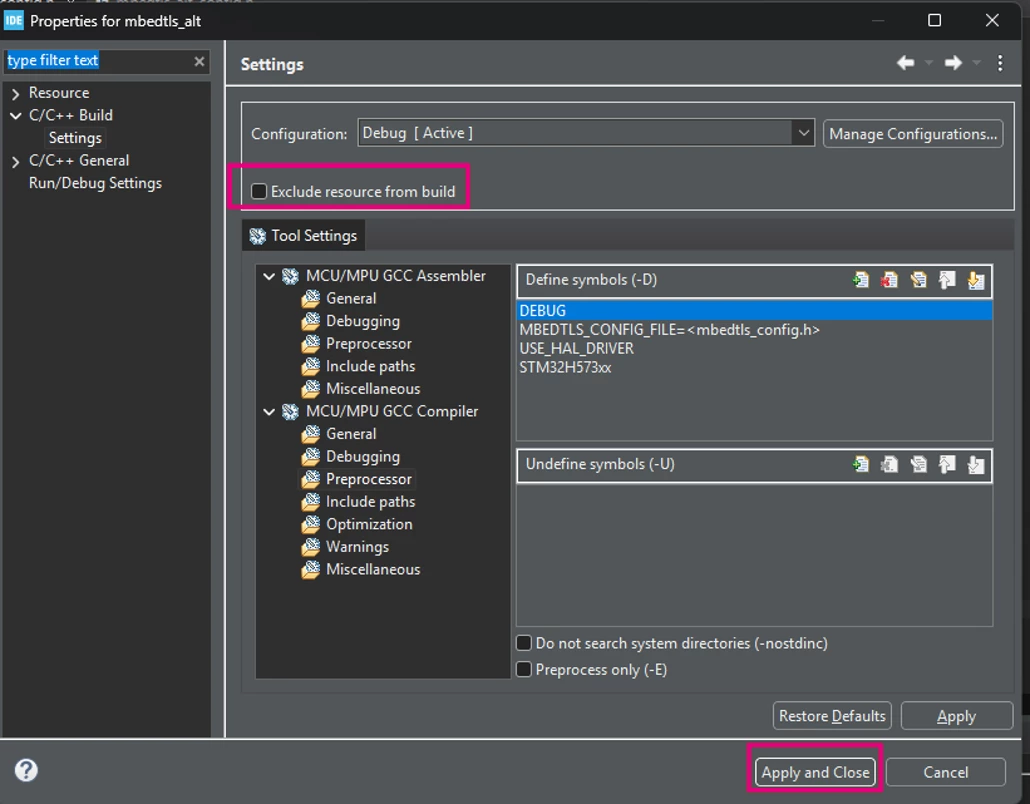
Both stm32-mw-mbedtls and mbedtls_alt need to be included in the compilation process.
- Right click on the mbedtls_alt and stm32-mw-mbedtls, go to properties -> settings, then unselect exclude from build.
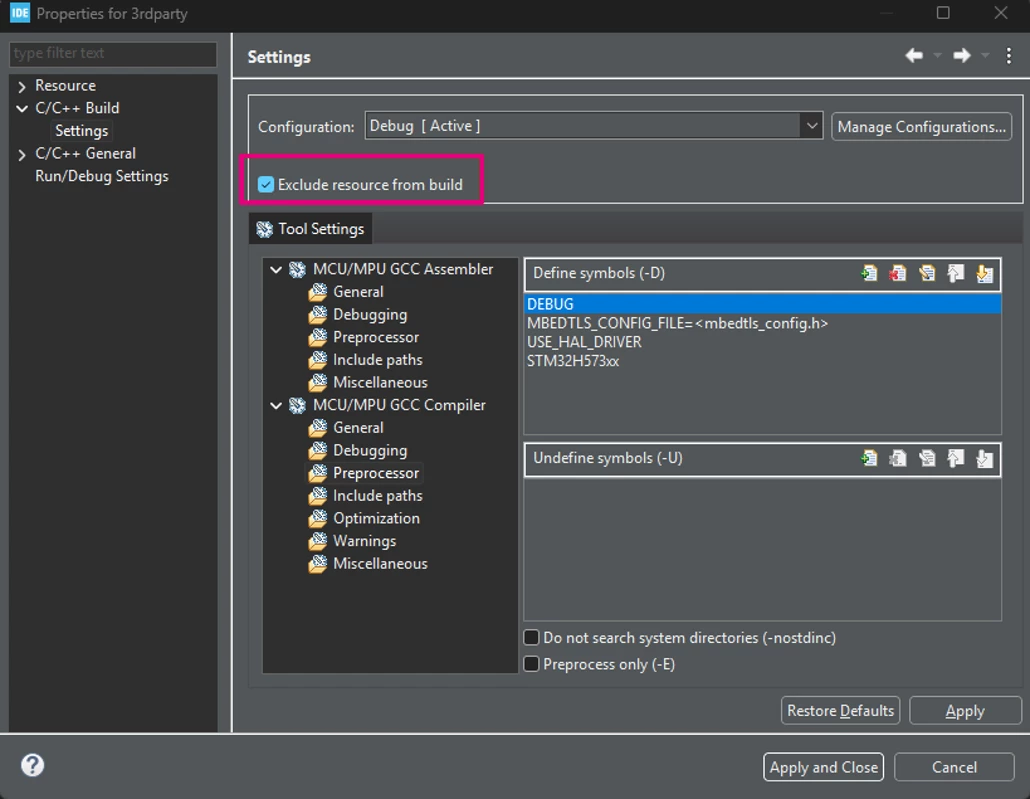
- Before building, several directories and files that are not required by the application must be excluded from the build.
Middleware/mbedtls_alt/interfaces/patterns/storage_interface_template.c
Middleware/mbedtls_alt/interfaces/patterns/storage_interface_template.h
Middleware/stm32-mw-mbedtls/3rdparty directory
Middleware/stm32-mw-mbedtls/tests directory
Middleware/stm32-mw-mbedtls/programs directory
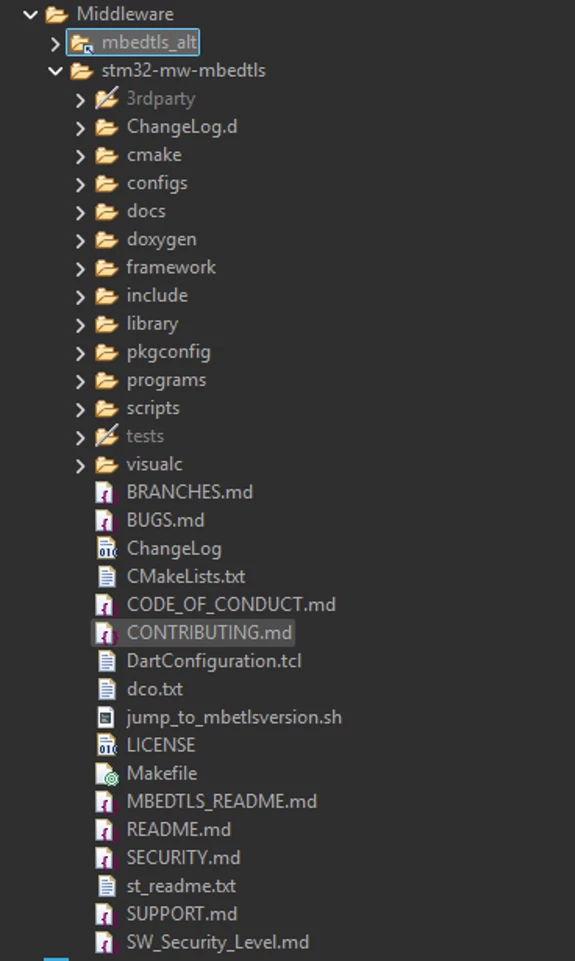
- The resulting configuration should look like the following:
2.4 Configure Mbed TLS
- In the Core/Inc directory, create the following two configuration files:
mbedtls_config.h
mbedtls_alt_config.h - The complete configuration files are provided with this article.
- Note that we need to include the #include "stm32h5xx_hal.h" in the mbedtls_alt_config.h.
The following table summarizes the main Mbed TLS features enabled for this example:
| Category | Configuration | Purpose |
| Platform |
| Enables the Mbed TLS platform abstraction layer. |
| Memory |
| Uses a dedicated static memory pool for Mbed TLS allocations. |
| Version |
| Provides the Mbed TLS version information. |
| MPI |
| Provides the mathematical operations required by RSA and ECC. |
| ASN.1/OID |
| Required for RSA and DER-related operations. |
| Entropy |
| Provides entropy management. |
| Hardware entropy |
| Uses the STM32 RNG peripheral as the entropy source. |
| DRBG |
| Provides deterministic random number generation. |
| SHA |
| Enable the SHA hashing and the generic message-digest interface. |
| SHA hardware acceleration |
| Uses the STM32 HASH peripheral. |
| AES |
| Enables AES and its hardware-accelerated implementation. |
| Cipher modes |
| Enables the required AES cipher modes. |
| AEAD |
| Enables CCM/GCM and their hardware-accelerated implementations. |
| ECC |
| Enables ECC and PKA acceleration. |
| ECDH |
| Enables ECDH using the PKA hardware accelerator. |
| ECDSA |
| Enables ECDSA signing and verification using PKA. |
| RSA |
| Enables RSA and PKA acceleration. |
| RSA key size |
| Prevents generation of RSA keys smaller than 2048 bits. |
| RSA padding |
| Enables the supported PKCS#1 padding schemes. |
| Self-tests |
| Enables the Mbed TLS self-test functions. |
2.5 Writing the application
• Create the mbedtls.h header in the Core/Inc and add the following content:
/*
 * mbedtls.h
 *
 *  Created on: Aug 21, 2026
 *      Author: sellamim
 */

#ifndef INC_MBEDTLS_H_
#define INC_MBEDTLS_H_

/* USER CODE BEGIN 0 */
#include "mbedtls_config.h"
#include "mbedtls/platform.h"

#include "mbedtls/entropy.h"
#include "mbedtls/ctr_drbg.h"
#include "mbedtls/sha256.h"
#include "mbedtls/sha512.h"
#include "mbedtls/des.h"
#include "mbedtls/aes.h"
#include "mbedtls/rsa.h"
#include "mbedtls/pkcs5.h"
#include "mbedtls/timing.h"
#include "mbedtls/gcm.h"
#include "mbedtls/ccm.h"
#include "mbedtls/ecp.h"

#include "mbedtls/error.h"
#include "mbedtls/version.h"
#include "mbedtls/debug.h"
#include "mbedtls/memory_buffer_alloc.h"

#include <stdio.h>
#include <string.h>

#endif /* INC_MBEDTLS_H_ */
- Then include the header in main.c
/* USER CODE BEGIN Includes */
#include "mbedtls.h"
/* USER CODE END Includes */
- Configure a 3KB memory buffer for Mbed TLS and paste the following content in the main.c file.
/* USER CODE BEGIN PV */
static uint8_t memory_buf[3 * 1024];
/* USER CODE END PV */
Add the self-test functions and paste the following content in the main.c file:
- Initializes the Mbed TLS memory pool.
- Prints the Mbed TLS version.
- Enables debug output.
- Executes the Mbed TLS self-tests.
/* USER CODE BEGIN WHILE */
	char mbedtls_string_version[20];

	// creates a memory pool allocator for mbedTLS inetrnal use.
	mbedtls_memory_buffer_alloc_init(memory_buf, sizeof(memory_buf));

	mbedtls_version_get_string_full(mbedtls_string_version);
	/*
	 *	- Debug levels
	 *	 	 - 0 No debug
	 *	 	 - 1 Error
	 *	 	 - 2 State change
	 *	 	 - 3 informational
	 *	 	 - 4 Verbose
	 */
	mbedtls_debug_set_threshold(1);

	mbedtls_printf("\nSelftest Application running with %s\n",
			mbedtls_string_version);

	mbedtls_printf("\n");
	int v = 1;

	if (mbedtls_entropy_self_test(v) == 0) {
		mbedtls_printf(" Executed entropy test suites\n\r");
	}

	if (mbedtls_ctr_drbg_self_test(v) == 0) {
		mbedtls_printf(" Executed ctrbg test suites\n\r");
	}

	if (mbedtls_sha256_self_test(v) == 0) {
		mbedtls_printf(" Executed sha256 test suites\n\r");
	}

	if (mbedtls_aes_self_test(v) == 0) {
		mbedtls_printf(" Executed aes test suites\n\r");
	}

	if (mbedtls_ccm_self_test(v) == 0) {
		mbedtls_printf(" Executed ccm test suites\n\r");
	}

	if (mbedtls_gcm_self_test(v) == 0) {
		mbedtls_printf(" Executed gcm test suites\n\r");
	}

	if (mbedtls_ecp_self_test(v) == 0) {
		mbedtls_printf(" Executed ecp test suites\n\r");
	}

	if (mbedtls_rsa_self_test(v) == 0) {
		mbedtls_printf(" Executed rsa test suites\n\r");
	}
	fflush(0);
	while (1) {

		BSP_LED_Toggle(LED_GREEN);
		HAL_Delay(1000);
		/* USER CODE END WHILE */

		/* USER CODE BEGIN 3 */
	}
- Build and run the project from STM32CubeIDE.
- Open the serial monitor, configure the baud rate to 115200.
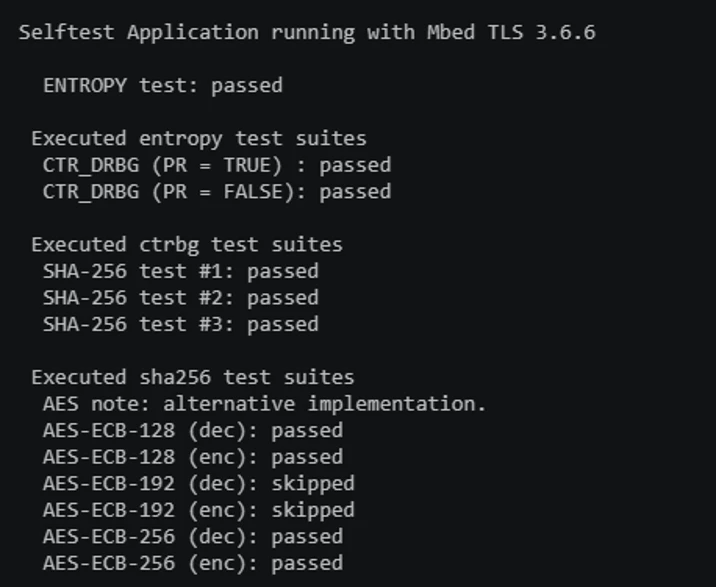
- If the Mbed TLS configuration and hardware acceleration are correctly integrated, the self-tests should be completed successfully. The output should look like the following:
The project can be found attached below.
3. Limitations
This section describes limitations and considerations that should be considered when integrating Mbed TLS with STM32H5 hardware acceleration.
3.1 Compiler limitations
When building Mbed TLS with GCC versions greater than 14, enabling assembly optimizations with MBEDTLS_HAVE_ASM may result in a compilation error.
The issue is related to the constraints used by the inline assembly code for certain multiplication operations. With some GCC versions, the compiler may be unable to satisfy the required register constraints for the generated code, resulting in a compilation error.
Two approaches can be used to address this issue:
- Use a supported GCC version where the assembly implementation builds successfully.
- Disable assembly optimizations by enabling:
#define MBEDTLS_NO_ASMDisabling the assembly does not disable the STM32 hardware cryptographic accelerators. The STM32-specific _ALT implementations can still use the hardware peripherals such as PKA, SAES, and HASH.
3.2 Memory limitations
Memory allocation must be carefully sized according to the application's requirements. The stack and Mbed TLS memory pool are separate allocations, although both consume the device's available RAM.
For the configuration tested in this article:
- A 3 KB dedicated memory pool is allocated for Mbed TLS instead of using the system heap.
- With -O0 optimization, the measured peak stack usage was approximately 2 KB.
- The 3 KB Mbed TLS memory pool is independent of the stack because it is declared as a global variable. It should therefore not be added to the stack requirement.
The measured stack usage should not be treated as a universal value. The required stack size depends on the Mbed TLS features enabled in mbedtls_config.h, the optimization level, and the application's runtime behavior.
In our case, a 2 KB stack was sufficient for the tested self-test application. However, applications using additional Mbed TLS functionality should provide an appropriate safety margin and verify their actual peak stack usage.
Conclusion
Integrating Mbed TLS with hardware acceleration on STM32H5 microcontrollers provides an efficient way to leverage the device's built-in cryptographic peripherals.
The integration process is straightforward. Add the Mbed TLS library and the corresponding STM32H5 mbedtls_alt implementations to the project and configure the required include-paths. Enable the necessary Mbed TLS features. Finally, build and run the application.
The successful execution of the Mbed TLS self-tests confirms that the cryptographic functionality is correctly integrated and that the supported operations can use the STM32H5 hardware accelerators.