


KDJEM.1
ST Technical Moderator
June 3, 2024

How to integrate CMSIS-DSP libraries on a STM32 project

  • June 3, 2024
  • 20 replies
  • 39212 views

Introduction

Since CMSIS V 5.8.0, the CMSIS-DSP libraries are supplied as an individual package. The advantage is to decouple the release cycles of DSP from the CMSIS-Core stuff. As a side-effect, the DSP libraries structure was changed and the steps described in the article: Configuring DSP libraries on STM32CubeIDE cannot be applied.
For that the aim of this article is to describe step by step: How to integrate this new CMSIS-DSP on an STM32 project.

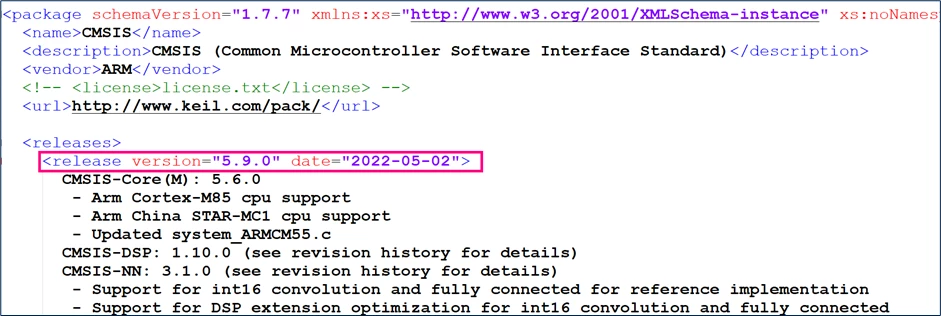
Before you get started, open the ARM.CMSIS.pdsc file in \STM32Cube_FW_xx_Vx.x.x\Drivers\CMSIS folder with notepad to know which CMSIS version is included in the package. 
KDJEM1_3-1716913675458.png

Software prerequisite

The versions used in this tutorial are:

Step-by-step instructions

The following steps show how to integrate DSP libraries in your project when using STM32CubeIDE toolchain. For this demonstration, an example based on the STM32CubeF4 package version 1.28.0 is used.

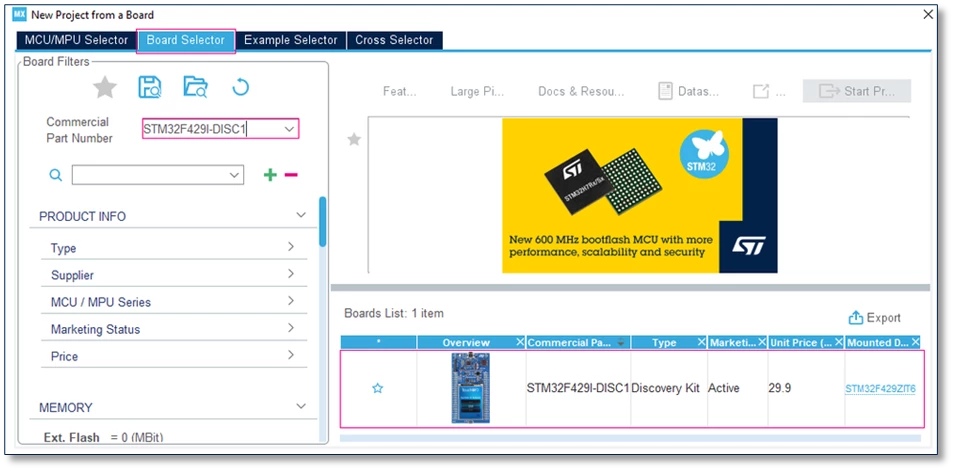
1. Create a new project using STM32CubeMX and STM32F429-DISC1 board.
KDJEM1_0-1716913201570.png
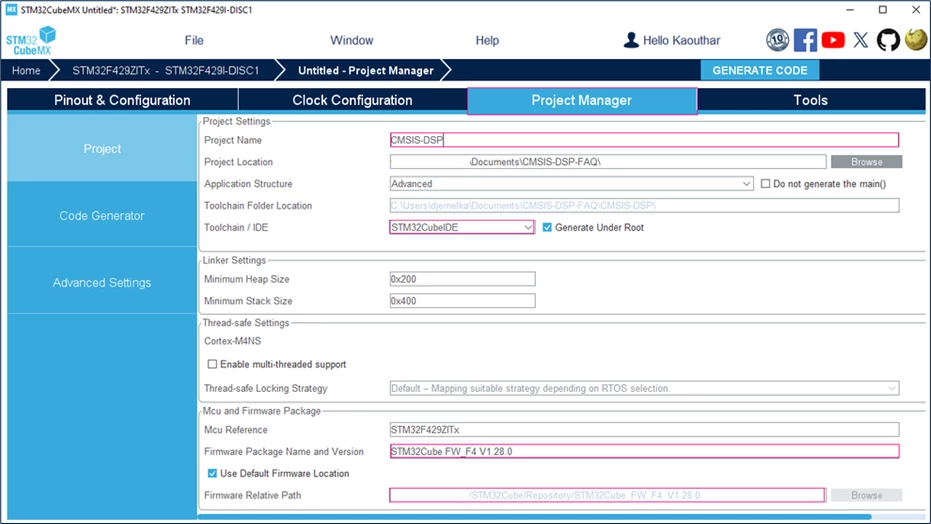
2. After finishing the settings, generate the code with the STM32CubeIDE tool chain and STM32CubeF4 1.28.0
KDJEM1_1-1716913286505.png
3. In the generated project, create a folder under ..\Drivers named "CMSIS_DSP"

4. Copy these folders in the created folder:

<STM32Cube_Repository>\STM32Cube_FW_F4_V1.28.0\Drivers\CMSIS\DSP\Include

<STM32Cube_Repository>\STM32Cube_FW_F4_V1.28.0\Drivers\CMSIS\DSP\PrivateInclude

<STM32Cube_Repository>\STM32Cube_FW_F4_V1.28.0\Drivers\CMSIS\DSP\Source

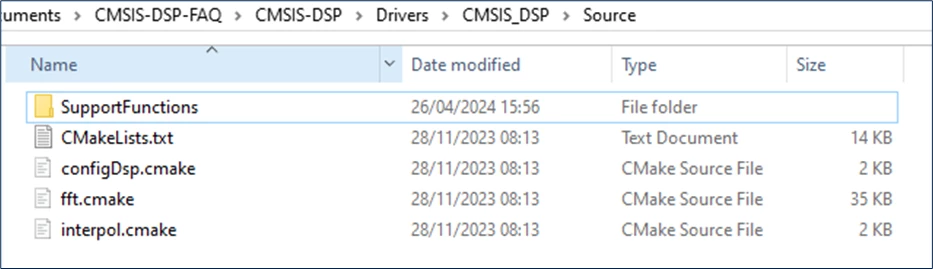
5. For this example, only the SupportFunctions are used. For that, open the "Source" folder under "..\Drivers\CMSIS_DSP" and keep only the SupportFunctions (other folders can be removed).
KDJEM1_5-1716913808851.png
6. Make sure that you have these folders in your project with this structure
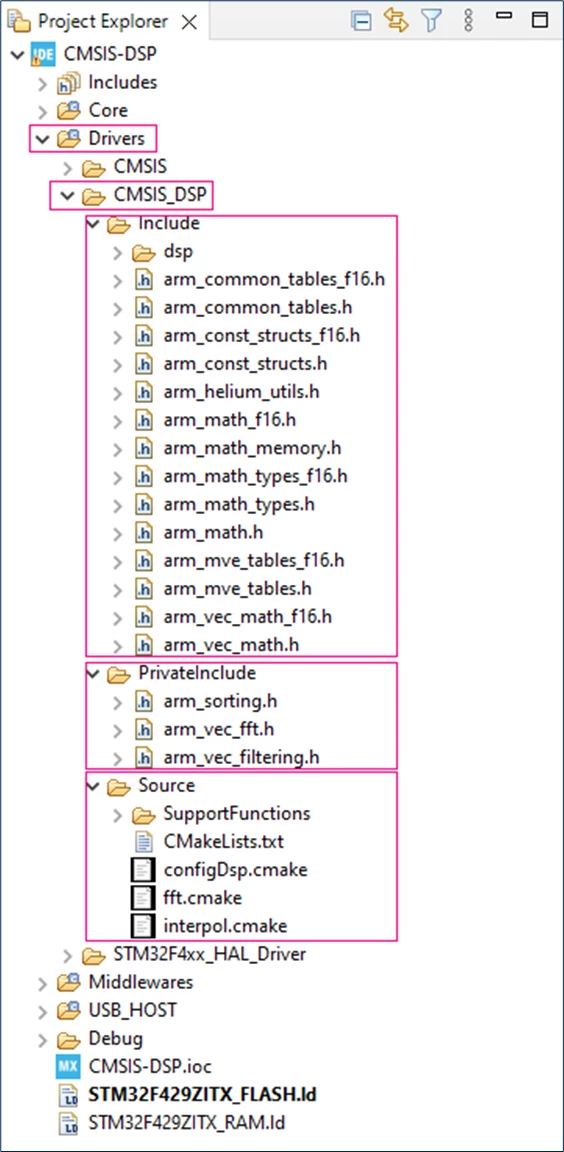
KDJEM1_6-1716913860403.png
7. Update include paths: 
Include paths: Select project properties from the [Project Explorer] section
From the [Project menu or [File menu], go to [Project properties] > [C/C++ Build] > [Settings] > [Tool Settings] > [MCU GCC Compiler] > [Include paths]
  • Click on [Add] to include the new paths.

  • Add the ../Drivers/CMSIS_DSP/Include path and the ../Drivers/CMSIS_DSP/PrivateInclude path
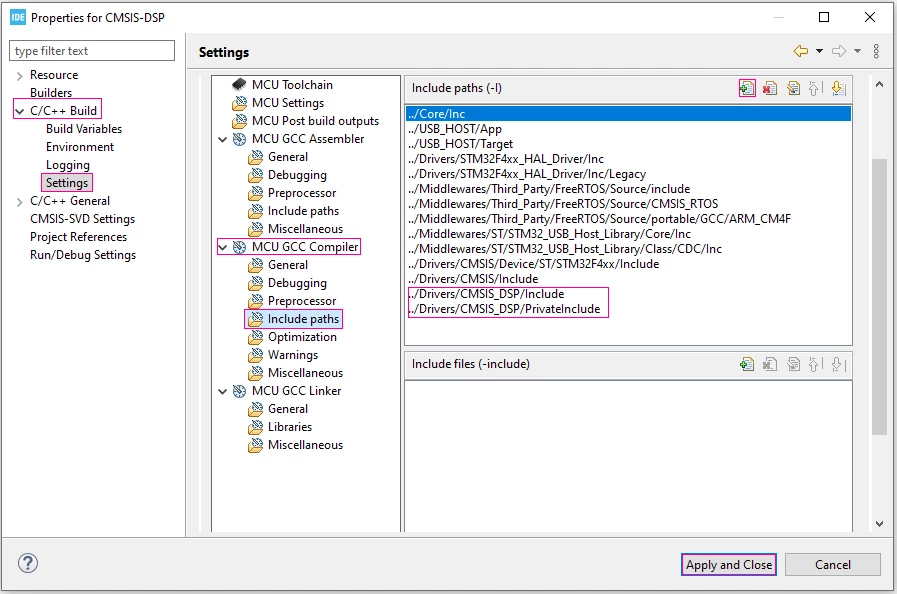
KDJEM1_3-1714995417164.png
8. Open SupportFunctions.c and SupportFunctionsF16.c files and comment these lines of code:

File name

Source Comment code lines

SupportFunctions.c

Drivers\CMSIS_DSP\Source\

SupportFunctions

#include "arm_barycenter_f32.c"
#include "arm_bitonic_sort_f32.c"
#include "arm_bubble_sort_f32.c"
#include "arm_copy_f32.c"
#include "arm_copy_f64.c"
#include "arm_copy_q15.c"
#include "arm_copy_q31.c"
#include "arm_copy_q7.c"
#include "arm_fill_f32.c"
#include "arm_fill_f64.c"
#include "arm_fill_q15.c"
#include "arm_fill_q31.c"
#include "arm_fill_q7.c"
#include "arm_heap_sort_f32.c"
#include "arm_insertion_sort_f32.c"
#include "arm_merge_sort_f32.c"
#include "arm_merge_sort_init_f32.c"
#include "arm_quick_sort_f32.c"
#include "arm_selection_sort_f32.c"
#include "arm_sort_f32.c"
#include "arm_sort_init_f32.c"
#include "arm_weighted_sum_f32.c"

#include "arm_float_to_q15.c"
#include "arm_float_to_q31.c"
#include "arm_float_to_q7.c"
#include "arm_q15_to_float.c"
#include "arm_q15_to_q31.c"
#include "arm_q15_to_q7.c"
#include "arm_q31_to_float.c"
#include "arm_q31_to_q15.c"
#include "arm_q31_to_q7.c"
#include "arm_q7_to_float.c"
#include "arm_q7_to_q15.c"
#include "arm_q7_to_q31.c"
SupportFunctionsF16.c

Drivers\CMSIS_DSP\Source\

SupportFunctions

#include "arm_copy_f16.c"

#include "arm_fill_f16.c"

#include "arm_f16_to_q15.c"

#include "arm_f16_to_float.c"

#include "arm_q15_to_f16.c"

#include "arm_float_to_f16.c"

#include "arm_weighted_sum_f16.c"

#include "arm_barycenter_f16.c"


9. Now, you can use the DSP libraries in your project. For that open main.c and add the required header file "arm_math.h" and declare the used variables:

#include "arm_math.h"


/* USER CODE BEGIN PD */
#define FFT_Length 1024
/* USER CODE END PD */


/* USER CODE BEGIN PV */
float32_t FFT_Input_Q15_f[50];
float32_t aFFT_Input_Q15[50];
/* USER CODE END PV */

10. Let us take the example of using the “arm_float_to_q15” function:

/* USER CODE BEGIN 1 */
	arm_float_to_q15((float32_t *)&FFT_Input_Q15_f[0], (q15_t *)&aFFT_Input_Q15[0], FFT_Length*2);
/* USER CODE END 1 */


Note:

  • If you use the 5.8.0 version of CMSIS or higher, follow the steps shared in this article.
  • If you use a version of CMSIS less than 5.8.0, refer to Configuring DSP libraries on STM32CubeIDE - STMicroelectronics Community to add the DSP libraries in your project.
  • For STM32N6 devices: add the following flag -flax-vector-conversions in Project →  Properties →  C/C++ Build →  Settings →  MCU/MPU GCC Compiler →  Miscellaneous →  "Other flags"

Conclusion

In conclusion, after following the steps outlined in this article, you should be able to add DSP libraries to a STM32 project. If you encounter any issues, we suggest that you create a post in the ST community for further assistance.

20 replies

Associate III
March 29, 2025

Thank you. Deleting these files resolved my issue.

Associate II
March 30, 2025

JACKLUCK_0-1743300984923.png

Hello, in the process of importing DSP library, I followed the tutorial steps to delete the relevant files, but in the SupportFunctions folder, I reported the above two errors, how to solve? thank you

Associate II
March 30, 2025

I have not experienced those errors, JACK-LUCK. Maybe check that you added the folders to your project's include paths as shown above, and have #include "arm_math.h"?

Associate III
March 30, 2025

What mcu are you compiling the support_functions that you are having the errors?

Associate II
March 31, 2025

I included the relevant content according to the tutorial, also added #include "arm_math.h", I used STM32N657X0H, please, thank you

KDJEM.1
KDJEM.1Author
ST Technical Moderator
April 9, 2025

Hello @JACK-LUCK and welcome to the community;


For STM32N6 devices could you please try to add this flag -flax-vector-conversions in Project => Properties => C/C++ Build => Settings => MCU/MPU GCC Compiler => Miscellaneous => "Other flags"


If the issue isn't solved, I recommend you to create a new post in the community and share your project?


I hope this help you!

Thank you.

Kaouthar

To give better visibility on the answered topics, please click on "Best answer" on the reply which solved your issue or answered your question.
nicolas
Senior II
May 8, 2025

Thanks for the guide but why providing an utterly wrong code example ?
From my point of view, the code below is a lot better:

#define DATA_LENGTH 50

float32_t input_f[DATA_LENGTH];
q15_t output_q15[DATA_LENGTH];

arm_float_to_q15(input_f, output_q15, DATA_LENGTH);
Senior III
August 12, 2025

Thanks for that. The deleting the #includes in each file is a real pain why do you think ARM did this, it make no sense to me?

Associate III
November 19, 2025

@NicRoberts the reason for this is probably for makefiles or IDE project files where you have to add all individual files to be compiled and linked.

Then you could either list all individual source files, or to avoid all that work by just adding a single 'combination' sourcefile which includes all individual source files.


As long as you never add both the individual source files and the combination files, because that will give you duplicate symbols definitions.


STM32CubeIDE does not use makefiles or project files, it simply compiles and links every source file you copy into the tree.

So in that case, you need to remove the 'combination' files (or comment their contents).

whitehorsesoft
Associate III
December 23, 2025

To add to the conversation, I've had great experience with an easier approach described more in detail at https://community.st.com/t5/stm32cubemx-mcus/how-to-integrate-cmsis-dsp-libraries-on-a-cmake-stm32-project/m-p/866653/highlight/true#M34608.