


How to implement a USB device custom HID class on STM32 part2
Hello and welcome back to the second and last portion!
1. Recap
We resume from the point we left off, just to give a brief recap, in part 1 we made all the way up to the code generation with STM32CubeIDE:

Among the several files created automatically, the highlighted ones are modified during this tutorial, so you might want to open them preemptively: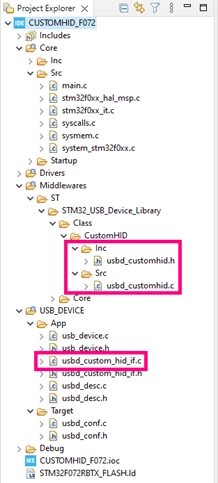
The first step in the code is to increase the IN and OUT Endpoint size. Just to do a small recap, the Endpoint is the source or destination data buffer that must be implemented on the device side, each amount of data that is received from or sent to the host will be placed into an endpoint. In the usbd_customhid.h file, modify the CUSTOM_HID_EPIN_SIZE and CUSTOM_HID_EPOUT_SIZE defines to 0x40 (64 bytes):
#define CUSTOM_HID_EPIN_SIZE 0x40U
#define CUSTOM_HID_EPOUT_SIZE 0x40U
Modify the USBD_CUSTOM_HID_ItfTypeDef to get the entire message buffer:
typedef struct _USBD_CUSTOM_HID_Itf
{
 uint8_t *pReport;
 int8_t (* Init)(void);
 int8_t (* DeInit)(void);
 int8_t (* OutEvent)(uint8_t* state);

} USBD_CUSTOM_HID_ItfTypeDef;
Save and close the file.
NOTE: All the modifications on files inside the middlewares folder may be overwritten in case of code generation from STM32CubeMX. So, create a copy of the files when the modifications were finished.
Open the usbd_customhid.c file and modify the following functions:
static uint8_t USBD_CUSTOM_HID_DataOut(USBD_HandleTypeDef *pdev,
 uint8_t epnum)
{

 USBD_CUSTOM_HID_HandleTypeDef *hhid = (USBD_CUSTOM_HID_HandleTypeDef *)pdev->pClassData;

 ((USBD_CUSTOM_HID_ItfTypeDef *)pdev->pUserData)->OutEvent(hhid->Report_buf);

 USBD_LL_PrepareReceive(pdev, CUSTOM_HID_EPOUT_ADDR, hhid->Report_buf,
 USBD_CUSTOMHID_OUTREPORT_BUF_SIZE);

 return USBD_OK;
}
static uint8_t USBD_CUSTOM_HID_EP0_RxReady(USBD_HandleTypeDef *pdev)
{
 USBD_CUSTOM_HID_HandleTypeDef *hhid = (USBD_CUSTOM_HID_HandleTypeDef *)pdev->pClassData;

 if (hhid->IsReportAvailable == 1U)
 {
 ((USBD_CUSTOM_HID_ItfTypeDef *)pdev->pUserData)->OutEvent(hhid->Report_buf);
 hhid->IsReportAvailable = 0U;
 }

 return USBD_OK;
}
Save and close the file.
Open the usbd_custom_hid_if.c and add the following information in Usb HID report descriptor (if you need more information regarding the report descriptor, refer the documentation available in Information for Developers | USB-IF:(
/** Usb HID report descriptor. */
__ALIGN_BEGIN static uint8_t CUSTOM_HID_ReportDesc_FS[USBD_CUSTOM_HID_REPORT_DESC_SIZE] __ALIGN_END =
{
		/* USER CODE BEGIN 0 */
		0x06, 0x00, 0xff, // Usage Page(Undefined )
		0x09, 0x01, // USAGE (Undefined)
		0xa1, 0x01, // COLLECTION (Application)
		0x15, 0x00, // LOGICAL_MINIMUM (0)
		0x26, 0xff, 0x00, // LOGICAL_MAXIMUM (255)
		0x75, 0x08, // REPORT_SIZE (8)
		0x95, 0x40, // REPORT_COUNT (64)
		0x09, 0x01, // USAGE (Undefined)
		0x81, 0x02, // INPUT (Data,Var,Abs)
		0x95, 0x40, // REPORT_COUNT (64)
		0x09, 0x01, // USAGE (Undefined)
		0x91, 0x02, // OUTPUT (Data,Var,Abs)
		0x95, 0x01, // REPORT_COUNT (1)
		0x09, 0x01, // USAGE (Undefined)
		0xb1, 0x02, // FEATURE (Data,Var,Abs)
		/* USER CODE END 0 */
		0xC0 /* END_COLLECTION */

};
In the same file, modify both the CUSTOM_HID_OutEvent_FS prototype and function structure (this function is called when a full package data is received through the USB):
static int8_t CUSTOM_HID_OutEvent_FS(uint8_t* state);
static int8_t CUSTOM_HID_OutEvent_FS(uint8_t* state)
{
	/* USER CODE BEGIN 6 */
	return (USBD_OK);
	/* USER CODE END 6 */
}
Open the main.c file, extern the USB handler, add the transmission and reception buffers and the following flags variables. Use the USER CODE comments to locate the proper place to copy and paste the code snippets below:
/* USER CODE BEGIN PV */
uint8_t tx_buffer[64];		//Variable to store the output data
uint8_t report_buffer[64];		//Variable to receive the report buffer
uint8_t flag = 0;			//Variable to store the button flag
uint8_t flag_rx = 0;			//Variable to store the reception flag

//extern the USB handler
extern USBD_HandleTypeDef hUsbDeviceFS;
/* USER CODE END PV */


/* USER CODE BEGIN 2 */
 //To fill the buffer
 for (uint8_t i=0; i<64; i++)
 {
tx_buffer[i] = i;
 }
/* USER CODE END 2 */


 /* Infinite loop */
 /* USER CODE BEGIN WHILE */
 while (1)
 {
 if (flag_rx == 1)
 {
 //Check if the first byte of the report buffer equals 1
 if (report_buffer[0] == 1)
 {
//Turn the user LED on
HAL_GPIO_WritePin(LED3_GPIO_Port, LED3_Pin, SET);
 }

 //Check if the first byte of the report buffer equals 2
 else if (report_buffer[0] == 2)
 {
//Turn the user LED off
HAL_GPIO_WritePin(LED3_GPIO_Port, LED3_Pin, RESET);
 }

 flag_rx = 0;
 }

 //To send the output data when the button is pressed
 if (flag==1)
 {
 USBD_CUSTOM_HID_SendReport(&hUsbDeviceFS, tx_buffer, 64);

 Flag = 0;
 }

/* USER CODE END WHILE */


/* USER CODE BEGIN 4 */

//If the button is pressed, set button flag variable
void HAL_GPIO_EXTI_Callback(uint16_t GPIO_Pin)
{
Flag = 1;
}

/* USER CODE END 4 */
Open the usbd_custom_hid_if.c file and extern the variables created in main.c.
/* USER CODE BEGIN PV */
/* Private variables --------------------------------------------------*/
//To extern the report_buffer variable
extern uint8_t report_buffer[64];
extern uint8_t flag_rx;
/* USER CODE END PV */
In CUSTOM_HID_OutEvent_FS function, add the memcpy command to copy the data stored in the reception variable of the USB (“state”) and place it in the variable report_buffer previously created
static int8_t CUSTOM_HID_OutEvent_FS(uint8_t* state)
{
 /* USER CODE BEGIN 6 */

//To copy the reception buffer into the report_buffer variable
memcpy(report_buffer, state, 64);

flag_rx = 1;

return (USBD_OK);
 /* USER CODE
Done! By building the application the dream of all programmers should be achieved, 0 errors and 0 warnings. Now let us see if it also works.
2. Validation
Start a debug session with the created project with STM32CubeIDE by clicking in the Debug button:
A window may appear to ask for some settings about the Debugger, for this example the standard settings work well. So, just click on Ok: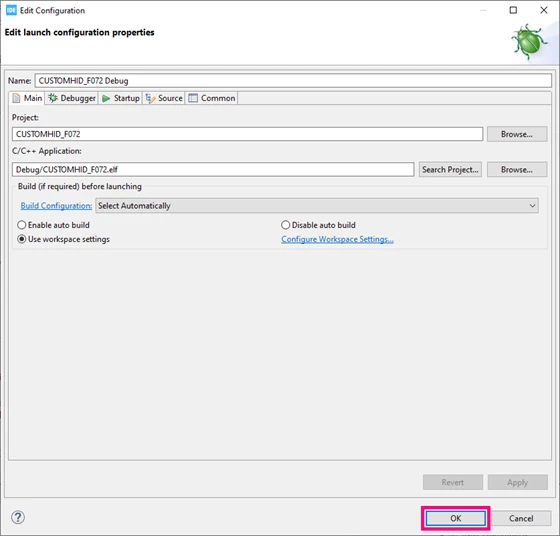
Run the execution clicking Resume button or pressing F8:
Open the SimpleHIDWrite software, select the STM32 Custom Human interface in the list, then click on Clear button to clear the terminal: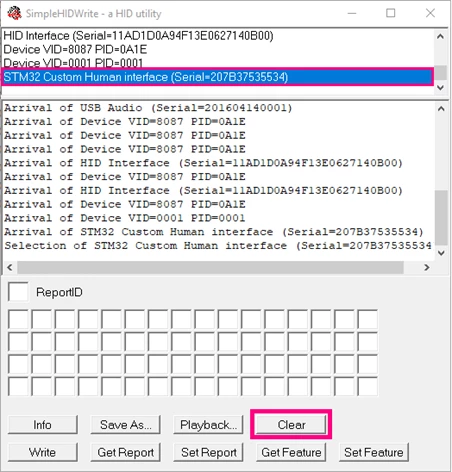
Press the User Button on the Discovery Board and check that the buffer sent to host on terminal. It is the buffer with the sequence from 0 to 63U (0x3F):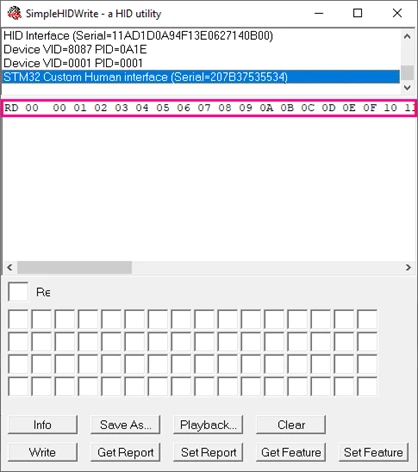
Fill the first field with the value 1, click on Set Report button and check that the Red LED turned ON (change the first value to 2 and send the report again to turn OFF the LED):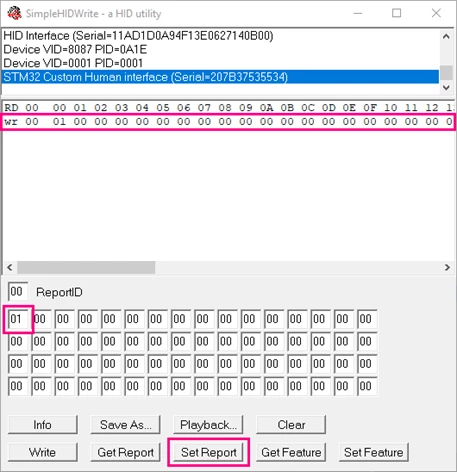
Finally, insert a breakpoint on some line between the if statement of main.c that checks the flag_rx, fill the fields of the SimpleHIDWrite with random data, set a report and check the value of the report_buffer on STM32CubeIDE: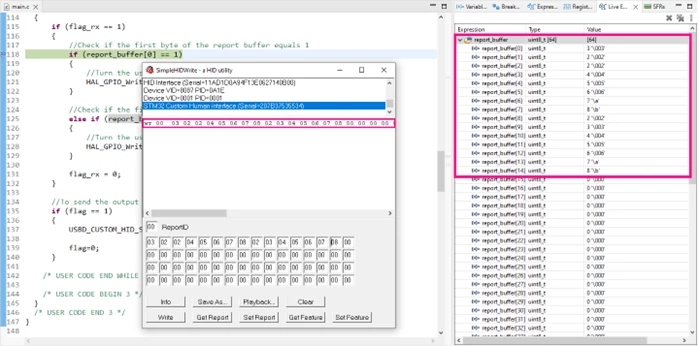
Conclusion
All the steps to implement a USB Device as Custom HID Class on STM32 are done! And now you have a project that can transmit a package through the USB, receive and manage a data package from a Host in your code. Enjoy it!
Related links