


xpress_embedo
Associate III
January 6, 2022
Solved

Help Needed in Building a Simple Project with STemWin and STM32CubeIDE

  • January 6, 2022
  • 19 replies
  • 9164 views

Hello Everyone,

I need help in building the project as I am facing some issues.

As we know we can't configure the STemWin from CubeMX/STM32CubeIDE and to use the STemWin library we have to add it separately in our project.

I created a simple project using CubeMX/STM32CubeIDE which is auto-generated and then I took the reference from the example STemWin_HelloWorld present in the CubeF7 package.

I think I did most of the steps, by comparing these two projects, but I am getting the error.

../STemWin_Config/GUIConf.c:54:10: fatal error: GUI.h: No such file or directory
 54 | #include "GUI.h"
 | ^~~~~~~
compilation terminated.

But in my project this file is present and added to the project, even the path is also updated in the project settings, I don't know why I am getting this error, that this file is not present.

One strange thing which I have noticed is as shown below, here in include section I can see most of the include paths related to STemWin are disabled/greyed out, I don't know what is the reason.
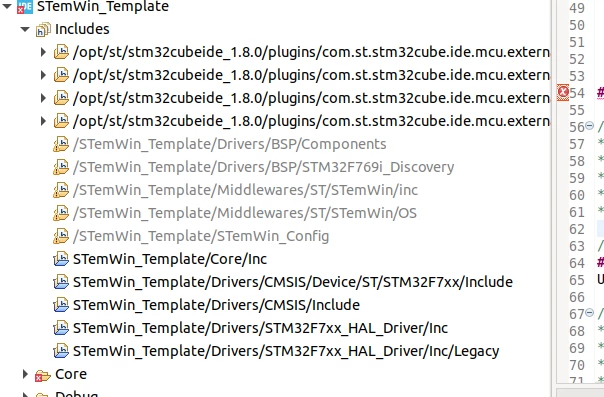
0693W00000Hqo0NQAR.pngWhile the example project which is working fine, this is not greyed out/disabled.
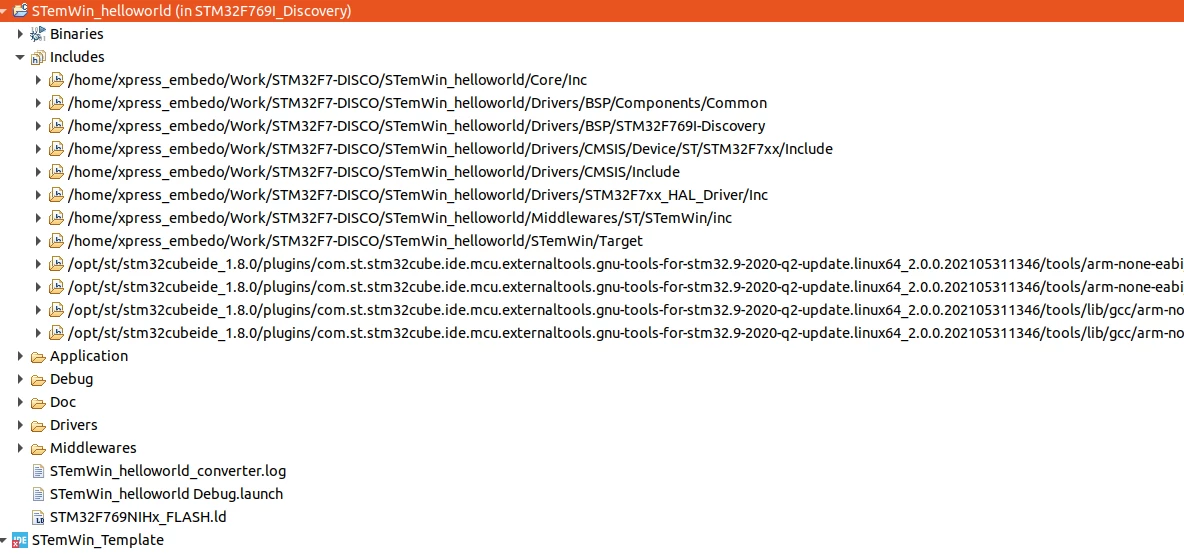
0693W00000Hqo1BQAR.pngMaybe the issue is related to this.

I am using STM32F769I Discovery Board, and STM32CubeIDE 1.8.0.

I have attached the complete project ziped with this post, please help me in resolving this.

I think the issue might be very simple which I missed due to lack of knowledge.

Thanks in advance.
This topic has been closed for replies.
Best answer by xpress_embedo

Okay, I was able to solve this problem (I am still getting some other build errors, but not related to this, which I will fix in sometime).

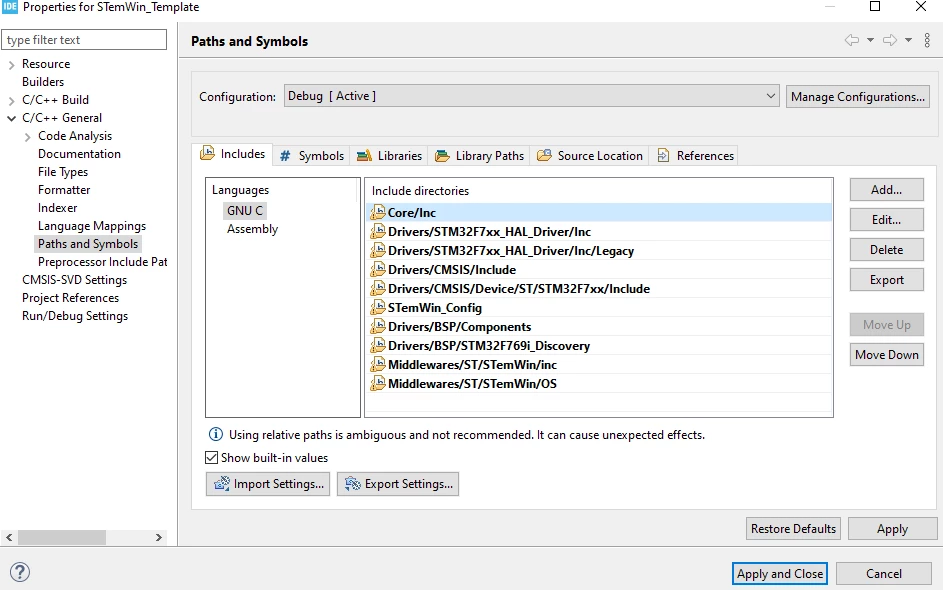
I observed properly and found that when I added path they are added as "/STemWin_Template/...." but if we see other include paths which are not greyed out, it's without the project name, so I just removed "/STemWin_Template" and I am not getting this error again.

So I updated as below.

0693W00000HqqoeQAB.pngNow I have few other issues which I will try to resolve. Thanks

PS: The screenshot attached on the original post are from Ubuntu machine and this screenshot is from Windows, but the project is same.

19 replies

xpress_embedo
xpress_embedoAuthorBest answer
Associate III
January 7, 2022

Okay, I was able to solve this problem (I am still getting some other build errors, but not related to this, which I will fix in sometime).

I observed properly and found that when I added path they are added as "/STemWin_Template/...." but if we see other include paths which are not greyed out, it's without the project name, so I just removed "/STemWin_Template" and I am not getting this error again.

So I updated as below.

0693W00000HqqoeQAB.pngNow I have few other issues which I will try to resolve. Thanks

PS: The screenshot attached on the original post are from Ubuntu machine and this screenshot is from Windows, but the project is same.

ST Technical Moderator
January 7, 2022

Hi @xpress_embedo​ ,

Glad to know you overcame this problem :)

If you still have issues, don't hesitate to come back to the Community either with new threads or as a continuity of this one (when related to same initial topic).

Thanks

Imen

In order to give better visibility on the answered topics, please click on 'Best answer' on the reply which solved your issue or answered your question. Thanks
xpress_embedo
Associate III
January 7, 2022

Thank You @Imen DAHMEN​ 

I am new to STM32CubeIDE so maybe I didn't have much knowledge of all the settings and configuration.

But usually with other IDE's like IAR, when we add path and it is compatible with the IDE.

Here with STM32CubeIDE when I added path, by default it appended STemWin_Template which is project name with the path.

So the good thing is my project is up and running, but I have one issue which when I checked on original project directly opened from CubeF7 example.

The issue is as below, if I single step while debugging my project, nothing gets displayed on the display. But if I press F8 (run) then it works fine.

void MainTask(void) {
 GUI_Clear();
 GUI_SetFont(&GUI_Font32_1);
 GUI_DispString("Hello World from STM32F7\r\n");
 GUI_DispStringAt("Hello world!", (LCD_GetXSize()-100)/2, (LCD_GetYSize()-20)/2); 
 while(1);
}

Another issue is that, if I put a delay like HAL_Delay(1000) or even GUI_Delay(1000), and now even I press F8 (run), then nothing gets displayed after that delay, while control reaches while(1), example is given below

void MainTask(void) {
 GUI_Clear();
 GUI_SetFont(&GUI_Font32_1);
 GUI_DispString("Hello World from STM32F7\r\n");
 GUI_Delay(1000);
 GUI_DispStringAt("Hello world!", (LCD_GetXSize()-100)/2, (LCD_GetYSize()-20)/2); 
 while(1);
}

I can see "Hello World from STM32F7" but not "Hello World"

I am asking this question because this issue is present on the exiting example present in the CubeF7

Do you know what could be issue?

ST Technical Moderator
January 7, 2022

Hi @xpress_embedo​ 

Firstly, GUI_Init must be called before any STemWin function or GUI routines is used, and the CRC module (in RCC clock enable) must be enabled before calling GUI_Init, if not STemWin will not work.(This is mentioned in the "4.2 GUI initialization" of AN4323)

 /* Init the STemWin GUI Library */
 BSP_SDRAM_Init(); /* Initializes the SDRAM device */
 __HAL_RCC_CRC_CLK_ENABLE(); /* Enable the CRC Module */
 
 GUI_Init();
 
 GUI_SetFont(&GUI_Font32_ASCII);
 
 GUI_DispStringAt("Starting...", 0, 0);

I advise you to check and get inspired from to the "STemWin_HelloWorld" available in the latest release of the STM32CubeF7 MCU package:

\STM32Cube_FW_F7_V1.16.1\Projects\STM32F769I_EVAL\Applications\STemWin\STemWin_HelloWorld\

You can follow the guide UM2579 to import the example from SW4STM32 to STM32CubeIDE.

Imen

In order to give better visibility on the answered topics, please click on 'Best answer' on the reply which solved your issue or answered your question. Thanks
xpress_embedo
Associate III
January 7, 2022

Hi @Imen DAHMEN​ 

Thank You for your response.

But maybe I am not very much clear in my last post.

As suggested by you, I am already using the "STemWin_HelloWorld" example from the CubeF7 MCU package.

And it works fine (also the project I created taking this as reference works fine).

I have two problems (this problem is also present in the STemWin_HelloWorld example.

  • When I used single step debugging I can't see anything on the display, but if I pressed F8, I can see the text on the display.
void MainTask(void) {
 GUI_Clear();
 GUI_SetFont(&GUI_Font32_1);
 GUI_DispString("Hello World from STM32F7\r\n");
 GUI_DispStringAt("Hello world!", (LCD_GetXSize()-100)/2, (LCD_GetYSize()-20)/2); 
 while(1);
}
  • When GUI_Delay is used, there is delay but nothing after the GUI_Delay Works. So Let's say, I used the below program and started debugging, and then pressed F8 to run the program freely.
void MainTask(void) {
 GUI_Clear();
 GUI_SetFont(&GUI_Font32_1);
 GUI_DispString("Hello World from STM32F7\r\n");
 GUI_Delay(1000);
 GUI_DispStringAt("Hello world!", (LCD_GetXSize()-100)/2, (LCD_GetYSize()-20)/2); 
 while(1);
}

I can see "Hello World from STM32F7" but not the "Hello World" on the middle of the screen. I have attached the picture also.

0693W00000HqtA8QAJ.pngRight Side image is when I didn't used GUI_Delay and didn't use single step debugging.

Left side image is when I used GUI_Delay, GUI_Delay is doing it work can be seen from the below screenshot, my control is reaching the while(1), so it means GUI_Delay is not blocking the GUI_DispString function call.

0693W00000HqtBGQAZ.png 

Also regarding the points you mentioned that GUI_Init must be called and CRC should be enabled is already done. And since this is the example from CubeF7 package, I just modified it to include Delay and another Display String line.

Do you have some suggestions here now?

ST Technical Moderator
January 11, 2022

Hi @xpress_embedo​ ,

I apologize for the late reply; I was out of the office for a few days.

I haven't tested the provided "STemWin_HelloWorld" example available in the CubeF7 MCU package, since I'm working from home, and I don't have access to that specific board, but that should work.

I will try to contact our STemWin expert internally for investigate more and answer your questions.

Is it possible to check the display behavior when increasing the memory allocated to the GUI?

Note that if there is no enough memory to create the memory device, the performance of the display will be decreased.

Did you try the Windows Manager?

“GUI_Delay�? API calls internally “GUI_Exec�?. The call of “GUI_Exec�? regularly is recommended to update the modified windows.

“GUI_Exec�? API send notifications to STemWin callbacks and update all invalidated windows.

 0693W00000HrEQMQA3.jpg 

Imen

In order to give better visibility on the answered topics, please click on 'Best answer' on the reply which solved your issue or answered your question. Thanks
xpress_embedo
Associate III
January 11, 2022

Thanks @Imen DAHMEN​ for your response.

I will answer your questions.

"Is it possible to check the display behavior when increasing the memory allocated to the GUI?

Note that if there is no enough memory to create the memory device, the performance of the display will be decreased."

I increased the memory and there is no effect at all, situation is still same, I did changes in GUIConf.c file, earlier the value was 256 and I changed to 400, but as mentioned situation is same.

#define GUI_NUMBYTES (400) * 1024
U32 aMemory[GUI_NUMBYTES / 4];

Did you try the Windows Manager?

I would say I tried but not whole heartedly, and when I tried it also doesn't work properly, maybe I can spent some more time on this but I am curious why a simple program with delay is not working. Earlier I was using the emWin windows simulator and I don't have any problem in the simulator window, GUI_Delay was working fine there, which means that this is supported by library and should also work on STM32F769I-DISCO board. Anyways I know that you guys will find the solution for me, many thanks for that.

GUI_Delay�? API calls internally “GUI_Exec�?. The call of “GUI_Exec�? regularly is recommended to update the modified windows.

“GUI_Exec�? API send notifications to STemWin callbacks and update all invalidated windows.

Thanks for detailed explanation, my understanding was that GUI_Delay uses GUI_X_Delay and GUI_Exec functions internally. And I will share one scenario with you.

Below is the program, where I wanted to display three Hello World message on the LCD Screen, and as I mentioned in the previous post that when I used GUI_Delay function, the emWin API which I use after the delay doesn't work.

So, in this case I just "Hello World-1" message on the screen (If I remove delay I get all three messages)

void MainTask(void) {
 GUI_Clear();
 GUI_SetFont(&GUI_Font32_1);
 GUI_DispString("Hello World-1\r\n");
 GUI_Delay(1000);
 GUI_DispString("Hello World-2\r\n");
 GUI_Delay(1000);
 GUI_DispString("Hello World-3\r\n");
 while(1)
 {
 GUI_Delay(100);
 }

Assuming that GUI_Delay(1000) is equals to GUI_X_Delay(1000) + GUI_Exec(), the above program can be breakdown as.

void MainTask(void) {
 GUI_Clear();
 GUI_SetFont(&GUI_Font32_1);
 GUI_DispString("Hello World-1\r\n");
 // GUI_Delay(1000);
 GUI_X_Delay(1000);
 GUI_Exec();
 GUI_DispString("Hello World-2\r\n");
 // GUI_Delay(1000);
 GUI_X_Delay(1000);
 GUI_Exec();
 GUI_DispString("Hello World-3\r\n");
 while(1)
 {
 GUI_Delay(100);
 }

but now I modified the program like below. Here I give a delay, and then used emWin API to display "Hello World-2" on display and then used GUI_Exec function.

void MainTask(void) {
 GUI_Clear();
 GUI_SetFont(&GUI_Font32_1);
 GUI_DispString("Hello World-1\r\n");
 GUI_X_Delay(1000);
 GUI_DispString("Hello World-2\r\n");
 GUI_Exec();
 GUI_X_Delay(1000);
 GUI_DispString("Hello World-3\r\n");
 GUI_Exec();
 while(1)
 {
 GUI_Delay(100);
 }

And in this case I get "Hello World-1" and after 1 second delay "Hello World-2" but no "Hello World-3"

This means that first call of GUI_Exec does it work, but after this it doesn't work. I don't know the reason, just sharing whatever I find here and did till now.

And my understanding is that, it might be due to the same reason when I do single step debugging I am not able to see anything on display.

Just to mention I am not the only one who faced this issue, some of the posts from the ST Community which are not yet solved.

STemWIn, GUI_DispString function isn't working after a while

I'm working on stm32f469 discovery board for GUI application , using stm32cubemx 5.4 and graphics framework stemWin, where I want to display integers from 1 to 5, my delay function is not working I guess, only 1st value 1 is displaying on the screen.

Why does not the LCD update in STM32H747I-DISCO board?

"I haven't tested the provided "STemWin_HelloWorld" example available in the CubeF7 MCU package, since I'm working from home, and I don't have access to that specific board, but that should work.

I will try to contact our STemWin expert internally for investigate more and answer your questions."

If possible for you, in case you have any other ST board with a LCD, you can test the HelloWorld program with the usage of GUI_Delay function, but if difficult for you, for me it's not a problem.

I will wait for some answer from your side after you get some inputs from STemWin experts team members.

Just to mention, since the subject of this post was different, I had created another post, but it's not an issue, you can still reply me here and once we get the solution I will update that post also.

STemWin_HelloWorld Example Debugging and GUI_Delay Not Working

Since this topic was urgent for me, I have created a Support ticket also with case number 00149151

And @Imen DAHMEN​  thanks a lot for supporting me with this issue I am facing.

ST Technical Moderator
January 13, 2022

Hi @xpress_embedo​ ,

I suggest to check/increase the stack and Heap of the project.

Imen 

In order to give better visibility on the answered topics, please click on 'Best answer' on the reply which solved your issue or answered your question. Thanks
xpress_embedo
Associate III
January 26, 2022

Hi @Imen DAHMEN​ 

Did you get some information from your colleagues regarding the issue?

This is my last message and after this I will not follow-up, I have already communicated ST Support at various places and didn't get feedback. So I will not waste anyone's time.

xpress_embedo
Associate III
January 30, 2022

Hi @Imen DAHMEN​ 

Just wanted to update you with some information.

As you mentioned the demo works fine on your board and you have revision B of the demo board. And I don't know which revision I have (for this I have shared the information above).

I purchased the board from Amazon.de where the seller was ST. The board comes with a pre-programmed demo and it works fine, and I remember the demo version was V1.0.0, which can be found when we click on "System Information" on the LCD screen.

There is a demo project available named "STemWin" which I think is equivalent to this pre-programmed demo, and when I compiled and programmed this, it works but the display was messy.

After this, I thought that I will use the binaries directly from the ST website and not by compiling myself.

So, I downloaded various STM32CubeF7 packages, and finally, I found the binaries under the following path.0693W00000JNqteQAD.png I used the binary STM32769I-DISCO_DEMO_V1.0.0_FULL.hex because it is version 1.0.0 and it works fine. Screenshot below.

0693W00000JNqtoQAD.jpgBut when I programmed the version STM32CubeDemo_STM32769I-DISCO_V1.0.1.hex, the display was still messy as I have seen when I compiled the demo myself.

I found another version of the demo in the latest version of Repository STM32CubeDemo_STM32769I-DISCO_V1.2.0.hex, and the situation is the same, the display is messy as seen below.

0693W00000JNqtyQAD.jpgWorking Video

Not Working Video

Maybe this can be due to the hardware change, do you know what could be the reason?